Learn Coding Visually
Learn to code with interactive, live-preview playgrounds — HTML, CSS, JavaScript, React & more.
 HTML Playground42 lessons · Click-based · Live preview
 CSS PlaygroundLearn CSS with a live editor
 JavaScript Playground60 lessons · DOM · Async · Canvas
 React PlaygroundLearn React with a live code editor
 GSAP PlaygroundLearn GSAP animation interactively
 SVG Playground44 lessons · shapes · paths · animation
 SCSS Playground45 lessons · Sass modules · tokens
 Tailwind PlaygroundLearn Tailwind CSS with a live editor
 Bootstrap 5 Playground50 lessons · live preview
Scroll Typewriter — Free GSAP Scrubbed Typing Snippet
Scroll Typewriter · Scroll · Plain HTML, CSS & JS · Live preview
What's included
Features
About this UI Snippet
Scroll Typewriter — Type Text With the Scrollbar, Delete It in Reverse
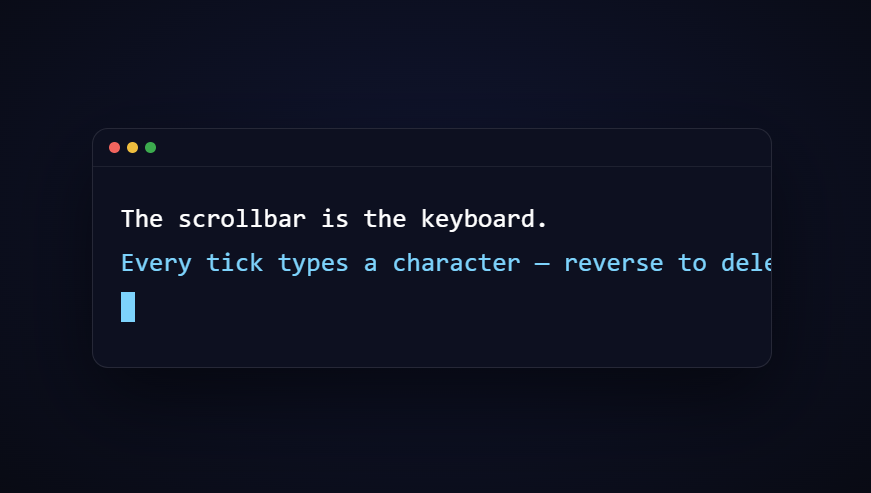
The scroll typewriter turns the classic typing animation into a scrubbed one: instead of playing on a timer, characters appear one by one as you scroll down — and *un-type* when you scroll back up, caret and all. That reversibility is what makes it feel like the scrollbar is the keyboard. This snippet builds it with GSAP ScrollTrigger (from a CDN), a per-character DOM split, and a display-toggling stagger trick.
Lines split into per-character spans at load
Each .stw-line carries its copy in a data-text attribute; JavaScript splits it into individual <span class="ch"> elements, converting spaces to \u00A0 so they don't collapse. Keeping the source text in an attribute (rather than markup) means the split can't double-run into nested spans, and the untyped state renders as genuinely empty lines with a reserved min-height so the terminal never changes size while typing.
display: none is the typing mechanism
Untyped characters are display: none — they occupy no width at all. That's the crucial choice over opacity: 0 or visibility: hidden: invisible-but-present characters would still take space, so the caret couldn't sit at the typing position and text would appear inside a pre-reserved gap. With display, each revealed character genuinely extends the line, exactly like real typing.
A stagger of instant tweens creates stepped, scrubbable typing
display isn't interpolatable, so GSAP applies it at each tween's start. The snippet exploits that: one tl.to(allChars, ...) with duration: 0.0001 and stagger: 1 lays hundreds of near-instant tweens along the timeline like teeth on a gear. As the scrubbed playhead crosses each tween, its character pops in; when the playhead moves backward, ScrollTrigger restores the recorded previous value (none), deleting the character. Reverse typing costs nothing extra — it falls out of GSAP's value-restoration model.
The caret physically follows the typing position
On every timeline update, a loop finds the last visible character and re-appends the caret element directly after it (moving it between lines automatically at the line break). Because hidden characters occupy no space, the caret always hugs the true end of the typed text, while a CSS steps(1) blink keeps it alive during scroll pauses.
Pinned so the typing owns its scroll distance
The terminal pins for +=180% of scroll — enough that each wheel tick types a few characters rather than whole sentences. Widen end for slower, more deliberate typing; the character count is mapped across whatever distance you give it, since the stagger normalizes to the timeline's total duration.
Why a terminal frame
The macOS-style window (traffic lights, mono font, blinking block caret) primes the "typing" metaphor and gives the text a stable, styled container. It's decoration though — the mechanism works on any headline or paragraph.
scrub: true, not a smoothed scrub — on purpose
Most scroll effects in this library use scrub: 0.4 so motion glides after each wheel tick, but typing is a *discrete* effect: characters either exist or don't, so there's no in-between state for smoothing to render. A raw scrub: true locks the typed length exactly to the scrollbar, which keeps the caret honest — pause scrolling and the text is precisely where the playhead says. Smoothing here would only delay character pops after the wheel stops, making the typewriter feel laggy rather than fluid.
Customizing it
Edit the data-text attributes (the split adapts to any length), add more lines, or restyle the caret to a thin bar. For a timer-based version see the typewriter snippet; combine with typing code for code content, or hand off to a scroll text clip reveal for the following section.
Build with AI
Build, Understand, Optimize, and Extend It With AI
You don't have to reverse-engineer every ScrollTrigger option by hand. Paste this snippet's HTML, CSS, and JS into an AI coding assistant like Claude and ask it to walk through what each line of the timeline config does, or to explain in plain terms why display can't be tweened directly and what the near-zero duration workaround is actually doing. The same assistant can help you optimize it — profiling whether splitting by word instead of character makes sense for a long paragraph, or suggesting a cheaper way to track the caret than walking the full character array on every update tick. It's just as useful for extending the effect: ask it to add a typing sound on each revealed character, layer in a syntax-highlighted code block instead of plain sentences, or chain multiple terminal sections together so one typewriter hands off to the next as you keep scrolling. Treat the code less like a finished artifact and more like a starting point for a conversation.
Prompt to recreate it
Copy this into your AI assistant of choice to build the effect from scratch, or as a jumping-off point for your own variant:
Build a "scroll typewriter" effect in plain HTML, CSS, and JavaScript using GSAP and its ScrollTrigger plugin (load both from a CDN, no build step).

Requirements:
- A pinned section containing one or more lines of text, each line's real text stored in a data-text attribute (not as visible markup).
- On load, split each line's text into one character span per character, appended to the line. Replace literal spaces with a non-breaking space so gaps don't collapse.
- Every character span starts with CSS display: none (not opacity or visibility) so the line has zero width until a character is revealed.
- Register a single GSAP timeline on a ScrollTrigger with pin: true, scrub: true, start at the top of the viewport, and an end a few hundred percent of the viewport tall.
- Inside that timeline, tween all character spans' display to inline with a near-zero duration (e.g. 0.0001) and a stagger of 1, so GSAP treats each character as an instantly-triggered tooth spread evenly across the whole scrubbed timeline.
- Do not write any manual scroll-position math or a setInterval-based timer — the typing speed must come entirely from GSAP's scrub mapping scroll position to timeline progress.
- Add a blinking caret element that, on every scrollTrigger update, is moved via appendChild to sit right after whichever character is currently the last one visible, so it visibly tracks the typing position including across line breaks.
- Confirm and explain: scrolling back up should delete characters in reverse for free, with no extra code, because of how GSAP scrubbing reverts tweened properties past their start point.
Want to tighten it up first? Run this prompt through the AI Prompt Studio to score it across 8 quality dimensions, catch anti-patterns, and tune the wording for Claude, ChatGPT, or Gemini before you paste it in.
Step by step
How to Use
- 1Add the GSAP CDNsInclude gsap and ScrollTrigger from the CDN panel.
- 2Paste HTML, CSS, and JSLines split into hidden per-character spans on load.
- 3Scroll into the terminalIt pins and characters start typing with each tick.
- 4Watch the caretIt rides the end of the typed text across line breaks.
- 5Scroll back upCharacters delete in reverse — scrubbed typing.
- 6Change the copyEdit the data-text attributes; the split adapts.
Real-world uses
Common Use Cases
Got questions?
Frequently Asked Questions
Each character is a display: none span. A pinned, scrubbed timeline runs one tween per character with duration 0.0001 and stagger 1 — GSAP applies non-tweenable properties like display instantly at each tween's start, so as the scrubbed playhead crosses each tween its character pops in. The playhead position in the timeline is literally the typing position.
When a scrubbed timeline moves backward past a tween's start, GSAP restores the property's recorded previous value — display: none here. So reverse deletion isn't coded anywhere; it falls out of GSAP's value-restoration model. That's also why the caret walks backward correctly: the update callback re-finds the last visible character every tick.
Opacity-hidden characters still occupy width, so the line would be full-length from the start, the caret couldn't sit at the typing position, and text would fill a pre-reserved gap instead of growing. display: none characters take no space, so each reveal genuinely extends the line — the geometry of real typing.
Speed is scroll-mapped, not timed: the trigger's end (+=180%) spreads all characters across that distance, so a longer end means fewer characters per wheel tick. To pace lines differently, split them into separate tweens with position labels, or insert empty tl.to({}, { duration: n }) gaps as pauses between lines.
Yes — the splitter handles any data-text length, and a few hundred spans is trivial for the DOM. For very long content (thousands of characters) split by word instead of character to cut the element count tenfold, and stretch the trigger's end so per-tick typing stays readable. The monospace terminal already suits code; keep angle brackets HTML-escaped inside the attribute so the splitter receives literal text.
Do the character split and timeline in a mount effect (useEffect, onMounted, ngAfterViewInit) against refs, not document queries, and guard against double-splitting under StrictMode by checking for existing .ch spans. Revert a gsap.context in the cleanup so the pin dies on unmount. Keep chars in the DOM rather than state — re-rendering per character would fight the scrub. The terminal shell styles port to Tailwind directly.