
Learn Coding Visually
Learn to code with interactive, live-preview playgrounds — HTML, CSS, JavaScript, React & more.
 HTML Playground42 lessons · Click-based · Live preview
 CSS PlaygroundLearn CSS with a live editor
 JavaScript Playground60 lessons · DOM · Async · Canvas
 React PlaygroundLearn React with a live code editor
 GSAP PlaygroundLearn GSAP animation interactively
 SVG Playground44 lessons · shapes · paths · animation
 SCSS Playground45 lessons · Sass modules · tokens
 Tailwind PlaygroundLearn Tailwind CSS with a live editor
 Bootstrap 5 Playground50 lessons · live preview
Scroll-Pinned Story — Free GSAP ScrollTrigger Snippet
Scroll-Pinned Mountain Story · Scroll · Plain HTML, CSS & JS · Live preview
What's included
Features
, scrub: true`) — the animation plays in lockstep with the scrollbar, forward and backward, instead of just firing once"<" position parameter — the hero photo and background section scale together for a layered, parallax-style depth effecttoggleActions: "play none none reverse" — paragraphs fade and rise into view with a stagger as they cross the viewport, and reverse cleanly on scroll-up@keyframes — animates without depending on any external CSS, and toggles on window.scrollY so it reappears when the visitor scrolls back to the topdarkenScroll helper computes scroll progress with .scrollTop()/.offset() and applies it as an inset box-shadow to vignette the hero image — a small effect that is awkward to write as a pure GSAP tweenAbout this UI Snippet
How this scroll-pinned story animation was built — GSAP, ScrollTrigger, and jQuery
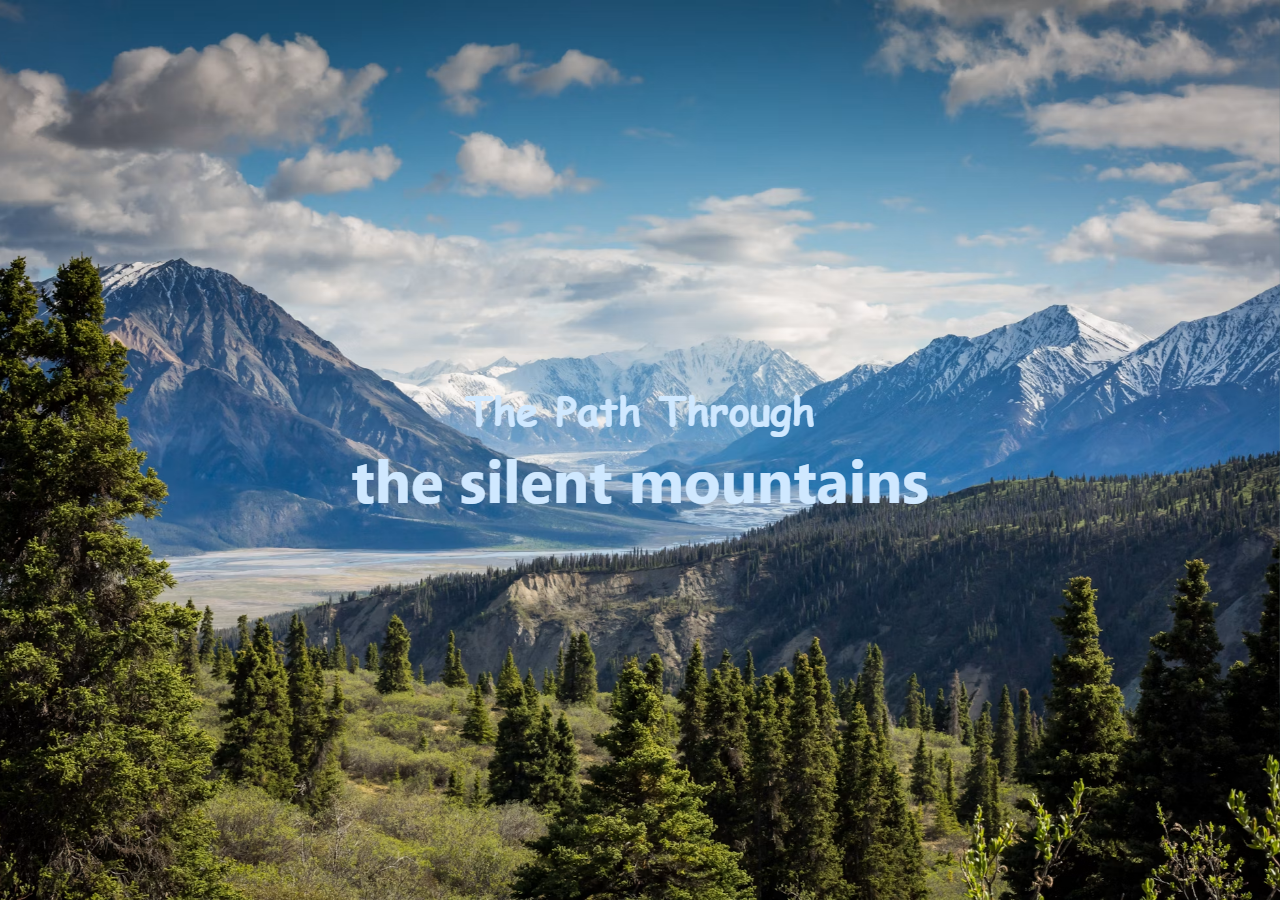
This snippet recreates the "scrollytelling" effect you see on travel features, product launch pages, and Awwwards-winning portfolios — the page locks in place while a hero photo zooms in, then releases into a story that fades into view as you keep scrolling. It's built entirely with GSAP (the GreenSock Animation Platform), the ScrollTrigger plugin, and a small bit of jQuery for one supporting effect — three scripts loaded straight from a CDN, no bundler or build step required.
The pin-and-scrub timeline
The core trick is a single GSAP timeline wired to a ScrollTrigger with pin: true and scrub: true. Pinning freezes the .wrapper element in place for a fixed scroll distance, and scrubbing ties the timeline's playhead directly to the scrollbar — scroll down and the animation plays forward, scroll up and it reverses, frame for frame. Inside that pinned window, two tweens run in parallel (chained with GSAP's "<" position parameter): the hero photo scales up to 2x with a z translation for depth, while the background section scales to 1.4x for a subtle parallax push. The moment the zoom hits its max scale, the pin releases — so the story content comes up scrolling immediately, instead of leaving the visitor stuck on a frozen frame waiting for something to happen. If you'd rather build this kind of timeline up from scratch and see each property change live, the GSAP Playground walks through pin, scrub, and timeline mechanics with a guided live editor and instant preview.
Staggered text reveal on scroll
Once the pin lets go, the page scrolls normally and the story paragraphs animate in with their own gsap.from() call, stagger: 0.3, and toggleActions: "play none none reverse" on a dedicated ScrollTrigger — each line rises and fades in just as it crosses into the viewport, and reverses cleanly if the visitor scrolls back up. It's the same staggered-reveal idea behind our Reveal on Scroll snippet, just pointed at one specific block instead of the whole page.
Supporting touches
A small custom SVG — a minimalist "scroll to begin" mouse icon with its own internal @keyframes animation — nudges first-time visitors to start scrolling, in the same spirit as the indicator in our Scroll Progress Bar snippet, and toggles itself back on whenever the visitor returns to the top. At the bottom of the JS, a short jQuery helper darkens the hero photo as the visitor scrolls past it — computing scroll progress with .scrollTop() and .offset() and applying it as an inset box-shadow, a small effect that's awkward to express with GSAP tweens alone, which is why jQuery still earns a spot in the CDN list here.
Build with AI
Build, Understand, Optimize, and Extend It With AI
You don't have to trace the pin-release timing or the jQuery vignette math by hand. Paste this snippet's HTML, CSS, and JS into an AI coding assistant like Claude and ask it to explain exactly why the end: "+=50%" value on the wrapper's ScrollTrigger is what makes the pin release right as the zoom finishes, or how the jQuery darkenScroll helper turns .scrollTop() and .offset() into an inset box-shadow opacity. The same assistant can help optimize it — asking whether the jQuery-based darken effect could be rewritten as a pure GSAP ScrollTrigger tween to drop the dependency, or whether the "<" position-parameter chaining scales cleanly if a third parallax layer is added. It's also useful for extending the effect: ask it to add a second pinned zoom chapter further down the page, replace the SVG scroll cue with an animated Lottie file, or make the darken effect respond to scroll velocity instead of just position. Treat the code less like a finished artifact and more like a starting point for a conversation.
Prompt to recreate it
Copy this into your AI assistant of choice to build the effect from scratch, or as a jumping-off point for your own variant:
Build a "scroll-pinned story" hero-to-narrative effect in plain HTML, CSS, and JavaScript using GSAP with its ScrollTrigger plugin and jQuery (load all three from a CDN) — no build step.

Requirements:
- A wrapper containing three layers: an absolutely positioned intro overlay with a title and a scroll cue, a stack of full-height content sections (a background hero section, one or more gradient spacer sections, and a text section containing several paragraphs), and an absolutely positioned image container that sits visually on top of the hero.
- Pin the wrapper with a single GSAP timeline whose ScrollTrigger uses pin: true, scrub: true, and an end distance (e.g. "+=50%") deliberately sized to match the duration of the zoom tweens inside it, so the pin releases the instant the zoom finishes rather than holding the frame for extra unnecessary scroll distance.
- Inside that pinned timeline, scale the top image up (e.g. to 2x) with an added z-axis translate for depth, and in parallel (using GSAP's "<" position parameter, not a separate offset) scale the background hero section up by a smaller amount for a layered parallax push — both tweens must use the same easing and must complete together.
- After the pin releases, add a second, independent ScrollTrigger on the text section's paragraphs using gsap.from with opacity and a y offset, a stagger between paragraphs, and toggleActions set to play on enter and reverse on scroll back up.
- Add a self-contained "scroll to begin" cue (an SVG or icon) with its own CSS @keyframes bobbing animation, that hides itself once the user has scrolled past a small threshold and reappears when they scroll back to the very top.
- Using jQuery specifically (not GSAP) for this one piece: add a scroll handler that computes a 0-to-1 opacity value from the ratio of current scroll position to the hero section's total offset, and applies it as an inset box-shadow to progressively darken/vignette the hero image as the user scrolls past it.
Want to tighten it up first? Run this prompt through the AI Prompt Studio to score it across 8 quality dimensions, catch anti-patterns, and tune the wording for Claude, ChatGPT, or Gemini before you paste it in.
Source Code
<div class="wrapper">
  <div class="intro">
    <h1>The Path Through</h1>
    <p>the silent mountains</p>
    <div class="scroll-cue" aria-hidden="true">
      <span>Scroll to begin</span>
      <img class="scroll-cue-icon" src="/images/ui-snippets/scroll-pin-story/scroll-cue-mouse.svg" alt="">
    </div>
  </div>
  <div class="content">
    <section class="section hero"></section>
    <section class="section gradient-purple"></section>
    <section class="section gradient-blue">
      <div class="test">
        <p>Beyond the last village, the trail climbs into mist and stone, where no map dares to follow.</p>
        <p>Here the wind carries old songs, and the peaks keep their secrets beneath centuries of snow.</p>
        <p>Press onward, traveler — for what waits at the summit has been waiting far longer than memory itself.</p>
      </div>
    </section>
  </div>
  <div class="image-container">
    <img src="https://images.unsplash.com/photo-1464822759023-fed622ff2c3b?q=80&w=2070&auto=format&fit=crop&ixlib=rb-4.0.3" alt="Misty mountain trail winding through the peaks">
  </div>
</div>
@import url('https://fonts.googleapis.com/css2?family=Beth+Ellen&family=Chelsea+Market&display=swap');
* {
margin: 0;
padding: 0;
box-sizing: border-box;
}
body {
background: black;
font-weight: 400;
font-style: normal;
font-family: "Chelsea Market", system-ui;
font-size: 34px;
}
.wrapper,
.content {
position: relative;
width: 100%;
z-index: 1;
}
.intro {
position: absolute;
left: 0%;
top: 0%;
right: auto;
bottom: auto;
z-index: 3;
display: flex;
width: 100%;
height: 100vh;
flex-direction: column;
justify-content: center;
align-items: center;
color: #cfe8ff;
}
.intro h1 {
font-size: 40px;
font-family: "Beth Ellen", cursive;
}
.intro p {
font-size: 60px;
font-family: "Chelsea Market", system-ui;
font-weight: bolder;
}
.scroll-cue {
position: absolute;
bottom: 56px;
left: 50%;
display: flex;
flex-direction: column;
align-items: center;
gap: 6px;
font-size: 14px;
font-family: system-ui, sans-serif;
letter-spacing: 0.12em;
text-transform: uppercase;
color: rgba(207, 232, 255, 0.6);
opacity: 0;
transform: translateX(-50%);
transition: opacity 0.5s ease;
animation: cue-in 0.8s ease 1s forwards;
}
.scroll-cue.is-hidden {
opacity: 0 !important;
}
.scroll-cue-icon {
display: block;
width: 22px;
height: auto;
animation: cue-bob 1.8s ease-in-out infinite;
}
@keyframes cue-in {
to { opacity: 1; }
}
@keyframes cue-bob {
0%, 100% { transform: translateY(0); }
50% { transform: translateY(6px); }
}
.content {
overflow-x: hidden;
}
.content .section {
width: 100%;
height: 100vh;
}
.content .section.gradient-purple {
height: 50vh;
}
.content .section.gradient-blue {
height: auto;
min-height: 100vh;
display: flex;
align-items: center;
justify-content: center;
}
.content .section.hero {
background-image: url(https://images.unsplash.com/photo-1483728642387-6c3bdd6c93e5?q=80&w=2070&auto=format&fit=crop&ixlib=rb-4.0.3);
background-position: center center;
background-repeat: no-repeat;
background-size: cover;
transition: opacity 0.5s ease;
}
.image-container {
width: 100%;
height: 100vh;
position: absolute;
top: 0;
left: 0;
right: 0;
z-index: 2;
perspective: 500px;
overflow: hidden;
}
.image-container img {
width: 100%;
height: 100%;
object-fit: cover;
object-position: center center;
position: relative;
z-index: 1;
}
.test {
position: relative;
color: white;
display: flex;
flex-direction: column;
justify-content: center;
align-items: center;
max-width: 800px;
margin: 0 auto;
padding: 0 32px;
text-align: center;
line-height: 45px;
color: #9fd4ffc4;
}console.clear();
gsap.registerPlugin(ScrollTrigger);
window.addEventListener("load", () => {
// pin just long enough for the zoom to play out — once it hits max scale,
// release the pin so the story below comes up immediately on continued scroll
gsap
.timeline({
scrollTrigger: {
trigger: ".wrapper",
start: "top top",
end: "+=50%",
pin: true,
scrub: true,
markers: false
}
})
.to("img", {
scale: 2,
z: 250,
transformOrigin: "center center",
ease: "power1.inOut"
})
.to(
".section.hero",
{
scale: 1.4,
transformOrigin: "center center",
ease: "power1.inOut"
},
"<"
);
// reveal the story text as it scrolls into view, after the pin releases
gsap.from(".test p", {
scrollTrigger: {
trigger: ".test",
start: "top 85%",
toggleActions: "play none none reverse"
},
opacity: 0,
y: 40,
stagger: 0.3,
ease: "power1.out"
});
// toggle the "scroll to begin" cue based on scroll position —
// hide it once the visitor scrolls down, bring it back when they return to the top
const cue = document.querySelector(".scroll-cue");
if (cue) {
const toggleCue = () => {
cue.classList.toggle("is-hidden", window.scrollY > 10);
};
window.addEventListener("scroll", toggleCue, { passive: true });
}
});
// darken bg on scroll - jQuery
// cannot figure out how to get the same effect using GSAP,
// if you do, please let me know :D
$(document).ready(function() {
$.fn.darkenScroll = function() {
var elem = $(this);
self = this;
$(window).on('scroll', function() {
scroll = $(document).scrollTop();
offsetTop = elem.offset().top + elem.outerHeight();
opacity = 1 / offsetTop * scroll;
if (opacity > 0 && opacity < 1) {
elem.css({ 'box-shadow': '10000px 0 0 0 rgba(0,0,0,' + opacity + ') inset' });
}
});
};
$('.section.hero').darkenScroll();
});Step by step
How to Use
- 1Lay out the three layersStructure the markup as an
.introtitle overlay, a.contentblock of stacked sections (hero, gradient spacers, story text), and an absolutely-positioned.image-containerthat sits on top and gets zoomed. - 2Load GSAP, ScrollTrigger, and jQuery from a CDNAdd the three script URLs — GSAP core, the ScrollTrigger plugin, and jQuery — then call
gsap.registerPlugin(ScrollTrigger)before building any timelines. - 3Pin the wrapper and scrub a zoom timelineCreate a
gsap.timeline()withscrollTrigger: { trigger: ".wrapper", pin: true, scrub: true, end: "+=50%" }, then.to()the image and hero section to scale up in parallel using the"<"position parameter. - 4Reveal the story as it scrolls into viewAdd a second, independent ScrollTrigger on the
.testtext block withstart: "top 85%"andtoggleActions: "play none none reverse", animating the paragraphsfrom()opacity: 0, y: 40with astagger. - 5Add the scroll cue and darken effectDrop in a small SVG icon with its own CSS
@keyframes, toggle its visibility based onwindow.scrollY, and finish with the jQuerydarkenScrollhelper that dims the hero photo as it scrolls past. - 6Copy the code and swap the contentUse the Copy buttons to grab the HTML, CSS, and JS, then replace the title, story paragraphs, and image URLs with your own — the timeline and triggers keep working as long as the class names stay aligned.
Real-world uses
Common Use Cases
gsap.from() with stagger and toggleActions — the exact pattern to reach for any time you need text or cards to fade in as the visitor scrolls.Got questions?
Frequently Asked Questions
Wrap the section you want to "freeze" in a container, then give a GSAP timeline a scrollTrigger with trigger, pin: true, and scrub: true. While the visitor scrolls through the pinned distance (set with end, e.g. "+=50%"), the timeline's playhead tracks the scroll position directly — so your tweens (zooms, fades, moves) play forward and backward in sync with the scrollbar. That is the entire mechanism behind this snippet's zoom-in intro.
scrub: true ties the animation's progress directly to the scrollbar position — scroll halfway through the trigger's range and the timeline is exactly halfway done, and scrolling back up reverses it instantly, frame for frame. A normal ScrollTrigger, like the one used for this snippet's story-text reveal with toggleActions: "play none none reverse", instead plays the animation once when an element enters the viewport and reverses it as a whole when it leaves — it does not track scroll position moment to moment.
The ScrollTrigger's end is set to roughly match the zoom timeline's own duration (end: "+=50%"), so the pinned scroll distance ends right when the last tween completes. That keeps the experience snappy — the moment the zoom maxes out, the pin lets go and the story content scrolls up immediately, with no "dead" stretch of scrolling where nothing visibly changes.
No — GSAP and ScrollTrigger work entirely on their own and have no dependency on jQuery. This snippet only loads jQuery for one small supporting effect: darkening the hero photo based on scroll position via .scrollTop() and .offset(). If you do not need that vignette effect, you can drop the jQuery <script> tag and the darkenScroll block entirely — the pin, zoom, and text-reveal animations keep working unchanged.
Give the text element its own ScrollTrigger — separate from any pinned timeline — with a start like "top 85%" and toggleActions: "play none none reverse". Animate it with gsap.from(selector, { opacity: 0, y: 40, stagger: 0.3, scrollTrigger: {...} }); GSAP plays the tween forward when the element enters the trigger zone and reverses it when it scrolls back out. This exact pattern drives the staggered paragraph reveal in this snippet.
Yes — copy the HTML, CSS, and JS with the buttons on this page and adapt them freely, including in commercial projects. GSAP's core library and the ScrollTrigger plugin used here are free under the GreenSock license; only the separate Club GreenSock plugins (like SplitText or MorphSVG, neither of which is used in this snippet) require a paid membership. Swap in your own images, headline, and story text, and the animation keeps working as long as the element class names stay aligned with the JS selectors.