
Learn Coding Visually
Learn to code with interactive, live-preview playgrounds — HTML, CSS, JavaScript, React & more.
 HTML Playground42 lessons · Click-based · Live preview
 CSS PlaygroundLearn CSS with a live editor
 JavaScript Playground60 lessons · DOM · Async · Canvas
 React PlaygroundLearn React with a live code editor
 GSAP PlaygroundLearn GSAP animation interactively
 SVG Playground44 lessons · shapes · paths · animation
 SCSS Playground45 lessons · Sass modules · tokens
 Tailwind PlaygroundLearn Tailwind CSS with a live editor
 Bootstrap 5 Playground50 lessons · live preview
Three.js Scroll Ink Drop Diffusion — Particle Turbulence Effect
Three.js Scroll Ink Drop Diffusion · Scroll · Plain HTML, CSS & JS · Live preview
What's included
Features
About this UI Snippet
How to Build a Scroll-Driven Ink Diffusion Effect With Three.js
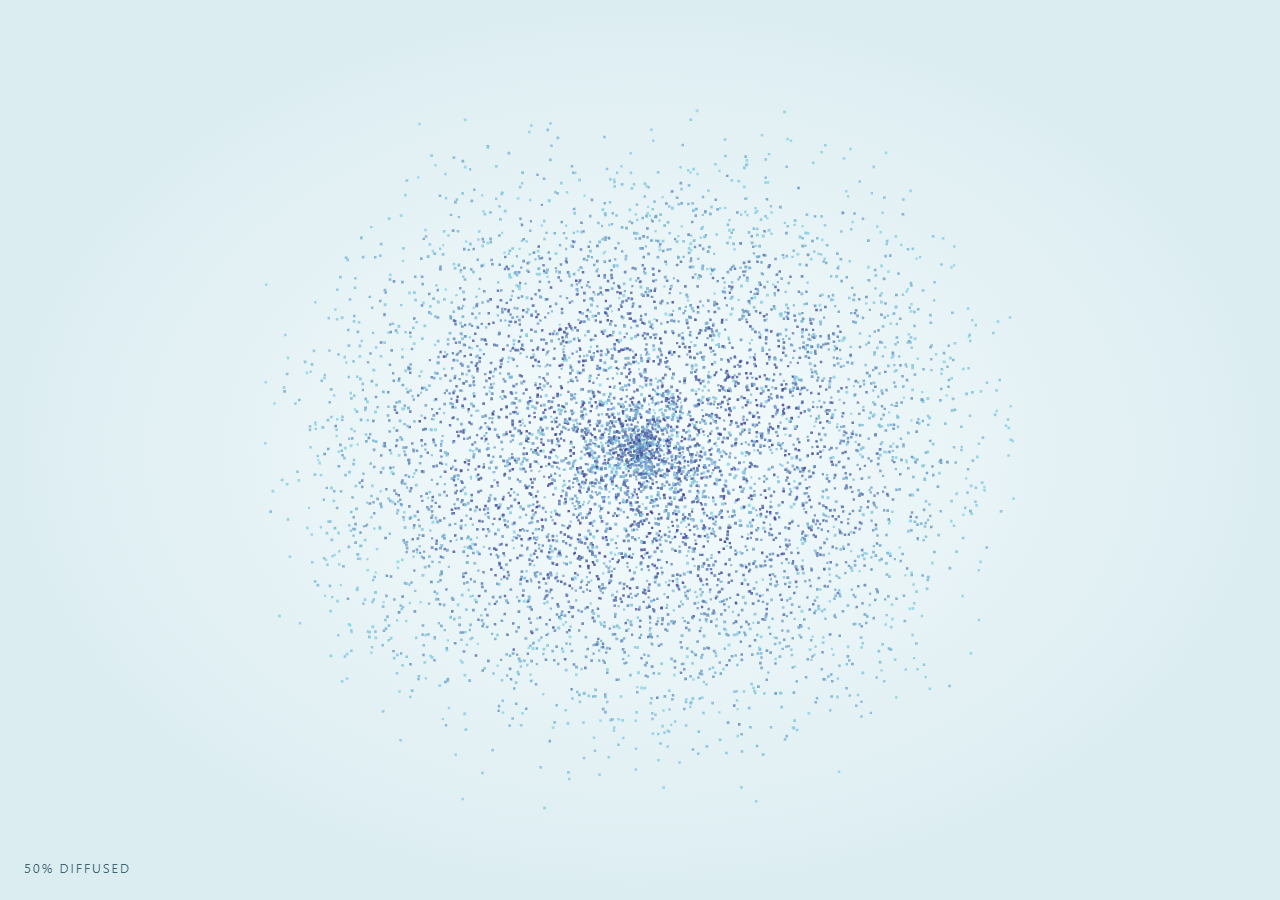
The Three.js Scroll Ink Drop Diffusion snippet takes seven thousand points packed into a tight dark sphere and, as the visitor scrolls through a pinned stage, lerps and swirls every one of them outward into feathered, tendril-like clouds — mimicking how a drop of ink unfurls in still water.
Hashed-noise seeded drift, not a fluid simulator
A true fluid sim is overkill for a decorative scroll effect and breaks reversibility. Instead, each particle's outward drift direction is derived once from a small deterministic hash function (hashNoise) evaluated at the particle's own starting coordinates, so neighboring particles — which start at similar coordinates — get similar drift directions. That local coherence is what makes the diffusion read as swirling tendrils instead of a uniform radial explosion, the same principle behind curl-noise turbulence but without needing a full noise library.
One BufferGeometry, precomputed start and target
As in galaxy formation, every particle's tight starting position and turbulence-drifted target position are computed once into flat Float32Arrays, and the render loop only lerps between them by a scrubbed, eased progress value — no physics state to step forward or reset.
A progress-driven swirl on top of the lerp
To keep the tendrils curling rather than moving in straight lines, each particle also gets a small rotational offset — sin(eased * PI) * seed[i] — applied around the view axis. Because the swirl amount is itself a pure function of the eased scroll progress (peaking mid-diffusion, returning to zero at both ends), it composes cleanly with the lerp and stays perfectly reversible; nothing here depends on elapsed time.
Color bleeding from dark ink to pale water
Each particle's color is baked into a second BufferAttribute, interpolated from a deep indigo ink tone through a violet mid-tone to a pale cyan as a function of how far that particle's target sits from the drop's center — so particles that travel further into the water also visually fade lighter, mimicking real ink dilution.
Why normal blending here, not additive
Unlike a glowing dust cloud, ink diffusing in water should look like pigment thinning out, not light accumulating — so this snippet intentionally uses THREE.NormalBlending with depthWrite: false, the opposite blending choice from galaxy formation's additive dust, chosen specifically to suit this material.
Build with AI
Build, Understand, Optimize, and Extend It With AI
You do not need to reverse-engineer how ink diffuses into swirling tendrils without a fluid simulator. Paste this snippet's HTML, CSS, and JS into an AI assistant like Claude and ask it to explain why the drift directions are seeded from each particle's own starting coordinates, or why the swirl term uses sin(eased * PI) instead of a linear ramp. The same assistant can help you extend it — ask it to add a second, slower-diffusing particle layer for extra depth, tint the ink a different hue, or make particles fade in opacity as they near their target to simulate dilution more explicitly. It can also help optimize further, for instance moving the swirl rotation into a vertex shader. Treat the code as a conversation starter, not a finished artifact.
Prompt to recreate it
Copy this into your AI assistant of choice to build the effect from scratch, or as a jumping-off point for your own variant:
Build a "scroll-scrubbed ink drop diffusion" effect in plain HTML, CSS, and JavaScript using Three.js, GSAP, and GSAP's ScrollTrigger plugin, all loaded from a CDN (no bundler, no build step).

Requirements:
- A pinned section containing a full-size canvas, with a WebGLRenderer and PerspectiveCamera sized to it and updated on window resize including aspect ratio.
- Create roughly 7,000 particles using a single THREE.BufferGeometry with a flat Float32Array position attribute rendered via THREE.Points.
- For each particle, precompute a tight starting position inside a small sphere (the "ink drop") and a "target" position offset outward along a direction derived from a small deterministic hash function evaluated at the particle's own starting coordinates, so nearby particles drift in coherent, similar directions rather than a perfectly uniform radial explosion.
- Bake a per-particle color into a second BufferAttribute (vertexColors: true) that gradients from a deep indigo ink tone through violet to pale cyan, driven by how far that particle's target sits from the drop's center.
- Use PointsMaterial with normal (not additive) blending and depthWrite: false so the look reads as thinning pigment rather than glowing light.
- Register a GSAP tween on a ScrollTrigger targeting the pinned section, with pin: true, start at top top, a numeric scrub, and a multi-hundred-percent end, animating a single plain progress value from 0 to 1 with linear easing.
- Every animation frame, apply smoothstep easing to the scrubbed progress, lerp every particle's live position between its start and target by that eased value, then apply an additional small rotation around the view axis whose magnitude is sin(easedProgress * PI) times a per-particle seed value, so tendrils visibly swirl mid-diffusion and return to zero rotation at both ends of the scroll range. Write results into the position BufferAttribute and set needsUpdate to true.
- Confirm scrolling back up reverses the entire diffusion smoothly back into a tight, unrotated drop, since every particle's position is a pure function of the current scrubbed progress value.
Want to tighten it up first? Run this prompt through the AI Prompt Studio to score it across 8 quality dimensions, catch anti-patterns, and tune the wording for Claude, ChatGPT, or Gemini before you paste it in.
Source Code
<section class="ink-stage" id="inkStage">
  <div class="ink-intro-overlay"><p>Scroll ↓ to diffuse an ink drop through clear water</p></div>
  <canvas id="inkCanvas"></canvas>
  <div class="ink-hud"><span id="inkPct">0</span>% diffused</div>
</section>
<section class="ink-bottom"><p>Feathered tendrils, fully dispersed.</p></section>*{box-sizing:border-box;margin:0;padding:0}
html,body{background:#eef6f8;color:#0d2733;font-family:system-ui,-apple-system,sans-serif}
.ink-bottom{min-height:70vh;display:flex;justify-content:center;align-items:center;color:#5c8a96;font-size:15px;letter-spacing:.08em;text-transform:uppercase;text-align:center;padding:0 24px}
.ink-stage{height:100vh;position:relative;overflow:hidden;background:radial-gradient(ellipse at center,#f5fbfc 0%,#dcedf1 70%)}
.ink-intro-overlay{position:absolute;inset:0;display:flex;align-items:center;justify-content:center;text-align:center;padding:24px;pointer-events:none;z-index:5;color:#3a6a78;font-size:15px;letter-spacing:.08em;text-transform:uppercase;transition:opacity .4s ease;}
#inkCanvas{display:block;width:100%;height:100%}
.ink-hud{position:absolute;left:24px;bottom:24px;font-variant-numeric:tabular-nums;font-size:13px;letter-spacing:.14em;color:#1d4e5c;text-transform:uppercase;opacity:.85}const canvas = document.getElementById('inkCanvas');
const pctEl = document.getElementById('inkPct');
const renderer = new THREE.WebGLRenderer({ canvas, antialias: true, alpha: true });
renderer.setPixelRatio(Math.min(window.devicePixelRatio, 2));
const scene = new THREE.Scene();
const camera = new THREE.PerspectiveCamera(55, 1, 0.1, 200);
camera.position.set(0, 0, 20);
camera.lookAt(0, 0, 0);
const COUNT = 7000;
const startPos = new Float32Array(COUNT * 3);
const targetPos = new Float32Array(COUNT * 3);
const seed = new Float32Array(COUNT); // per-particle turbulence seed
const colors = new Float32Array(COUNT * 3);
const livePos = new Float32Array(COUNT * 3);
// Cheap deterministic pseudo-noise: no imports, just a hashed sine lattice.
// Used only to give each particle's drift direction organic variation
// instead of a perfectly radial explosion.
function hashNoise(x, y, z) {
const s = Math.sin(x * 12.9898 + y * 78.233 + z * 37.719) * 43758.5453;
return s - Math.floor(s);
}
const inkDark = new THREE.Color(0x1a1035);
const inkMid = new THREE.Color(0x3d3a8f);
const inkPale = new THREE.Color(0x8fd8e8);
for (let i = 0; i < COUNT; i++) {
// Tight starting "drop": a small dense sphere near the origin.
const sr = Math.pow(Math.random(), 1.6) * 1.1;
const sTheta = Math.random() * Math.PI * 2;
const sPhi = Math.acos(2 * Math.random() - 1);
const sx = sr * Math.sin(sPhi) * Math.cos(sTheta);
const sy = sr * Math.sin(sPhi) * Math.sin(sTheta);
const sz = sr * Math.cos(sPhi) * 0.5;
startPos[i * 3] = sx;
startPos[i * 3 + 1] = sy;
startPos[i * 3 + 2] = sz;
// Target: drift outward along a turbulent direction seeded from a hashed
// noise lattice so neighboring particles drift similarly, producing
// coherent swirling tendrils rather than a uniform radial cloud.
const n1 = hashNoise(sx * 1.7, sy * 1.7, i * 0.013) * Math.PI * 2;
const n2 = hashNoise(sy * 2.3, sz * 2.3, i * 0.021) * Math.PI;
const reach = 6 + Math.pow(Math.random(), 0.6) * 10;
const swirl = (hashNoise(i * 0.007, 0.5, 0.2) - 0.5) * 3.2;
seed[i] = swirl;
const dx = Math.cos(n1) * Math.sin(n2) * reach;
const dy = Math.sin(n1) * Math.sin(n2) * reach * 0.7;
const dz = Math.cos(n2) * reach * 0.4;
targetPos[i * 3] = sx + dx;
targetPos[i * 3 + 1] = sy + dy;
targetPos[i * 3 + 2] = sz + dz;
const distT = Math.min(1, reach / 16);
const c = new THREE.Color();
if (distT < 0.4) c.copy(inkDark).lerp(inkMid, distT / 0.4);
else c.copy(inkMid).lerp(inkPale, (distT - 0.4) / 0.6);
colors[i * 3] = c.r; colors[i * 3 + 1] = c.g; colors[i * 3 + 2] = c.b;
livePos.set([sx, sy, sz], i * 3);
}
const geometry = new THREE.BufferGeometry();
geometry.setAttribute('position', new THREE.BufferAttribute(livePos, 3));
geometry.setAttribute('color', new THREE.BufferAttribute(colors, 3));
const material = new THREE.PointsMaterial({
size: 0.1,
vertexColors: true,
transparent: true,
opacity: 0.85,
blending: THREE.NormalBlending,
depthWrite: false,
sizeAttenuation: true,
});
const points = new THREE.Points(geometry, material);
scene.add(points);
const introEl = document.querySelector('.ink-intro-overlay');
gsap.registerPlugin(ScrollTrigger);
const form = { t: 0 };
gsap.to(form, {
t: 1,
ease: 'none',
scrollTrigger: {
trigger: '#inkStage',
start: 'top top',
end: '+=400%',
scrub: 0.6,
pin: true,
},
});
function resize() {
const w = canvas.clientWidth, h = canvas.clientHeight;
renderer.setSize(w, h, false);
camera.aspect = w / h;
camera.updateProjectionMatrix();
}
const posAttr = geometry.getAttribute('position');
let swirlAccum = 0;
function animate() {
requestAnimationFrame(animate);
if (introEl) introEl.style.opacity = (form.t > 0.03) ? '0' : '1';
const t = form.t;
const eased = t * t * (3 - 2 * t);
swirlAccum = eased; // deterministic function of scroll progress, not time
for (let i = 0; i < COUNT; i++) {
const ix = i * 3;
let lx = startPos[ix] + (targetPos[ix] - startPos[ix]) * eased;
let ly = startPos[ix + 1] + (targetPos[ix + 1] - startPos[ix + 1]) * eased;
const lz = startPos[ix + 2] + (targetPos[ix + 2] - startPos[ix + 2]) * eased;
// Add a swirl that grows and fades with progress (peaks mid-diffusion)
// so tendrils curl rather than move in straight lines. Purely a
// function of eased progress, so it is exactly reversible.
const swirlAmt = Math.sin(eased * Math.PI) * seed[i] * 0.6;
const cosA = Math.cos(swirlAmt), sinA = Math.sin(swirlAmt);
const rx = lx * cosA - ly * sinA;
const ry = lx * sinA + ly * cosA;
lx = rx; ly = ry;
posAttr.array[ix] = lx;
posAttr.array[ix + 1] = ly;
posAttr.array[ix + 2] = lz;
}
posAttr.needsUpdate = true;
camera.position.z = 20 - eased * 4;
pctEl.textContent = Math.round(eased * 100);
renderer.render(scene, camera);
}
resize();
window.addEventListener('resize', resize);
animate();Step by step
How to Use
- 1Load all three CDN scriptsAdd three.min.js, gsap.min.js, and ScrollTrigger.min.js from the CDN panel, in that order.
- 2Paste HTML, CSS, and JSA tight dark ink drop appears inside a pinned 3D stage with a live "% diffused" read-out.
- 3Scroll downSeven thousand particles drift outward along noise-seeded paths, swirling into feathered tendrils.
- 4Scroll back upThe tendrils pull back into a tight drop exactly in reverse, since every particle lerps between two fixed points.
- 5Retune the shapeChange COUNT for particle density, or the reach range for how far the ink spreads.
- 6Adjust the pacingChange the ScrollTrigger end value (+=400%) for a slower or faster diffusion.
Real-world uses
Common Use Cases
Got questions?
Frequently Asked Questions
A full noise library adds a dependency and more code than this effect needs. A simple hashed sine lattice evaluated at each particle's own coordinates already gives spatially coherent, organic-looking variation — neighboring particles get similar values — which is all that's needed to make tendrils swirl together instead of moving radially outward in a perfect sphere.
Tying the swirl amount to eased scroll progress (rather than a running clock) means the exact same rotation applies whenever the user is at a given scroll position, whether scrolling down or back up. If the swirl instead accumulated with real time, scrolling backward would not retrace the same visual path.
The swirl multiplier uses sin(eased * PI), which is 0 at both eased = 0 and eased = 1 and peaks at eased = 0.5. That makes the tendrils curl visibly mid-diffusion while still starting as a tight, un-rotated drop and ending as a settled, feathered cloud with no residual spin.
AdditiveBlending makes overlapping particles brighten, which suits glowing dust or light but looks wrong for pigment diffusing in water — real ink gets more transparent and diluted as it spreads, not brighter. NormalBlending with depthWrite: false keeps the look consistent with thinning pigment while still avoiding harsh z-fighting between particles.
Yes. Click JSX for a React component, Vue for a Vue 3 SFC, Angular for a standalone component, or Tailwind for a React + Tailwind version. Build the geometry and particle arrays inside a mount effect keyed to a canvas ref, and on unmount kill the ScrollTrigger instance, dispose the geometry and material, and call renderer.dispose().