
Learn Coding Visually
Learn to code with interactive, live-preview playgrounds — HTML, CSS, JavaScript, React & more.
 HTML Playground42 lessons · Click-based · Live preview
 CSS PlaygroundLearn CSS with a live editor
 JavaScript Playground60 lessons · DOM · Async · Canvas
 React PlaygroundLearn React with a live code editor
 GSAP PlaygroundLearn GSAP animation interactively
 SVG Playground44 lessons · shapes · paths · animation
 SCSS Playground45 lessons · Sass modules · tokens
 Tailwind PlaygroundLearn Tailwind CSS with a live editor
 Bootstrap 5 Playground50 lessons · live preview
Three.js Scroll Origami Crane Unfold — Panel Hinge Fold Animation
Three.js Scroll Origami Crane Unfold · Scroll · Plain HTML, CSS & JS · Live preview
What's included
Features
About this UI Snippet
How to Build a Scroll-Driven Origami Crane Fold With Three.js
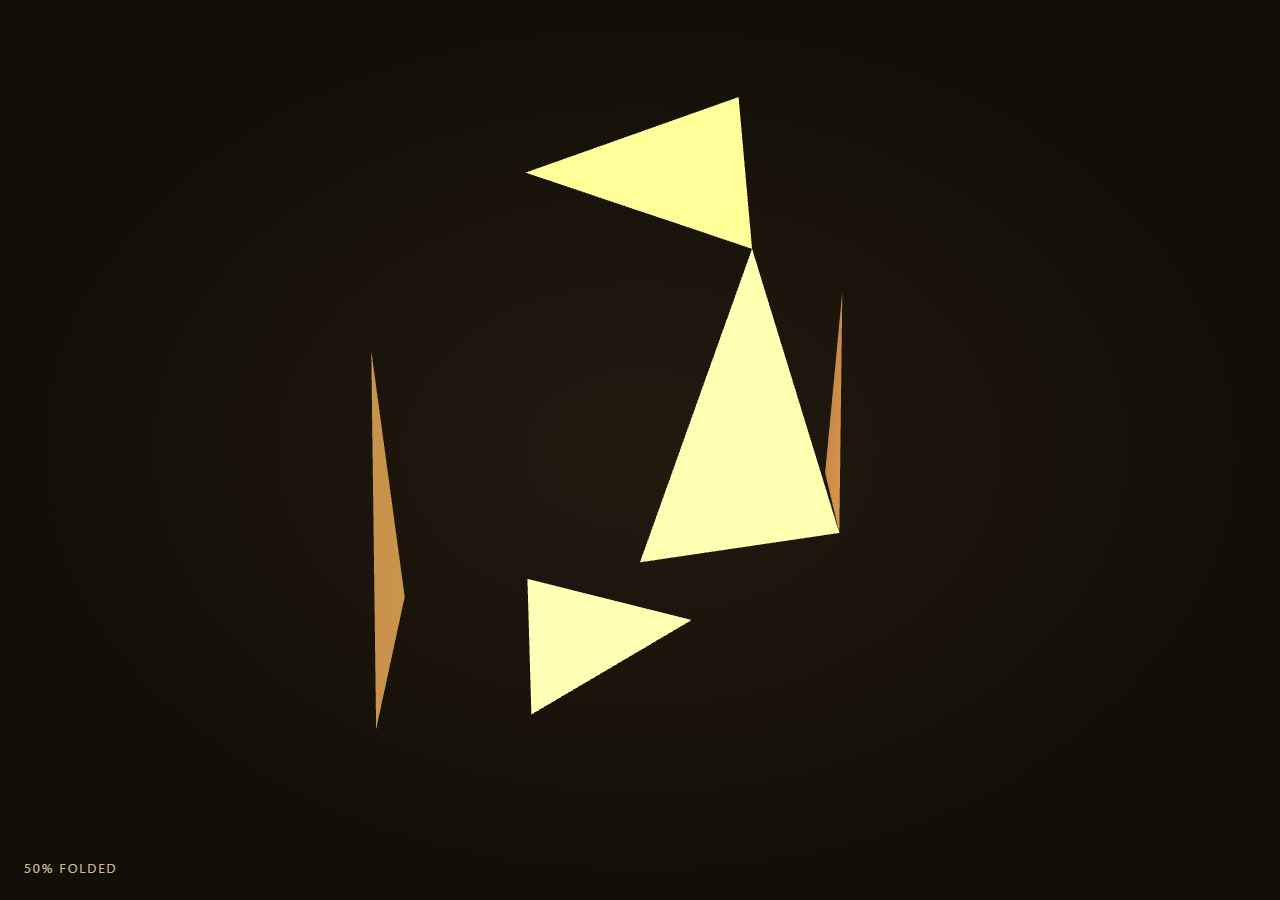
The Three.js Scroll Origami Crane Unfold snippet builds a low-poly paper crane from a handful of flat triangular panels, each mounted on its own hinge pivot. As the visitor scrolls through a pinned stage, panels rotate around their hinge axes in a staggered sequence, folding a flat sheet-like arrangement into a recognizable crane silhouette.
Panels as pivoted Groups, not skinned meshes
Rather than using a skeletal rig or morph targets, each panel is a single flat THREE.BufferGeometry triangle whose local origin sits exactly at its hinge line. That geometry is added to a THREE.Group positioned at the panel's hinge point in the overall sheet layout. Rotating the group's rotation.x, .y, or .z folds the flat panel up out of the sheet plane around that hinge, the same lightweight pivot-group trick used any time a hinge needs to rotate a flat surface without a skeletal rig, applied here to build a full multi-panel form instead of a single flip.
Five panels approximate wing, neck, and tail folds
A real crane fold involves dozens of creases, but a low-poly reading only needs a handful of large panels: a static body base, two wing panels folding outward and back, a neck/head panel folding up and forward, and a tail panel folding down and back. Each panel definition carries a fold axis (x, y, or z) and a target angle in radians, so the whole crane's final pose is fully described by five small objects rather than a mesh-editing tool export.
Staggered per-panel progress from one scrubbed value
Instead of animating all five panels in lockstep, each panel remaps the single scrubbed eased progress into its own local 0-1 window via (eased - start) / span, clamped and re-smoothstepped. Earlier panels (like the wings) get an earlier window than later ones (like the neck), so panels visibly fold in sequence rather than simultaneously — closer to how a person actually folds paper, one crease at a time, and comparable to the staggered reveal timing in scroll sticky stack.
Reversible because every fold is angle times progress
Every panel's live rotation is its fixed target angle multiplied by its own local eased progress, so there is no accumulated state anywhere — setting the input progress back to zero exactly unfolds every panel back to flat, in the same staggered order reversed. Scrolling up therefore always retraces the fold exactly, panel by panel.
Warm parchment palette with soft directional lighting
Two paper-tone MeshStandardMaterials (warm cream and a slightly deeper tan) alternate across panels so adjacent folds read as distinct facets, and side: THREE.DoubleSide keeps the thin triangles visible from both sides as they rotate through extreme angles. A single warm directional light plus a soft point fill light gives the flat paper geometry enough shading to read as folded 3D form without needing high-poly geometry.
Build with AI
Build, Understand, Optimize, and Extend It With AI
You do not need to reverse-engineer how a flat sheet of paper panels folds into a recognizable crane using only rotation values. Paste this snippet's HTML, CSS, and JS into an AI assistant like Claude and ask it to explain why pivot Groups are used instead of a skeletal rig, or how the per-panel staggered progress remap produces a one-crease-at-a-time fold from a single scrubbed value. The same assistant can help you extend it — ask it to add more panels for finer creases, add a subtle paper-texture normal map, or generalize panelDefs into a small JSON format so other origami shapes (boat, box, star) can be described the same way. Treat the code as a conversation starter, not a finished artifact.
Prompt to recreate it
Copy this into your AI assistant of choice to build the effect from scratch, or as a jumping-off point for your own variant:
Build a "scroll-scrubbed origami crane fold" in plain HTML, CSS, and JavaScript using Three.js, GSAP, and GSAP's ScrollTrigger plugin, all loaded from a CDN (no bundler, no build step).

Requirements:
- A pinned section containing a full-size canvas, with a WebGLRenderer and PerspectiveCamera sized to the canvas element (not window.innerWidth/innerHeight) and updated on window resize including aspect ratio.
- Model roughly five flat triangular paper panels using THREE.BufferGeometry, each built in local space so its hinge edge sits at the geometry's local origin.
- Wrap each panel mesh in its own THREE.Group positioned at that panel's hinge point relative to a shared flat layout, so rotating group.rotation around a chosen axis (x, y, or z) folds the panel around its hinge line without any skinning or bones.
- Define each panel's fold as a target rotation axis and target angle in radians representing a fully folded pose (e.g. wing panels folding outward and back, a neck panel folding up, a tail panel folding down).
- Use two alternating warm paper-tone MeshStandardMaterials with side: THREE.DoubleSide so thin panels stay visible from both sides through extreme fold angles.
- Register a GSAP tween on a ScrollTrigger targeting the pinned section, with pin: true, start at top top, a numeric scrub, and a multi-hundred-percent end, animating a single plain progress value from 0 to 1 with linear easing.
- Every animation frame, apply smoothstep easing to the scrubbed progress, then for each panel remap that eased progress into its own local 0-1 window (via a per-panel start offset and span, clamped and re-smoothstepped) so panels visibly fold in a staggered one-at-a-time sequence rather than simultaneously, and set each panel group's rotation to its target angle times its own local eased value.
- Slowly rotate and reposition the whole crane group and arc the camera as the fold progresses, ending on a clear three-quarter view of the finished crane.
- Confirm scrolling back up reverses the entire fold smoothly, unfolding panels back to flat in the same staggered order reversed, since every rotation is a fixed angle times a progress value with no accumulated state.
Want to tighten it up first? Run this prompt through the AI Prompt Studio to score it across 8 quality dimensions, catch anti-patterns, and tune the wording for Claude, ChatGPT, or Gemini before you paste it in.
Source Code
<section class="ogc-stage" id="ogcStage">
  <div class="ogc-intro-overlay"><p>Scroll ↓ to fold the flat sheet into a paper crane</p></div>
  <canvas id="ogcCanvas"></canvas>
  <div class="ogc-hud"><span id="ogcPct">0</span>% folded</div>
</section>
<section class="ogc-bottom"><p>A fully folded low-poly paper crane.</p></section>*{box-sizing:border-box;margin:0;padding:0}
html,body{background:#120e08;color:#fff;font-family:system-ui,-apple-system,sans-serif}
.ogc-bottom{min-height:70vh;display:flex;justify-content:center;align-items:center;color:#c9a877;font-size:15px;letter-spacing:.08em;text-transform:uppercase;text-align:center;padding:0 24px}
.ogc-stage{height:100vh;position:relative;overflow:hidden;background:radial-gradient(ellipse at center,#231a0f 0%,#120e08 70%)}
.ogc-intro-overlay{position:absolute;inset:0;display:flex;align-items:center;justify-content:center;text-align:center;padding:24px;pointer-events:none;z-index:5;color:#c9a877;font-size:15px;letter-spacing:.08em;text-transform:uppercase;transition:opacity .4s ease;}
#ogcCanvas{display:block;width:100%;height:100%}
.ogc-hud{position:absolute;left:24px;bottom:24px;font-variant-numeric:tabular-nums;font-size:13px;letter-spacing:.14em;color:#f0d9a8;text-transform:uppercase;opacity:.85}const canvas = document.getElementById('ogcCanvas');
const pctEl = document.getElementById('ogcPct');
const renderer = new THREE.WebGLRenderer({ canvas, antialias: true, alpha: true });
renderer.setPixelRatio(Math.min(window.devicePixelRatio, 2));
const scene = new THREE.Scene();
const camera = new THREE.PerspectiveCamera(48, 1, 0.1, 200);
camera.position.set(0, 5, 15);
camera.lookAt(0, 0, 0);
scene.add(new THREE.AmbientLight(0x554430, 1.3));
const key = new THREE.DirectionalLight(0xffe9c4, 1.4);
key.position.set(8, 12, 10);
scene.add(key);
const fill = new THREE.PointLight(0xffb27a, 0.9, 60);
fill.position.set(-8, -4, 8);
scene.add(fill);
// A "panel" is a flat triangular plane, pivoted at a hinge line via a wrapper
// Group. Rotating the group folds the panel out of the flat sheet plane.
// Each panel definition: geometry built in local space with the hinge at x=0,
// a pivot offset in the flat sheet, and a target fold angle (radians) plus
// axis reached at full fold.
const paperMat = new THREE.MeshStandardMaterial({ color: 0xe8d3a0, roughness: 0.75, metalness: 0.05, side: THREE.DoubleSide, emissive: 0x2a1f0d, emissiveIntensity: 0.3 });
const paperMatB = new THREE.MeshStandardMaterial({ color: 0xd8b878, roughness: 0.75, metalness: 0.05, side: THREE.DoubleSide, emissive: 0x241a0a, emissiveIntensity: 0.3 });
function makeTriPanel(w, h) {
const geo = new THREE.BufferGeometry();
const verts = new Float32Array([
0, 0, 0,
w, 0, 0,
w * 0.5, h, 0,
]);
geo.setAttribute('position', new THREE.BufferAttribute(verts, 3));
geo.computeVertexNormals();
return geo;
}
// Panel layout: body (center, static), two wing panels, a tail panel, a head/
// neck panel, split further into two sub-folds each for a crisper silhouette.
const panelDefs = [
{ geo: makeTriPanel(3.2, 4.2), mat: paperMat, pivot: [0, 0, 0], flatRot: [0, 0, 0], axis: 'x', angle: 0 }, // body base, stays flat
{ geo: makeTriPanel(3.2, 3.4), mat: paperMatB, pivot: [-3.2, 0, 0], flatRot: [0, 0, 0], axis: 'y', angle: -2.35 }, // left wing
{ geo: makeTriPanel(3.2, 3.4), mat: paperMat, pivot: [3.2, 0, 0], flatRot: [0, Math.PI, 0], axis: 'y', angle: 2.35 }, // right wing
{ geo: makeTriPanel(2.0, 3.0), mat: paperMatB, pivot: [1.6, 4.2, 0], flatRot: [0, 0, Math.PI * 0.5], axis: 'x', angle: -1.55 }, // neck/head
{ geo: makeTriPanel(2.0, 2.4), mat: paperMat, pivot: [-1.6, -4.2 * 0, 0.0], flatRot: [0, 0, -Math.PI * 0.5], axis: 'x', angle: 1.85 }, // tail
];
const pivots = panelDefs.map((def) => {
const group = new THREE.Group();
group.position.set(def.pivot[0], def.pivot[1], def.pivot[2]);
group.rotation.set(def.flatRot[0], def.flatRot[1], def.flatRot[2]);
const mesh = new THREE.Mesh(def.geo, def.mat);
group.add(mesh);
scene.add(group);
return { group, axis: def.axis, angle: def.angle, seed: Math.random() };
});
const introEl = document.querySelector('.ogc-intro-overlay');
gsap.registerPlugin(ScrollTrigger);
const form = { t: 0 };
gsap.to(form, {
t: 1,
ease: 'none',
scrollTrigger: {
trigger: '#ogcStage',
start: 'top top',
end: '+=450%',
scrub: 0.6,
pin: true,
},
});
function resize() {
const w = canvas.clientWidth, h = canvas.clientHeight;
renderer.setSize(w, h, false);
camera.aspect = w / h;
camera.updateProjectionMatrix();
}
const craneGroup = new THREE.Group();
pivots.forEach((p) => craneGroup.add(p.group));
scene.add(craneGroup);
function animate() {
requestAnimationFrame(animate);
if (introEl) introEl.style.opacity = (form.t > 0.03) ? '0' : '1';
const t = form.t;
const eased = t * t * (3 - 2 * t);
// Panels fold in a staggered sequence: each panel's own fold progress is a
// remapped slice of the overall eased progress, so later panels wait for
// earlier ones to mostly finish before they start moving.
pivots.forEach((p, i) => {
const start = i * 0.12;
const span = 0.55;
let local = (eased - start) / span;
local = Math.max(0, Math.min(1, local));
const localEased = local * local * (3 - 2 * local);
const amount = p.angle * localEased;
if (p.axis === 'x') p.group.rotation.x = amount;
else if (p.axis === 'y') p.group.rotation.y = amount;
else p.group.rotation.z = amount;
});
craneGroup.rotation.y = eased * 0.9 + Math.sin(t * 0.001) * 0;
craneGroup.position.y = -eased * 1.2;
const camDist = 15 - eased * 4;
camera.position.set(Math.sin(eased * 0.6) * 3, 5 - eased * 1, camDist);
camera.lookAt(0, 1, 0);
pctEl.textContent = Math.round(eased * 100);
renderer.render(scene, camera);
}
resize();
window.addEventListener('resize', resize);
animate();Step by step
How to Use
- 1Load all three CDN scriptsAdd three.min.js, gsap.min.js, and ScrollTrigger.min.js from the CDN panel, in that order.
- 2Paste HTML, CSS, and JSA flat arrangement of paper panels appears inside a pinned 3D stage with a live "% folded" read-out.
- 3Scroll downWing, neck, and tail panels fold in a staggered sequence into a low-poly crane silhouette.
- 4Scroll back upThe crane unfolds back to a flat sheet exactly in reverse, panel by panel, since every rotation is angle times progress.
- 5Retune the foldEdit panelDefs to change hinge positions, fold axes, or target angles for a different final silhouette.
- 6Adjust the pacingChange each panel's start/span window or the ScrollTrigger end value (+=450%) to retime the staggered fold.
Real-world uses
Common Use Cases
Got questions?
Frequently Asked Questions
A skeletal rig with bone weights is built for smoothly deforming continuous surfaces, which is overkill for flat rigid paper panels that only need to rotate around a straight hinge line. Positioning a THREE.Group at the hinge and adding the panel mesh as its child means rotating the group's rotation.x/y/z folds the panel exactly around that line with no skinning, weight painting, or animation clip export required.
Each panel remaps the single shared scrubbed progress value into its own local window via (eased - start) / span, clamped to 0-1 and re-smoothstepped. Giving wing panels an earlier start than the neck panel means the wings are mostly folded before the neck begins moving, producing a visible one-crease-at-a-time sequence from one underlying progress driver.
Yes. Every panel's rotation is computed as its fixed target angle multiplied by its own local eased progress, with no accumulation or hidden state. Driving the shared progress value back toward zero recomputes every panel's rotation back toward zero in the same staggered order, so the crane visibly unfolds panel by panel in reverse.
A flat single-triangle panel has zero thickness, so as it rotates through steep hinge angles the camera will see its back face at some point during the fold. THREE.DoubleSide on the MeshStandardMaterial ensures the panel keeps rendering correctly from both sides rather than disappearing when it turns edge-on or beyond.
Yes. Click JSX for a React component, Vue for a Vue 3 SFC, Angular for a standalone component, or Tailwind for a React + Tailwind version. Build the panel geometries, pivot groups, and GSAP ScrollTrigger inside a mount effect keyed to a canvas ref, and on unmount kill the ScrollTrigger instance, dispose geometries/materials, and call renderer.dispose().