
Learn Coding Visually
Learn to code with interactive, live-preview playgrounds — HTML, CSS, JavaScript, React & more.
 HTML Playground42 lessons · Click-based · Live preview
 CSS PlaygroundLearn CSS with a live editor
 JavaScript Playground60 lessons · DOM · Async · Canvas
 React PlaygroundLearn React with a live code editor
 GSAP PlaygroundLearn GSAP animation interactively
 SVG Playground44 lessons · shapes · paths · animation
 SCSS Playground45 lessons · Sass modules · tokens
 Tailwind PlaygroundLearn Tailwind CSS with a live editor
 Bootstrap 5 Playground50 lessons · live preview
Three.js Scroll DNA Helix Unwind — 3D Double Helix Animation
Three.js Scroll DNA Helix Unwind · Scroll · Plain HTML, CSS & JS · Live preview
What's included
Features
About this UI Snippet
How to Build a Scroll-Driven DNA Helix Unwind With Three.js
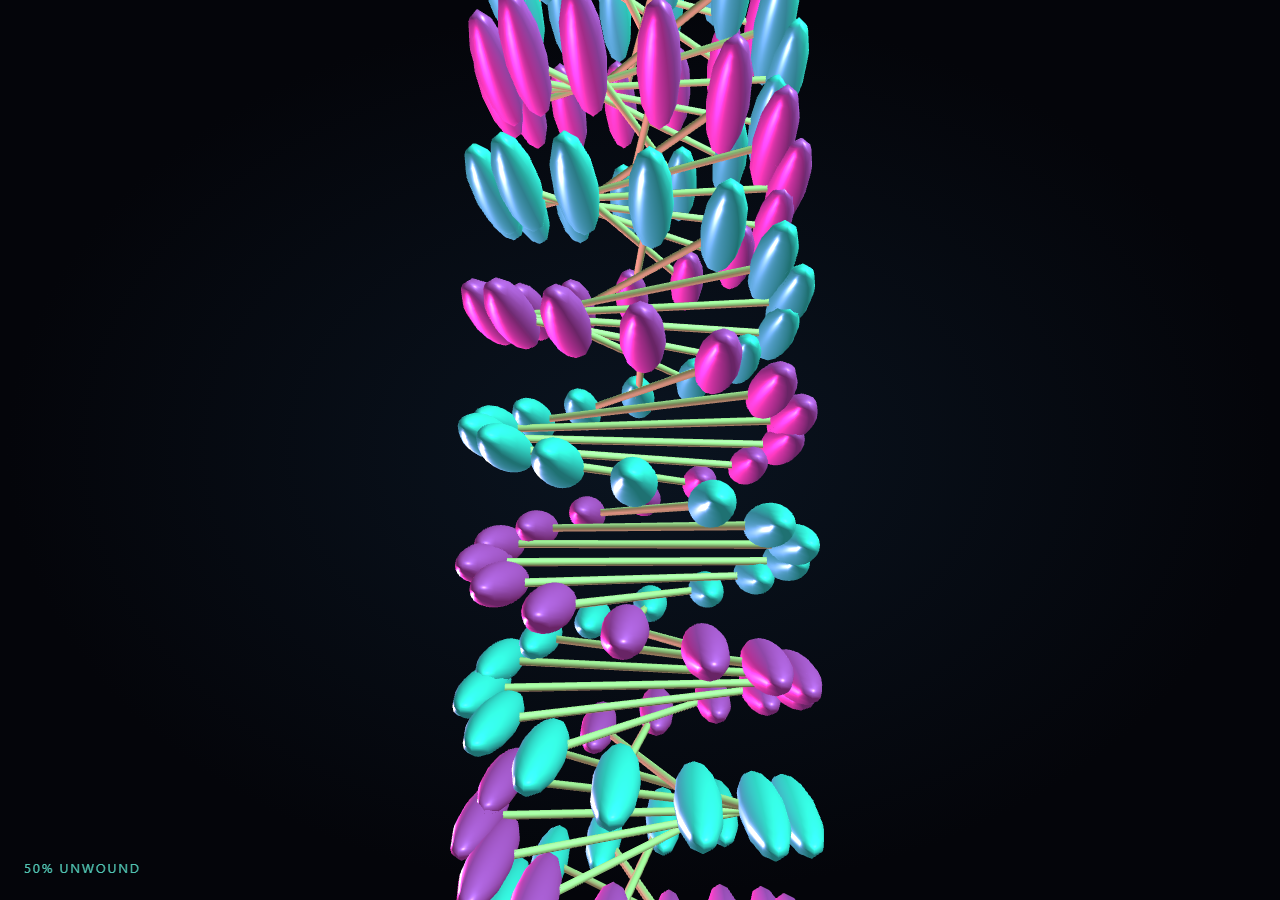
The Three.js Scroll DNA Helix Unwind snippet represents a double helix as two strands of instanced spheres plus a set of instanced connecting rungs, all packed into three THREE.InstancedMesh objects. As the visitor scrolls through a pinned stage, every base pair's twist angle and vertical position lerp from a tightly compressed, over-twisted starting state to a loosely wound, fully extended strand.
Three InstancedMesh objects, not hundreds of separate meshes
Rendering seventy base pairs the naive way would mean 210+ individual meshes (two backbone spheres and one rung per pair), each with its own draw call. Instead this snippet allocates one THREE.InstancedMesh for strand A's spheres, one for strand B's spheres, and one for the rungs, each sized to N. A single reusable THREE.Object3D dummy computes each instance's transform and writes it into the mesh's instance matrix via setMatrixAt, so the whole helix renders in three draw calls regardless of how many base pairs it has. This is the same instancing discipline used in the particle work of galaxy formation, applied here to discrete rigid-body instances instead of points.
Angle and height as the only two interpolated quantities
Rather than storing full 3D start/end positions per point, each base pair only needs two scalars: a twist angle and a height. Strand A's position is derived from the angle via cos/sin * RADIUS, and strand B is always the mirrored point at angle + PI, which keeps the two backbones geometrically locked into a true double helix at every frame instead of drifting apart. Precomputing angleA0/angleA1 and y0/y1 once up front means the render loop only performs a lerp and a couple of trig calls per base pair — cheap enough for 60fps even before instancing is considered.
Rungs oriented per frame, not pre-modeled
The connecting rung between each base pair is a single unit-length cylinder geometry, translated so its origin sits at one end. Every frame, the dummy object is scaled along Z to the live distance between strand A and strand B and pointed at strand B with lookAt, so one shared cylinder geometry can represent a rung of any length or orientation without ever needing new geometry — the same trick used for connector lines in the neural network pulse snippet.
Smoothstep easing and an orbiting camera
A single scrubbed progress value form.t is smoothstepped into eased before driving any interpolation, giving the unwind an accelerate-and-settle feel rather than constant-speed motion. The camera continuously orbits the strand at a slowly increasing angle, and its radius and height both shift with eased so the final extended helix is framed from a slightly wider, more centered shot than the compressed starting coil.
Fully reversible by construction
Because every base pair's angle and height are lerped between two fixed, precomputed endpoints, scrolling back up simply drives eased back toward zero and every sphere and rung retraces its exact path — there is no accumulated or one-way state anywhere in the animation, matching the reversibility guarantee also used in particle assembly.
Build with AI
Build, Understand, Optimize, and Extend It With AI
You do not need to reverse-engineer how a double helix unwinds with only a handful of draw calls. Paste this snippet's HTML, CSS, and JS into an AI assistant like Claude and ask it to explain why the rungs are reoriented with lookAt every frame instead of being pre-modeled, or how the angle/height parameterization keeps both strands geometrically locked. The same assistant can help you extend it — ask it to add a third strand for an RNA-style ribbon, color-code base pairs by type, or add a subtle pulse of light traveling along one strand once fully unwound. Treat the code as a conversation starter, not a finished artifact.
Prompt to recreate it
Copy this into your AI assistant of choice to build the effect from scratch, or as a jumping-off point for your own variant:
Build a "scroll-scrubbed DNA double helix unwind" in plain HTML, CSS, and JavaScript using Three.js, GSAP, and GSAP's ScrollTrigger plugin, all loaded from a CDN (no bundler, no build step).

Requirements:
- A pinned section containing a full-size canvas, with a WebGLRenderer and PerspectiveCamera sized to the canvas element (not window.innerWidth/innerHeight) and updated on window resize including aspect ratio.
- Represent roughly 70 base pairs using three THREE.InstancedMesh objects: one for strand A's backbone spheres, one for strand B's backbone spheres, and one for the connecting rungs, so the whole helix renders in three draw calls total.
- For each base pair, precompute a start twist angle and height (tightly twisted, vertically compressed) and an end twist angle and height (loosely twisted, vertically extended) as parallel Float32Arrays.
- Derive strand A's live position each frame from cos(angle)*radius / sin(angle)*radius and strand B's from the same angle plus PI, so the two backbones stay a true double helix at every interpolated state.
- Reuse one THREE.Object3D "dummy" helper to compute and write each instance's matrix via setMatrixAt every frame, and set instanceMatrix.needsUpdate = true after updating all instances of a mesh.
- Orient each rung's cylinder by scaling it to the live distance between its two strand points and calling lookAt, so one shared cylinder geometry represents every rung regardless of length.
- Register a GSAP tween on a ScrollTrigger targeting the pinned section, with pin: true, start at top top, a numeric scrub, and a multi-hundred-percent end, animating a single plain progress value from 0 to 1 with linear easing.
- Every animation frame, apply smoothstep easing to the scrubbed progress, then lerp every base pair's angle and height between its start and end values by that eased amount, and slowly orbit the camera around the helix with radius/height tied to the same eased value.
- Confirm scrolling back up reverses the entire unwind smoothly, since every base pair lerps between two fixed, precomputed states.
Want to tighten it up first? Run this prompt through the AI Prompt Studio to score it across 8 quality dimensions, catch anti-patterns, and tune the wording for Claude, ChatGPT, or Gemini before you paste it in.
Source Code
<section class="dhx-stage" id="dhxStage">
  <div class="dhx-intro-overlay"><p>Scroll ↓ to unwind the compressed double helix</p></div>
  <canvas id="dhxCanvas"></canvas>
  <div class="dhx-hud"><span id="dhxPct">0</span>% unwound</div>
</section>
<section class="dhx-bottom"><p>A fully extended, readable double helix.</p></section>*{box-sizing:border-box;margin:0;padding:0}
html,body{background:#04050a;color:#fff;font-family:system-ui,-apple-system,sans-serif}
.dhx-bottom{min-height:70vh;display:flex;justify-content:center;align-items:center;color:#7fa8b8;font-size:15px;letter-spacing:.08em;text-transform:uppercase;text-align:center;padding:0 24px}
.dhx-stage{height:100vh;position:relative;overflow:hidden;background:radial-gradient(ellipse at center,#0a1420 0%,#04050a 70%)}
.dhx-intro-overlay{position:absolute;inset:0;display:flex;align-items:center;justify-content:center;text-align:center;padding:24px;pointer-events:none;z-index:5;color:#7fa8b8;font-size:15px;letter-spacing:.08em;text-transform:uppercase;transition:opacity .4s ease;}
#dhxCanvas{display:block;width:100%;height:100%}
.dhx-hud{position:absolute;left:24px;bottom:24px;font-variant-numeric:tabular-nums;font-size:13px;letter-spacing:.14em;color:#5ee6d0;text-transform:uppercase;opacity:.85}const canvas = document.getElementById('dhxCanvas');
const pctEl = document.getElementById('dhxPct');
const renderer = new THREE.WebGLRenderer({ canvas, antialias: true, alpha: true });
renderer.setPixelRatio(Math.min(window.devicePixelRatio, 2));
const scene = new THREE.Scene();
const camera = new THREE.PerspectiveCamera(55, 1, 0.1, 200);
scene.add(new THREE.AmbientLight(0x334455, 1.2));
const key = new THREE.PointLight(0x5ee6d0, 1.4, 100);
key.position.set(10, 10, 14);
scene.add(key);
const rim = new THREE.PointLight(0xff5ec4, 1.0, 100);
rim.position.set(-12, -8, -10);
scene.add(rim);
// Each base-pair index i owns two backbone points (strand A / strand B) and one
// rung connecting them. Start state is tightly twisted + compressed; end state
// is loosely twisted + extended. All geometry lives in flat Float32Arrays so the
// render loop only rewrites numbers, never allocates.
const N = 70;
const RADIUS = 2.6;
const TWIST_START = 46; // total radians of twist across the strand, compressed
const TWIST_END = 15; // total radians of twist across the strand, unwound
const HEIGHT_START = 7; // compressed total height
const HEIGHT_END = 34; // extended total height
const angleA0 = new Float32Array(N), angleA1 = new Float32Array(N);
const y0 = new Float32Array(N), y1 = new Float32Array(N);
for (let i = 0; i < N; i++) {
const s = i / (N - 1);
angleA0[i] = s * TWIST_START;
angleA1[i] = s * TWIST_END;
y0[i] = (s - 0.5) * HEIGHT_START;
y1[i] = (s - 0.5) * HEIGHT_END;
}
const sphereGeo = new THREE.SphereGeometry(0.34, 12, 12);
const matA = new THREE.MeshStandardMaterial({ color: 0x5ee6d0, emissive: 0x0f3d38, roughness: 0.4, metalness: 0.3 });
const matB = new THREE.MeshStandardMaterial({ color: 0xff5ec4, emissive: 0x3d0f2e, roughness: 0.4, metalness: 0.3 });
const strandA = new THREE.InstancedMesh(sphereGeo, matA, N);
const strandB = new THREE.InstancedMesh(sphereGeo, matB, N);
scene.add(strandA, strandB);
// Rungs: one thin cylinder per base pair, instanced and rescaled/reoriented per frame.
const rungGeo = new THREE.CylinderGeometry(0.07, 0.07, 1, 6);
rungGeo.translate(0, 0.5, 0);
rungGeo.rotateX(Math.PI / 2);
const rungMat = new THREE.MeshStandardMaterial({ color: 0xd9c98a, emissive: 0x332c10, roughness: 0.6, metalness: 0.1 });
const rungs = new THREE.InstancedMesh(rungGeo, rungMat, N);
scene.add(rungs);
const dummy = new THREE.Object3D();
const pA = new THREE.Vector3(), pB = new THREE.Vector3(), mid = new THREE.Vector3();
const introEl = document.querySelector('.dhx-intro-overlay');
gsap.registerPlugin(ScrollTrigger);
const form = { t: 0 };
gsap.to(form, {
t: 1,
ease: 'none',
scrollTrigger: {
trigger: '#dhxStage',
start: 'top top',
end: '+=450%',
scrub: 0.6,
pin: true,
},
});
function resize() {
const w = canvas.clientWidth, h = canvas.clientHeight;
renderer.setSize(w, h, false);
camera.aspect = w / h;
camera.updateProjectionMatrix();
}
let spin = 0;
function animate() {
requestAnimationFrame(animate);
if (introEl) introEl.style.opacity = (form.t > 0.03) ? '0' : '1';
const t = form.t;
const eased = t * t * (3 - 2 * t);
for (let i = 0; i < N; i++) {
const ang = angleA0[i] + (angleA1[i] - angleA0[i]) * eased;
const y = y0[i] + (y1[i] - y0[i]) * eased;
pA.set(Math.cos(ang) * RADIUS, y, Math.sin(ang) * RADIUS);
pB.set(Math.cos(ang + Math.PI) * RADIUS, y, Math.sin(ang + Math.PI) * RADIUS);
dummy.position.copy(pA);
dummy.rotation.set(0, 0, 0);
dummy.updateMatrix();
strandA.setMatrixAt(i, dummy.matrix);
dummy.position.copy(pB);
dummy.updateMatrix();
strandB.setMatrixAt(i, dummy.matrix);
mid.copy(pA).add(pB).multiplyScalar(0.5);
const dist = pA.distanceTo(pB);
dummy.position.copy(pA);
dummy.scale.set(1, 1, dist);
dummy.lookAt(pB);
dummy.updateMatrix();
rungs.setMatrixAt(i, dummy.matrix);
}
strandA.instanceMatrix.needsUpdate = true;
strandB.instanceMatrix.needsUpdate = true;
rungs.instanceMatrix.needsUpdate = true;
spin += 0.0016 * (0.4 + eased);
const group = 0; // no wrapper group needed, orbit the camera instead
const camRadius = 16 - eased * 2;
const camHeight = (y0[0] + (y1[0] - y0[0]) * eased) * 0.15;
camera.position.set(Math.sin(spin) * camRadius, camHeight, Math.cos(spin) * camRadius);
camera.lookAt(0, 0, 0);
pctEl.textContent = Math.round(eased * 100);
renderer.render(scene, camera);
}
resize();
window.addEventListener('resize', resize);
animate();Step by step
How to Use
- 1Load all three CDN scriptsAdd three.min.js, gsap.min.js, and ScrollTrigger.min.js from the CDN panel, in that order.
- 2Paste HTML, CSS, and JSA compressed, tightly twisted double helix appears inside a pinned 3D stage with a live "% unwound" read-out.
- 3Scroll downThe helix untwists and stretches vertically, base pair by base pair, while the camera slowly orbits.
- 4Scroll back upThe strand re-compresses and re-twists exactly in reverse, since every point lerps between two fixed states.
- 5Retune the shapeChange N for more or fewer base pairs, or TWIST_START/TWIST_END and HEIGHT_START/HEIGHT_END for a tighter coil or longer strand.
- 6Adjust the pacingChange the ScrollTrigger end value (+=450%) to slow down or speed up the unwind relative to scroll distance.
Real-world uses
Common Use Cases
Got questions?
Frequently Asked Questions
Seventy base pairs need 210+ individual shapes; rendering each as its own mesh means hundreds of draw calls and matrix updates per frame. THREE.InstancedMesh lets all spheres of one strand share one geometry, one material, and one draw call, with per-instance transforms written into a shared matrix buffer via setMatrixAt — the same approach used for the particle work in the galaxy formation snippet, applied to rigid instances instead of points.
The rung dummy object is positioned at strand A's live point, scaled along its local Z axis to the current distance to strand B, and rotated with lookAt(pB) every frame. Because this is recomputed from the live strand positions rather than stored separately, the rung can never desync from its two endpoints.
Deriving each strand point from cos(angle) * RADIUS and sin(angle) * RADIUS guarantees the two backbones stay exactly RADIUS apart and offset by PI radians at every frame — a true double helix. Storing raw XYZ positions for both strands independently would risk them drifting out of the correct geometric relationship as they interpolate.
Yes. Every base pair's angle and height are lerped between fixed start and end values by a single progress number. Scrolling up simply drives that number back toward zero, and because there is no other state (no accumulated physics, no random seed reused per frame), the helix retraces its exact path in reverse.
Yes. Click JSX for a React component, Vue for a Vue 3 SFC, Angular for a standalone component, or Tailwind for a React + Tailwind version. Build the geometry, InstancedMesh objects, and GSAP ScrollTrigger inside a mount effect keyed to a canvas ref, and on unmount kill the ScrollTrigger instance, dispose geometries and materials, and call renderer.dispose().