
Learn Coding Visually
Learn to code with interactive, live-preview playgrounds — HTML, CSS, JavaScript, React & more.
 HTML Playground42 lessons · Click-based · Live preview
 CSS PlaygroundLearn CSS with a live editor
 JavaScript Playground60 lessons · DOM · Async · Canvas
 React PlaygroundLearn React with a live code editor
 GSAP PlaygroundLearn GSAP animation interactively
 SVG Playground44 lessons · shapes · paths · animation
 SCSS Playground45 lessons · Sass modules · tokens
 Tailwind PlaygroundLearn Tailwind CSS with a live editor
 Bootstrap 5 Playground50 lessons · live preview
Three.js Scroll Paper Plane Flight — Curve-Path Camera Follow
Three.js Scroll Paper Plane Flight · Scroll · Plain HTML, CSS & JS · Live preview
What's included
Features
About this UI Snippet
How to Build a Scroll-Driven Paper Plane Flight With Three.js
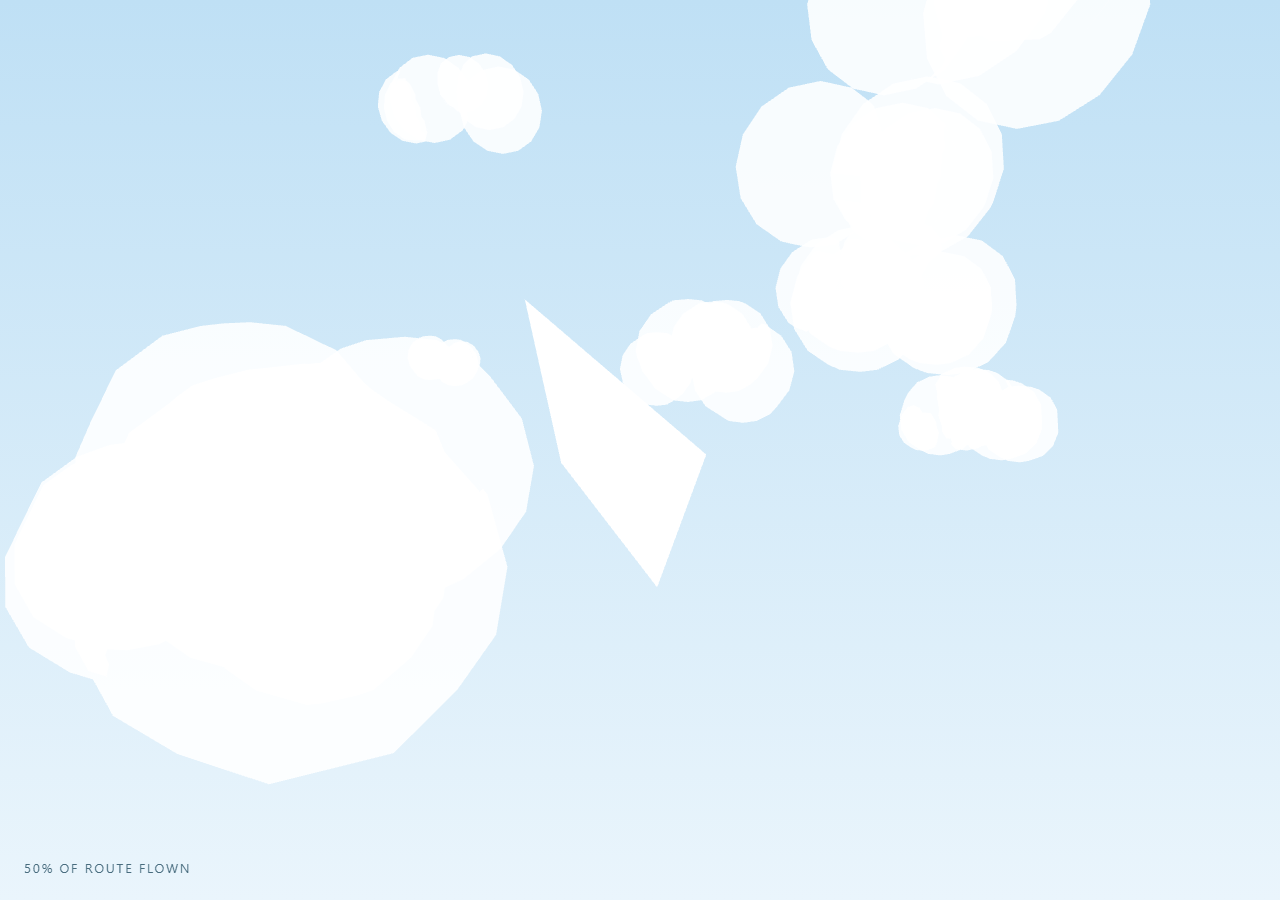
The Three.js Scroll Paper Plane Flight snippet flies a low-poly folded paper dart along a smooth 3D curve through a stylized sky of puffy low-poly clouds, with the camera trailing behind and the plane visibly banking into turns, all driven by one scrubbed scroll progress value.
A folded dart from four flat triangles, one BufferGeometry
Rather than importing a 3D-modeled airplane asset, the plane mesh is four flat triangles — describing the top and bottom of two wings meeting at a shared centerline fold — packed into a single THREE.BufferGeometry. side: THREE.DoubleSide on the material keeps every triangle visible from both sides as the plane rolls and banks through extreme angles, the same double-sided approach used for the flat panels in origami crane unfold, applied here to a rigid dart instead of a hinge-folding form.
CatmullRomCurve3 defines a smooth climb-and-dive path
A handful of waypoint Vector3s — climbing, banking sideways, diving, climbing again — are handed to THREE.CatmullRomCurve3, which interpolates a smooth spline through all of them. Calling curve.getPointAt(t) for any t between 0 and 1 returns a position an even arc-length fraction along that spline (not just parameter fraction), which is what keeps the plane's apparent speed visually consistent even through tighter and looser sections of the curve.
Orientation and banking derived from nearby curve samples
Every frame, the plane looks at a point slightly further along the curve (ahead) via lookAt, which orients its nose along the direction of travel. To bank into turns, the snippet also samples a point slightly *behind* the current position and compares the lateral (x-axis) difference between the behind-sample and the ahead-sample — a discrete estimate of how sharply the path is curving sideways at this point — and rolls the plane around its own forward axis proportionally with rotateZ. This produces a natural-looking bank into turns without needing any pre-authored animation keyframes.
Camera trails behind on the same curve, not on an independent path
Rather than defining a separate camera path, the camera samples the exact same curve at a slightly earlier t value (behindT = clamped - 0.045) so it always trails a fixed arc-length distance behind the plane, offset upward for a classic chase-cam framing, and looks directly at the plane's live position. Because both plane and camera derive their positions from the same single t parameter, they never desync, and the whole rig reverses cleanly.
Fully reversible flight
Every visual property — plane position, plane orientation, bank angle, and camera position — is recomputed fresh every frame purely from the current scrubbed t value sampled against the static curve. Scrolling back up decreases t, and the plane and camera both retrace the exact same climb-and-dive path in reverse, banking the opposite way through each turn exactly as it did going forward.
Build with AI
Build, Understand, Optimize, and Extend It With AI
You do not need to reverse-engineer how a paper plane banks realistically into turns along a hand-designed 3D flight path. Paste this snippet's HTML, CSS, and JS into an AI assistant like Claude and ask it to explain how getPointAt's even arc-length sampling keeps flight speed consistent, or how the behind/ahead curve-sample comparison produces a believable bank angle with no keyframes. The same assistant can help you extend it — ask it to add a paper-trail ribbon effect behind the plane, sync scroll-triggered text captions to specific t ranges along the curve, or add gentle procedural wind-sway to the clouds. Treat the code as a conversation starter, not a finished artifact.
Prompt to recreate it
Copy this into your AI assistant of choice to build the effect from scratch, or as a jumping-off point for your own variant:
Build a "scroll-scrubbed paper plane flight along a curved path" in plain HTML, CSS, and JavaScript using Three.js, GSAP, and GSAP's ScrollTrigger plugin, all loaded from a CDN (no bundler, no build step).

Requirements:
- A pinned section containing a full-size canvas, with a WebGLRenderer and PerspectiveCamera sized to the canvas element (not window.innerWidth/innerHeight) and updated on window resize including aspect ratio.
- Build a low-poly paper plane mesh from a small number of flat triangles in a single THREE.BufferGeometry (representing folded wing panels meeting at a centerline), with a DoubleSide material so thin panels stay visible through extreme rotation.
- Define a multi-waypoint flight path using THREE.CatmullRomCurve3 with several Vector3 points that climb, bank sideways, and dive to create visual variety, and populate the scene with a couple dozen static low-poly "cloud" objects (clusters of overlapping spheres) placed around the path.
- Register a GSAP tween on a ScrollTrigger targeting the pinned section, with pin: true, start at top top, a numeric scrub, and a multi-hundred-percent end, animating a single plain progress value from 0 to 1 with linear easing.
- Every animation frame, apply smoothstep easing to the scrubbed progress and clamp it into the curve's valid sampling range, then use curve.getPointAt to find the plane's current position and a point slightly further along the curve to orient the plane toward via lookAt.
- Compute a bank/roll angle by sampling the curve at a point slightly behind the plane's current position and comparing its lateral offset to the ahead-sample's lateral offset, then roll the plane around its own forward axis proportionally to that difference.
- Position the camera by sampling the same curve at a t value offset slightly behind the plane's own t, offset upward for a chase-cam angle, and have it look at the plane's live position every frame.
- Confirm scrolling back up reverses the entire flight smoothly: the plane and camera retrace the exact path and banking in reverse, since every value is derived fresh each frame from the current scrubbed progress with no accumulated state.
Want to tighten it up first? Run this prompt through the AI Prompt Studio to score it across 8 quality dimensions, catch anti-patterns, and tune the wording for Claude, ChatGPT, or Gemini before you paste it in.
Source Code
<section class="ppf-stage" id="ppfStage">
  <div class="ppf-intro-overlay"><p>Scroll ↓ to send the paper plane climbing and diving through the clouds</p></div>
  <canvas id="ppfCanvas"></canvas>
  <div class="ppf-hud"><span id="ppfPct">0</span>% of route flown</div>
</section>
<section class="ppf-bottom"><p>The paper plane completes its curved flight through the sky.</p></section>*{box-sizing:border-box;margin:0;padding:0}
html,body{background:#dff0fb;color:#264b5c;font-family:system-ui,-apple-system,sans-serif}
.ppf-bottom{min-height:70vh;display:flex;justify-content:center;align-items:center;color:#5a8ca3;font-size:15px;letter-spacing:.08em;text-transform:uppercase;text-align:center;padding:0 24px;background:#eaf5fc}
.ppf-stage{height:100vh;position:relative;overflow:hidden;background:linear-gradient(180deg,#bfe0f5 0%,#eaf5fc 100%)}
.ppf-intro-overlay{position:absolute;inset:0;display:flex;align-items:center;justify-content:center;text-align:center;padding:24px;pointer-events:none;z-index:5;color:#3d6f85;font-size:15px;letter-spacing:.08em;text-transform:uppercase;transition:opacity .4s ease;}
#ppfCanvas{display:block;width:100%;height:100%}
.ppf-hud{position:absolute;left:24px;bottom:24px;font-variant-numeric:tabular-nums;font-size:13px;letter-spacing:.14em;color:#2c5468;text-transform:uppercase;opacity:.85}const canvas = document.getElementById('ppfCanvas');
const pctEl = document.getElementById('ppfPct');
const renderer = new THREE.WebGLRenderer({ canvas, antialias: true, alpha: true });
renderer.setPixelRatio(Math.min(window.devicePixelRatio, 2));
const scene = new THREE.Scene();
const camera = new THREE.PerspectiveCamera(52, 1, 0.1, 200);
scene.add(new THREE.AmbientLight(0xffffff, 1.1));
const sun = new THREE.DirectionalLight(0xfff6e0, 1.1);
sun.position.set(10, 14, 8);
scene.add(sun);
// Clouds: soft, low-poly puff clusters made from overlapping spheres, placed
// once around the flight path. Static geometry, cheap to render.
const cloudMat = new THREE.MeshStandardMaterial({ color: 0xffffff, roughness: 1, metalness: 0, transparent: true, opacity: 0.88 });
function makeCloud(x, y, z, scale) {
const group = new THREE.Group();
const puffCount = 4 + Math.floor(Math.random() * 3);
for (let i = 0; i < puffCount; i++) {
const geo = new THREE.SphereGeometry(0.6 + Math.random() * 0.5, 8, 8);
const puff = new THREE.Mesh(geo, cloudMat);
puff.position.set((Math.random() - 0.5) * 2.2, (Math.random() - 0.5) * 0.6, (Math.random() - 0.5) * 1.2);
group.add(puff);
}
group.position.set(x, y, z);
group.scale.setScalar(scale);
return group;
}
for (let i = 0; i < 22; i++) {
const cloud = makeCloud(
(Math.random() - 0.5) * 60,
(Math.random() - 0.5) * 20 - 2,
-Math.random() * 90,
1 + Math.random() * 1.8
);
scene.add(cloud);
}
// Low-poly paper plane: a folded dart shape built from a handful of flat
// triangles sharing one BufferGeometry.
function makePlaneGeometry() {
const geo = new THREE.BufferGeometry();
const v = new Float32Array([
// right wing top
0, 0, 1.6, 1.4, -0.15, -1.2, 0, 0.3, -1.0,
// left wing top
0, 0, 1.6, 0, 0.3, -1.0, -1.4, -0.15, -1.2,
// right wing bottom
0, 0, 1.6, 0, -0.35, -1.0, 1.4, -0.15, -1.2,
// left wing bottom
0, 0, 1.6, -1.4, -0.15, -1.2, 0, -0.35, -1.0,
]);
geo.setAttribute('position', new THREE.BufferAttribute(v, 3));
geo.computeVertexNormals();
return geo;
}
const planeMat = new THREE.MeshStandardMaterial({ color: 0xffffff, roughness: 0.55, metalness: 0.05, side: THREE.DoubleSide, emissive: 0x24343c, emissiveIntensity: 0.08 });
const plane = new THREE.Mesh(makePlaneGeometry(), planeMat);
scene.add(plane);
// Flight path: a smooth Catmull-Rom curve climbing, banking, and diving
// through the sky.
const curve = new THREE.CatmullRomCurve3([
new THREE.Vector3(0, -4, 14),
new THREE.Vector3(-6, 2, 2),
new THREE.Vector3(6, 8, -14),
new THREE.Vector3(-4, 3, -32),
new THREE.Vector3(8, -3, -50),
new THREE.Vector3(0, 6, -68),
new THREE.Vector3(-6, 1, -84),
], false, 'catmullrom', 0.4);
const introEl = document.querySelector('.ppf-intro-overlay');
gsap.registerPlugin(ScrollTrigger);
const form = { t: 0 };
gsap.to(form, {
t: 1,
ease: 'none',
scrollTrigger: {
trigger: '#ppfStage',
start: 'top top',
end: '+=500%',
scrub: 0.7,
pin: true,
},
});
function resize() {
const w = canvas.clientWidth, h = canvas.clientHeight;
renderer.setSize(w, h, false);
camera.aspect = w / h;
camera.updateProjectionMatrix();
}
const pos = new THREE.Vector3();
const ahead = new THREE.Vector3();
const up = new THREE.Vector3(0, 1, 0);
const camOffset = new THREE.Vector3();
function animate() {
requestAnimationFrame(animate);
if (introEl) introEl.style.opacity = (form.t > 0.03) ? '0' : '1';
const t = form.t;
const eased = t * t * (3 - 2 * t);
const clamped = Math.min(0.999, Math.max(0.001, eased));
curve.getPointAt(clamped, pos);
curve.getPointAt(Math.min(0.999, clamped + 0.01), ahead);
plane.position.copy(pos);
plane.lookAt(ahead);
// Bank into turns: roll around the plane's own forward axis proportional to
// how sharply the path is curving laterally at this point.
const prevT = Math.max(0.001, clamped - 0.01);
curve.getPointAt(prevT, camOffset);
const turnDelta = ahead.x - camOffset.x;
plane.rotateZ(-turnDelta * 2.2);
// Camera trails slightly behind and above the plane, looking toward it.
const behindT = Math.max(0.001, clamped - 0.045);
const camPos = curve.getPointAt(behindT);
camera.position.set(camPos.x, camPos.y + 1.4, camPos.z + 3.5);
camera.lookAt(pos);
pctEl.textContent = Math.round(eased * 100);
renderer.render(scene, camera);
}
resize();
window.addEventListener('resize', resize);
animate();Step by step
How to Use
- 1Load all three CDN scriptsAdd three.min.js, gsap.min.js, and ScrollTrigger.min.js from the CDN panel, in that order.
- 2Paste HTML, CSS, and JSA paper plane sits at the start of its route inside a bright sky, in a pinned 3D stage with a live "% of route flown" read-out.
- 3Scroll downThe plane climbs, banks, and dives along a smooth curved path through low-poly clouds while the camera trails behind it.
- 4Scroll back upThe plane and camera retrace the exact same path in reverse, banking the opposite way through each turn.
- 5Retune the routeEdit the CatmullRomCurve3 waypoint array to design a different climb-and-dive path or add more turns.
- 6Adjust the pacingChange the ScrollTrigger end value (+=500%) for a slower, more scenic flight or a faster one.
Real-world uses
Common Use Cases
Got questions?
Frequently Asked Questions
Linearly interpolating between waypoints would produce a path with visible sharp corners at each waypoint. THREE.CatmullRomCurve3 fits a smooth spline through all the given points, and its getPointAt(t) method samples that spline by even arc-length fraction rather than raw parameter fraction, so the plane moves at a visually consistent speed even where waypoints are closer together or further apart.
Each frame, the snippet samples the curve at a point slightly behind and a point slightly ahead of the plane's current position, and compares their lateral (x-axis) difference. A larger difference means the path is curving more sharply sideways at that point, so the plane rolls proportionally further around its own forward axis via rotateZ — an approximation of how a real aircraft banks harder into a tighter turn, computed with no manual keyframing.
If the camera followed an independently authored path, keeping it visually locked behind the plane through every climb, dive, and turn would require constant manual tuning. Sampling the identical curve at a t value slightly earlier than the plane's own t guarantees the camera always trails at a consistent arc-length distance and banks through the same turns, since both derive from one shared parameter.
Yes. Plane position, orientation, bank angle, and camera position are all recomputed from scratch every frame purely as functions of the current scrubbed t value against the static curve — nothing is accumulated between frames. Scrolling up decreases t, and every computed value (including the bank direction) naturally retraces its forward-flight counterpart in reverse.
Yes. Click JSX for a React component, Vue for a Vue 3 SFC, Angular for a standalone component, or Tailwind for a React + Tailwind version. Build the plane geometry, curve, clouds, and GSAP ScrollTrigger inside a mount effect keyed to a canvas ref, and on unmount kill the ScrollTrigger instance, dispose geometries/materials, and call renderer.dispose().