
Learn Coding Visually
Learn to code with interactive, live-preview playgrounds — HTML, CSS, JavaScript, React & more.
 HTML Playground42 lessons · Click-based · Live preview
 CSS PlaygroundLearn CSS with a live editor
 JavaScript Playground60 lessons · DOM · Async · Canvas
 React PlaygroundLearn React with a live code editor
 GSAP PlaygroundLearn GSAP animation interactively
 SVG Playground44 lessons · shapes · paths · animation
 SCSS Playground45 lessons · Sass modules · tokens
 Tailwind PlaygroundLearn Tailwind CSS with a live editor
 Bootstrap 5 Playground50 lessons · live preview
Three.js Scroll Solar Eclipse Transit — Corona Reveal Animation
Three.js Scroll Solar Eclipse Transit · Scroll · Plain HTML, CSS & JS · Live preview
What's included
Features
About this UI Snippet
How to Build a Scroll-Driven Solar Eclipse Transit With Three.js
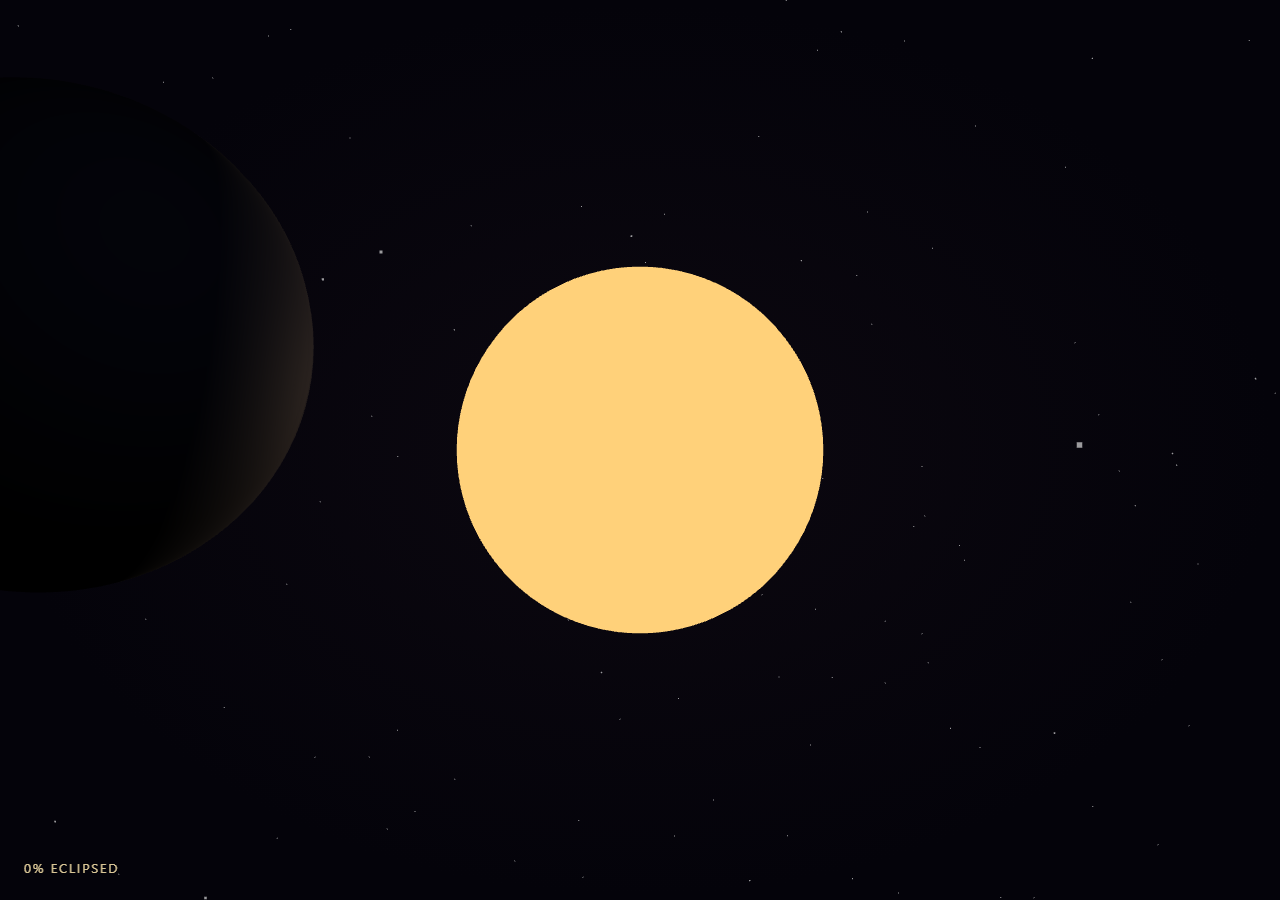
The Three.js Scroll Solar Eclipse Transit snippet slides a dark moon sphere across the scene toward a fixed, glowing sun as the visitor scrolls through a pinned stage, growing a ring-shaped corona effect the closer the two bodies get to perfect alignment — a small, focused physical simulation built from two spheres, one ring mesh, and a distance calculation.
A fixed sun and a lerping moon
The sun sits permanently at the origin as a MeshBasicMaterial sphere (self-lit, so it always reads as a light source regardless of scene lighting) paired with a THREE.PointLight for glow on nearby geometry. The moon, by contrast, starts far to one side (moonStart) and every frame its position is set via Vector3.lerpVectors(moonStart, moonEnd, eased) — a direct interpolation between two fixed points using the smoothstepped scroll progress, the same fixed-endpoint lerp technique used for particle placement in galaxy formation, here applied to a single rigid body instead of thousands of particles.
Alignment computed from live 2D screen-plane distance, not just progress
Rather than tying the corona and lighting effects directly to the scrubbed eased value, this snippet computes a separate alignment value each frame from the actual live distance between the moon's and sun's x/y positions (ignoring z, since the eclipse effect is about screen-plane overlap from the camera's point of view). This means the corona and dimming effects are driven by *where the moon visually is*, not merely how far scroll has progressed — a subtle but important distinction that would matter if moonEnd were ever changed to not perfectly overlap the sun, or if the lerp path curved.
Additive-blended ring geometry for the corona
The corona is a flat THREE.RingGeometry with an inner radius just past the sun's radius and an outer radius further out, given a MeshBasicMaterial with blending: THREE.AdditiveBlending, depthWrite: false, and transparent: true. Its opacity is driven by alignmentSmooth (alignment squared, so the corona stays essentially invisible until the moon is quite close and then blooms in quickly near full eclipse), and it calls lookAt(camera.position) every frame so the flat ring always billboards to face the viewer regardless of camera position — a simple but effective substitute for a full glow sprite or bloom post-process pass.
Sun dimming and color shift reinforce the eclipse
As alignment increases, the sun's own PointLight intensity is reduced (simulating the moon blocking direct light) and the sun material's color is nudged toward a slightly warmer, whiter tone at full alignment — small touches that sell the sense of the light source being obscured even though the moon sphere and sun sphere are never boolean-clipped against each other.
Fully reversible via live distance, not a one-way flag
Because alignment is recomputed fresh from live positions every single frame rather than being set once and left, there is no "eclipse happened" flag to reset. Scrolling back up moves the moon back toward moonStart, live distance increases again, and the corona and dimming fade out exactly following the same alignment curve in reverse.
Build with AI
Build, Understand, Optimize, and Extend It With AI
You do not need to reverse-engineer how a moon slides into alignment with a sun to reveal a glowing corona. Paste this snippet's HTML, CSS, and JS into an AI assistant like Claude and ask it to explain why alignment is computed from live distance rather than scroll progress directly, or how the additive-blended ring corona billboards toward the camera. The same assistant can help you extend it — ask it to add a subtle lens-flare sprite at full eclipse, animate visible solar prominences around the corona's edge, or add a small orbiting Earth silhouette in the foreground for scale. Treat the code as a conversation starter, not a finished artifact.
Prompt to recreate it
Copy this into your AI assistant of choice to build the effect from scratch, or as a jumping-off point for your own variant:
Build a "scroll-scrubbed solar eclipse transit" in plain HTML, CSS, and JavaScript using Three.js, GSAP, and GSAP's ScrollTrigger plugin, all loaded from a CDN (no bundler, no build step).

Requirements:
- A pinned section containing a full-size canvas, with a WebGLRenderer and PerspectiveCamera sized to the canvas element (not window.innerWidth/innerHeight) and updated on window resize including aspect ratio.
- Create a fixed, self-lit sun sphere at the origin using MeshBasicMaterial (so it always reads as glowing regardless of scene lighting), paired with a THREE.PointLight for ambient glow.
- Create a dark moon sphere slightly larger in apparent radius than the sun, starting at a position offset far to one side, and every frame set its live position via Vector3.lerpVectors between that starting position and a target position centered on the sun, driven by a single scrubbed 0-1 progress value with smoothstep easing applied.
- Every frame, compute an "alignment" value from the live 2D (x, y) distance between the moon's and sun's current positions, not directly from the scroll progress value, normalized so it reaches 1 when the moon is centered on the sun and 0 when far away.
- Add a flat THREE.RingGeometry mesh as a corona, with an inner radius matching the sun's edge and a larger outer radius, using a MeshBasicMaterial with additive blending, depthWrite false, and transparent true; set its opacity each frame to the squared alignment value so it stays invisible until the moon is nearly overlapping the sun, and call lookAt(camera.position) on it every frame so it always faces the viewer.
- Slightly dim the sun's point light intensity and shift its material color as alignment increases, to reinforce the sense of the light source being obscured.
- Register a GSAP tween on a ScrollTrigger targeting the pinned section, with pin: true, start at top top, a numeric scrub, and a multi-hundred-percent end, animating a single plain progress value from 0 to 1 with linear easing, which drives the moon's lerp.
- Add a simple static starfield background (a single Points object with a few hundred randomly placed points) for a deep-space setting.
- Confirm scrolling back up reverses the transit smoothly: the moon slides back away from the sun and the corona fades out, since alignment is recomputed fresh every frame from live positions with no one-way flag.
Want to tighten it up first? Run this prompt through the AI Prompt Studio to score it across 8 quality dimensions, catch anti-patterns, and tune the wording for Claude, ChatGPT, or Gemini before you paste it in.
Source Code
<section class="sec-stage" id="secStage">
  <div class="sec-intro-overlay"><p>Scroll ↓ to bring the moon into alignment with the sun</p></div>
  <canvas id="secCanvas"></canvas>
  <div class="sec-hud"><span id="secPct">0</span>% eclipsed</div>
</section>
<section class="sec-bottom"><p>Total eclipse — the corona blazes around a darkened sun.</p></section>*{box-sizing:border-box;margin:0;padding:0}
html,body{background:#04030a;color:#fff;font-family:system-ui,-apple-system,sans-serif}
.sec-bottom{min-height:70vh;display:flex;justify-content:center;align-items:center;color:#e0c98a;font-size:15px;letter-spacing:.08em;text-transform:uppercase;text-align:center;padding:0 24px}
.sec-stage{height:100vh;position:relative;overflow:hidden;background:radial-gradient(ellipse at center,#0c0810 0%,#04030a 70%)}
.sec-intro-overlay{position:absolute;inset:0;display:flex;align-items:center;justify-content:center;text-align:center;padding:24px;pointer-events:none;z-index:5;color:#e0c98a;font-size:15px;letter-spacing:.08em;text-transform:uppercase;transition:opacity .4s ease;}
#secCanvas{display:block;width:100%;height:100%}
.sec-hud{position:absolute;left:24px;bottom:24px;font-variant-numeric:tabular-nums;font-size:13px;letter-spacing:.14em;color:#ffe9b0;text-transform:uppercase;opacity:.85}const canvas = document.getElementById('secCanvas');
const pctEl = document.getElementById('secPct');
const renderer = new THREE.WebGLRenderer({ canvas, antialias: true, alpha: true });
renderer.setPixelRatio(Math.min(window.devicePixelRatio, 2));
const scene = new THREE.Scene();
const camera = new THREE.PerspectiveCamera(42, 1, 0.1, 200);
camera.position.set(0, 0, 22);
camera.lookAt(0, 0, 0);
// Background starfield: a light static point cloud so the deep-space setting
// reads immediately, built once as a single BufferGeometry.
const STAR_COUNT = 900;
const starPos = new Float32Array(STAR_COUNT * 3);
for (let i = 0; i < STAR_COUNT; i++) {
starPos[i * 3] = (Math.random() - 0.5) * 140;
starPos[i * 3 + 1] = (Math.random() - 0.5) * 140;
starPos[i * 3 + 2] = (Math.random() - 0.5) * 80 - 20;
}
const starGeo = new THREE.BufferGeometry();
starGeo.setAttribute('position', new THREE.BufferAttribute(starPos, 3));
const starMat = new THREE.PointsMaterial({ size: 0.12, color: 0xffffff, transparent: true, opacity: 0.6 });
scene.add(new THREE.Points(starGeo, starMat));
// Sun: emissive sphere, fixed at the origin.
const sunGeo = new THREE.SphereGeometry(3.4, 48, 48);
const sunMat = new THREE.MeshBasicMaterial({ color: 0xffd27a });
const sun = new THREE.Mesh(sunGeo, sunMat);
scene.add(sun);
const sunGlow = new THREE.PointLight(0xffcf8a, 2.2, 80);
scene.add(sunGlow);
// Moon: dark sphere, starts offset far to one side and slides in front of the
// sun as scroll progresses.
const moonGeo = new THREE.SphereGeometry(3.42, 48, 48);
const moonMat = new THREE.MeshStandardMaterial({ color: 0x0a0a12, roughness: 0.9, metalness: 0 });
const moon = new THREE.Mesh(moonGeo, moonMat);
moon.position.set(-16, 3, 6);
scene.add(moon);
const rim = new THREE.PointLight(0x7799ff, 0.5, 40);
rim.position.set(-10, 6, 12);
scene.add(rim);
// Corona: an additive-blended ring sprite behind the sun, faded in only near
// full alignment.
const coronaGeo = new THREE.RingGeometry(3.5, 7.2, 64);
const coronaMat = new THREE.MeshBasicMaterial({
color: 0xfff0c4,
transparent: true,
opacity: 0,
blending: THREE.AdditiveBlending,
side: THREE.DoubleSide,
depthWrite: false,
});
const corona = new THREE.Mesh(coronaGeo, coronaMat);
scene.add(corona);
const introEl = document.querySelector('.sec-intro-overlay');
gsap.registerPlugin(ScrollTrigger);
const form = { t: 0 };
gsap.to(form, {
t: 1,
ease: 'none',
scrollTrigger: {
trigger: '#secStage',
start: 'top top',
end: '+=420%',
scrub: 0.6,
pin: true,
},
});
function resize() {
const w = canvas.clientWidth, h = canvas.clientHeight;
renderer.setSize(w, h, false);
camera.aspect = w / h;
camera.updateProjectionMatrix();
}
const moonStart = new THREE.Vector3(-16, 3, 6);
const moonEnd = new THREE.Vector3(0, 0, 6);
function animate() {
requestAnimationFrame(animate);
if (introEl) introEl.style.opacity = (form.t > 0.03) ? '0' : '1';
const t = form.t;
const eased = t * t * (3 - 2 * t);
moon.position.lerpVectors(moonStart, moonEnd, eased);
moon.rotation.y += 0.001;
rim.position.copy(moon.position).add(new THREE.Vector3(6, 3, 6));
// Alignment closeness: 1 when moon is centered on the sun (x,y both ~0),
// 0 when far away. Drives corona opacity and sun dimming.
const dx = moon.position.x - sun.position.x;
const dy = moon.position.y - sun.position.y;
const dist = Math.sqrt(dx * dx + dy * dy);
const alignment = Math.max(0, 1 - dist / 3.4);
const alignmentSmooth = alignment * alignment;
corona.material.opacity = alignmentSmooth * 0.9;
corona.scale.setScalar(1 + alignmentSmooth * 0.15);
corona.lookAt(camera.position);
sunGlow.intensity = 2.2 - alignmentSmooth * 1.7;
sun.material.color.setRGB(1, 0.82 + alignmentSmooth * 0.1, 0.48 + alignmentSmooth * 0.3);
pctEl.textContent = Math.round(alignmentSmooth * 100);
renderer.render(scene, camera);
}
resize();
window.addEventListener('resize', resize);
animate();Step by step
How to Use
- 1Load all three CDN scriptsAdd three.min.js, gsap.min.js, and ScrollTrigger.min.js from the CDN panel, in that order.
- 2Paste HTML, CSS, and JSThe sun sits alone with the moon offset far to one side inside a pinned 3D stage with a live "% eclipsed" read-out.
- 3Scroll downThe moon slides into alignment with the sun; as they overlap, a glowing corona ring blooms into view.
- 4Scroll back upThe moon slides back away and the corona fades, following the exact same alignment curve in reverse.
- 5Retune the transitChange moonStart/moonEnd for a different transit path, or the RingGeometry radii for a bigger or smaller corona.
- 6Adjust the pacingChange the ScrollTrigger end value (+=420%) for a slower or snappier alignment relative to scroll distance.
Real-world uses
Common Use Cases
Got questions?
Frequently Asked Questions
Tying corona opacity and sun dimming directly to the scrubbed progress value would assume the moon's path always ends in perfect visual overlap with the sun. By instead measuring the live x/y distance between the moon and sun every frame, the corona effect responds to where the moon actually appears relative to the sun on screen, which stays correct even if the transit path, camera angle, or endpoint were changed later.
A THREE.Sprite always faces the camera automatically but has less control over its exact inner/outer radius shape. A flat RingGeometry mesh gives precise control over the corona's inner and outer radii to match the sun's size, and calling lookAt(camera.position) every frame achieves the same camera-facing billboard behavior manually, which also makes it easy to combine with additive blending and a custom opacity curve.
Squaring the 0-1 alignment value before using it for opacity keeps the corona invisible for most of the moon's approach and then blooms it in rapidly only in the last stretch before full alignment, which matches how a real solar corona is imperceptible until totality is nearly reached, rather than fading in at a constant, unrealistic rate throughout the whole transit.
Yes. The moon's position is a pure lerp between two fixed points driven by scroll progress, and alignment, corona opacity, and sun dimming are all recomputed fresh from that live position every frame rather than being set once and left. Scrolling up moves the moon back toward its starting position and every dependent effect fades out following the exact same curve in reverse.
Yes. Click JSX for a React component, Vue for a Vue 3 SFC, Angular for a standalone component, or Tailwind for a React + Tailwind version. Build the sun, moon, corona mesh, and GSAP ScrollTrigger inside a mount effect keyed to a canvas ref, and on unmount kill the ScrollTrigger instance, dispose geometries/materials, and call renderer.dispose().