
Learn Coding Visually
Learn to code with interactive, live-preview playgrounds — HTML, CSS, JavaScript, React & more.
 HTML Playground42 lessons · Click-based · Live preview
 CSS PlaygroundLearn CSS with a live editor
 JavaScript Playground60 lessons · DOM · Async · Canvas
 React PlaygroundLearn React with a live code editor
 GSAP PlaygroundLearn GSAP animation interactively
 SVG Playground44 lessons · shapes · paths · animation
 SCSS Playground45 lessons · Sass modules · tokens
 Tailwind PlaygroundLearn Tailwind CSS with a live editor
 Bootstrap 5 Playground50 lessons · live preview
Three.js Scroll Sand Dune Drift — Procedural Terrain Flyover
Three.js Scroll Sand Dune Drift · Scroll · Plain HTML, CSS & JS · Live preview
What's included
Features
About this UI Snippet
How to Build a Scroll-Driven Desert Dune Flyover With Three.js
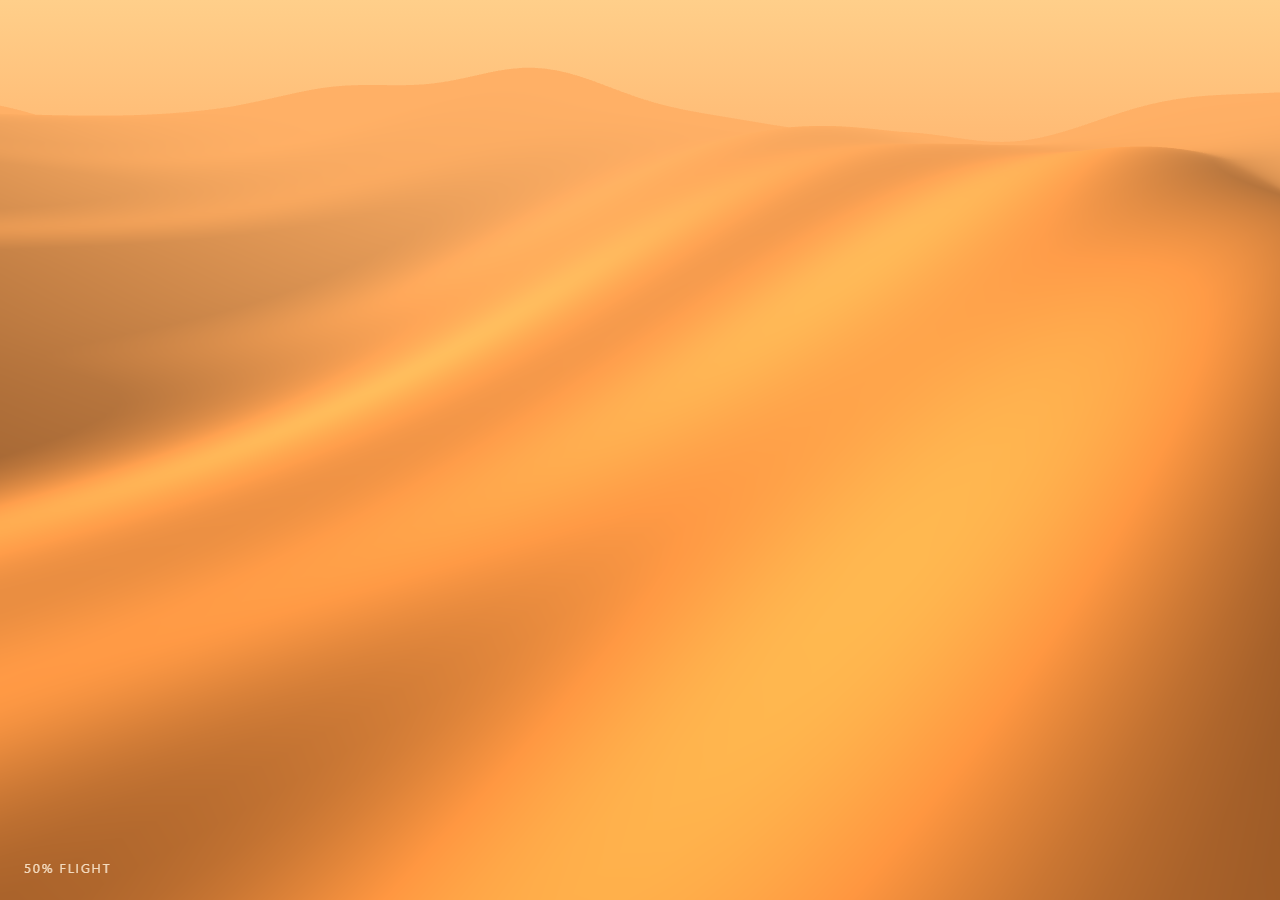
The Three.js Scroll Sand Dune Drift snippet displaces every vertex of a large plane with a procedural heightmap to sculpt rolling desert dunes, then drifts that heightmap's phase and flies a low camera over it as the visitor scrolls through a pinned stage — no image-based heightmap, no terrain library.
A hashed-sine heightmap instead of an image texture
Rather than loading a grayscale heightmap texture, the dune() function combines three layered sine ridges at different frequencies and phase offsets into one height value per (x, z) coordinate. This is cheap to evaluate for every vertex every frame and, crucially, accepts a phase parameter — shifting that single number slides the entire ridge pattern, which is what makes the dunes look like they are drifting rather than static.
Displacing a PlaneGeometry in place
A THREE.PlaneGeometry with 130x130 segments is rotated flat, and each vertex's original x/z is cached once into plain Float32Arrays (baseX/baseZ) so the per-frame update loop only has to look up those two coordinates and write a new Y via posAttr.setY, followed by geometry.computeVertexNormals() so the golden-hour lighting responds correctly to the newly sculpted slopes — the same displaced-plane technique used in wave terrain, here driven by ridge noise instead of a rippling sine grid.
Phase drift is a pure function of scroll progress
The ripple phase passed into dune() is eased * 6.0 — directly derived from the scrubbed, eased scroll progress, not from elapsed real time. That means the dune pattern at any given scroll position is always identical whether you arrived there scrolling down or back up, which is what keeps the whole flyover exactly reversible.
A camera path that samples the terrain it flies over
The camera doesn't just move along a fixed line — its target height is computed by sampling dune() directly beneath the flight path (groundY) and clamped so the camera never dips below the sand, giving a genuine low-altitude "skimming the ridgelines" feel rather than a floating drone shot with no relationship to the terrain underneath it.
Golden-hour palette
A low warm THREE.DirectionalLight positioned near the horizon, a warm ambient fill, and THREE.Fog tinted the same warm orange as the sky gradient behind the canvas combine to sell the golden-hour desert mood without any post-processing pipeline.
Build with AI
Build, Understand, Optimize, and Extend It With AI
You do not need to reverse-engineer how a scroll-driven terrain flyover works without a heightmap texture or terrain engine. Paste this snippet's HTML, CSS, and JS into an AI assistant like Claude and ask it to explain why the ripple phase is derived from scroll progress rather than elapsed time, or why computeVertexNormals is called after every height update. The same assistant can help you extend it — ask it to add a second, higher-frequency noise layer for finer sand texture, blend in a distant mountain silhouette, or add scattered rock/cactus instances that sit on the live terrain height. It can also help optimize further, for instance moving the heightmap evaluation into a vertex shader so the CPU loop disappears. Treat the code as a conversation starter, not a finished artifact.
Prompt to recreate it
Copy this into your AI assistant of choice to build the effect from scratch, or as a jumping-off point for your own variant:
Build a "scroll-scrubbed procedural desert dune flyover" in plain HTML, CSS, and JavaScript using Three.js, GSAP, and GSAP's ScrollTrigger plugin, all loaded from a CDN (no bundler, no build step).

Requirements:
- A pinned section containing a full-size canvas, with a WebGLRenderer and PerspectiveCamera sized to it and updated on window resize including aspect ratio, plus THREE.Fog and a low warm DirectionalLight to establish a golden-hour desert mood.
- Create a large flat-shaded PlaneGeometry with roughly 130x130 segments, rotated to lie horizontal, and cache every vertex's original x/z coordinate into plain arrays before displacing it.
- Write a height function of (x, z, phase) that combines two or three layered sine waves at different frequencies and phase offsets to produce dune-like rolling ridgelines, with no image-based heightmap or external noise library.
- Each frame, recompute every vertex's Y coordinate from its cached x/z and a phase value derived from the current scrubbed scroll progress (not elapsed time), write it into the geometry's position attribute, set needsUpdate to true, and call computeVertexNormals so lighting responds correctly to the reshaped terrain.
- Register a GSAP tween on a ScrollTrigger targeting the pinned section, with pin: true, start at top top, a numeric scrub, and a multi-hundred-percent end, animating a single plain progress value from 0 to 1 with linear easing.
- Move the camera from a high, distant establishing position down to a low altitude that skims just above the dune ridgelines as progress advances, sampling the height function directly beneath the camera's flight path so it never dips below the sand.
- Confirm scrolling back up reverses both the camera's flight and the dune ripple drift exactly, since both depend only on the current scrubbed progress value.
Want to tighten it up first? Run this prompt through the AI Prompt Studio to score it across 8 quality dimensions, catch anti-patterns, and tune the wording for Claude, ChatGPT, or Gemini before you paste it in.
Source Code
<section class="dune-stage" id="duneStage">
  <div class="dune-intro-overlay"><p>Scroll ↓ to fly low over drifting desert dunes</p></div>
  <canvas id="duneCanvas"></canvas>
  <div class="dune-hud"><span id="dunePct">0</span>% flight</div>
</section>
<section class="dune-bottom"><p>Golden ridgelines, drifting to the horizon.</p></section>*{box-sizing:border-box;margin:0;padding:0}
html,body{background:#2a1508;color:#fff;font-family:system-ui,-apple-system,sans-serif}
.dune-bottom{min-height:70vh;display:flex;justify-content:center;align-items:center;color:#c99a5e;font-size:15px;letter-spacing:.08em;text-transform:uppercase;text-align:center;padding:0 24px}
.dune-stage{height:100vh;position:relative;overflow:hidden;background:linear-gradient(180deg,#ffcf8a 0%,#ff9a52 40%,#8a3d1e 100%)}
.dune-intro-overlay{position:absolute;inset:0;display:flex;align-items:center;justify-content:center;text-align:center;padding:24px;pointer-events:none;z-index:5;color:#3a1c08;font-size:15px;letter-spacing:.08em;text-transform:uppercase;transition:opacity .4s ease;text-shadow:0 1px 6px rgba(255,220,170,.6)}
#duneCanvas{display:block;width:100%;height:100%}
.dune-hud{position:absolute;left:24px;bottom:24px;font-variant-numeric:tabular-nums;font-size:13px;letter-spacing:.14em;color:#fff0da;text-transform:uppercase;opacity:.85}const canvas = document.getElementById('duneCanvas');
const pctEl = document.getElementById('dunePct');
const renderer = new THREE.WebGLRenderer({ canvas, antialias: true, alpha: true });
renderer.setPixelRatio(Math.min(window.devicePixelRatio, 2));
const scene = new THREE.Scene();
scene.fog = new THREE.Fog(0xffb066, 8, 70);
const camera = new THREE.PerspectiveCamera(60, 1, 0.1, 300);
// Golden-hour lighting: a low warm directional "sun" plus soft warm ambient.
scene.add(new THREE.AmbientLight(0xffcf9a, 0.55));
const sun = new THREE.DirectionalLight(0xffdca0, 1.4);
sun.position.set(-30, 8, -10);
scene.add(sun);
// --- Procedural dune heightmap ------------------------------------------
// A hashed-sine pseudo-noise lattice (no external noise library) drives
// vertex height. Several octaves of sine ridges at different frequencies
// and a phase offset create long rolling dune ridgelines that can be
// "drifted" simply by shifting the phase used to evaluate them.
function dune(x, z, phase) {
const r1 = Math.sin(x * 0.08 + phase * 1.0) * Math.cos(z * 0.05 - phase * 0.6);
const r2 = Math.sin(x * 0.22 + z * 0.11 + phase * 1.8) * 0.4;
const r3 = Math.sin((x + z) * 0.35 - phase * 2.4) * 0.18;
return (r1 * 3.2 + r2 + r3) * 1.4;
}
const SIZE = 140, SEGS = 130;
const geo = new THREE.PlaneGeometry(SIZE, SIZE, SEGS, SEGS);
geo.rotateX(-Math.PI / 2);
const posAttr = geo.getAttribute('position');
const baseX = new Float32Array(posAttr.count);
const baseZ = new Float32Array(posAttr.count);
for (let i = 0; i < posAttr.count; i++) {
baseX[i] = posAttr.getX(i);
baseZ[i] = posAttr.getZ(i);
}
const material = new THREE.MeshStandardMaterial({
color: 0xe8a25c,
roughness: 0.95,
metalness: 0.0,
flatShading: false,
});
const terrain = new THREE.Mesh(geo, material);
scene.add(terrain);
function updateTerrain(phase) {
for (let i = 0; i < posAttr.count; i++) {
const x = baseX[i], z = baseZ[i];
posAttr.setY(i, dune(x, z, phase));
}
posAttr.needsUpdate = true;
geo.computeVertexNormals();
}
updateTerrain(0);
const introEl = document.querySelector('.dune-intro-overlay');
gsap.registerPlugin(ScrollTrigger);
const form = { t: 0 };
gsap.to(form, {
t: 1,
ease: 'none',
scrollTrigger: {
trigger: '#duneStage',
start: 'top top',
end: '+=400%',
scrub: 0.6,
pin: true,
},
});
function resize() {
const w = canvas.clientWidth, h = canvas.clientHeight;
renderer.setSize(w, h, false);
camera.aspect = w / h;
camera.updateProjectionMatrix();
}
function animate() {
requestAnimationFrame(animate);
if (introEl) introEl.style.opacity = (form.t > 0.03) ? '0' : '1';
const t = form.t;
const eased = t * t * (3 - 2 * t);
// The ripple phase drifts continuously with progress, so the dune pattern
// visibly migrates as the camera advances, and reverses cleanly since it
// is a pure function of t.
const phase = eased * 6.0;
updateTerrain(phase);
// Camera flies from a high distant establishing shot down to a low pass
// skimming just above the ridgelines, moving forward along -Z.
const flyZ = 55 - eased * 95;
const camHeight = 24 - eased * 20;
const groundY = dune(0, flyZ + 6, phase);
camera.position.set(Math.sin(eased * 2.0) * 4, Math.max(camHeight, groundY + 3.5), flyZ);
camera.lookAt(Math.sin(eased * 2.0) * 2, groundY, flyZ - 20);
pctEl.textContent = Math.round(eased * 100);
renderer.render(scene, camera);
}
resize();
window.addEventListener('resize', resize);
animate();Step by step
How to Use
- 1Load all three CDN scriptsAdd three.min.js, gsap.min.js, and ScrollTrigger.min.js from the CDN panel, in that order.
- 2Paste HTML, CSS, and JSA distant, high establishing shot of the dunes appears inside a pinned 3D stage with a live "% flight" read-out.
- 3Scroll downThe camera dives low over the ridgelines while the dune ripple pattern visibly drifts beneath it.
- 4Scroll back upThe flight retraces exactly in reverse and the ripple pattern un-drifts, since both are pure functions of progress.
- 5Retune the terrainAdjust the frequencies/amplitudes inside dune() for gentler rolling hills or sharper, choppier ridges.
- 6Adjust the pacingChange the ScrollTrigger end value (+=400%) for a slower or faster flyover.
Real-world uses
Common Use Cases
Got questions?
Frequently Asked Questions
Three layered sine ridges at different frequencies and phase offsets already produce convincing dune-like ridgelines without pulling in a noise library, and because the function is cheap, it can be re-evaluated for every one of the roughly 17,000 vertices every frame without a performance cost.
The dune() height function takes a phase parameter that shifts the sine ridges horizontally. Each frame, every vertex's Y is recomputed from its cached original x/z plus the current phase, so the same geometry buffer is reused — only the values written into it change, which is far cheaper than creating new geometry.
If phase advanced with a running clock, the dune pattern at a given scroll position would depend on how long the user had been on the page, and scrolling back up would not restore the earlier pattern. Deriving phase directly from the eased scroll progress value guarantees the terrain state is always identical for a given scroll position, in either direction.
Vertex normals determine how light reflects off each face. If they were left at their original flat-plane values after displacing the geometry, the golden-hour lighting would look flat and wrong on the newly sculpted slopes — recomputing normals every update keeps the shading responsive to the current terrain shape.
Yes. Click JSX for a React component, Vue for a Vue 3 SFC, Angular for a standalone component, or Tailwind for a React + Tailwind version. Build the geometry and cached coordinate arrays inside a mount effect keyed to a canvas ref, and on unmount kill the ScrollTrigger instance, dispose the geometry and material, and call renderer.dispose().