
Learn Coding Visually
Learn to code with interactive, live-preview playgrounds — HTML, CSS, JavaScript, React & more.
 HTML Playground42 lessons · Click-based · Live preview
 CSS PlaygroundLearn CSS with a live editor
 JavaScript Playground60 lessons · DOM · Async · Canvas
 React PlaygroundLearn React with a live code editor
 GSAP PlaygroundLearn GSAP animation interactively
 SVG Playground44 lessons · shapes · paths · animation
 SCSS Playground45 lessons · Sass modules · tokens
 Tailwind PlaygroundLearn Tailwind CSS with a live editor
 Bootstrap 5 Playground50 lessons · live preview
Three.js Scroll Neural Network Pulse — Layered Graph Assembly
Three.js Scroll Neural Network Pulse · Scroll · Plain HTML, CSS & JS · Live preview
What's included
Features
About this UI Snippet
How to Build a Scroll-Driven Neural Network Pulse With Three.js
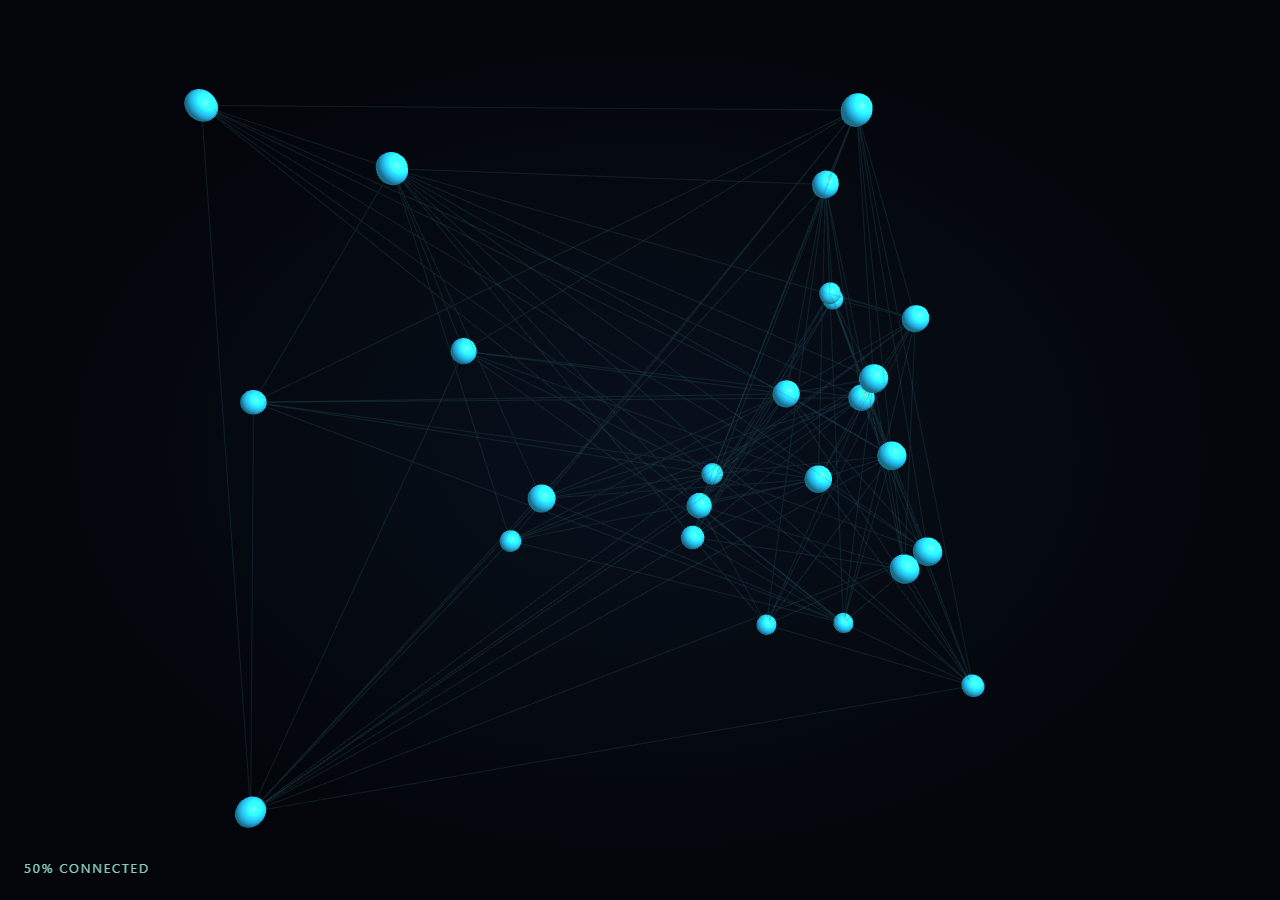
The Three.js Scroll Neural Network Pulse snippet represents a small neural network as instanced node spheres, a single LineSegments web of connections, and a pool of traveling pulse markers. As the visitor scrolls through a pinned stage, scattered nodes assemble into clean layers, their connections fade in, and once mostly formed, glowing pulses begin flowing from the input layer toward the output layer.
Nodes as data, not as individually authored meshes
Every node is a plain JS object carrying a scatter position (its chaotic starting point), a target position (its slot in a layered grid derived from LAYER_SIZES and LAYER_X), and a live position updated every frame. All nodes share one THREE.InstancedMesh, so however many layers or nodes-per-layer the network has, node rendering stays a single draw call — the same instancing discipline used for backbone spheres in DNA helix unwind, applied here to a graph layout instead of a helix.
Fully connected layers via precomputed index pairs
Connections are generated once at startup: every node in layer L is paired with every node in layer L+1, and each pair is stored as a two-element index array into the flat nodes list. This produces a classic fully-connected feed-forward topology without hardcoding any specific node count. All links share one THREE.BufferGeometry rendered via THREE.LineSegments, with endpoint positions rewritten into a flat Float32Array every frame by reading each linked node's live position — meaning the connections automatically track the nodes as they assemble, with zero extra bookkeeping.
Assembly driven by one lerp per node
Each node's live position is simply lerp(scatter, target, eased), where eased is the smoothstepped scroll progress. Because both endpoints are fixed and precomputed, scrolling back up drives every node — and by extension every connection line reading from those nodes — back toward its scattered starting position in perfect reverse, with no separate "disassemble" logic required.
Pulses as a reused object pool, gated by progress
Forty pulse markers share their own THREE.InstancedMesh and are never created or destroyed at runtime. Each pulse tracks which link it is traveling along and a 0-1 progress value that increments every frame and wraps to a newly chosen random link when it reaches 1. Pulses only render at meaningful scale once eased passes roughly 0.55, remapped into a 0-1 pulseVisible value — so pulses fade in only after the network has mostly assembled, reinforcing the sense that signals can't flow through a network that hasn't finished wiring itself yet.
Line opacity as a second progress-driven channel
On top of positions, the connecting lines' opacity itself ramps from a faint 0.06 to a much more visible 0.4 as eased increases, so the web of connections visually strengthens in tandem with the nodes snapping into their layered grid, rather than being either fully invisible or fully opaque at every point in the scroll.
Build with AI
Build, Understand, Optimize, and Extend It With AI
You do not need to reverse-engineer how a scattered point cloud assembles into a wired, pulsing neural network diagram. Paste this snippet's HTML, CSS, and JS into an AI assistant like Claude and ask it to explain how the fully-connected index-pair generation works, or why pulses use a fixed-size reused object pool instead of dynamic allocation. The same assistant can help you extend it — ask it to color-code pulses by which layer transition they're crossing, add a subtle activation "glow" on each node when a pulse arrives, or vary link opacity by simulated connection weight. Treat the code as a conversation starter, not a finished artifact.
Prompt to recreate it
Copy this into your AI assistant of choice to build the effect from scratch, or as a jumping-off point for your own variant:
Build a "scroll-scrubbed neural network assembly and signal pulse" effect in plain HTML, CSS, and JavaScript using Three.js, GSAP, and GSAP's ScrollTrigger plugin, all loaded from a CDN (no bundler, no build step).

Requirements:
- A pinned section containing a full-size canvas, with a WebGLRenderer and PerspectiveCamera sized to the canvas element (not window.innerWidth/innerHeight) and updated on window resize including aspect ratio.
- Define a network topology as an array of layer sizes (e.g. [5, 8, 8, 4]) and assign each node a target position in a layered grid (x by layer index, y spread evenly within the layer) plus a random scattered starting position.
- Render all nodes through a single THREE.InstancedMesh regardless of node count, using a reused dummy Object3D and setMatrixAt to write each instance's live transform every frame.
- Generate a fully-connected set of links once at startup by pairing every node in each layer with every node in the next layer, stored as index pairs into the flat node list.
- Render all connections through one THREE.LineSegments backed by a single BufferGeometry, rewriting its position attribute every frame by reading each link's two endpoint nodes' current live positions.
- Register a GSAP tween on a ScrollTrigger targeting the pinned section, with pin: true, start at top top, a numeric scrub, and a multi-hundred-percent end, animating a single plain progress value from 0 to 1 with linear easing.
- Every animation frame, apply smoothstep easing to the scrubbed progress, lerp every node's live position between its scattered and target position by that eased value, and ramp the connection line material's opacity with the same eased value.
- Implement a fixed-size pool (e.g. 40) of pulse markers, also rendered via one InstancedMesh, each tracking a current link and a 0-1 travel progress that increments every frame and reassigns to a new random link when it completes a traversal; remap the eased scroll progress above some threshold into a visibility factor that scales pulse instances toward zero until the network is mostly assembled.
- Confirm scrolling back up reverses the entire effect smoothly: pulses fade out, connection opacity drops, and nodes scatter back toward their random starting positions, since every visual property is a direct function of the shared progress value with no accumulated state.
Want to tighten it up first? Run this prompt through the AI Prompt Studio to score it across 8 quality dimensions, catch anti-patterns, and tune the wording for Claude, ChatGPT, or Gemini before you paste it in.
Source Code
<section class="nnp-stage" id="nnpStage">
  <div class="nnp-intro-overlay"><p>Scroll ↓ to assemble the network and fire signal pulses</p></div>
  <canvas id="nnpCanvas"></canvas>
  <div class="nnp-hud"><span id="nnpPct">0</span>% connected</div>
</section>
<section class="nnp-bottom"><p>A fully wired network, pulsing signals layer to layer.</p></section>*{box-sizing:border-box;margin:0;padding:0}
html,body{background:#03050a;color:#fff;font-family:system-ui,-apple-system,sans-serif}
.nnp-bottom{min-height:70vh;display:flex;justify-content:center;align-items:center;color:#7fd4e0;font-size:15px;letter-spacing:.08em;text-transform:uppercase;text-align:center;padding:0 24px}
.nnp-stage{height:100vh;position:relative;overflow:hidden;background:radial-gradient(ellipse at center,#08101c 0%,#03050a 70%)}
.nnp-intro-overlay{position:absolute;inset:0;display:flex;align-items:center;justify-content:center;text-align:center;padding:24px;pointer-events:none;z-index:5;color:#7fd4e0;font-size:15px;letter-spacing:.08em;text-transform:uppercase;transition:opacity .4s ease;}
#nnpCanvas{display:block;width:100%;height:100%}
.nnp-hud{position:absolute;left:24px;bottom:24px;font-variant-numeric:tabular-nums;font-size:13px;letter-spacing:.14em;color:#9ff0e0;text-transform:uppercase;opacity:.85}const canvas = document.getElementById('nnpCanvas');
const pctEl = document.getElementById('nnpPct');
const renderer = new THREE.WebGLRenderer({ canvas, antialias: true, alpha: true });
renderer.setPixelRatio(Math.min(window.devicePixelRatio, 2));
const scene = new THREE.Scene();
const camera = new THREE.PerspectiveCamera(52, 1, 0.1, 200);
camera.position.set(0, 2, 24);
camera.lookAt(0, 0, 0);
scene.add(new THREE.AmbientLight(0x224455, 1.2));
const key = new THREE.PointLight(0x5ee6ff, 1.4, 100);
key.position.set(10, 10, 18);
scene.add(key);
// Layered layout: LAYER_SIZES defines how many nodes sit in each layer. Nodes
// start at scattered random positions and assemble into a neat layered grid.
const LAYER_SIZES = [5, 8, 8, 4];
const LAYER_X = [-9, -3, 3, 9];
const nodes = [];
LAYER_SIZES.forEach((size, li) => {
for (let i = 0; i < size; i++) {
const target = new THREE.Vector3(LAYER_X[li], (i - (size - 1) / 2) * 2.1, 0);
const scatter = new THREE.Vector3(
(Math.random() - 0.5) * 30,
(Math.random() - 0.5) * 20,
(Math.random() - 0.5) * 20
);
nodes.push({ layer: li, indexInLayer: i, target, scatter, live: scatter.clone() });
}
});
const nodeGeo = new THREE.SphereGeometry(0.32, 14, 14);
const nodeMat = new THREE.MeshStandardMaterial({ color: 0x5ee6ff, emissive: 0x0d3a44, roughness: 0.4, metalness: 0.3 });
const nodeMesh = new THREE.InstancedMesh(nodeGeo, nodeMat, nodes.length);
scene.add(nodeMesh);
const dummy = new THREE.Object3D();
// Connections: every node in layer L links to every node in layer L+1. Stored
// as index pairs; live endpoints are read from nodes[].live each frame into a
// single LineSegments BufferGeometry so the whole web is one draw call.
const links = [];
let offset = 0;
for (let li = 0; li < LAYER_SIZES.length - 1; li++) {
const a0 = offset, aCount = LAYER_SIZES[li];
const b0 = offset + aCount, bCount = LAYER_SIZES[li + 1];
for (let i = 0; i < aCount; i++) {
for (let j = 0; j < bCount; j++) links.push([a0 + i, b0 + j]);
}
offset += aCount;
}
const linePositions = new Float32Array(links.length * 2 * 3);
const lineGeo = new THREE.BufferGeometry();
lineGeo.setAttribute('position', new THREE.BufferAttribute(linePositions, 3));
const lineMat = new THREE.LineBasicMaterial({ color: 0x2f6f7a, transparent: true, opacity: 0.35 });
const lineSegments = new THREE.LineSegments(lineGeo, lineMat);
scene.add(lineSegments);
// Pulses: small glowing points traveling along a subset of links once the
// network is mostly formed. Reused pool, no per-frame allocation.
const PULSE_COUNT = 40;
const pulseGeo = new THREE.SphereGeometry(0.12, 6, 6);
const pulseMat = new THREE.MeshBasicMaterial({ color: 0xbafff0 });
const pulseMesh = new THREE.InstancedMesh(pulseGeo, pulseMat, PULSE_COUNT);
scene.add(pulseMesh);
const pulses = [];
for (let i = 0; i < PULSE_COUNT; i++) {
pulses.push({ link: links[Math.floor(Math.random() * links.length)], progress: Math.random(), speed: 0.4 + Math.random() * 0.5 });
}
const introEl = document.querySelector('.nnp-intro-overlay');
gsap.registerPlugin(ScrollTrigger);
const form = { t: 0 };
gsap.to(form, {
t: 1,
ease: 'none',
scrollTrigger: {
trigger: '#nnpStage',
start: 'top top',
end: '+=450%',
scrub: 0.6,
pin: true,
},
});
function resize() {
const w = canvas.clientWidth, h = canvas.clientHeight;
renderer.setSize(w, h, false);
camera.aspect = w / h;
camera.updateProjectionMatrix();
}
const pA = new THREE.Vector3(), pB = new THREE.Vector3();
function animate() {
requestAnimationFrame(animate);
if (introEl) introEl.style.opacity = (form.t > 0.03) ? '0' : '1';
const t = form.t;
const eased = t * t * (3 - 2 * t);
for (let i = 0; i < nodes.length; i++) {
const n = nodes[i];
n.live.copy(n.scatter).lerp(n.target, eased);
dummy.position.copy(n.live);
dummy.scale.setScalar(0.7 + eased * 0.4);
dummy.updateMatrix();
nodeMesh.setMatrixAt(i, dummy.matrix);
}
nodeMesh.instanceMatrix.needsUpdate = true;
const posArr = lineGeo.getAttribute('position').array;
for (let i = 0; i < links.length; i++) {
const [ai, bi] = links[i];
const la = nodes[ai].live, lb = nodes[bi].live;
const ix = i * 6;
posArr[ix] = la.x; posArr[ix + 1] = la.y; posArr[ix + 2] = la.z;
posArr[ix + 3] = lb.x; posArr[ix + 4] = lb.y; posArr[ix + 5] = lb.z;
}
lineGeo.getAttribute('position').needsUpdate = true;
lineMat.opacity = 0.06 + eased * 0.34;
// Pulses only travel visibly once the network is mostly assembled; their
// opacity/scale is gated by eased so they fade in rather than popping.
const pulseVisible = Math.max(0, (eased - 0.55) / 0.45);
for (let i = 0; i < PULSE_COUNT; i++) {
const p = pulses[i];
p.progress += 0.006 * p.speed;
if (p.progress > 1) {
p.progress = 0;
p.link = links[Math.floor(Math.random() * links.length)];
}
const la = nodes[p.link[0]].live, lb = nodes[p.link[1]].live;
pA.copy(la).lerp(lb, p.progress);
dummy.position.copy(pA);
dummy.scale.setScalar(pulseVisible > 0.02 ? 1 : 0.0001);
dummy.updateMatrix();
pulseMesh.setMatrixAt(i, dummy.matrix);
}
pulseMesh.instanceMatrix.needsUpdate = true;
const camDist = 24 - eased * 5;
camera.position.set(0, 2 - eased, camDist);
camera.lookAt(0, 0, 0);
pctEl.textContent = Math.round(eased * 100);
renderer.render(scene, camera);
}
resize();
window.addEventListener('resize', resize);
animate();Step by step
How to Use
- 1Load all three CDN scriptsAdd three.min.js, gsap.min.js, and ScrollTrigger.min.js from the CDN panel, in that order.
- 2Paste HTML, CSS, and JSA scattered cloud of nodes appears inside a pinned 3D stage with a live "% connected" read-out.
- 3Scroll downNodes assemble into layered columns, faint connections strengthen, and glowing pulses begin flowing once mostly formed.
- 4Scroll back upPulses fade, connections dim, and nodes scatter back to their random starting positions exactly in reverse.
- 5Retune the topologyEdit LAYER_SIZES to add or remove layers and nodes per layer; connections regenerate automatically to stay fully connected.
- 6Adjust the pacingChange the ScrollTrigger end value (+=450%) or the 0.55 pulse-visibility threshold to retime the reveal.
Real-world uses
Common Use Cases
Got questions?
Frequently Asked Questions
Links are stored as index pairs into the flat nodes array, never as fixed positions. Every frame, the LineSegments position buffer is rewritten by reading each linked node's current live position, so connections always track wherever their endpoint nodes currently are, whether scattered, mid-assembly, or fully formed.
Creating and destroying objects (and their geometries or mesh entries) every frame causes garbage collection pauses and complicates InstancedMesh bookkeeping. Instead, all 40 pulses exist for the lifetime of the scene; each simply gets reassigned to a new random link and resets its progress to 0 whenever it finishes traveling the current one, so the total instance count never changes.
Signals traveling through an unformed, scattered network would look like errant noise rather than a legible pulse effect. Remapping eased progress above a threshold into a 0-1 pulseVisible value (and scaling pulse instances toward zero below it) means pulses only become visually meaningful once the layered structure has mostly assembled, matching the metaphor of "signal flowing through a wired network."
Yes. Node positions are a pure lerp between two fixed, precomputed points driven by one progress value, connection lines are derived from those same live node positions every frame, and pulse visibility and line opacity are both direct functions of the same progress value. Scrolling up drives progress back toward zero and every visual layer unwinds in step, with no separate reverse-animation code needed.
Yes. Click JSX for a React component, Vue for a Vue 3 SFC, Angular for a standalone component, or Tailwind for a React + Tailwind version. Build the node/link data, InstancedMesh and LineSegments objects, and GSAP ScrollTrigger inside a mount effect keyed to a canvas ref, and on unmount kill the ScrollTrigger instance, dispose geometries/materials, and call renderer.dispose().