
Learn Coding Visually
Learn to code with interactive, live-preview playgrounds — HTML, CSS, JavaScript, React & more.
 HTML Playground42 lessons · Click-based · Live preview
 CSS PlaygroundLearn CSS with a live editor
 JavaScript Playground60 lessons · DOM · Async · Canvas
 React PlaygroundLearn React with a live code editor
 GSAP PlaygroundLearn GSAP animation interactively
 SVG Playground44 lessons · shapes · paths · animation
 SCSS Playground45 lessons · Sass modules · tokens
 Tailwind PlaygroundLearn Tailwind CSS with a live editor
 Bootstrap 5 Playground50 lessons · live preview
Three.js Scroll Coral Reef Grow — Procedural Branching Effect
Three.js Scroll Coral Reef Grow · Scroll · Plain HTML, CSS & JS · Live preview
What's included
Features
About this UI Snippet
How to Build a Scroll-Driven Procedural Coral Reef With Three.js
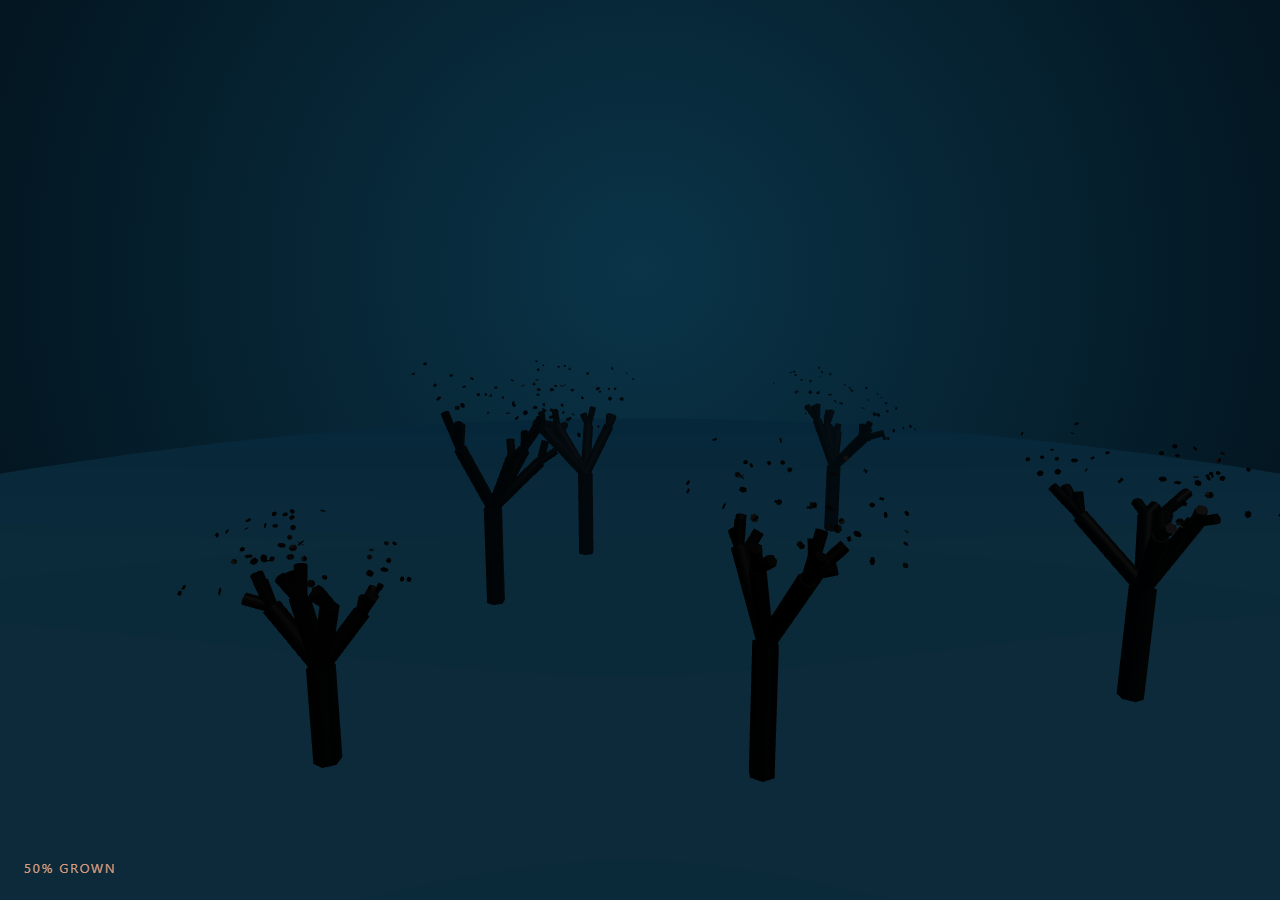
The Three.js Scroll Coral Reef Grow snippet recursively generates a branching coral skeleton once, packs every branch segment into a single THREE.InstancedMesh, and reveals it generation by generation as the visitor scrolls through a pinned stage — going from an empty seabed to a dense reef with one GPU-friendly draw call.
A recursive L-system, computed once
A small recursive grow() function starts from six seed points scattered around a seabed circle and, at each step, spawns two or three child branches from the parent's tip with a randomized spread angle and a shrinking length and radius — the classic idea behind an L-system, implemented directly as a JavaScript recursion rather than a string-rewriting grammar. Because the whole structure is generated up front into a flat segments array, there is no per-frame branching logic — only interpolation.
One InstancedMesh, hundreds of branches
Every generated segment becomes one instance of a single unit THREE.CylinderGeometry, rendered through THREE.InstancedMesh. Instead of hundreds of individual meshes and draw calls, the GPU renders the entire reef in one pass, similar to the instancing approach used in particle assembly but applied to oriented cylinders instead of points.
Orienting a unit cylinder along an arbitrary branch
Each cylinder's default axis is Y, so to point it along a branch direction the snippet uses THREE.Quaternion().setFromUnitVectors(up, dir) to compute the rotation from world-up to that branch's direction, then scales the Y axis by the branch's current length. A single reused THREE.Object3D dummy computes every instance's matrix, so the render loop allocates nothing new per frame.
Staggered growth by generation depth
Each segment is assigned a growStart/growEnd window derived from its recursion depth plus a little jitter, so root branches begin extending first and outer twigs begin only once their parent generation is already underway — this is what makes the reef read as growing outward rather than fading in all at once. A branch's visible length is simply fullLength * easedProgress, so reversing scroll shrinks it back to nothing exactly in reverse.
Warm coral color against deep-water fog
Instance colors are baked once via InstancedMesh.setColorAt, gradient-lerped from coral pink to warm orange by branch depth, and combined with THREE.Fog in a deep ocean blue so distant branches fade into the water — the same technique used for the pinned camera drift in galaxy formation, here creating atmospheric depth instead of cosmic scale.
A slow camera drift ties the story together
As growth progresses, the camera drifts sideways and rises slightly while looking further up the reef, so the final frame frames a full-grown cluster rather than staying locked on the seabed the whole time.
Build with AI
Build, Understand, Optimize, and Extend It With AI
You do not need to reverse-engineer how a coral reef grows from a recursive branch generator without a physics engine. Paste this snippet's HTML, CSS, and JS into an AI assistant like Claude and ask it to explain why growth windows are staggered by recursion depth, or how setFromUnitVectors orients a unit cylinder along an arbitrary branch direction. The same assistant can help you extend it — ask it to vary branch color by cluster instead of only depth, add small emissive polyps at branch tips using a second InstancedMesh, or introduce gentle sway animation once a branch has finished growing. It can also help optimize further, for instance moving the per-instance matrix computation into a vertex shader so the CPU loop shrinks. Treat the code as a conversation starter, not a finished artifact.
Prompt to recreate it
Copy this into your AI assistant of choice to build the effect from scratch, or as a jumping-off point for your own variant:
Build a "scroll-scrubbed procedural coral reef growth" effect in plain HTML, CSS, and JavaScript using Three.js, GSAP, and GSAP's ScrollTrigger plugin, all loaded from a CDN (no bundler, no build step).

Requirements:
- A pinned section containing a full-size canvas, with a WebGLRenderer and PerspectiveCamera sized to it and updated on window resize including aspect ratio, plus THREE.Fog in a deep ocean blue.
- Write a recursive function that generates a branching coral skeleton as a flat array of straight line segments (from point, to point, radius, recursion depth), starting from several seed points on a seabed plane and spawning 2-3 child branches per node with randomized spread angle and shrinking length/radius until a max depth.
- Render every segment as one instance of a single unit cylinder geometry via THREE.InstancedMesh, so the whole reef renders in one draw call. Use THREE.Quaternion.setFromUnitVectors to orient each instance's cylinder along its branch direction, and scale it to the branch's current visible length.
- Assign each segment a growStart/growEnd progress window derived from its recursion depth (plus small random jitter) so branches nearer the seabed finish growing before deeper child branches begin.
- Bake a coral-pink-to-orange color gradient per instance via InstancedMesh.setColorAt, driven by branch depth.
- Register a GSAP tween on a ScrollTrigger targeting the pinned section, with pin: true, start at top top, a numeric scrub, and a multi-hundred-percent end, animating a single plain progress value from 0 to 1 with linear easing.
- Every animation frame, recompute each instance's matrix from its current eased visible length using a single reused Object3D "dummy" object (no per-frame allocation), and set instanceMatrix.needsUpdate to true.
- Slowly drift the camera sideways and upward as growth progresses so the final frame frames a full-grown coral cluster.
- Confirm scrolling back up shrinks every branch back toward its seabed root exactly in reverse.
Want to tighten it up first? Run this prompt through the AI Prompt Studio to score it across 8 quality dimensions, catch anti-patterns, and tune the wording for Claude, ChatGPT, or Gemini before you paste it in.
Source Code
<section class="crf-stage" id="crfStage">
  <div class="crf-intro-overlay"><p>Scroll ↓ to grow a coral reef from a barren seabed</p></div>
  <canvas id="crfCanvas"></canvas>
  <div class="crf-hud"><span id="crfPct">0</span>% grown</div>
</section>
<section class="crf-bottom"><p>A dense coral reef, fully branched.</p></section>*{box-sizing:border-box;margin:0;padding:0}
html,body{background:#031621;color:#fff;font-family:system-ui,-apple-system,sans-serif}
.crf-bottom{min-height:70vh;display:flex;justify-content:center;align-items:center;color:#5c93a8;font-size:15px;letter-spacing:.08em;text-transform:uppercase;text-align:center;padding:0 24px}
.crf-stage{height:100vh;position:relative;overflow:hidden;background:radial-gradient(ellipse at 50% 30%,#0a3448 0%,#031621 75%)}
.crf-intro-overlay{position:absolute;inset:0;display:flex;align-items:center;justify-content:center;text-align:center;padding:24px;pointer-events:none;z-index:5;color:#7fc4d8;font-size:15px;letter-spacing:.08em;text-transform:uppercase;transition:opacity .4s ease;}
#crfCanvas{display:block;width:100%;height:100%}
.crf-hud{position:absolute;left:24px;bottom:24px;font-variant-numeric:tabular-nums;font-size:13px;letter-spacing:.14em;color:#ffb08a;text-transform:uppercase;opacity:.85}const canvas = document.getElementById('crfCanvas');
const pctEl = document.getElementById('crfPct');
const renderer = new THREE.WebGLRenderer({ canvas, antialias: true, alpha: true });
renderer.setPixelRatio(Math.min(window.devicePixelRatio, 2));
const scene = new THREE.Scene();
scene.fog = new THREE.Fog(0x04263a, 10, 62);
const camera = new THREE.PerspectiveCamera(55, 1, 0.1, 200);
camera.position.set(0, 9, 22);
camera.lookAt(0, 3, 0);
scene.add(new THREE.AmbientLight(0x88aabb, 0.7));
const key = new THREE.DirectionalLight(0xfff0e0, 0.9);
key.position.set(6, 14, 8);
scene.add(key);
// Seabed: a simple dark plane the reef grows out of.
const seabed = new THREE.Mesh(
new THREE.CircleGeometry(30, 48),
new THREE.MeshStandardMaterial({ color: 0x08222f, roughness: 1 })
);
seabed.rotation.x = -Math.PI / 2;
scene.add(seabed);
// --- Procedural branch generation (L-system style) ---------------------
// Each branch is a straight segment from "from" to "to". Children spawn at
// the tip of a parent with a randomized spread angle and shrinking
// length/radius, recursively, until maxDepth. Every segment also carries an
// "order" (its index in generation sequence) used later to stagger growth.
const segments = [];
function grow(from, dir, length, radius, depth, maxDepth) {
const to = from.clone().addScaledVector(dir, length);
segments.push({ from, to, radius, depth });
if (depth >= maxDepth) return;
const children = depth === 0 ? 5 : (Math.random() < 0.7 ? 2 : 3);
for (let c = 0; c < children; c++) {
const spread = 0.45 + Math.random() * 0.55;
const axis = new THREE.Vector3(Math.random() - 0.5, Math.random() * 0.4, Math.random() - 0.5).normalize();
const newDir = dir.clone().applyAxisAngle(axis, spread * (Math.random() < 0.5 ? 1 : -1)).normalize();
newDir.y = Math.max(newDir.y, 0.15); // bias upward growth
newDir.normalize();
grow(to.clone(), newDir, length * (0.62 + Math.random() * 0.14), radius * 0.66, depth + 1, maxDepth);
}
}
const CLUSTERS = 6;
for (let k = 0; k < CLUSTERS; k++) {
const angle = (k / CLUSTERS) * Math.PI * 2 + Math.random() * 0.4;
const r = 3 + Math.random() * 9;
const base = new THREE.Vector3(Math.cos(angle) * r, 0, Math.sin(angle) * r);
grow(base, new THREE.Vector3(0, 1, 0), 1.6 + Math.random() * 0.8, 0.22, 0, 4);
}
const COUNT = segments.length;
const geo = new THREE.CylinderGeometry(1, 1, 1, 6, 1);
const material = new THREE.MeshStandardMaterial({ vertexColors: true, roughness: 0.55, metalness: 0.05 });
const mesh = new THREE.InstancedMesh(geo, material, COUNT);
mesh.instanceMatrix.setUsage(THREE.DynamicDrawUsage);
scene.add(mesh);
// Growth staggering: deeper / later segments start growing later so the
// reef visibly branches outward generation by generation rather than
// popping in all at once.
const growStart = new Float32Array(COUNT);
const growEnd = new Float32Array(COUNT);
const coralA = new THREE.Color(0xff6f61); // coral pink
const coralB = new THREE.Color(0xff9c4a); // warm orange
for (let i = 0; i < COUNT; i++) {
const s = segments[i];
const base = s.depth / 5;
growStart[i] = Math.max(0, base - 0.06 + Math.random() * 0.05);
growEnd[i] = Math.min(1, growStart[i] + 0.22 + Math.random() * 0.12);
const c = coralA.clone().lerp(coralB, s.depth / 4);
mesh.setColorAt(i, c);
}
mesh.instanceColor.needsUpdate = true;
const dummy = new THREE.Object3D();
const up = new THREE.Vector3(0, 1, 0);
const dirV = new THREE.Vector3();
const mid = new THREE.Vector3();
function updateGrowth(t) {
for (let i = 0; i < COUNT; i++) {
const s = segments[i];
const g = Math.min(1, Math.max(0, (t - growStart[i]) / (growEnd[i] - growStart[i])));
const eased = g * g * (3 - 2 * g);
const len = s.from.distanceTo(s.to) * eased;
dirV.subVectors(s.to, s.from).normalize();
mid.copy(s.from).addScaledVector(dirV, len / 2);
dummy.position.copy(mid);
dummy.quaternion.setFromUnitVectors(up, dirV);
const rad = Math.max(0.0001, s.radius);
dummy.scale.set(rad, Math.max(0.0001, len), rad);
dummy.updateMatrix();
mesh.setMatrixAt(i, dummy.matrix);
}
mesh.instanceMatrix.needsUpdate = true;
}
const introEl = document.querySelector('.crf-intro-overlay');
gsap.registerPlugin(ScrollTrigger);
const form = { t: 0 };
gsap.to(form, {
t: 1,
ease: 'none',
scrollTrigger: {
trigger: '#crfStage',
start: 'top top',
end: '+=420%',
scrub: 0.6,
pin: true,
},
});
function resize() {
const w = canvas.clientWidth, h = canvas.clientHeight;
renderer.setSize(w, h, false);
camera.aspect = w / h;
camera.updateProjectionMatrix();
}
function animate() {
requestAnimationFrame(animate);
if (introEl) introEl.style.opacity = (form.t > 0.03) ? '0' : '1';
updateGrowth(form.t);
camera.position.set(Math.sin(form.t * 0.6) * 4, 9 - form.t * 3, 22 - form.t * 8);
camera.lookAt(0, 3 + form.t * 2, 0);
pctEl.textContent = Math.round(form.t * 100);
renderer.render(scene, camera);
}
resize();
window.addEventListener('resize', resize);
animate();Step by step
How to Use
- 1Load all three CDN scriptsAdd three.min.js, gsap.min.js, and ScrollTrigger.min.js from the CDN panel, in that order.
- 2Paste HTML, CSS, and JSA bare seabed appears inside a pinned 3D stage with a live "% grown" read-out.
- 3Scroll downSix coral clusters recursively branch outward generation by generation until the reef is fully grown.
- 4Scroll back upEvery branch shrinks back toward its parent tip exactly in reverse, since length is a direct function of eased progress.
- 5Retune the shapeChange CLUSTERS for more or fewer coral colonies, or maxDepth in the grow() call for a sparser or denser branch structure.
- 6Adjust the pacingChange the ScrollTrigger end value (+=420%) for a slower or snappier growth sequence.
Real-world uses
Common Use Cases
Got questions?
Frequently Asked Questions
A recursive grow() function can produce a naturally varied, organic branching structure from just a handful of parameters (spread angle, length decay, max depth), and because it runs once up front rather than every frame, the runtime cost is identical to a hand-authored structure while staying easy to retune.
A coral colony can easily have several hundred branch segments. Individual meshes would mean hundreds of draw calls and matrix updates per frame. InstancedMesh renders all of them from one geometry and one material in a single draw call, which is what keeps the frame rate smooth as CLUSTERS or maxDepth increase.
Every branch segment is assigned a growStart and growEnd value based on its recursion depth plus a little random jitter. Each frame, the branch's visible length is fullLength times the eased progress clamped between those two values — so branches nearer the seabed finish growing before their children even start, purely through arithmetic on a single scrubbed progress value.
Because every branch's current length is a direct, stateless function of the scrubbed progress value (length = fullLength * easedProgress), decreasing progress immediately and correctly shrinks every branch back toward its parent tip — there is no simulation state to reset or replay.
Yes. Click JSX for a React component, Vue for a Vue 3 SFC, Angular for a standalone component, or Tailwind for a React + Tailwind version. Generate the branch segments and build the InstancedMesh inside a mount effect keyed to a canvas ref, and on unmount kill the ScrollTrigger instance, dispose the geometry and material, and call renderer.dispose().