
Learn Coding Visually
Learn to code with interactive, live-preview playgrounds — HTML, CSS, JavaScript, React & more.
 HTML Playground42 lessons · Click-based · Live preview
 CSS PlaygroundLearn CSS with a live editor
 JavaScript Playground60 lessons · DOM · Async · Canvas
 React PlaygroundLearn React with a live code editor
 GSAP PlaygroundLearn GSAP animation interactively
 SVG Playground44 lessons · shapes · paths · animation
 SCSS Playground45 lessons · Sass modules · tokens
 Tailwind PlaygroundLearn Tailwind CSS with a live editor
 Bootstrap 5 Playground50 lessons · live preview
Three.js Scroll Crystal Cave Descent — Flythrough Tunnel Effect
Three.js Scroll Crystal Cave Descent · Scroll · Plain HTML, CSS & JS · Live preview
What's included
Features
About this UI Snippet
How to Build a Scroll-Driven Crystal Cave Flythrough With Three.js
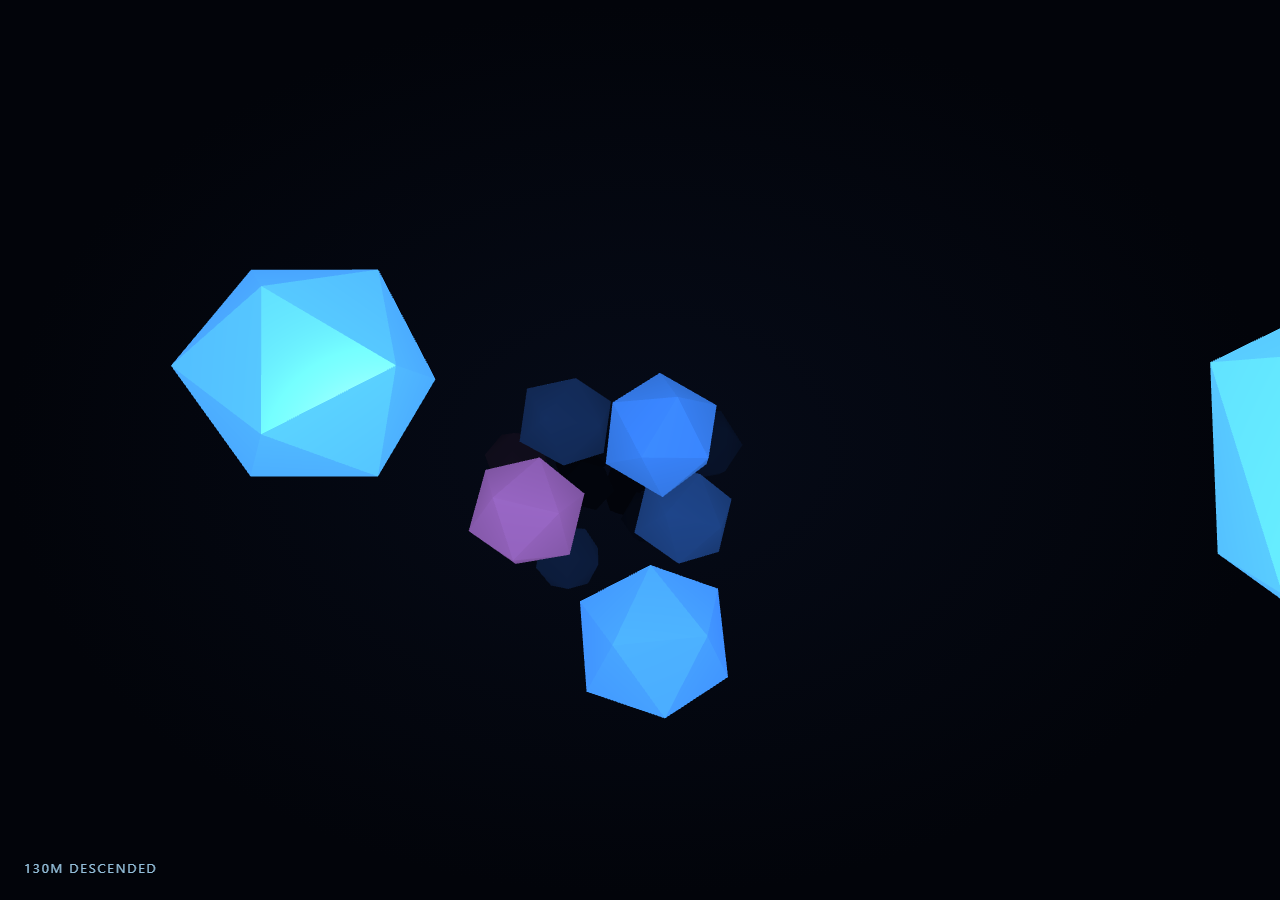
The Three.js Scroll Crystal Cave Descent snippet places dozens of glowing crystal clusters along a winding depth path and drives the camera forward through them as the visitor scrolls through a pinned stage — a first-person "descent" effect built from static geometry and one moving camera, rather than any geometry that itself needs to animate its shape.
Clusters placed once along a winding depth path
Every crystal cluster's position is computed once at startup from a single depth index: z moves linearly deeper, while x/y follow a combination of a rotating ring angle and slow sine/cosine drift, so clusters spiral gently around the camera's forward path instead of sitting in a straight, predictable tunnel. Clusters near the mouth of the cave are small and sparse-feeling (low scale), while clusters deeper in (depthT closer to 1) are scaled up to 2-3x larger, so the cave visibly feels more massive and enclosing the further the camera travels.
The camera retraces the same path formula used to place clusters
Rather than moving the crystal clusters, this snippet moves the camera. Its position each frame is computed from the exact same winding-path formula (sine/cosine offsets keyed to a depth fraction) used when clusters were placed, just evaluated at the camera's current eased depth instead of each cluster's fixed depth. That shared formula is what keeps the flight path threading between the crystal formations rather than drifting into them or feeling disconnected from the cave's geometry.
FogExp2 for depth cueing without extra geometry
THREE.FogExp2 exponentially fades distant geometry into the background fog color, which does two jobs at once: it gives the player an intuitive sense of how far they can see into the dark cave, and it hides the "pop-in" of clusters at the far end of the DEPTH range so the tunnel never appears to have a visible, abrupt end. No extra draw calls or shader work are required — fog is a built-in per-fragment effect applied automatically to every lit material in the scene.
Emissive materials plus a moving headlamp point light
Each cluster uses MeshStandardMaterial with a bright emissive color (so crystals read as glowing even in near-total darkness) layered under a THREE.PointLight that moves with the camera like a headlamp, illuminating nearby crystal faces as the camera passes. Combining self-illumination with a traveling light source keeps the scene readable at every depth without needing dozens of static lights placed throughout the cave.
Reversible because camera position is a pure function of progress
The camera's position and look-at target are both recomputed fully from the current eased value every frame — there is no velocity or accumulated displacement carried between frames. Scrolling back up simply decreases eased, and the camera flies back out along the exact same path it flew in on, in reverse.
Build with AI
Build, Understand, Optimize, and Extend It With AI
You do not need to reverse-engineer how a first-person cave flythrough stays perfectly reversible on scroll. Paste this snippet's HTML, CSS, and JS into an AI assistant like Claude and ask it to explain why the camera reuses the exact same path formula as the cluster placement, or how FogExp2 hides the tunnel's far boundary. The same assistant can help you extend it — ask it to add particle dust motes drifting past the camera, vary crystal cluster shapes by depth for more visual variety, or add a subtle camera shake tied to scroll velocity for a more visceral descent feel. Treat the code as a conversation starter, not a finished artifact.
Prompt to recreate it
Copy this into your AI assistant of choice to build the effect from scratch, or as a jumping-off point for your own variant:
Build a "scroll-scrubbed first-person crystal cave descent" in plain HTML, CSS, and JavaScript using Three.js, GSAP, and GSAP's ScrollTrigger plugin, all loaded from a CDN (no bundler, no build step).

Requirements:
- A pinned section containing a full-size canvas, with a WebGLRenderer and PerspectiveCamera sized to the canvas element (not window.innerWidth/innerHeight) and updated on window resize including aspect ratio.
- Add THREE.FogExp2 to the scene for depth cueing and to hide the tunnel's far boundary.
- Place several dozen crystal cluster meshes (low-poly icosahedra with flatShading and a bright emissive MeshStandardMaterial) once at startup along a winding depth path, where each cluster's x/y position comes from a rotating ring angle plus slow sine/cosine drift keyed to a depth fraction, z moves linearly deeper per cluster, and scale increases with depth so the cave feels larger further in.
- Add a THREE.PointLight that acts as a camera-following headlamp, updated to the camera's position every frame, plus a low ambient light so unlit areas are not pitch black.
- Register a GSAP tween on a ScrollTrigger targeting the pinned section, with pin: true, start at top top, a numeric scrub, and a multi-hundred-percent end, animating a single plain progress value from 0 to 1 with linear easing.
- Every animation frame, apply smoothstep easing to the scrubbed progress to get a depth fraction, then compute the camera's live position using the exact same winding-path formula used to place the clusters (evaluated at the camera's current depth), and set the camera's look-at target slightly further along the same path so it always looks in its direction of travel.
- Add subtle per-cluster ambient motion (slow independent rotation, small scale pulsing) that does not affect the camera path or progress state.
- Confirm scrolling back up reverses the flight exactly, since the camera's position and orientation are both pure functions of the current scroll progress value with no accumulated velocity.
Want to tighten it up first? Run this prompt through the AI Prompt Studio to score it across 8 quality dimensions, catch anti-patterns, and tune the wording for Claude, ChatGPT, or Gemini before you paste it in.
Source Code
<section class="ccd-stage" id="ccdStage">
  <div class="ccd-intro-overlay"><p>Scroll ↓ to descend deeper into the glowing crystal cave</p></div>
  <canvas id="ccdCanvas"></canvas>
  <div class="ccd-hud"><span id="ccdPct">0</span>m descended</div>
</section>
<section class="ccd-bottom"><p>The bottom of the crystal cavern, glowing in every direction.</p></section>*{box-sizing:border-box;margin:0;padding:0}
html,body{background:#02040a;color:#fff;font-family:system-ui,-apple-system,sans-serif}
.ccd-bottom{min-height:70vh;display:flex;justify-content:center;align-items:center;color:#8ab8ff;font-size:15px;letter-spacing:.08em;text-transform:uppercase;text-align:center;padding:0 24px}
.ccd-stage{height:100vh;position:relative;overflow:hidden;background:radial-gradient(ellipse at center,#060b18 0%,#02040a 70%)}
.ccd-intro-overlay{position:absolute;inset:0;display:flex;align-items:center;justify-content:center;text-align:center;padding:24px;pointer-events:none;z-index:5;color:#8ab8ff;font-size:15px;letter-spacing:.08em;text-transform:uppercase;transition:opacity .4s ease;}
#ccdCanvas{display:block;width:100%;height:100%}
.ccd-hud{position:absolute;left:24px;bottom:24px;font-variant-numeric:tabular-nums;font-size:13px;letter-spacing:.14em;color:#aee0ff;text-transform:uppercase;opacity:.85}const canvas = document.getElementById('ccdCanvas');
const pctEl = document.getElementById('ccdPct');
const renderer = new THREE.WebGLRenderer({ canvas, antialias: true, alpha: true });
renderer.setPixelRatio(Math.min(window.devicePixelRatio, 2));
const scene = new THREE.Scene();
scene.fog = new THREE.FogExp2(0x02040a, 0.028);
const camera = new THREE.PerspectiveCamera(62, 1, 0.1, 300);
camera.position.set(0, 0, 0);
scene.add(new THREE.AmbientLight(0x1a2a4a, 0.7));
const headlamp = new THREE.PointLight(0xbfe0ff, 1.4, 40);
scene.add(headlamp);
// Crystal clusters are placed along a slightly winding path (z depth with a
// gentle sine offset in x/y) so the tunnel feels hand-carved rather than a
// straight pipe. Clusters grow larger and denser the deeper they sit.
const CLUSTER_COUNT = 42;
const DEPTH = 260;
const clusterGeo = new THREE.IcosahedronGeometry(1, 0);
const hueDeep = new THREE.Color(0x2255ff);
const hueShallow = new THREE.Color(0x66d9ff);
const hueAccent = new THREE.Color(0xd88bff);
const clusters = [];
for (let i = 0; i < CLUSTER_COUNT; i++) {
const depthT = i / (CLUSTER_COUNT - 1);
const z = -depthT * DEPTH;
const ringAngle = (i * 2.4) % (Math.PI * 2);
const ringRadius = 6 + Math.sin(i * 0.7) * 2.5;
const x = Math.cos(ringAngle) * ringRadius + Math.sin(depthT * 6) * 3;
const y = Math.sin(ringAngle) * ringRadius * 0.7 + Math.cos(depthT * 5) * 2;
const scale = 0.6 + depthT * 2.6 + Math.random() * 0.8;
const color = new THREE.Color();
if (i % 5 === 0) color.copy(hueAccent);
else color.copy(hueShallow).lerp(hueDeep, depthT);
const mat = new THREE.MeshStandardMaterial({
color: color.clone().multiplyScalar(0.5),
emissive: color,
emissiveIntensity: 0.9 + depthT * 0.6,
roughness: 0.35,
metalness: 0.1,
flatShading: true,
});
const mesh = new THREE.Mesh(clusterGeo, mat);
mesh.position.set(x, y, z);
mesh.scale.setScalar(scale);
mesh.rotation.set(Math.random() * Math.PI, Math.random() * Math.PI, Math.random() * Math.PI);
scene.add(mesh);
clusters.push({ mesh, depthT, baseScale: scale });
}
const introEl = document.querySelector('.ccd-intro-overlay');
gsap.registerPlugin(ScrollTrigger);
const form = { t: 0 };
gsap.to(form, {
t: 1,
ease: 'none',
scrollTrigger: {
trigger: '#ccdStage',
start: 'top top',
end: '+=500%',
scrub: 0.7,
pin: true,
},
});
function resize() {
const w = canvas.clientWidth, h = canvas.clientHeight;
renderer.setSize(w, h, false);
camera.aspect = w / h;
camera.updateProjectionMatrix();
}
let clock = 0;
function animate() {
requestAnimationFrame(animate);
if (introEl) introEl.style.opacity = (form.t > 0.03) ? '0' : '1';
const t = form.t;
const eased = t * t * (3 - 2 * t);
clock += 0.01;
// Camera flies forward (negative z) along the same winding path used to
// place clusters, so the descent always threads between formations rather
// than clipping through them.
const camZ = -eased * DEPTH;
const camDepthT = eased;
const camX = Math.sin(camDepthT * 6) * 1.4;
const camY = Math.cos(camDepthT * 5) * 1.0;
camera.position.set(camX, camY, camZ + 4);
camera.lookAt(camX * 0.6, camY * 0.6, camZ - 10);
headlamp.position.set(camX, camY, camZ + 2);
for (let i = 0; i < clusters.length; i++) {
const c = clusters[i];
c.mesh.rotation.y += 0.0011 * (1 + c.depthT);
c.mesh.rotation.x += 0.0007;
const pulse = 1 + Math.sin(clock * 1.4 + i) * 0.04;
c.mesh.scale.setScalar(c.baseScale * pulse);
}
pctEl.textContent = Math.round(eased * DEPTH);
renderer.render(scene, camera);
}
resize();
window.addEventListener('resize', resize);
animate();Step by step
How to Use
- 1Load all three CDN scriptsAdd three.min.js, gsap.min.js, and ScrollTrigger.min.js from the CDN panel, in that order.
- 2Paste HTML, CSS, and JSThe mouth of a glowing crystal cave appears inside a pinned 3D stage with a live "meters descended" read-out.
- 3Scroll downThe camera flies forward through increasingly large and dense clusters of glowing crystal formations.
- 4Scroll back upThe camera retraces its exact path back out toward the cave mouth, since its position is a pure function of progress.
- 5Retune the caveChange CLUSTER_COUNT and DEPTH for a longer or shorter descent, or the ring radius/scale formulas for a wider or tighter tunnel.
- 6Adjust the pacingChange the ScrollTrigger end value (+=500%) for a slower, more atmospheric descent or a faster one.
Real-world uses
Common Use Cases
Got questions?
Frequently Asked Questions
Moving dozens of cluster meshes every frame would mean recomputing and rewriting many transforms per frame for no visual benefit, since the effect a viewer perceives — flying deeper into a cave — is identical whether the world moves past a static camera or the camera moves through a static world. Keeping clusters static after their one-time placement and only moving the camera keeps the per-frame cost to updating one camera transform and one light position.
Clusters are placed with sine/cosine offsets keyed to a depth fraction so the tunnel winds gently rather than running straight. If the camera moved on a different, unrelated path, it could drift toward or through cluster geometry as depth increases. Evaluating the identical formula for the camera's live position at its current depth keeps the flight path threading naturally between the crystal formations at every point in the descent.
THREE.FogExp2 fades objects toward the fog color exponentially with distance, giving a natural sense of depth and visibility range in the dark cave, and critically it hides the fact that cluster placement stops at a fixed DEPTH value — without fog, the far end of the tunnel would show a visible, artificial edge where geometry simply stops.
Yes. The camera's position and look-at target are fully recomputed every frame from the current eased scroll progress value, with no velocity or momentum carried between frames. Decreasing progress by scrolling up immediately moves the camera back along the same path formula it used going forward, so the descent reverses exactly.
Yes. Click JSX for a React component, Vue for a Vue 3 SFC, Angular for a standalone component, or Tailwind for a React + Tailwind version. Build the cluster placement, fog, and GSAP ScrollTrigger inside a mount effect keyed to a canvas ref, and on unmount kill the ScrollTrigger instance, dispose geometries/materials, and call renderer.dispose().