
Learn Coding Visually
Learn to code with interactive, live-preview playgrounds — HTML, CSS, JavaScript, React & more.
 HTML Playground42 lessons · Click-based · Live preview
 CSS PlaygroundLearn CSS with a live editor
 JavaScript Playground60 lessons · DOM · Async · Canvas
 React PlaygroundLearn React with a live code editor
 GSAP PlaygroundLearn GSAP animation interactively
 SVG Playground44 lessons · shapes · paths · animation
 SCSS Playground45 lessons · Sass modules · tokens
 Tailwind PlaygroundLearn Tailwind CSS with a live editor
 Bootstrap 5 Playground50 lessons · live preview
Three.js Scroll Circuit Board Trace — Self-Routing PCB Effect
Three.js Scroll Circuit Board Trace · Scroll · Plain HTML, CSS & JS · Live preview
What's included
Features
About this UI Snippet
How to Build a Scroll-Driven Self-Drawing Circuit Board With Three.js
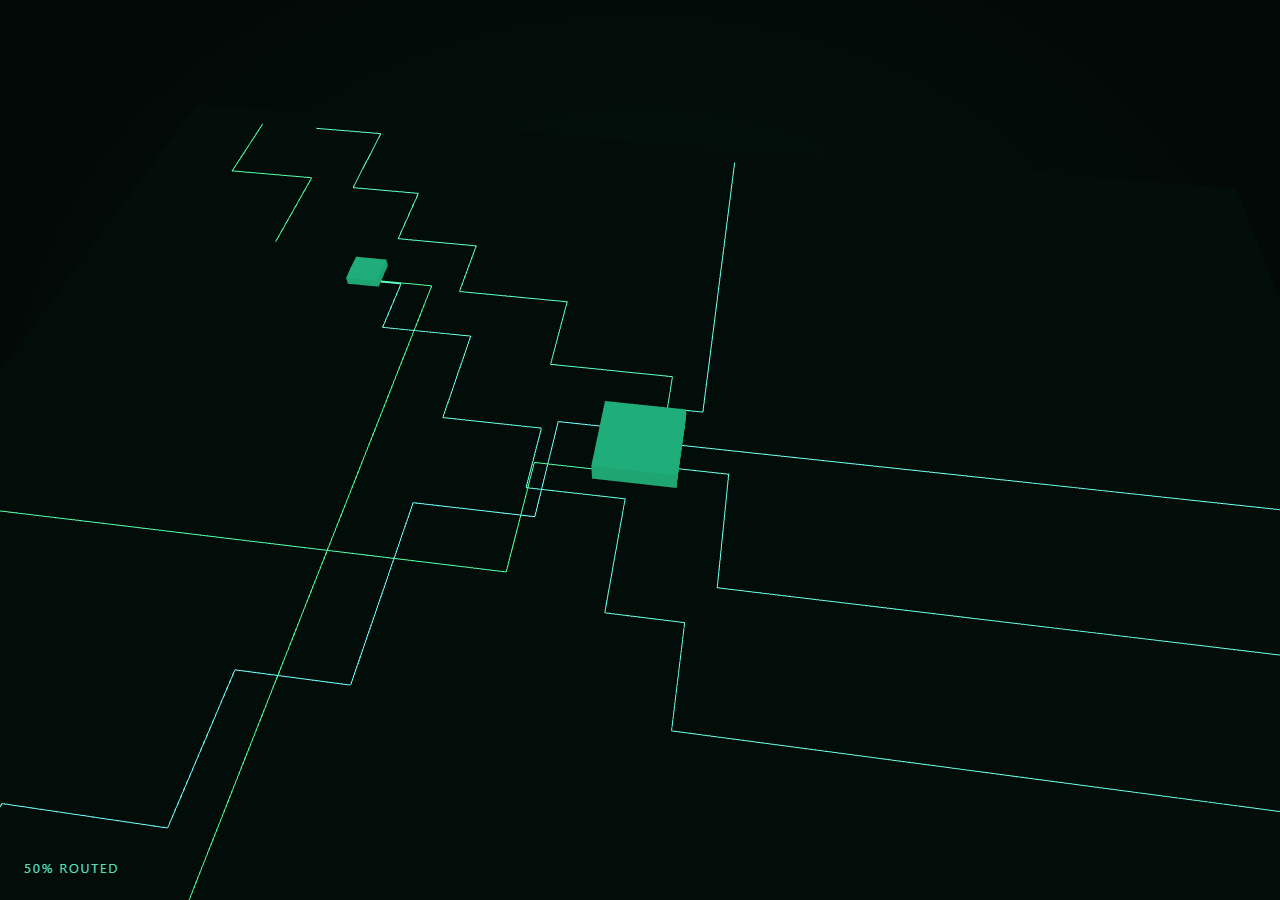
The Three.js Scroll Circuit Board Trace snippet generates a set of Manhattan-routed circuit paths once, then reveals each one segment by segment — like a PCB autorouter working in real time — as the visitor scrolls through a pinned stage, converging on glowing chip boxes.
Manhattan routing without a real autorouter
routeTrace() walks from a random edge point toward a chip target in axis-aligned (horizontal-then-vertical) steps, picking whichever axis has more distance remaining at each step — a simplified stand-in for how a real PCB autorouter lays traces in 90-degree turns rather than diagonals. The result is a point list per trace that already looks like plausible circuit routing, computed once and never touched again.
Drawing a line progressively with drawRange, not tweened geometry
Rather than animating vertex positions, each trace's full point list is uploaded once into a THREE.BufferGeometry, and "drawing" it is simply calling geometry.setDrawRange(0, count) with a growing count — WebGL only renders the first count vertices of the line strip. This is far cheaper than rebuilding geometry per frame and trivially reversible: shrinking count erases the trace from the end backward exactly as it was drawn.
Staggering traces so they route one after another
Every trace is assigned a sequential order at generation time, and its visible fraction is only nonzero within its own slice of the overall scroll range (order / totalTraces to a bit past that). That staggering is what makes the board look like traces are being routed one at a time rather than every trace inching forward simultaneously — the same staggered-reveal idea used by branch growth in coral reef grow, applied here to line segments instead of cylinders.
A cheap glow without a bloom postprocessing pass
Each trace is drawn twice from the same geometry: once as a crisp, fully opaque LineBasicMaterial line, and once as a wider-reading, lower-opacity AdditiveBlending "halo" copy underneath. Because both share the same drawRange-driven geometry, the halo reveals in perfect sync with the trace, faking a neon PCB glow with zero postprocessing setup.
Chip boxes that power on as their traces complete
Each chip's visible scale is the average completion fraction of every trace routed to it, so a chip box grows into place only once its incoming traces have mostly arrived — reinforcing the feeling that the chip is being "powered up" by the circuit connecting to it, rather than appearing on an unrelated timer.
Build with AI
Build, Understand, Optimize, and Extend It With AI
You do not need to reverse-engineer how a circuit board routes itself on scroll without a real autorouter or bloom pass. Paste this snippet's HTML, CSS, and JS into an AI assistant like Claude and ask it to explain why setDrawRange is used instead of animating vertex positions, or how the per-trace order index creates a staggered one-after-another routing sequence. The same assistant can help you extend it — ask it to add via-hole dots at each turn point, make traces pulse briefly after completing, or vary trace width by giving them THREE.TubeGeometry instead of plain lines. It can also help optimize further, for instance batching all traces into one BufferGeometry with per-trace draw ranges via multiple draw calls. Treat the code as a conversation starter, not a finished artifact.
Prompt to recreate it
Copy this into your AI assistant of choice to build the effect from scratch, or as a jumping-off point for your own variant:
Build a "scroll-scrubbed self-routing circuit board" effect in plain HTML, CSS, and JavaScript using Three.js, GSAP, and GSAP's ScrollTrigger plugin, all loaded from a CDN (no bundler, no build step).

Requirements:
- A pinned section containing a full-size canvas, with a WebGLRenderer and PerspectiveCamera sized to it and updated on window resize including aspect ratio, viewing a dark plane representing a PCB.
- Write a function that generates a Manhattan-style (axis-aligned, 90-degree-turn) route as a list of points from a random point on the board's edge to one of a few fixed "chip" target positions, by repeatedly stepping along whichever of the horizontal/vertical axis has more remaining distance to the target.
- Generate roughly 15-20 such traces, each converging on one of 2-3 chip positions, and upload each trace's point list once into its own THREE.BufferGeometry rendered as a THREE.Line, plus a second, wider-reading, additively-blended low-opacity "halo" line sharing the same geometry to fake a neon glow with no postprocessing.
- Assign each trace a sequential order index, and reveal it progressively via geometry.setDrawRange(0, count), where count grows from 0 to the trace's full vertex count only within that trace's own slice of the overall scroll progress range, so traces visibly complete one after another rather than all advancing together.
- Add a small box mesh at each chip position that scales in based on the average completion fraction of its incoming traces, so chips visually power on as their traces arrive.
- Register a GSAP tween on a ScrollTrigger targeting the pinned section, with pin: true, start at top top, a numeric scrub, and a multi-hundred-percent end, animating a single plain progress value from 0 to 1 with linear easing that drives all of the above.
- Confirm scrolling back up erases every trace from its endpoint backward and shrinks the chips back down, exactly in reverse, since drawRange and chip scale are both pure functions of the current scrubbed progress value.
Want to tighten it up first? Run this prompt through the AI Prompt Studio to score it across 8 quality dimensions, catch anti-patterns, and tune the wording for Claude, ChatGPT, or Gemini before you paste it in.
Source Code
<section class="pcb-stage" id="pcbStage">
  <div class="pcb-intro-overlay"><p>Scroll ↓ to route a circuit board trace by trace</p></div>
  <canvas id="pcbCanvas"></canvas>
  <div class="pcb-hud"><span id="pcbPct">0</span>% routed</div>
</section>
<section class="pcb-bottom"><p>Fully routed. All traces reach their chips.</p></section>*{box-sizing:border-box;margin:0;padding:0}
html,body{background:#020806;color:#eafff5;font-family:system-ui,-apple-system,sans-serif}
.pcb-bottom{min-height:70vh;display:flex;justify-content:center;align-items:center;color:#2e9c7a;font-size:15px;letter-spacing:.08em;text-transform:uppercase;text-align:center;padding:0 24px}
.pcb-stage{height:100vh;position:relative;overflow:hidden;background:radial-gradient(ellipse at 50% 45%,#04160f 0%,#020806 75%)}
.pcb-intro-overlay{position:absolute;inset:0;display:flex;align-items:center;justify-content:center;text-align:center;padding:24px;pointer-events:none;z-index:5;color:#5bf7c9;font-size:15px;letter-spacing:.08em;text-transform:uppercase;transition:opacity .4s ease;text-shadow:0 0 12px rgba(91,247,201,.5)}
#pcbCanvas{display:block;width:100%;height:100%}
.pcb-hud{position:absolute;left:24px;bottom:24px;font-variant-numeric:tabular-nums;font-size:13px;letter-spacing:.14em;color:#5bf7c9;text-transform:uppercase;opacity:.9}const canvas = document.getElementById('pcbCanvas');
const pctEl = document.getElementById('pcbPct');
const renderer = new THREE.WebGLRenderer({ canvas, antialias: true, alpha: true });
renderer.setPixelRatio(Math.min(window.devicePixelRatio, 2));
const scene = new THREE.Scene();
const camera = new THREE.PerspectiveCamera(50, 1, 0.1, 200);
camera.position.set(0, 26, 20);
camera.lookAt(0, 0, 0);
// Dark PCB board plane.
const board = new THREE.Mesh(
new THREE.PlaneGeometry(40, 30),
new THREE.MeshStandardMaterial({ color: 0x061511, roughness: 0.9 })
);
board.rotation.x = -Math.PI / 2;
scene.add(board);
scene.add(new THREE.AmbientLight(0x1a3328, 0.9));
const dl = new THREE.DirectionalLight(0x8affe0, 0.4);
dl.position.set(5, 20, 8);
scene.add(dl);
// --- Manhattan-routed trace generator -----------------------------------
// Each trace starts at a random point on the board edge and random-walks in
// axis-aligned (90-degree) steps toward a target "chip" position, like a
// simplified autorouter. The point list is flattened into a line geometry;
// "drawing" the trace is just growing THREE.BufferGeometry drawRange.
const CHIPS = [
new THREE.Vector3(0, 0.05, 0),
new THREE.Vector3(-10, 0.05, -6),
new THREE.Vector3(11, 0.05, 5),
];
const TRACES_PER_CHIP = 6;
function routeTrace(start, target) {
const pts = [start.clone()];
let cur = start.clone();
let guard = 0;
while ((Math.abs(cur.x - target.x) > 0.4 || Math.abs(cur.z - target.z) > 0.4) && guard < 40) {
guard++;
const dx = target.x - cur.x, dz = target.z - cur.z;
const stepLen = Math.min(2 + Math.random() * 2, Math.hypot(dx, dz));
if (Math.abs(dx) > Math.abs(dz)) {
cur = cur.clone(); cur.x += Math.sign(dx) * stepLen;
} else {
cur = cur.clone(); cur.z += Math.sign(dz) * stepLen;
}
pts.push(cur.clone());
}
pts.push(target.clone());
return pts;
}
const traceObjs = [];
let traceOrder = 0;
const totalTraces = CHIPS.length * TRACES_PER_CHIP;
const cyan = new THREE.Color(0x5bf7c9);
const green = new THREE.Color(0x3dff7a);
CHIPS.forEach((chip) => {
for (let i = 0; i < TRACES_PER_CHIP; i++) {
const edge = Math.floor(Math.random() * 4);
let sx, sz;
if (edge === 0) { sx = -18 + Math.random() * 36; sz = -14; }
else if (edge === 1) { sx = -18 + Math.random() * 36; sz = 14; }
else if (edge === 2) { sx = -19; sz = -14 + Math.random() * 28; }
else { sx = 19; sz = -14 + Math.random() * 28; }
const start = new THREE.Vector3(sx, 0.05, sz);
const pts = routeTrace(start, chip);
const positions = new Float32Array(pts.length * 3);
for (let p = 0; p < pts.length; p++) {
positions[p * 3] = pts[p].x;
positions[p * 3 + 1] = pts[p].y;
positions[p * 3 + 2] = pts[p].z;
}
const geo = new THREE.BufferGeometry();
geo.setAttribute('position', new THREE.BufferAttribute(positions, 3));
geo.setDrawRange(0, 0);
const col = cyan.clone().lerp(green, Math.random());
const mat = new THREE.LineBasicMaterial({ color: col, transparent: true, opacity: 0.95 });
const line = new THREE.Line(geo, mat);
scene.add(line);
// A slightly wider, dimmer additive halo copy underneath fakes a glow
// without a postprocessing bloom pass.
const haloMat = new THREE.LineBasicMaterial({ color: col, transparent: true, opacity: 0.35, blending: THREE.AdditiveBlending });
const halo = new THREE.Line(geo, haloMat);
scene.add(halo);
traceObjs.push({ geo, vertCount: pts.length, order: traceOrder++, chip });
}
});
// Chip boxes scale in once their traces have mostly arrived.
const chipMeshes = CHIPS.map((chip) => {
const m = new THREE.Mesh(
new THREE.BoxGeometry(2.4, 0.6, 2.4),
new THREE.MeshStandardMaterial({ color: 0x0c2620, emissive: 0x2effb0, emissiveIntensity: 0.6, roughness: 0.4 })
);
m.position.copy(chip);
m.position.y = 0.3;
m.scale.set(0.001, 0.001, 0.001);
scene.add(m);
return m;
});
const introEl = document.querySelector('.pcb-intro-overlay');
gsap.registerPlugin(ScrollTrigger);
const form = { t: 0 };
gsap.to(form, {
t: 1,
ease: 'none',
scrollTrigger: {
trigger: '#pcbStage',
start: 'top top',
end: '+=420%',
scrub: 0.6,
pin: true,
},
});
function resize() {
const w = canvas.clientWidth, h = canvas.clientHeight;
renderer.setSize(w, h, false);
camera.aspect = w / h;
camera.updateProjectionMatrix();
}
function updateRouting(t) {
for (let i = 0; i < traceObjs.length; i++) {
const tr = traceObjs[i];
const start = tr.order / totalTraces;
const end = start + (1 / totalTraces) * 1.6;
const g = Math.min(1, Math.max(0, (t - start) / (end - start)));
const count = Math.round(g * tr.vertCount);
tr.geo.setDrawRange(0, count);
}
chipMeshes.forEach((m, idx) => {
const chipTraces = traceObjs.filter((tr) => tr.chip === CHIPS[idx]);
const avg = chipTraces.reduce((s, tr) => s + Math.min(1, Math.max(0, (t - tr.order / totalTraces) / ((1 / totalTraces) * 1.6))), 0) / chipTraces.length;
const s = Math.max(0.001, avg);
m.scale.set(s, s, s);
});
}
function animate() {
requestAnimationFrame(animate);
if (introEl) introEl.style.opacity = (form.t > 0.03) ? '0' : '1';
const t = form.t;
updateRouting(t);
camera.position.set(Math.sin(t * 0.8) * 6, 26 - t * 8, 20 - t * 6);
camera.lookAt(0, 0, 0);
pctEl.textContent = Math.round(t * 100);
renderer.render(scene, camera);
}
resize();
window.addEventListener('resize', resize);
animate();Step by step
How to Use
- 1Load all three CDN scriptsAdd three.min.js, gsap.min.js, and ScrollTrigger.min.js from the CDN panel, in that order.
- 2Paste HTML, CSS, and JSA bare dark PCB appears inside a pinned 3D stage with a live "% routed" read-out.
- 3Scroll downEighteen traces route themselves in sequence toward three chip boxes, which power on as their traces arrive.
- 4Scroll back upTraces erase from their endpoint backward and chips power back down, exactly in reverse.
- 5Retune the layoutChange CHIPS for different chip positions, or TRACES_PER_CHIP for a denser or sparser board.
- 6Adjust the pacingChange the ScrollTrigger end value (+=420%) for a slower or faster routing sequence.
Real-world uses
Common Use Cases
Got questions?
Frequently Asked Questions
setDrawRange tells WebGL to render only the first N vertices of an already-uploaded line strip, so "drawing" a trace is a single integer update instead of rewriting a Float32Array every frame. It is both cheaper and trivially reversible — decreasing the count erases the trace from its most recently drawn end.
From a starting point, routeTrace() repeatedly compares the remaining horizontal and vertical distance to the target and steps a random amount along whichever axis has more distance left, appending each turn point to a list. This produces the right-angle, segment-by-segment paths characteristic of real PCB traces without implementing a full autorouter.
Every trace is given a sequential order index when it is generated. Its own visible fraction only becomes nonzero once scroll progress passes order / totalTraces, and reaches full draw a little further on. Because each trace owns a distinct slice of the overall progress range, traces visibly complete in generation order rather than all advancing together.
Each trace is rendered twice from the exact same drawRange-driven geometry: a crisp opaque line plus a lower-opacity, additively blended copy. The additive halo brightens where it overlaps the board and the crisp line beneath it, reading as a soft glow without any extra render passes or full-screen shader.
Yes. Click JSX for a React component, Vue for a Vue 3 SFC, Angular for a standalone component, or Tailwind for a React + Tailwind version. Generate traces and chips inside a mount effect keyed to a canvas ref, and on unmount kill the ScrollTrigger instance, dispose all geometries and materials, and call renderer.dispose().