
Learn Coding Visually
Learn to code with interactive, live-preview playgrounds — HTML, CSS, JavaScript, React & more.
 HTML Playground42 lessons · Click-based · Live preview
 CSS PlaygroundLearn CSS with a live editor
 JavaScript Playground60 lessons · DOM · Async · Canvas
 React PlaygroundLearn React with a live code editor
 GSAP PlaygroundLearn GSAP animation interactively
 SVG Playground44 lessons · shapes · paths · animation
 SCSS Playground45 lessons · Sass modules · tokens
 Tailwind PlaygroundLearn Tailwind CSS with a live editor
 Bootstrap 5 Playground50 lessons · live preview
Three.js Scroll Kaleidoscope Mandala — Radial Instanced Bloom
Three.js Scroll Kaleidoscope Mandala · Scroll · Plain HTML, CSS & JS · Live preview
What's included
Features
About this UI Snippet
How to Build a Scroll-Driven Kaleidoscope Mandala With Three.js
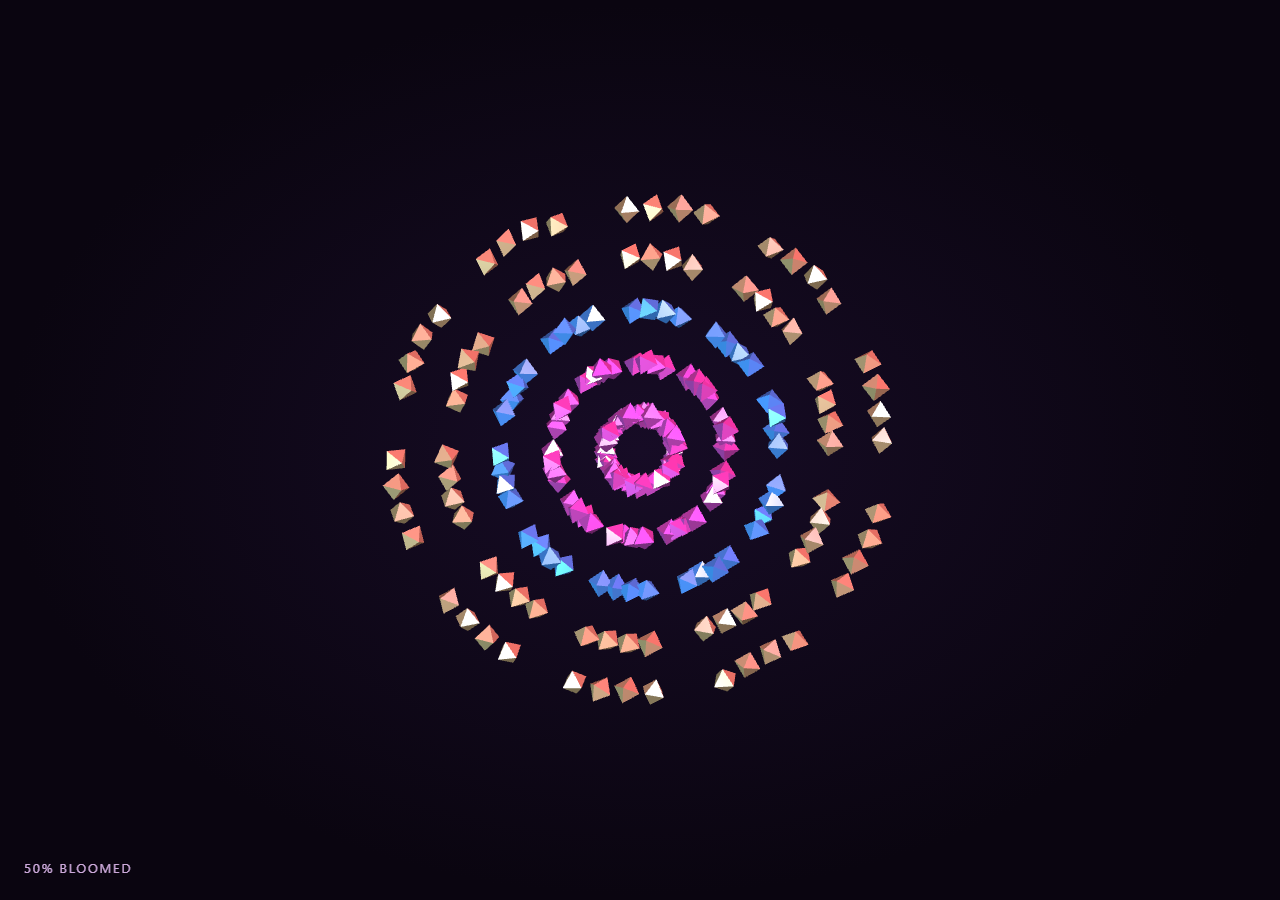
The Three.js Scroll Kaleidoscope Mandala snippet arranges hundreds of small octahedra into repeating radial segments and rings using a handful of THREE.InstancedMesh color tiers. As the visitor scrolls through a pinned stage, every shape blooms outward from a collapsed center point to its assigned polar position, rotating and growing along the way, producing a symmetric mandala pattern built entirely from precomputed polar coordinates.
Radial segments times rings times per-ring shapes
The instance count is the product of three constants: SEGMENTS (the mandala's rotational symmetry, like the mirrors in a kaleidoscope), RINGS (concentric bands from center to edge), and PER_RING (shapes clustered within each segment/ring cell). Looping over all three nested indices once at startup assigns every instance a fixed target angle and target radius — the angle comes from (segment / SEGMENTS) * TAU plus a small per-shape offset, and the radius comes from the ring's normalized position scaled up to the mandala's outer edge. This is the same "precompute polar targets, then animate toward them" approach used for spiral placement in galaxy formation, applied here with rotational symmetry instead of arm-based placement.
Three color-tier InstancedMesh objects instead of per-instance vertex color
All octahedra share one THREE.OctahedronGeometry, but rather than relying on per-instance instanced vertex colors (a feature added to three.js after r128, the version this snippet targets), rings are grouped into three color tiers — inner, mid, and outer — each rendered by its own THREE.InstancedMesh with a distinct solid-color MeshStandardMaterial. That keeps the whole mandala at exactly three draw calls, portable to any three.js build, while still reading as a magenta-to-cyan-to-gold gradient from core to rim.
Bloom driven by one scrubbed progress value
The scrubbed form.t is smoothstepped into eased, which scales each instance's live radius (targetRadius * eased) and scale (0.15 + eased * 0.85), so at eased = 0 every shape sits collapsed and tiny at the origin, and at eased = 1 the full mandala is bloomed to its precomputed radius. Because radius and scale are both pure functions of the same eased value, scrolling back up collapses the mandala smoothly back to a point with no extra bookkeeping.
Layered rotation for a living kaleidoscope feel
On top of the bloom, each instance also spins on its own axis at an individually randomized speed (spinSpeed), the whole mesh slowly rotates as a group, and each instance's angular position additionally drifts with a ring-dependent multiple of that global spin — outer rings rotate faster than inner ones, echoing how real kaleidoscopes show independent motion per mirrored layer. This constant low-amplitude motion runs from an accumulating clock value, but because it never touches eased (only supplies orbital variation), it does not break the reversibility of the bloom itself.
Camera pull-in reinforces the bloom
The camera dollies from z = 26 down toward z = 18 as the mandala blooms, framing the finished pattern tighter than the collapsed starting point — a similar reveal-camera technique to the pull-back used in origami crane unfold, just inverted in direction to suit a symmetric pattern instead of a folding form.
Build with AI
Build, Understand, Optimize, and Extend It With AI
You do not need to reverse-engineer how a radially symmetric mandala blooms from a single point using one draw call. Paste this snippet's HTML, CSS, and JS into an AI assistant like Claude and ask it to explain how the nested SEGMENTS/RINGS/PER_RING loop produces polar coordinates, or why ring-dependent rotation speed makes the pattern feel alive rather than static. The same assistant can help you extend it — ask it to add a second InstancedMesh layer with a different geometry for more visual variety, tie the color gradient to scroll velocity, or add mirrored reflection across a second axis for a more intricate kaleidoscope. Treat the code as a conversation starter, not a finished artifact.
Prompt to recreate it
Copy this into your AI assistant of choice to build the effect from scratch, or as a jumping-off point for your own variant:
Build a "scroll-scrubbed kaleidoscope mandala bloom" in plain HTML, CSS, and JavaScript using Three.js, GSAP, and GSAP's ScrollTrigger plugin, all loaded from a CDN (no bundler, no build step).

Requirements:
- A pinned section containing a full-size canvas, with a WebGLRenderer and PerspectiveCamera sized to the canvas element (not window.innerWidth/innerHeight) and updated on window resize including aspect ratio.
- Render several hundred small polyhedra (e.g. octahedra) using two or three THREE.InstancedMesh objects, one per color tier, so the whole mandala renders in a small fixed number of draw calls regardless of instance count.
- Generate instance targets with a triple nested loop over a number of radial segments (rotational symmetry), a number of concentric rings, and a number of shapes per ring cell, computing each instance's target angle as (segment / totalSegments) * TAU plus a small offset, and its target radius from the ring's normalized position scaled to an outer radius.
- Assign each ring to one of a small number of color tiers (inner, mid, outer), each rendered by its own InstancedMesh with a distinct solid material color, so the mandala reads as a gradient without per-instance vertex colors.
- Register a GSAP tween on a ScrollTrigger targeting the pinned section, with pin: true, start at top top, a numeric scrub, and a multi-hundred-percent end, animating a single plain progress value from 0 to 1 with linear easing.
- Every animation frame, apply smoothstep easing to the scrubbed progress, then compute each instance's live radius and scale as that value times its precomputed target, convert its polar coordinates to Cartesian, and write the resulting transform via a reused dummy Object3D and setMatrixAt.
- Add continuous per-instance rotation using an accumulating clock and a randomized per-instance spin speed, plus a slow global rotation of the whole mandala with an outer-rings-spin-faster relationship to ring index, without letting any of that continuous motion affect the bloom progress itself.
- Dolly the camera closer as the mandala blooms.
- Confirm scrolling back up reverses the entire bloom smoothly, collapsing every shape back toward the origin, since radius and scale are pure functions of the one progress value.
Want to tighten it up first? Run this prompt through the AI Prompt Studio to score it across 8 quality dimensions, catch anti-patterns, and tune the wording for Claude, ChatGPT, or Gemini before you paste it in.
Source Code
<section class="kdm-stage" id="kdmStage">
  <div class="kdm-intro-overlay"><p>Scroll ↓ to bloom the mandala into full symmetry</p></div>
  <canvas id="kdmCanvas"></canvas>
  <div class="kdm-hud"><span id="kdmPct">0</span>% bloomed</div>
</section>
<section class="kdm-bottom"><p>A fully bloomed, radially symmetric mandala.</p></section>*{box-sizing:border-box;margin:0;padding:0}
html,body{background:#0a0510;color:#fff;font-family:system-ui,-apple-system,sans-serif}
.kdm-bottom{min-height:70vh;display:flex;justify-content:center;align-items:center;color:#b89ad8;font-size:15px;letter-spacing:.08em;text-transform:uppercase;text-align:center;padding:0 24px}
.kdm-stage{height:100vh;position:relative;overflow:hidden;background:radial-gradient(ellipse at center,#170c26 0%,#0a0510 70%)}
.kdm-intro-overlay{position:absolute;inset:0;display:flex;align-items:center;justify-content:center;text-align:center;padding:24px;pointer-events:none;z-index:5;color:#b89ad8;font-size:15px;letter-spacing:.08em;text-transform:uppercase;transition:opacity .4s ease;}
#kdmCanvas{display:block;width:100%;height:100%}
.kdm-hud{position:absolute;left:24px;bottom:24px;font-variant-numeric:tabular-nums;font-size:13px;letter-spacing:.14em;color:#f0c8ff;text-transform:uppercase;opacity:.85}const canvas = document.getElementById('kdmCanvas');
const pctEl = document.getElementById('kdmPct');
const renderer = new THREE.WebGLRenderer({ canvas, antialias: true, alpha: true });
renderer.setPixelRatio(Math.min(window.devicePixelRatio, 2));
const scene = new THREE.Scene();
const camera = new THREE.PerspectiveCamera(50, 1, 0.1, 200);
camera.position.set(0, 0, 26);
camera.lookAt(0, 0, 0);
scene.add(new THREE.AmbientLight(0x442255, 1.1));
const light1 = new THREE.PointLight(0xff6ec7, 1.6, 100);
light1.position.set(10, 10, 18);
scene.add(light1);
const light2 = new THREE.PointLight(0x6ecfff, 1.2, 100);
light2.position.set(-12, -8, 14);
scene.add(light2);
// A mandala is built from SEGMENTS radial mirrors, each containing RINGS rows
// of shapes. Every shape instance starts collapsed at the center with zero
// scale and blooms outward to its ring radius, rotating as it grows.
// Rings are grouped into three color tiers, each its own InstancedMesh with a
// solid-color material - this keeps the whole mandala at exactly three draw
// calls without depending on per-instance instanced vertex colors.
const SEGMENTS = 10;
const RINGS = 5;
const PER_RING = 4;
const geo = new THREE.OctahedronGeometry(0.55, 0);
const tierDefs = [
{ rings: [0, 1], color: 0xff6ec7, emissive: 0x330f22 },
{ rings: [2], color: 0x6ecfff, emissive: 0x0f2733 },
{ rings: [3, 4], color: 0xffe08a, emissive: 0x33280f },
];
const tiers = tierDefs.map((def) => {
const count = SEGMENTS * def.rings.length * PER_RING;
const mat = new THREE.MeshStandardMaterial({ color: def.color, emissive: def.emissive, roughness: 0.35, metalness: 0.5 });
const mesh = new THREE.InstancedMesh(geo, mat, count);
scene.add(mesh);
return {
mesh,
count,
ringSet: def.rings,
targetAngle: new Float32Array(count),
targetRadius: new Float32Array(count),
spinSpeed: new Float32Array(count),
spinOffset: new Float32Array(count),
ringIndexArr: new Float32Array(count),
};
});
for (const tier of tiers) {
let idx = 0;
for (let seg = 0; seg < SEGMENTS; seg++) {
const baseAngle = (seg / SEGMENTS) * Math.PI * 2;
for (let ri = 0; ri < tier.ringSet.length; ri++) {
const r = tier.ringSet[ri];
const ringT = r / (RINGS - 1);
for (let p = 0; p < PER_RING; p++) {
const microAngle = baseAngle + (p / PER_RING) * (Math.PI * 2 / SEGMENTS) * 0.7;
tier.targetAngle[idx] = microAngle;
tier.targetRadius[idx] = 1.6 + ringT * 9.5;
tier.spinSpeed[idx] = 0.4 + Math.random() * 0.6;
tier.spinOffset[idx] = Math.random() * Math.PI * 2;
tier.ringIndexArr[idx] = ringT;
idx++;
}
}
}
}
const dummy = new THREE.Object3D();
const introEl = document.querySelector('.kdm-intro-overlay');
gsap.registerPlugin(ScrollTrigger);
const form = { t: 0 };
gsap.to(form, {
t: 1,
ease: 'none',
scrollTrigger: {
trigger: '#kdmStage',
start: 'top top',
end: '+=450%',
scrub: 0.6,
pin: true,
},
});
function resize() {
const w = canvas.clientWidth, h = canvas.clientHeight;
renderer.setSize(w, h, false);
camera.aspect = w / h;
camera.updateProjectionMatrix();
}
let globalSpin = 0;
let clock = 0;
function animate() {
requestAnimationFrame(animate);
if (introEl) introEl.style.opacity = (form.t > 0.03) ? '0' : '1';
const t = form.t;
const eased = t * t * (3 - 2 * t);
clock += 0.016;
for (const tier of tiers) {
for (let i = 0; i < tier.count; i++) {
const radius = tier.targetRadius[i] * eased;
const angle = tier.targetAngle[i] + globalSpin * (0.3 + tier.ringIndexArr[i] * 0.4);
const x = Math.cos(angle) * radius;
const y = Math.sin(angle) * radius;
const scale = 0.15 + eased * 0.85;
dummy.position.set(x, y, Math.sin(clock * 0.5 + tier.spinOffset[i]) * 0.6 * eased);
dummy.rotation.set(clock * tier.spinSpeed[i] * 0.5, clock * tier.spinSpeed[i], tier.spinOffset[i]);
dummy.scale.setScalar(scale);
dummy.updateMatrix();
tier.mesh.setMatrixAt(i, dummy.matrix);
}
tier.mesh.instanceMatrix.needsUpdate = true;
}
globalSpin += 0.0012 * (0.3 + eased);
for (const tier of tiers) tier.mesh.rotation.z = globalSpin * 0.15;
const camDist = 26 - eased * 8;
camera.position.set(0, 0, camDist);
camera.lookAt(0, 0, 0);
pctEl.textContent = Math.round(eased * 100);
renderer.render(scene, camera);
}
resize();
window.addEventListener('resize', resize);
animate();Step by step
How to Use
- 1Load all three CDN scriptsAdd three.min.js, gsap.min.js, and ScrollTrigger.min.js from the CDN panel, in that order.
- 2Paste HTML, CSS, and JSA collapsed point of shapes appears inside a pinned 3D stage with a live "% bloomed" read-out.
- 3Scroll downHundreds of instanced octahedra bloom outward into radial rings, forming a symmetric mandala while spinning.
- 4Scroll back upThe mandala collapses back to a point exactly in reverse, since radius and scale are pure functions of one progress value.
- 5Retune the shapeChange SEGMENTS for more or fewer kaleidoscope mirrors, or RINGS/PER_RING for a denser or sparser pattern.
- 6Adjust the pacingChange the ScrollTrigger end value (+=450%) for a slower or snappier bloom relative to scroll distance.
Real-world uses
Common Use Cases
Got questions?
Frequently Asked Questions
A mandala built from hundreds of individual THREE.Mesh objects would issue one draw call per shape, which quickly becomes a bottleneck. THREE.InstancedMesh solves that, but this snippet targets three.js r128, and splits the rings into three solid-color materials (one InstancedMesh per color tier) rather than relying on per-instance instanced vertex colors, so it renders in exactly three draw calls on any three.js version without depending on newer instance-color APIs.
A triple nested loop over SEGMENTS, RINGS, and PER_RING assigns each instance index a target angle (segment fraction of a full turn, plus a small per-shape offset) and a target radius (ring fraction scaled to the outer edge). These polar targets are stored once in Float32Arrays and never recomputed, so the render loop only needs to scale them by the live progress value.
The radius and scale of every instance are pure functions of the smoothstepped progress value, so reversing scroll direction immediately reverses the bloom. The continuous per-instance spin and ring-dependent rotational drift use an independent accumulating clock purely for orbital variation — they never gate or accumulate into the bloom progress itself, so they add life to the animation without breaking its reversibility.
Yes — SEGMENTS controls how many rotational mirrors the mandala has. Because all target angles and radii are recomputed from SEGMENTS, RINGS, and PER_RING at load time, changing SEGMENTS to a different integer (say 6 for a hexagonal mandala or 14 for a finer one) immediately changes the pattern's symmetry order without touching the animation logic.
Yes. Click JSX for a React component, Vue for a Vue 3 SFC, Angular for a standalone component, or Tailwind for a React + Tailwind version. Build the InstancedMesh, target arrays, and GSAP ScrollTrigger inside a mount effect keyed to a canvas ref, and on unmount kill the ScrollTrigger instance, dispose geometry/material, and call renderer.dispose().