You Might Also Like
Learn Coding Visually
Learn to code with interactive, live-preview playgrounds — HTML, CSS, JavaScript, React & more.
 HTML Playground42 lessons · Click-based · Live preview
 CSS PlaygroundLearn CSS with a live editor
 JavaScript Playground60 lessons · DOM · Async · Canvas
 React PlaygroundLearn React with a live code editor
 GSAP PlaygroundLearn GSAP animation interactively
 SVG Playground44 lessons · shapes · paths · animation
 SCSS Playground45 lessons · Sass modules · tokens
 Tailwind PlaygroundLearn Tailwind CSS with a live editor
 Bootstrap 5 Playground50 lessons · live preview
Three.js Scroll Moon Phases — Orbiting-Light Terminator
Three.js Scroll Moon Phases Cycle · Scroll · Plain HTML, CSS & JS · Live preview
What's included
Features
About this UI Snippet
How to Build Scroll-Driven Moon Phases With Three.js and GSAP
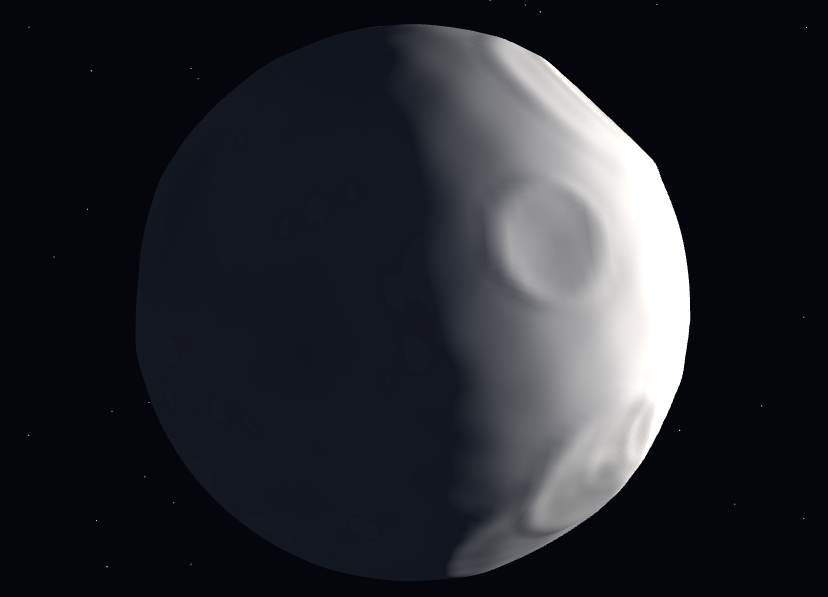
The Three.js Scroll Moon Phases Cycle snippet renders a single cratered moon and takes it through an entire synodic month in one scroll — new moon, waxing crescent, first quarter, gibbous, full, and back — by doing what the solar system does: moving the light, not masking the moon. GSAP's ScrollTrigger scrubs one sun angle from 0 to 2π; every phase, the terminator's curve, and the HUD label fall out of that geometry.
Phases are lighting, not masks
Most moon-phase widgets overlay crescent-shaped masks on a circle — and the terminator (the day/night boundary) never quite curves correctly through the intermediate phases. This snippet has no masks at all: one DirectionalLight orbits in the camera–moon plane, positioned at (sin(a)·60, 8, −cos(a)·60), so at a = 0 the light is behind the moon (new), at π behind the camera (full), and every angle between produces the exact elliptical terminator that real Lambert shading dictates. Waxing gibbous looks right because it *is* right — the same reason the planet approach's day/night line works during its corkscrew.
Craters that perform at the terminator
The moon is a 160-segment sphere with 26 craters pushed into its vertices at seeded directions — each a smooth cosine bowl with a gaussian-raised rim — plus continuous multi-octave regolith noise (a function of surface direction, never vertex index, so normals stay smooth) and five soft-edged dark maria patches baked as vertex colors. Craters exist for one payoff: the terminator. Along the day/night line, light rakes the surface nearly parallel, so every bowl throws its longest shadows exactly where the eye is drawn — the phenomenon that makes real first-quarter moons more dramatic than full ones. As scroll sweeps the terminator across the disc, each crater lights up, performs its shadow play, and fades — depth generated by displacement geometry, computeVertexNormals(), and per-fragment MeshStandardMaterial shading, no normal maps.
Earthshine keeps the dark side alive
A real new moon is not black — the night side glows faintly with sunlight reflected off Earth ("the old moon in the new moon's arms"). A dim blue-grey AmbientLight reproduces this: the dark portion stays barely legible against the starfield at every phase, which both looks correct and keeps the scene readable at new moon when a naive implementation would show nothing. Sun intensity also rises slightly toward full, echoing how a full moon washes out contrast.
Libration, the connoisseur's detail
The real moon rocks a few degrees over a month (libration), letting us see 59% of its surface over time. The snippet's moon wobbles ±0.04 radians on slow clock sines plus a tiny scroll-linked drift — imperceptible as rotation, but it shifts which crater rims catch the terminator, keeping long scrolls from feeling like a static photograph under a moving lamp. The camera drifts on a slow ellipse rather than orbiting: this is a portrait sitting, and the phase angle — not camera position — is the story.
Eight labels from one angle
The HUD phase name indexes a nine-entry array (new appears at both ends) by round(a / 2π × 8), so labels flip exactly at the midpoints between canonical phases. Reverse scrolling wanes the moon back through the month with the terminator sweeping the opposite direction — free, as always in this series, because everything derives from the one scrubbed angle, the same purity as the gear train's crank. Pair it with the seasons tree for a matched set of natural-cycle scrolls.
Build with AI
Build, Understand, Optimize, and Extend It With AI
You do not need an astronomy textbook to extend this scene — the physics is already encoded in one light position formula. Paste the snippet's HTML, CSS, and JS into an AI assistant like Claude and ask it to explain why orbital lighting produces correct terminators, how the cosine-bowl craters work, or what the earthshine ambient contributes. The same assistant can take it further — real dates mapped to phase angle so the scroll starts at today's actual moon, a lunar eclipse mode that slides a red-shadowed disc across at full, named mare regions as darker vertex-color patches, or the HUD swapped for illumination percentage computed from (1 − cos a)/2. It can also tune crater distribution to match the real near side. Treat the code as a starting point to interrogate and reshape, not a finished artifact.
Prompt to recreate it
Copy this into your AI assistant of choice to build the effect from scratch, or as a jumping-off point for your own variant:
Build a "scroll-driven moon phases cycle" in plain HTML, CSS, and JavaScript using Three.js and GSAP's ScrollTrigger plugin, all loaded from a CDN (no bundler, no build step).

Requirements:
- A pinned full-viewport section with a canvas, WebGLRenderer, PerspectiveCamera (~42° FOV at z ≈ 34, resized with aspect on window resize), near-black background, and a ~1,100-point starfield shell.
- The moon: SphereGeometry(9, 160, 160) with vertex displacement — 26 craters at seeded sin-hash directions (no Math.random), each a cosine bowl (deepest at center, angular radius 0.12–0.42) with a gaussian-profile raised rim just outside the bowl (never a hard conditional step, which rings); fine regolith roughness from continuous multi-octave trig noise evaluated from the surface direction n (never from the vertex index — index-based white noise turns into streaky normals at the terminator); five large soft-edged maria patches plus slightly darkened crater floors baked as vertex colors; computeVertexNormals() after displacement; per-fragment MeshStandardMaterial (roughness ~0.97, metalness 0, vertexColors) — not Lambert, which is per-vertex Gouraud in r128 and facets the terminator.
- Lighting IS the phase system: one DirectionalLight orbiting in the camera–moon plane at position (sin(a)·60, 8, −cos(a)·60) — a = 0 is new moon (light behind the moon), a = π full (light behind the camera). NO masks, NO textures. Plus a dim blue-grey AmbientLight (~0x2a3448, 0.55) as earthshine so the dark side stays faintly visible.
- One GSAP tween (ease "none") scrubbing the sun angle a from 0 to 2π on a ScrollTrigger with pin: true, scrub ~0.5, end ~+=500%.
- Libration: moon rotation wobbles ±0.04 rad on two slow clock sines plus a 0.02-rad scroll-linked drift — imperceptible as rotation, but crater lighting shifts.
- Sun intensity rises from 1.5 to 2.0 toward full via fullness = (1 − cos a)/2.
- Camera drifts on a slow ellipse (portrait sitting, not a flyby), always lookAt the moon.
- A HUD cycling NEW MOON → WAXING CRESCENT → FIRST QUARTER → WAXING GIBBOUS → FULL MOON → WANING GIBBOUS → LAST QUARTER → WANING CRESCENT → NEW MOON by round(a/2π × 8); intro overlay fades at a > 0.06.
- Confirm the terminator sweeps correctly through gibbous phases (elliptical, never straight) and reverse scrolling wanes the moon backwards.
Want to tighten it up first? Run this prompt through the AI Prompt Studio to score it across 8 quality dimensions, catch anti-patterns, and tune the wording for Claude, ChatGPT, or Gemini before you paste it in.
Step by step
How to Use
- 1Load the three CDN scriptsAdd three.min.js, gsap.min.js, and ScrollTrigger.min.js in that order before the snippet JS.
- 2Paste HTML, CSS, and JSA dark new moon hangs among stars, its night side faintly visible in blue-grey earthshine — the HUD reads NEW MOON.
- 3Scroll to waxA crescent opens on one limb and grows — watch craters light up and throw long shadows as the terminator crosses them.
- 4Pass full moonAt half scroll the light sits behind the camera and the disc floods flat and bright, phase label reading FULL MOON.
- 5Wane back to newThe terminator sweeps in from the opposite limb through gibbous, last quarter, and crescent — one complete synodic month.
- 6Make it yoursChange crater count/depth, earthshine color, or replace the HUD labels with dates for a real lunar-calendar tie-in.
Real-world uses
Common Use Cases
Got questions?
Frequently Asked Questions
Masks approximate; geometry computes. With a DirectionalLight orbiting at angle a — position (sin(a)·60, 8, −cos(a)·60) — the terminator is the exact great-circle boundary Lambert shading produces, which projects as the correct half-ellipse at every intermediate phase. Crescent masks notoriously get gibbous phases wrong (straight or wrongly-curved terminators); orbital lighting cannot, because it is the same geometry the real moon obeys.
Vertex displacement: 26 seeded directions each define a crater; every sphere vertex within a crater's angular radius is pushed inward on a cosine bowl profile (deepest at center), with a gaussian-profile rim raised just outside the bowl so there is no hard step and no ring artifacts. On top of that, continuous multi-octave trig noise — evaluated from the surface direction, never the vertex index, which would shred the normals into streaks — adds fine regolith roughness, and five soft-edged maria patches darken the vertex colors. computeVertexNormals() afterward makes the dents shade correctly under the per-fragment MeshStandardMaterial. Real geometry means crater shadows lengthen at the terminator automatically — the detail normal maps fake and displacement gets free.
Earthshine — sunlight reflected off Earth dimly illuminating the lunar night side, visible in reality as "the old moon in the new moon's arms" during crescents. A low-intensity blue-grey AmbientLight (0x2a3448 at 0.55) reproduces it, keeping the dark limb legible against the starfield at new moon, where a physically naive scene would render an invisible black disc.
Libration: the real moon's slight rocking that exposes 59% of its surface across a month. Here ±0.04-radian sines on two axes (plus a 0.02-radian scroll drift) are imperceptible as rotation but continuously change which crater rims catch light — especially near the terminator — so a slow scroll never feels like a photo under a moving lamp. It is the idle-life convention of this series applied astronomically.
Yes. Export via the JSX, Vue, Angular, or Tailwind buttons. Build the displaced sphere (a few hundred thousand vertex operations — do it once in the mount effect, never per render), starfield, and ScrollTrigger against a canvas ref. Update the phase label through a ref. On cleanup kill the ScrollTrigger, dispose moon and star geometries/materials, and call renderer.dispose().