Learn Coding Visually
Learn to code with interactive, live-preview playgrounds — HTML, CSS, JavaScript, React & more.
 HTML Playground42 lessons · Click-based · Live preview
 CSS PlaygroundLearn CSS with a live editor
 JavaScript Playground60 lessons · DOM · Async · Canvas
 React PlaygroundLearn React with a live code editor
 GSAP PlaygroundLearn GSAP animation interactively
 SVG Playground44 lessons · shapes · paths · animation
 SCSS Playground45 lessons · Sass modules · tokens
 Tailwind PlaygroundLearn Tailwind CSS with a live editor
 Bootstrap 5 Playground50 lessons · live preview
Three.js Scroll Black Hole — Accretion Disk Dive
Three.js Scroll Black Hole Approach · Scroll · Plain HTML, CSS & JS · Live preview
What's included
Features
About this UI Snippet
How to Build a Scroll-Driven Black Hole Approach With Three.js and GSAP
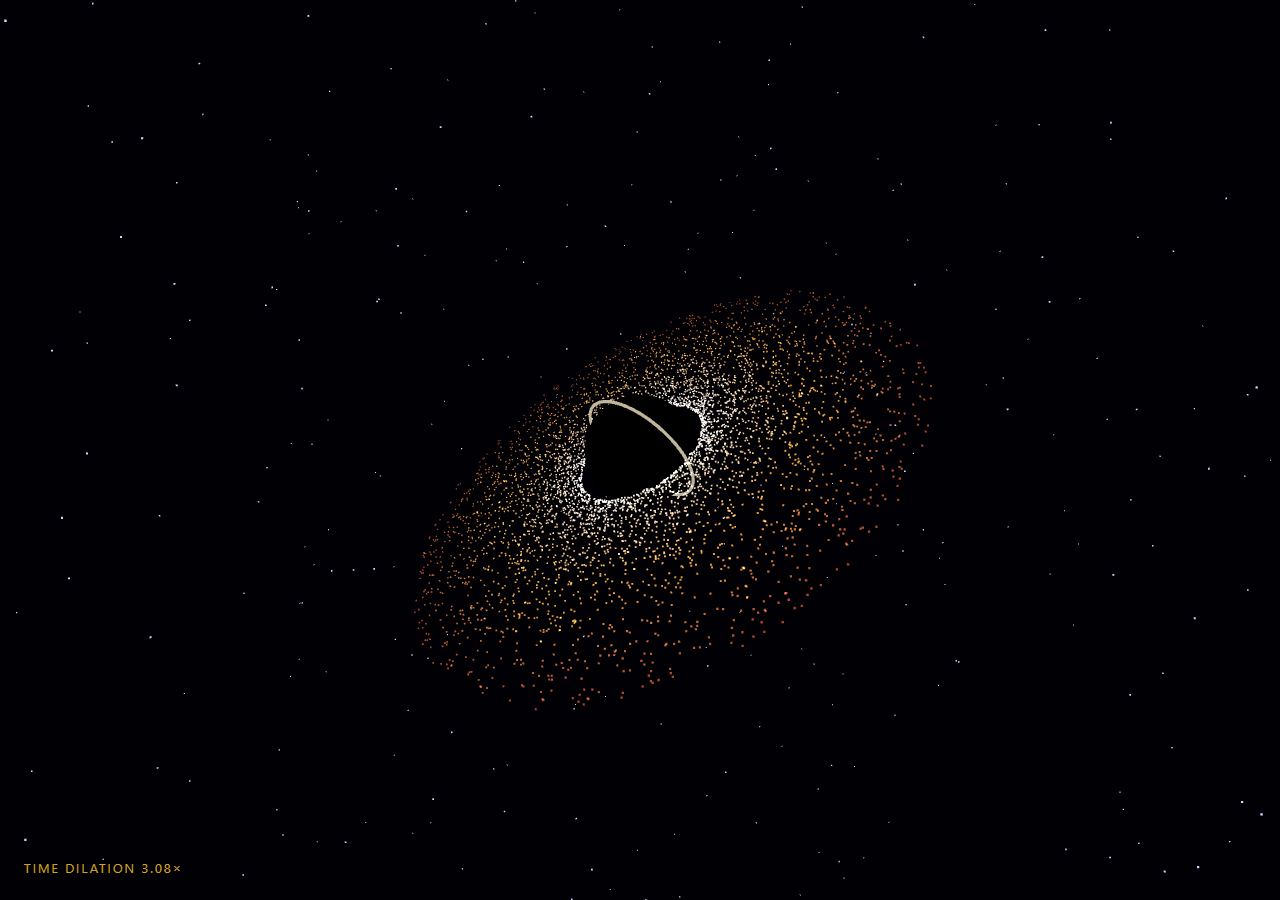
The Three.js Scroll Black Hole Approach snippet drops the camera toward a black hole wrapped in a 5,200-particle accretion disk — inner particles white-hot and orbiting fast, outer ones rust-red and slow, a photon ring hugging the shadow — while scroll accelerates the fall, multiplies the disk's apparent speed as a time-dilation metaphor, and creeps the camera's field of view wider for that stretched, pulled-in horizon feeling. Where the planet approach brakes into orbit, this one accelerates past the point of no return.
Keplerian orbits from a power law
Each disk particle stores polar parameters — radius, phase, vertical tilt, and an angular velocity ω = 14 / r^1.5 — the same r^−3/2 falloff as real Keplerian orbits, so the inner disk visibly laps the outer disk exactly the way accretion physics demands. Positions are computed fresh every frame from parameters plus time (the stateless design shared with the tornado vortex), which keeps the scrub exact at any scroll speed. Radius distribution uses pow(rand, 1.6) to crowd particles toward the inner edge where the action is.
Temperature as vertex color
Real accretion disks are hottest where orbital energy dissipates fastest — the inner edge. Each particle's color is assigned once at build time by double-lerping white-hot → orange → rust across normalized radius, stored in a color BufferAttribute with vertexColors: true and AdditiveBlending. Where particles crowd near the inner edge, additive blending stacks their brightness into a glowing band — the blackbody gradient emerges from geometry density rather than any texture.
The shadow is just an unlit sphere
The black hole itself is the cheapest mesh in the scene: a MeshBasicMaterial sphere in pure black, which ignores lighting by definition. Against the additive disk and starfield, an object that reflects *nothing* reads as a hole in space — no shader needed. The photon ring is a thin warm torus riding just outside the shadow, pulsing subtly on clock time and brightening plus swelling with approach, standing in for the lensed light band made famous by the EHT image and *Interstellar*.
Time dilation as a speed multiplier
The scroll's signature move: disk time advances as t × (1 + p^2.4 × 11), so at full approach the disk spins eleven times faster than at the start, and the HUD reports the multiplier as TIME DILATION n×. It is a metaphor rather than relativity — a real infalling observer would see the opposite — but it compresses "the universe speeds up as you fall" into one legible, scrubbable number. Because the multiplier applies to *clock* time inside the stateless position math, scrolling back down smoothly decelerates the disk with zero state to unwind.
FOV creep and lensing hints
Nearing the horizon, camera.fov interpolates from 60° to 84° with updateProjectionMatrix() each frame — a dolly-zoom-like stretch that makes the shadow balloon in the final stretch of scroll. The starfield counter-rotates slightly against the camera swing as a cheap suggestion of gravitational lensing, and the disk tilts more edge-on as the camera dives toward the orbital plane, trading the top-down spiral view for the *Interstellar* silhouette. For the gentler cousins of this scene, see the galaxy formation and starfield warp snippets.
Build with AI
Build, Understand, Optimize, and Extend It With AI
You do not need to research accretion physics to extend this scene. Paste this snippet's HTML, CSS, and JS into an AI assistant like Claude and ask it to explain the Keplerian ω ∝ r^−1.5 law in the code, why additive blending creates the hot inner band, or what the FOV creep contributes. The same assistant can push the realism or the drama — a Doppler-beaming brightness asymmetry (approaching side brighter, one line of dot-product math), infalling particle streams that spiral from the disk's inner edge into the shadow, a redshift color ramp applied by approach progress, or the whole disk converted to a ShaderMaterial for 50,000 particles. It can also retune the dilation curve so the spin-up peaks exactly where your page's key copy lands. Treat the code as a starting point to interrogate and reshape, not a finished artifact.
Prompt to recreate it
Copy this into your AI assistant of choice to build the effect from scratch, or as a jumping-off point for your own variant:
Build a "scroll-driven black hole approach" in plain HTML, CSS, and JavaScript using Three.js and GSAP's ScrollTrigger plugin, all loaded from a CDN (no bundler, no build step).

Requirements:
- A pinned full-viewport section with a canvas, WebGLRenderer, PerspectiveCamera (initial FOV 60, resized with aspect on window resize), near-black background, and NO lights — every material must be self-lit.
- The event horizon: a SphereGeometry with pure black MeshBasicMaterial, plus a thin warm TorusGeometry photon ring just outside it that pulses scale on clock time and brightens/swells with approach progress.
- An accretion disk of ~5,000 particles in one THREE.Points: each particle stores ONLY radius (7.4–29, crowded inward via pow(rand, 1.6)), phase, small vertical tilt, and Keplerian angular velocity ω = 14 / r^1.5, all from a seeded sin-hash. Per-particle vertex colors double-lerp white-hot → orange → rust by normalized radius; material uses vertexColors, AdditiveBlending, depthWrite false. Tilt the disk ~0.42 rad.
- ~1,500 background stars on a spherical shell.
- One GSAP tween (ease "none") scrubbing p 0→1 on a ScrollTrigger with pin: true, scrub ~0.6, end ~+=500%.
- Each frame: distance = 90 − 76 × p^1.7 (accelerating fall); disk time T = clock × (1 + p^2.4 × 11) × 0.22 — a time-dilation multiplier reported in a HUD as "TIME DILATION n.nn×"; recompute every particle position from (radius, phase + T × ω); tilt the disk ~0.5 rad more edge-on with p; creep camera.fov from 60 to 84 calling updateProjectionMatrix(); counter-rotate the starfield slightly against the camera swing as a lensing hint.
- Camera orbits slowly (clock) plus a p-linked 1.6 rad swing, descending toward the disk plane, lookAt origin; intro overlay fades at p > 0.02.
- Confirm reverse scrolling backs the camera out while the disk decelerates smoothly — all particle math must be stateless.
Want to tighten it up first? Run this prompt through the AI Prompt Studio to score it across 8 quality dimensions, catch anti-patterns, and tune the wording for Claude, ChatGPT, or Gemini before you paste it in.
Source Code
<section class="bkh-stage" id="bkhStage">
  <div class="bkh-intro"><p>Scroll ↓ to fall toward the event horizon</p></div>
  <canvas id="bkhCanvas"></canvas>
  <div class="bkh-hud">TIME DILATION <span id="bkhDil">1.00</span>×</div>
</section>
<section class="bkh-bottom"><p>Past the point of no return.</p></section>*{box-sizing:border-box;margin:0;padding:0}
html,body{background:#000005;color:#fff;font-family:system-ui,-apple-system,sans-serif}
.bkh-bottom{min-height:70vh;display:flex;justify-content:center;align-items:center;color:#77689a;font-size:15px;letter-spacing:.08em;text-transform:uppercase}
.bkh-stage{height:100vh;position:relative;overflow:hidden;background:#000005}
.bkh-intro{position:absolute;inset:0;display:flex;align-items:center;justify-content:center;text-align:center;padding:24px;pointer-events:none;z-index:5;color:#77689a;font-size:15px;letter-spacing:.08em;text-transform:uppercase;transition:opacity .4s ease}
#bkhCanvas{display:block;width:100%;height:100%}
.bkh-hud{position:absolute;left:24px;bottom:24px;font-variant-numeric:tabular-nums;font-size:13px;letter-spacing:.14em;color:#fbbf24;text-transform:uppercase;opacity:.85}const canvas = document.getElementById('bkhCanvas');
const dilEl = document.getElementById('bkhDil');
const introEl = document.querySelector('.bkh-intro');
const renderer = new THREE.WebGLRenderer({ canvas, antialias: true });
renderer.setPixelRatio(Math.min(window.devicePixelRatio, 2));
const scene = new THREE.Scene();
scene.background = new THREE.Color(0x000005);
const camera = new THREE.PerspectiveCamera(60, 1, 0.1, 500);
// The hole itself: a pure black sphere — the one mesh in the scene that
// ignores all light by design.
const hole = new THREE.Mesh(
new THREE.SphereGeometry(6, 64, 64),
new THREE.MeshBasicMaterial({ color: 0x000000 })
);
scene.add(hole);
// Photon ring: the thin bright halo hugging the shadow.
const photonRing = new THREE.Mesh(
new THREE.TorusGeometry(6.55, 0.16, 16, 128),
new THREE.MeshBasicMaterial({ color: 0xfff3d0, transparent: true, opacity: 0.9 })
);
scene.add(photonRing);
function rand(seed) {
const x = Math.sin(seed * 157.3 + 113.7) * 40853.8461;
return x - Math.floor(x);
}
// Accretion disk: particles on Keplerian-style orbits — inner ones orbit
// much faster (ω ∝ r^-1.5), and each stores polar parameters, never
// positions, so the scrub stays exact (same stateless design as the
// tornado snippet).
const COUNT = 5200;
const diskGeo = new THREE.BufferGeometry();
const diskPos = new Float32Array(COUNT * 3);
const diskCol = new Float32Array(COUNT * 3);
diskGeo.setAttribute('position', new THREE.BufferAttribute(diskPos, 3));
diskGeo.setAttribute('color', new THREE.BufferAttribute(diskCol, 3));
const parts = [];
const hot = new THREE.Color(0xfff7e8), warm = new THREE.Color(0xffb347), cool = new THREE.Color(0xb3452a);
const cTmp = new THREE.Color();
for (let i = 0; i < COUNT; i++) {
const r = 7.4 + Math.pow(rand(i), 1.6) * 22;
parts.push({
r,
phase: rand(i + 1e5) * Math.PI * 2,
tilt: (rand(i + 2e5) - 0.5) * 0.5,
omega: 14 / Math.pow(r, 1.5), // Keplerian falloff
});
// Inner disk is white-hot, fading through orange to rust outside.
const f = (r - 7.4) / 22;
cTmp.copy(hot).lerp(warm, Math.min(1, f * 2)).lerp(cool, Math.max(0, f * 2 - 1));
diskCol[i * 3] = cTmp.r; diskCol[i * 3 + 1] = cTmp.g; diskCol[i * 3 + 2] = cTmp.b;
}
const disk = new THREE.Points(diskGeo, new THREE.PointsMaterial({
size: 0.22, vertexColors: true, transparent: true, opacity: 0.95,
blending: THREE.AdditiveBlending, depthWrite: false,
}));
disk.rotation.x = 0.42;
scene.add(disk);
// Background stars.
const starGeo = new THREE.BufferGeometry();
const starPos = new Float32Array(1500 * 3);
for (let i = 0; i < 1500; i++) {
const rr = 180 + rand(i + 3e5) * 250;
const th = rand(i + 4e5) * Math.PI * 2, ph = Math.acos(2 * rand(i + 5e5) - 1);
starPos[i * 3] = rr * Math.sin(ph) * Math.cos(th);
starPos[i * 3 + 1] = rr * Math.cos(ph);
starPos[i * 3 + 2] = rr * Math.sin(ph) * Math.sin(th);
}
starGeo.setAttribute('position', new THREE.BufferAttribute(starPos, 3));
const stars = new THREE.Points(starGeo, new THREE.PointsMaterial({ color: 0xcfd6ff, size: 0.8, sizeAttenuation: true }));
scene.add(stars);
gsap.registerPlugin(ScrollTrigger);
const fall = { p: 0 };
gsap.to(fall, {
p: 1,
ease: 'none',
scrollTrigger: { trigger: '#bkhStage', start: 'top top', end: '+=500%', scrub: 0.6, pin: true },
});
function resize() {
const w = canvas.clientWidth, h = canvas.clientHeight;
renderer.setSize(w, h, false);
camera.aspect = w / h;
camera.updateProjectionMatrix();
}
const clock = new THREE.Clock();
function animate() {
requestAnimationFrame(animate);
const t = clock.getElapsedTime();
const p = fall.p;
if (introEl) introEl.style.opacity = p > 0.02 ? '0' : '1';
// Approach curve: distance collapses steeply near the end — falling in
// accelerates, unlike the braking of a planet arrival.
const dist = 90 - 76 * Math.pow(p, 1.7);
// "Time dilation": disk angular speed multiplies as you get closer, so
// the same clock time sweeps particles faster — the visual metaphor for
// an outside observer's view compressing.
const dil = 1 + Math.pow(p, 2.4) * 11;
const T = t * dil * 0.22;
for (let i = 0; i < COUNT; i++) {
const pt = parts[i];
const a = pt.phase + T * pt.omega;
diskPos[i * 3] = Math.cos(a) * pt.r;
diskPos[i * 3 + 1] = Math.sin(a * 2 + pt.phase) * pt.tilt;
diskPos[i * 3 + 2] = Math.sin(a) * pt.r;
}
diskGeo.attributes.position.needsUpdate = true;
// The disk and ring tilt more edge-on as the camera dives toward the
// orbital plane.
disk.rotation.x = 0.42 + p * 0.5;
photonRing.rotation.x = disk.rotation.x;
photonRing.scale.setScalar(1 + Math.sin(t * 3) * 0.008 + p * 0.12);
photonRing.material.opacity = 0.55 + p * 0.4;
// FOV creep adds the stretched, pulled-in feeling near the horizon.
camera.fov = 60 + p * 24;
camera.updateProjectionMatrix();
const ang = t * 0.03 + p * 1.6;
camera.position.set(Math.sin(ang) * dist, 14 - p * 9, Math.cos(ang) * dist);
camera.lookAt(0, 0, 0);
// Stars slide subtly opposite the camera swing — a cheap stand-in for
// gravitational lensing distortion.
stars.rotation.y = -p * 0.35;
stars.rotation.z = p * 0.18;
dilEl.textContent = dil.toFixed(2);
renderer.render(scene, camera);
}
resize();
window.addEventListener('resize', resize);
animate();Step by step
How to Use
- 1Load the three CDN scriptsAdd three.min.js, gsap.min.js, and ScrollTrigger.min.js in that order before the snippet JS.
- 2Paste HTML, CSS, and JSA distant black shadow ringed by a glowing accretion disk hangs among stars; the HUD reads TIME DILATION 1.00×.
- 3Scroll to fallDistance collapses on an accelerating curve while the disk visibly spins up — the inner edge lapping the rim faster and faster.
- 4Watch the horizon growFOV creeps from 60° to 84°, the photon ring brightens and swells, and the disk tilts toward its edge-on silhouette.
- 5Scroll back outThe fall reverses and the disk decelerates smoothly — positions are stateless functions of parameters, clock, and the scrubbed value.
- 6Tune the physicsChange the ω = 14 / r^1.5 falloff for stiffer or softer differential rotation, or the p^2.4 dilation curve for a gentler spin-up.
Real-world uses
Common Use Cases
Got questions?
Frequently Asked Questions
Each particle stores an angular velocity ω = 14 / r^1.5 — the Keplerian power law, where orbital speed falls with the 3/2 power of radius. Inner particles at r ≈ 7.4 sweep many times faster than rim particles at r ≈ 29, so the disk visibly shears rather than rotating as a plate. Positions are recomputed each frame from radius, phase, and shared disk time, never integrated.
MeshBasicMaterial ignores every light in the scene, so the sphere renders as an absolute-black disc from any angle — visually indistinguishable from "no light escapes." Surrounded by additive-blended disk particles and stars, the eye reads the void as depth. A shader could add lensed background distortion, but the flat shadow plus photon ring already matches the iconic EHT silhouette.
Disk time is t × (1 + p^2.4 × 11): at zero scroll the disk runs at 1×, at full approach nearly 12×. Because the multiplier scales the clock inside stateless position math, the spin-up is smooth in both directions and the HUD just prints the same factor. Physically it is a storytelling inversion (an infalling observer sees the outside universe speed up, not the disk), chosen because it makes the approach feel legible.
Interpolating fov from 60° to 84° (with updateProjectionMatrix() each frame) stretches peripheral space as the camera closes in — the dolly-zoom vocabulary for "space itself is distorting." Combined with the accelerating distance curve (90 − 76 × p^1.7), the shadow balloons in the last quarter of scroll far faster than linear motion would suggest, which is exactly how falling into a gravity well should feel.
Yes. Export via the JSX, Vue, Angular, or Tailwind buttons. Build the particle arrays and ScrollTrigger inside a mount effect against a canvas ref, keeping the Float32Arrays and parts array in effect scope. On cleanup kill the ScrollTrigger, dispose the disk, star, hole, and ring geometries/materials, call renderer.dispose(), and reset camera.fov if the camera object is shared.