Learn Coding Visually
Learn to code with interactive, live-preview playgrounds — HTML, CSS, JavaScript, React & more.
 HTML Playground42 lessons · Click-based · Live preview
 CSS PlaygroundLearn CSS with a live editor
 JavaScript Playground60 lessons · DOM · Async · Canvas
 React PlaygroundLearn React with a live code editor
 GSAP PlaygroundLearn GSAP animation interactively
 SVG Playground44 lessons · shapes · paths · animation
 SCSS Playground45 lessons · Sass modules · tokens
 Tailwind PlaygroundLearn Tailwind CSS with a live editor
 Bootstrap 5 Playground50 lessons · live preview
Three.js Scroll 3D Book — Bending Page Flip Snippet
Three.js Scroll 3D Book Page Flip · Scroll · Plain HTML, CSS & JS · Live preview
What's included
Features
About this UI Snippet
How to Build a Scroll-Driven 3D Book With Bending Page Flips in Three.js
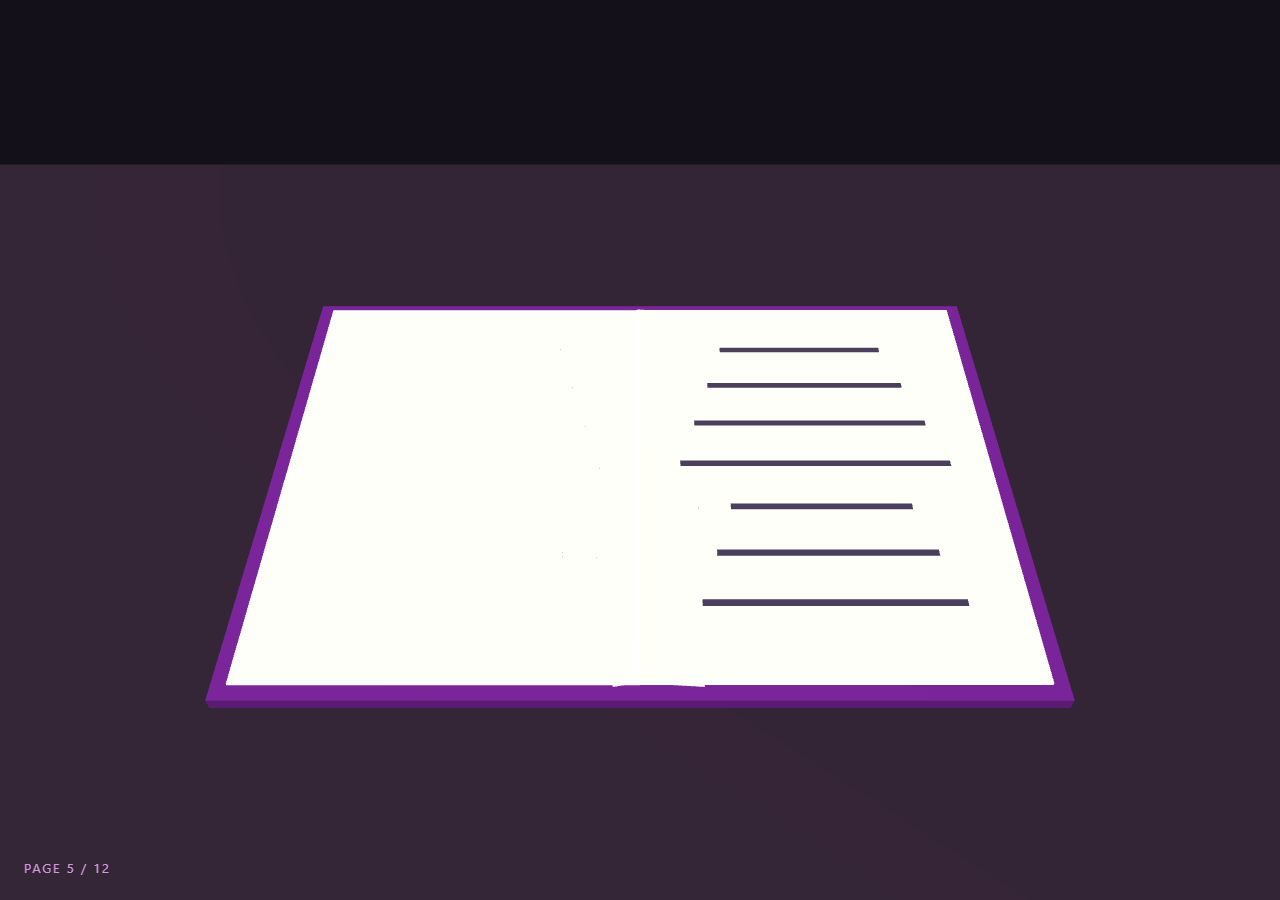
The Three.js Scroll 3D Book Page Flip snippet lays an open book on a desk and lets scroll turn its twelve pages one by one — each page arcing over the spine with a genuine mid-flip paper bend, printed text lines riding along, and the right-hand stack visibly transferring to the left as reading progresses. GSAP's ScrollTrigger scrubs one progress value; overlapping per-page windows and a vertex-bend pass do the rest.
The hinge is a geometry translation
A page must rotate about the book's spine, not its own center. Rather than wrapping each page in a pivot Group, the snippet translates the PlaneGeometry itself — geo.translate(PW/2, 0, 0) — so the page's left edge sits at its local origin. After that, plain rotation.z *is* the page turn: 0 lies flat right, −π lies flat left. This one-line trick eliminates a whole layer of pivot objects and is worth stealing for any hinged element: doors, lids, cards, lever arms.
Paper bends with a half-sine, not physics
Rigid rotating planes look like plastic sheets. Real paper lifts in an arc — the free edge lags, the middle bows. Each page's geometry has 20 width segments, and every frame its vertices are displaced in local Y by sin(x/PW × π) × bend, a half-sine that is zero at the hinge and free edge and maximal mid-page. The bend amplitude itself is sin(flipProgress × π) × 1.15 — zero when the page rests on either side, peaking mid-flip. Vertices are restored from a pristine slice() copy of the flat geometry each frame, the same base-copy pattern as the ocean dive surface, so bends never accumulate. computeVertexNormals() after displacement keeps lighting on the curved paper correct.
Overlapping flip windows read as leafing
Sequential page turns — each finishing before the next lifts — feel mechanical. The window arithmetic gives page i a slice starting at i × win × 0.65, so each new page lifts when its predecessor is 65% through its arc. Two or three pages are airborne at busy moments, the way a reader leafs through a book. It is the same derived-stagger technique as the voxel build, tuned by a single overlap constant.
Stack transfer and printed text for free
Unflipped pages stack on the right with each successive page 0.012 lower; the moment a page's flip completes, its rest height switches to the mirrored left-stack order (PAGES − i) × −0.012. The right pile visibly thins while the left thickens — a small state change that sells the passage of reading. The printed lines are thin dark boxes added as *children* of each page mesh, so they rotate and translate with the page automatically through scene-graph parenting (they float 0.012 above the surface rather than re-bending — invisible at reading distance). Line widths vary by a deterministic modulo so paragraphs look ragged-right, like real typesetting.
A reading camera, a HUD that counts
The camera hovers at an overhead reading angle, drifting a half-radian across the scroll with a slight descent — enough parallax to feel present at the desk without upstaging the pages, plus the series-standard clock bob for idle life. The HUD counts pages whose flip has completed, so PAGE 7 / 12 always matches what the stacks show. Scrolling backwards un-turns pages in exact reverse order, bends included. For 2D scroll storytelling with the same "chapters" energy, compare the scroll pin story and scroll before/after snippets.
Build with AI
Build, Understand, Optimize, and Extend It With AI
You do not need to work out hinge translations and bend envelopes from scratch. Paste this snippet's HTML, CSS, and JS into an AI assistant like Claude and ask it to explain why geo.translate turns rotation.z into a spine hinge, how the two nested sines create the paper bow, or why base vertices are restored each frame. The same assistant can level the book up — rendering real content onto pages with CanvasTexture (titles, images, your actual copy), adding a cover-opening prologue phase before page one, a soft page-turn shadow cast on the page beneath, or click-to-flip that tweens the same progress object GSAP scrubs. It can also recalculate the overlap constant for a riffle-through effect. Treat the code as a starting point to interrogate and reshape, not a finished artifact.
Prompt to recreate it
Copy this into your AI assistant of choice to build the effect from scratch, or as a jumping-off point for your own variant:
Build a "scroll-driven 3D book with bending page flips" in plain HTML, CSS, and JavaScript using Three.js and GSAP's ScrollTrigger plugin, all loaded from a CDN (no bundler, no build step).

Requirements:
- A pinned full-viewport section with a canvas, WebGLRenderer, PerspectiveCamera (~45° FOV, resized with aspect on window resize), warm ambient + directional lamp light, a dark desk BoxGeometry, and two cover slabs flanking the spine.
- 12 pages from PlaneGeometry(PW=8, PH=11, 20, 1), each rotated flat and then geometry-TRANSLATED by PW/2 so the left edge sits at the local origin — rotation.z alone must perform the spine flip (0 = flat right, −π = flat left). Slightly varied warm paper tints, DoubleSide.
- Keep a pristine Float32Array copy (slice()) of each page's flat vertices at build time.
- Printed text: thin dark BoxGeometry strips added as CHILDREN of even pages (7 lines each, widths varied by a deterministic modulo), so they ride the flip automatically.
- One GSAP tween (ease "none") scrubbing p 0→1 on a ScrollTrigger with pin: true, scrub ~0.5, end ~+=550%.
- Overlapping flip windows: page i animates across [i × win × 0.65, + win] where win = 1 / (PAGES − 0.35 × (PAGES − 1)); local progress passes through easeInOutQuad, rotation.z = −π × eased.
- Paper bend each frame: rewrite vertices from the stored base with localY += sin(x/PW × π) × sin(eased × π) × 1.15, then computeVertexNormals(). Bends must be zero when pages rest on either side.
- Stack transfer: unflipped pages stack right at i × −0.012; when a page's local progress reaches 1, its rest height becomes (PAGES − i) × −0.012 on the left stack.
- A PAGE n / 12 HUD counting completed flips, an overhead reading camera drifting ~0.5 rad with progress plus a slight clock bob, and an intro overlay fading at p > 0.02.
- Confirm scrolling backwards un-turns pages in exact reverse order, bends included.
Want to tighten it up first? Run this prompt through the AI Prompt Studio to score it across 8 quality dimensions, catch anti-patterns, and tune the wording for Claude, ChatGPT, or Gemini before you paste it in.
Source Code
<section class="bkp-stage" id="bkpStage">
  <div class="bkp-intro"><p>Scroll ↓ to read the book</p></div>
  <canvas id="bkpCanvas"></canvas>
  <div class="bkp-hud">PAGE <span id="bkpPage">0</span> / <span id="bkpTotal">0</span></div>
</section>
<section class="bkp-bottom"><p>The end.</p></section>*{box-sizing:border-box;margin:0;padding:0}
html,body{background:#141019;color:#fff;font-family:system-ui,-apple-system,sans-serif}
.bkp-bottom{min-height:70vh;display:flex;justify-content:center;align-items:center;color:#a396b5;font-size:15px;letter-spacing:.08em;text-transform:uppercase}
.bkp-stage{height:100vh;position:relative;overflow:hidden;background:#141019}
.bkp-intro{position:absolute;inset:0;display:flex;align-items:center;justify-content:center;text-align:center;padding:24px;pointer-events:none;z-index:5;color:#a396b5;font-size:15px;letter-spacing:.08em;text-transform:uppercase;transition:opacity .4s ease}
#bkpCanvas{display:block;width:100%;height:100%}
.bkp-hud{position:absolute;left:24px;bottom:24px;font-variant-numeric:tabular-nums;font-size:13px;letter-spacing:.14em;color:#f0abfc;text-transform:uppercase;opacity:.85}const canvas = document.getElementById('bkpCanvas');
const pageEl = document.getElementById('bkpPage');
const totalEl = document.getElementById('bkpTotal');
const introEl = document.querySelector('.bkp-intro');
const renderer = new THREE.WebGLRenderer({ canvas, antialias: true });
renderer.setPixelRatio(Math.min(window.devicePixelRatio, 2));
const scene = new THREE.Scene();
scene.background = new THREE.Color(0x141019);
const camera = new THREE.PerspectiveCamera(45, 1, 0.1, 100);
scene.add(new THREE.AmbientLight(0xfff4e0, 0.55));
const lamp = new THREE.DirectionalLight(0xffe9c9, 1.0);
lamp.position.set(-6, 14, 8);
scene.add(lamp);
// Desk + covers. Pages hinge at the spine (x = 0): geometry is translated
// so its left edge sits at the local origin, making rotation.y the flip.
const desk = new THREE.Mesh(
new THREE.BoxGeometry(40, 0.6, 26),
new THREE.MeshStandardMaterial({ color: 0x241b2e, roughness: 0.8 })
);
desk.position.y = -0.9;
scene.add(desk);
const PW = 8, PH = 11;
function coverMesh(x) {
const c = new THREE.Mesh(
new THREE.BoxGeometry(PW + 0.5, 0.28, PH + 0.6),
new THREE.MeshStandardMaterial({ color: 0x581c87, roughness: 0.5 })
);
c.position.set(x, -0.35, 0);
scene.add(c);
return c;
}
coverMesh(-PW / 2 - 0.1);
coverMesh(PW / 2 + 0.1);
const PAGES = 12;
totalEl.textContent = PAGES;
const pages = [];
for (let i = 0; i < PAGES; i++) {
// 20×1 width segments so the page can bend while flipping.
const geo = new THREE.PlaneGeometry(PW, PH, 20, 1);
geo.rotateX(-Math.PI / 2);
geo.translate(PW / 2, 0, 0); // hinge at local x = 0
const shade = 0.94 - (i % 3) * 0.025;
const mat = new THREE.MeshStandardMaterial({
color: new THREE.Color(shade, shade * 0.985, shade * 0.94),
roughness: 0.9, side: THREE.DoubleSide,
});
const m = new THREE.Mesh(geo, mat);
// Unflipped pages stack on the right; each sits a hair higher.
m.position.y = i * -0.012;
scene.add(m);
// Keep a pristine copy of the flat vertices for the bend math.
pages.push({ m, base: geo.attributes.position.array.slice(), idx: i });
}
// Printed "text": thin dark strips as children of even pages, so lines
// flip and bend with their page for free.
pages.forEach((p, i) => {
if (i % 2) return;
for (let l = 0; l < 7; l++) {
const line = new THREE.Mesh(
new THREE.BoxGeometry(PW * (0.5 + ((i * 7 + l) % 4) * 0.09), 0.012, 0.16),
new THREE.MeshBasicMaterial({ color: 0x4a3f5c })
);
line.position.set(PW * 0.5, 0.012, -PH * 0.36 + l * PH * 0.115);
p.m.add(line);
}
});
gsap.registerPlugin(ScrollTrigger);
const book = { p: 0 };
gsap.to(book, {
p: 1,
ease: 'none',
scrollTrigger: { trigger: '#bkpStage', start: 'top top', end: '+=550%', scrub: 0.5, pin: true },
});
function resize() {
const w = canvas.clientWidth, h = canvas.clientHeight;
renderer.setSize(w, h, false);
camera.aspect = w / h;
camera.updateProjectionMatrix();
}
const clock = new THREE.Clock();
function animate() {
requestAnimationFrame(animate);
const t = clock.getElapsedTime();
const p = book.p;
if (introEl) introEl.style.opacity = p > 0.02 ? '0' : '1';
// Overlapping page windows: page i flips across its slice of scroll,
// with ~35% overlap so the next page lifts before the last one lands.
const win = 1 / (PAGES - 0.35 * (PAGES - 1));
let flipped = 0;
pages.forEach((pg, i) => {
const start = i * win * 0.65;
const lp = Math.min(1, Math.max(0, (p - start) / win));
if (lp >= 1) flipped++;
// Ease with slight midpoint acceleration, like a real page falling.
const e = lp < 0.5 ? 2 * lp * lp : 1 - Math.pow(-2 * lp + 2, 2) / 2;
const angle = -Math.PI * e;
pg.m.rotation.z = angle;
// Bend: displace vertices in local Y by a half-sine along X, strongest
// mid-flip and zero when the page lies flat on either side.
const bend = Math.sin(e * Math.PI) * 1.15;
const posAttr = pg.m.geometry.attributes.position;
for (let vi = 0; vi < posAttr.count; vi++) {
const bx = pg.base[vi * 3], by = pg.base[vi * 3 + 1], bz = pg.base[vi * 3 + 2];
posAttr.array[vi * 3 + 1] = by + Math.sin((bx / PW) * Math.PI) * bend;
posAttr.array[vi * 3] = bx; posAttr.array[vi * 3 + 2] = bz;
}
posAttr.needsUpdate = true;
pg.m.geometry.computeVertexNormals();
// Flipped pages settle on the left stack, mirrored height order.
pg.m.position.y = (lp >= 1 ? (PAGES - i) * -0.012 : i * -0.012);
});
pageEl.textContent = flipped;
// Camera: overhead reading angle, drifting slightly with progress.
const ang = -0.25 + p * 0.5;
camera.position.set(Math.sin(ang) * 6, 20 - p * 3, 14 + Math.cos(ang) * 2 + Math.sin(t * 0.3) * 0.3);
camera.lookAt(0, 0, -0.5);
renderer.render(scene, camera);
}
resize();
window.addEventListener('resize', resize);
animate();Step by step
How to Use
- 1Load the three CDN scriptsAdd three.min.js, gsap.min.js, and ScrollTrigger.min.js in that order before the snippet JS.
- 2Paste HTML, CSS, and JSAn open book lies on a desk under warm lamp light — twelve pages stacked right, purple covers on both sides, PAGE 0 / 12 in the HUD.
- 3Scroll to readPages arc over the spine with a visible paper bow, printed lines riding each page; the next page lifts before the last one lands.
- 4Watch the stacksThe right pile thins and the left thickens as flipped pages settle in mirrored order — the HUD counts completed flips.
- 5Scroll backPages un-turn in exact reverse, bends and all — every flip is a pure function of the scrubbed progress.
- 6Make it your bookChange PAGES, page colors, or replace the line-strip children with CanvasTexture images to show real page content.
Real-world uses
Common Use Cases
Got questions?
Frequently Asked Questions
The PlaneGeometry is translated after creation — geo.translate(PW/2, 0, 0) — moving its vertices so the left edge lies at local x = 0. Rotation always happens about the local origin, so once the edge is the origin, plain rotation.z sweeps the page over the spine. No pivot Group, no matrix juggling: one translation converts center-rotation into hinge-rotation permanently.
Each page has 20 width segments, and every frame its vertices get a local-Y displacement of sin(x/PW × π) × bend — zero at the hinge and free edge, maximal mid-page. The bend amplitude is itself sin(flipProgress × π) × 1.15, so a page is flat at rest on either side and bows most at the vertical midpoint of its arc. Vertices are rewritten from a stored flat copy each frame, so displacement never compounds.
If each page finished before the next lifted, the book would tick like a metronome — twelve identical sequential events. Starting page i at i × win × 0.65 lets the next page lift while its predecessor is still falling, so at busy moments two or three pages are airborne, which is how actual leafing looks. One constant (0.65) tunes the whole feel: raise it toward 1 for sequential turns, lower it for a riffle.
They are children of the page mesh, so its rotation and position carry them automatically. They do not re-bend with the vertex displacement — they hover 0.012 units above the surface — but at reading distance and 1.15 units of maximum bow the mismatch is imperceptible. For exact adhesion you would draw lines into a CanvasTexture on the page material instead, at the cost of a texture per page.
Yes. Export with the JSX, Vue, Angular, or Tailwind buttons. Build pages, base-vertex copies, and the ScrollTrigger inside a mount effect against a canvas ref; the base arrays must live in effect scope alongside the meshes. On cleanup kill the ScrollTrigger, dispose every page geometry/material and line-strip child, and call renderer.dispose() to release the pin and WebGL context.