You Might Also Like
Learn Coding Visually
Learn to code with interactive, live-preview playgrounds — HTML, CSS, JavaScript, React & more.
 HTML Playground42 lessons · Click-based · Live preview
 CSS PlaygroundLearn CSS with a live editor
 JavaScript Playground60 lessons · DOM · Async · Canvas
 React PlaygroundLearn React with a live code editor
 GSAP PlaygroundLearn GSAP animation interactively
 SVG Playground44 lessons · shapes · paths · animation
 SCSS Playground45 lessons · Sass modules · tokens
 Tailwind PlaygroundLearn Tailwind CSS with a live editor
 Bootstrap 5 Playground50 lessons · live preview
Three.js Scroll Hologram Scan — Clipping Plane Reveal
Three.js Scroll Hologram Scan Reveal · Scroll · Plain HTML, CSS & JS · Live preview
What's included
Features
About this UI Snippet
How to Build a Scroll-Driven Hologram Scan With Three.js Clipping Planes and GSAP
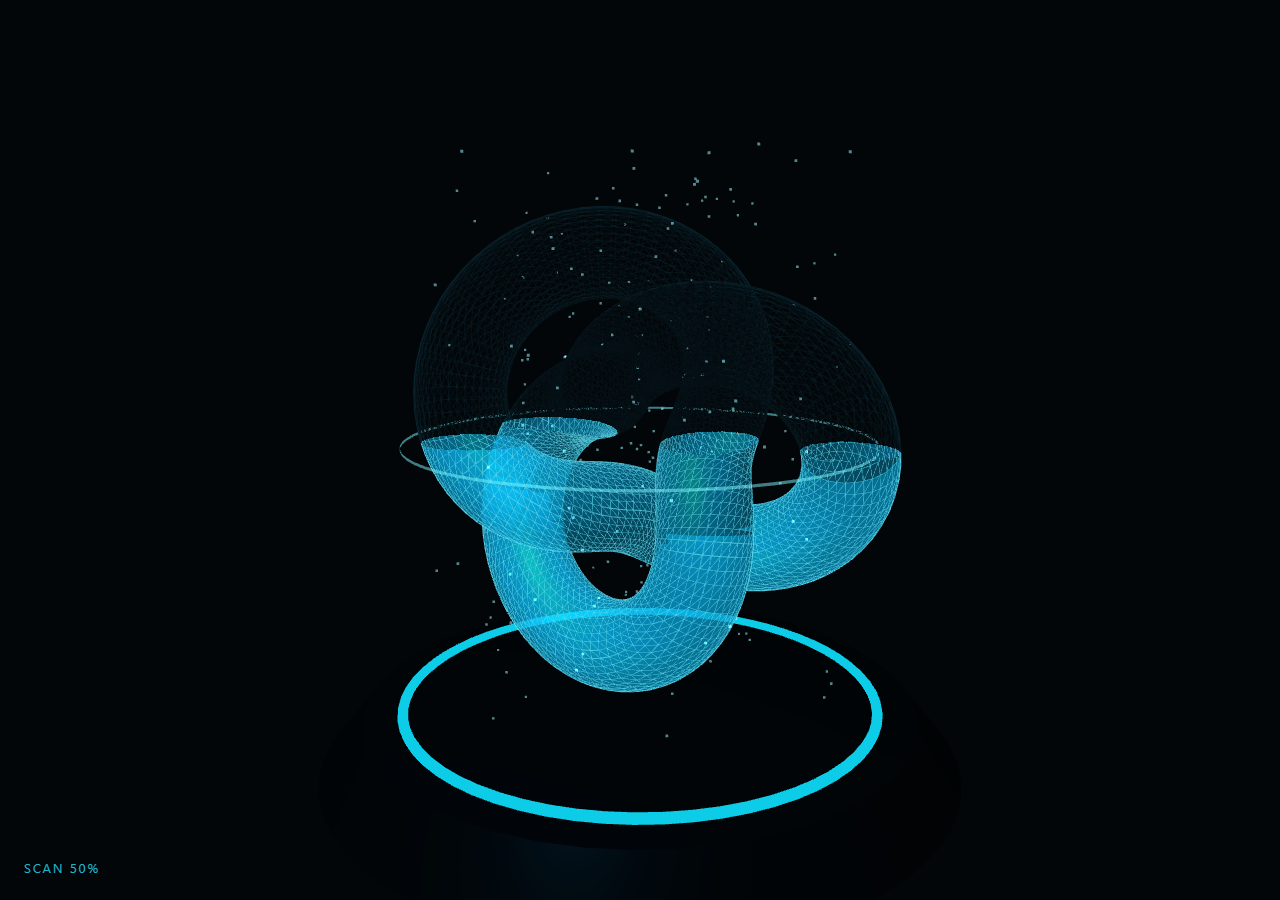
The Three.js Scroll Hologram Scan Reveal snippet materializes a rotating torus-knot "artifact" above a pedestal emitter, sliced open by a glowing scan line that rides upward with scroll — and unlike most scan effects, the slice is real: a THREE.Plane clipping plane whose constant GSAP's ScrollTrigger scrubs directly, so geometry below the line renders and geometry above it is mathematically cut away by the GPU.
Real clipping, not opacity tricks
Most "scan reveal" effects fade a whole object in, or mask it in 2D. This snippet enables renderer.localClippingEnabled = true (clipping is silently ignored without the flag — the classic gotcha) and assigns clippingPlanes: [clipPlane] to the hologram materials. The plane's normal is (0, −1, 0), which makes a fragment survive when y ≤ constant — meaning the plane's constant literally *is* the scan height, and the GSAP tween scrubs that constant from below the knot to above it. The cut edge is razor-sharp and follows every fold of the torus knot's surface, something no fade or mask can do.
Three copies of one geometry
The artifact is one TorusKnotGeometry rendered three times: a clipped translucent Phong fill with cyan emissive (the "light volume" of the hologram), a clipped brighter wireframe overlay (the structural lines that read as projection), and an unclipped 6%-opacity ghost wireframe. The ghost is the storytelling layer — above the scan line you faintly see what is *detected but not yet rendered*, giving the reveal a destination. All three share the same rotation values each frame, so the clip boundary stays coherent across copies while the artifact turns like a museum piece.
A scan line you can see
Clipping alone leaves a hollow cross-section but no visible beam. An open-ended, thin cylinder (CylinderGeometry with openEnded: true) rides at exactly the clip height, pulsing opacity on a 9 Hz sine — the visible manifestation of the invisible plane. It hides itself at the extreme ends of the range so no stray ring floats before the scan starts or after it completes. Rising additive-blended sparkle motes recycle through the scan column (the wrap-don't-respawn pattern from the ocean dive bubbles), brightening as the scan progresses.
Electrical flicker sells the projection
Holograms in film language flicker. Here two incommensurate sines are multiplied — sin(23t) × sin(7.3t) — and only when the product exceeds 0.93 do the fill and wireframe opacities briefly dip to 30%. The threshold on a product of unrelated frequencies produces irregular, unpredictable dropouts a single sine could never give, at the cost of one line of code. The emitter ring's HSL lightness also breathes with time and warms with progress, tying pedestal to projection.
Scroll as the scanner
Because the scrubbed value is the clip constant itself, the interaction is honest: scrolling *is* scanning, pausing leaves a partial render with a live cross-section through the knot's tubes, and scrolling up de-renders the artifact top-down. The HUD percentage is a normalization of the same value. The technique generalizes to any mesh — swap the torus knot for a loaded product model and this becomes a product viewer with a manufacturing-scan intro, or pair it with the exploded view for a full sci-fi teardown sequence.
Build with AI
Build, Understand, Optimize, and Extend It With AI
You do not need to debug clipping-plane sign conventions alone. Paste this snippet's HTML, CSS, and JS into an AI assistant like Claude and ask it to explain why localClippingEnabled must be set, how the (0, −1, 0) normal makes the constant equal the scan height, or why the flicker uses a thresholded product of sines. The same assistant can upgrade the effect — scanning a loaded GLTF product model instead of the torus knot, adding a second horizontal plane for a band-only reveal, emitting a particle burst along the cut edge by sampling vertices near the plane, or driving the scan from element visibility instead of a pinned scrub. It can also generate the cyan-to-your-brand-color material swap in one pass. Treat the code as a starting point to interrogate and reshape, not a finished artifact.
Prompt to recreate it
Copy this into your AI assistant of choice to build the effect from scratch, or as a jumping-off point for your own variant:
Build a "scroll-driven hologram scan reveal" in plain HTML, CSS, and JavaScript using Three.js and GSAP's ScrollTrigger plugin, all loaded from a CDN (no bundler, no build step).

Requirements:
- A pinned full-viewport section with a canvas, WebGLRenderer with renderer.localClippingEnabled = true set immediately after creation, and a PerspectiveCamera resized (with aspect) on window resize; cyan-tinted ambient and point lights.
- A metallic pedestal (CylinderGeometry) with a glowing TorusGeometry emitter ring whose HSL lightness breathes with clock time.
- One THREE.Plane with normal (0, −1, 0) shared by the hologram materials, so a fragment survives when y ≤ plane.constant — the constant IS the scan height.
- One TorusKnotGeometry rendered THREE times: (1) clipped translucent MeshPhongMaterial fill with cyan emissive, (2) clipped brighter wireframe MeshBasicMaterial overlay, (3) UNclipped ~6% opacity ghost wireframe previewing the unscanned remainder. All three share rotation each frame (slow museum turn).
- A visible scan line: a thin open-ended CylinderGeometry disc positioned at exactly the clip height, opacity pulsing on a ~9 Hz sine, hidden at the extreme ends of the range.
- ~260 additive-blended sparkle motes rising through the scan column, wrapping from top back to bottom by mutating one Float32Array, opacity growing with scan progress.
- Hologram flicker: when sin(23t) × sin(7.3t) exceeds 0.93, dip fill and wireframe opacity to ~30% — irregular, non-periodic dropouts.
- One GSAP tween (ease "none") scrubbing the plane constant from below the artifact to above it on a ScrollTrigger with pin: true, scrub ~0.5, end ~+=350%.
- A SCAN % HUD normalized from the same value, an intro overlay fading at 2% progress, and a camera that slowly orbits and rises with progress.
- Confirm pausing mid-scroll shows a live cross-section through the rotating knot, and scrolling back de-renders it top-down.
Want to tighten it up first? Run this prompt through the AI Prompt Studio to score it across 8 quality dimensions, catch anti-patterns, and tune the wording for Claude, ChatGPT, or Gemini before you paste it in.
Step by step
How to Use
- 1Load the three CDN scriptsAdd three.min.js, gsap.min.js, and ScrollTrigger.min.js in that order before the snippet JS.
- 2Paste HTML, CSS, and JSA pedestal with a glowing emitter ring sits under a faint ghost wireframe of the artifact — the SCAN HUD reads 0%.
- 3Scroll to scanA pulsing cyan disc rises through the ghost; below it the artifact renders as a translucent emissive fill plus bright wireframe, cut razor-sharp at the line.
- 4Pause mid-scanStop scrolling to inspect a live cross-section — the clip follows every fold of the rotating torus knot.
- 5Scroll back downThe artifact de-renders top-down as the plane constant retreats — the scan is fully scrubbed, not fired.
- 6Scan your own modelReplace the TorusKnotGeometry with any geometry (or a loaded GLTF's meshes) and assign the same clippingPlanes array to its materials.
Real-world uses
Common Use Cases
Got questions?
Frequently Asked Questions
Almost always the renderer flag: clipping is opt-in, and without renderer.localClippingEnabled = true every material's clippingPlanes array is silently ignored — no warning, no error. The second common cause is plane orientation: with normal (0, −1, 0) fragments survive where y ≤ constant; flip the normal and the kept side inverts. This snippet sets the flag immediately after creating the renderer so the gotcha is impossible to miss.
Each copy does one job: the translucent Phong fill provides the hologram's light volume, the wireframe overlay provides the projected-structure lines (a single material cannot be both filled and wireframe), and the unclipped faint ghost previews the unscanned remainder so the reveal has a visible destination. Geometry is shared — three materials, one TorusKnotGeometry, so memory cost is one mesh's worth of vertices.
Both read the same scrubbed value: the frame loop sets clipPlane.constant = scan.h and scanDisc.position.y = scan.h in adjacent lines. Because the plane's constant IS the world-space Y of the cut (given the (0,−1,0) normal), no conversion is needed — one number drives geometry math and beam position identically, which is why they can never drift apart.
The product sin(23t) × sin(7.3t) crosses 0.93 only at irregular intervals because the frequencies are incommensurate — the pattern never repeats on a perceivable period. When it does cross, opacity dips to 30% for a frame or two. A single sine would pulse metronomically and read as a loading indicator; the thresholded product reads as electrical interference.
Yes. Export with the JSX, Vue, Angular, or Tailwind buttons. Set localClippingEnabled inside the mount effect right after renderer creation, build the three meshes and ScrollTrigger there, and on cleanup kill the ScrollTrigger, dispose the shared TorusKnotGeometry once plus all four materials, and call renderer.dispose(). The clip plane itself is plain math — no disposal needed.