
Learn Coding Visually
Learn to code with interactive, live-preview playgrounds — HTML, CSS, JavaScript, React & more.
 HTML Playground42 lessons · Click-based · Live preview
 CSS PlaygroundLearn CSS with a live editor
 JavaScript Playground60 lessons · DOM · Async · Canvas
 React PlaygroundLearn React with a live code editor
 GSAP PlaygroundLearn GSAP animation interactively
 SVG Playground44 lessons · shapes · paths · animation
 SCSS Playground45 lessons · Sass modules · tokens
 Tailwind PlaygroundLearn Tailwind CSS with a live editor
 Bootstrap 5 Playground50 lessons · live preview
Three.js Scroll Exploded View — GSAP Product Teardown
Three.js Scroll Exploded Product View · Scroll · Plain HTML, CSS & JS · Live preview
What's included
Features
About this UI Snippet
How to Build a Scroll-Driven Exploded Product View With Three.js and GSAP
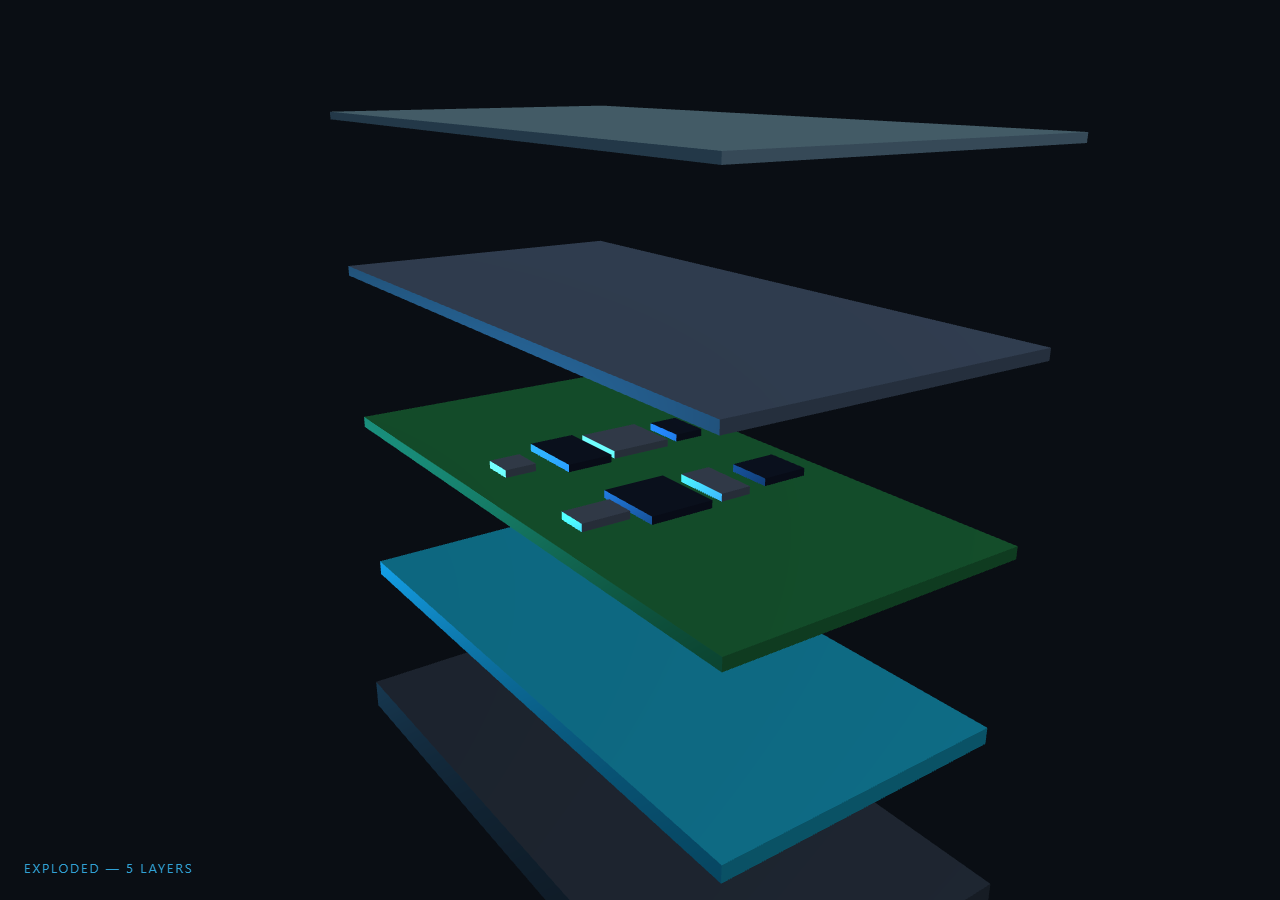
The Three.js Scroll Exploded Product View snippet builds a stylized phone from five stacked slabs — frame, battery, logic board, display, cover glass — and lets scroll peel them apart into a classic engineering exploded view, then orbit the camera 150° around the separated stack. It is the teardown counterpart to the turntable-style product stages snippet: instead of rotating a finished object through poses, scroll deconstructs it.
A device from slabs, not a downloaded model
Loading a real GLTF phone model would tie the snippet to an asset URL and a loader. Instead each layer is one BoxGeometry slab with MeshStandardMaterial tuned per layer — matte dark aluminium for the frame, teal for the battery, PCB green for the board, and a 35%-opacity low-roughness slab for the cover glass, whose transparency lets the display show through when assembled. Eight small chip boxes are parented directly to the logic-board mesh, so they explode with their parent automatically — a reminder that Three.js scene-graph parenting is the cheapest way to move sub-parts in lockstep.
Uneven explode offsets read as engineering
Each layer stores both an assembled Y and an exploded ey target, and the exploded spacings are deliberately uneven (−6.5, −2.6, 1.2, 4.8, 8.2). Evenly fanned layers look like a deck of cards; real exploded diagrams give heavy structural parts more separation than thin films. Storing explicit per-layer targets rather than computing index × spacing is what makes that art direction possible.
Top-down peel via per-layer progress offsets
Rather than all five layers separating simultaneously, each layer's local progress is the global explode value offset by (layerCount − 1 − index) × 0.08 — so the cover glass lifts first, then the display, and the frame drops away last. It is the same hand-rolled reversible stagger used in the Rubik's cube assembly: because the offset math is a pure function of one scrubbed value, scrolling up reassembles the device bottom-up in perfect mirror order.
A two-phase scrub: explode, then inspect
The single scrubbed progress splits at 0.55 — the first 55% drives the eased explode, the remainder sweeps the camera 2.6 radians around the exploded stack while pulling slightly closer and higher. Splitting derived phases from one value (rather than chaining two ScrollTriggers) guarantees the handoff cannot drift and the reverse scroll un-orbits before it reassembles, mirroring the phase design in the planet approach.
A label that names the focused layer
The HUD label reads ASSEMBLED at rest and EXPLODED — 5 LAYERS at completion, but mid-scrub it indexes into the layer list by Math.floor(explode × layerCount), naming each component as the peel reaches it: cover glass, display panel, logic board, battery, frame. Deriving the label from the same progress value keeps text and 3D perfectly synchronized with zero event wiring — the approach HTML overlays should always take in scrubbed scenes, and one that pairs naturally with pinned text patterns like scroll pin steps if you want longer annotations beside the canvas.
Build with AI
Build, Understand, Optimize, and Extend It With AI
You do not need to reverse-engineer exploded-diagram choreography. Paste this snippet's HTML, CSS, and JS into an AI assistant like Claude and ask it to explain the per-layer progress offsets behind the top-down peel, why the exploded spacings are uneven, or how the chips inherit the board's motion through parenting. The same assistant can adapt it to your product — regenerating the layers array from a list of your component names and brand colors, adding thin connector lines between separated layers like a technical diagram, pinning HTML annotation cards that fade in as each layer's local progress passes 0.9, or swapping the slabs for a loaded GLTF while keeping the same phase math. Treat the code as a starting point to interrogate and reshape, not a finished artifact.
Prompt to recreate it
Copy this into your AI assistant of choice to build the effect from scratch, or as a jumping-off point for your own variant:
Build a "scroll-driven exploded product view" in plain HTML, CSS, and JavaScript using Three.js and GSAP's ScrollTrigger plugin, all loaded from a CDN (no bundler, no build step).

Requirements:
- A pinned full-viewport section with a canvas, WebGLRenderer, and PerspectiveCamera resized (with aspect) on window resize; ambient light, a key DirectionalLight, and a colored rim light from behind.
- A stylized device from five stacked BoxGeometry slabs inside one Group: aluminium frame, battery, logic board, display panel, and a transparent (opacity ~0.35, low roughness) cover glass. Each layer is an object storing its mesh, assembled y, exploded ey (deliberately UNEVEN spacings like −6.5/−2.6/1.2/4.8/8.2), and a display name.
- Parent ~8 small chip boxes directly to the logic-board mesh so they explode with it via scene-graph inheritance.
- One GSAP tween (ease "none") scrubbing p 0→1 on a ScrollTrigger with pin: true and end ~+=400%.
- Two derived phases: explode = easeInOutCubic(min(1, p/0.55)); orbit = max(0, (p−0.55)/0.45). No second ScrollTrigger.
- Top-down peel: each layer's local progress = clamp((explode − (count−1−i) × 0.08) / 0.7), position.y = lerp(assembled, exploded, local), so the glass lifts first and the frame drops last, and reverse scroll reassembles bottom-up.
- During orbit, sweep the camera ~2.6 radians around the stack, raising it and pulling ~3 units closer, always lookAt the stack center.
- A corner label that reads ASSEMBLED at rest, names the layer at Math.floor(explode × count) mid-peel, and reads EXPLODED — 5 LAYERS at completion.
- Slow clock-driven group rotation and a slight camera bob so the scene idles alive; an intro overlay fading out once p passes 0.03.
- Confirm the whole sequence reverses exactly on scroll up.
Want to tighten it up first? Run this prompt through the AI Prompt Studio to score it across 8 quality dimensions, catch anti-patterns, and tune the wording for Claude, ChatGPT, or Gemini before you paste it in.
Source Code
<section class="exv-stage" id="exvStage">
  <div class="exv-intro"><p>Scroll ↓ to explode the device</p></div>
  <canvas id="exvCanvas"></canvas>
  <div class="exv-label" id="exvLabel">ASSEMBLED</div>
</section>
<section class="exv-bottom"><p>Every layer, one scroll.</p></section>*{box-sizing:border-box;margin:0;padding:0}
html,body{background:#0a0e14;color:#fff;font-family:system-ui,-apple-system,sans-serif}
.exv-bottom{min-height:70vh;display:flex;justify-content:center;align-items:center;color:#7c8ba1;font-size:15px;letter-spacing:.08em;text-transform:uppercase}
.exv-stage{height:100vh;position:relative;overflow:hidden;background:#0a0e14}
.exv-intro{position:absolute;inset:0;display:flex;align-items:center;justify-content:center;text-align:center;padding:24px;pointer-events:none;z-index:5;color:#7c8ba1;font-size:15px;letter-spacing:.08em;text-transform:uppercase;transition:opacity .4s ease}
#exvCanvas{display:block;width:100%;height:100%}
.exv-label{position:absolute;left:24px;bottom:24px;font-size:13px;letter-spacing:.14em;color:#38bdf8;text-transform:uppercase;opacity:.85;transition:color .3s}const canvas = document.getElementById('exvCanvas');
const labelEl = document.getElementById('exvLabel');
const introEl = document.querySelector('.exv-intro');
const renderer = new THREE.WebGLRenderer({ canvas, antialias: true });
renderer.setPixelRatio(Math.min(window.devicePixelRatio, 2));
const scene = new THREE.Scene();
scene.background = new THREE.Color(0x0a0e14);
const camera = new THREE.PerspectiveCamera(45, 1, 0.1, 200);
scene.add(new THREE.AmbientLight(0xffffff, 0.55));
const key = new THREE.DirectionalLight(0xffffff, 1.0);
key.position.set(10, 14, 8);
scene.add(key);
const rim = new THREE.DirectionalLight(0x38bdf8, 0.5);
rim.position.set(-8, -4, -10);
scene.add(rim);
// A stylized phone-like device built from stacked slabs. Each layer stores
// its explode offset — the exploded Y spacing is deliberately uneven so the
// stack reads as engineered, not evenly fanned.
const group = new THREE.Group();
scene.add(group);
function slab(w, h, d, color, opts) {
const mat = new THREE.MeshStandardMaterial(Object.assign({ color, roughness: 0.55, metalness: 0.35 }, opts || {}));
return new THREE.Mesh(new THREE.BoxGeometry(w, d, h), mat);
}
const layers = [
{ m: slab(7, 14, 0.7, 0x1f2733), y: 0, ey: -6.5, name: 'ALUMINIUM FRAME' },
{ m: slab(6.4, 13.4, 0.35, 0x0e7490), y: 0.55, ey: -2.6, name: 'BATTERY CELL' },
{ m: slab(6.6, 13.6, 0.25, 0x14532d), y: 1.0, ey: 1.2, name: 'LOGIC BOARD' },
{ m: slab(6.8, 13.8, 0.22, 0x334155), y: 1.35, ey: 4.8, name: 'DISPLAY PANEL' },
{ m: slab(7, 14, 0.16, 0x94c9e8, { transparent: true, opacity: 0.35, roughness: 0.1, metalness: 0.1 }), y: 1.6, ey: 8.2, name: 'COVER GLASS' },
];
layers.forEach((l) => { l.m.position.y = l.y; group.add(l.m); });
// Small chips on the logic board so the middle layer has visual interest
// when isolated during the explode.
const chips = [];
for (let i = 0; i < 8; i++) {
const chip = new THREE.Mesh(
new THREE.BoxGeometry(0.7 + (i % 3) * 0.35, 0.18, 0.7 + ((i * 7) % 4) * 0.3),
new THREE.MeshStandardMaterial({ color: i % 2 ? 0x0f172a : 0x475569, roughness: 0.4, metalness: 0.5 })
);
chip.position.set(((i % 4) - 1.5) * 1.4, 0.2, (Math.floor(i / 4) - 0.5) * 3.2);
layers[2].m.add(chip);
chips.push(chip);
}
gsap.registerPlugin(ScrollTrigger);
const ex = { p: 0 };
gsap.to(ex, {
p: 1,
ease: 'none',
scrollTrigger: { trigger: '#exvStage', start: 'top top', end: '+=400%', scrub: 0.6, pin: true },
});
function resize() {
const w = canvas.clientWidth, h = canvas.clientHeight;
renderer.setSize(w, h, false);
camera.aspect = w / h;
camera.updateProjectionMatrix();
}
const clock = new THREE.Clock();
function easeInOut(x) { return x < 0.5 ? 4 * x * x * x : 1 - Math.pow(-2 * x + 2, 3) / 2; }
function animate() {
requestAnimationFrame(animate);
const t = clock.getElapsedTime();
const p = ex.p;
if (introEl) introEl.style.opacity = p > 0.03 ? '0' : '1';
// Phase 1 (0–0.55): explode the stack. Phase 2 (0.55–1): orbit the camera
// 150° around the exploded assembly for inspection.
const explode = easeInOut(Math.min(1, p / 0.55));
const orbit = Math.max(0, (p - 0.55) / 0.45);
layers.forEach((l, i) => {
// Each layer starts moving slightly after the one above it, so the
// stack peels top-down rather than jumping apart at once.
const local = Math.min(1, Math.max(0, (explode - (layers.length - 1 - i) * 0.08) / 0.7));
l.m.position.y = l.y + (l.ey - l.y) * local;
l.m.rotation.y = Math.sin(t * 0.4 + i) * 0.015 * local;
});
// The label tracks which layer sits nearest the view center mid-explode.
const focusIdx = Math.min(layers.length - 1, Math.floor(explode * layers.length));
labelEl.textContent = explode < 0.02 ? 'ASSEMBLED' : (explode > 0.97 ? 'EXPLODED — ' + layers.length + ' LAYERS' : layers[focusIdx].name);
const ang = -0.5 + orbit * 2.6;
const radius = 24 - explode * 3;
camera.position.set(Math.sin(ang) * radius, 7 + explode * 2 + Math.sin(t * 0.3) * 0.4, Math.cos(ang) * radius);
camera.lookAt(0, 1 + explode * 0.8, 0);
group.rotation.y = t * 0.05;
renderer.render(scene, camera);
}
resize();
window.addEventListener('resize', resize);
animate();Step by step
How to Use
- 1Load the three CDN scriptsAdd three.min.js, gsap.min.js, and ScrollTrigger.min.js in that order before the snippet JS.
- 2Paste HTML, CSS, and JSA pinned assembled device floats with a slow idle rotation, the label reading ASSEMBLED.
- 3Scroll to explodeLayers peel top-down — glass first, frame last — with the label naming each component as the peel reaches it.
- 4Keep scrolling to inspectPast 55% the camera orbits 150° around the exploded stack, rising and closing in slightly.
- 5Scroll back upThe orbit unwinds, then layers reassemble bottom-up in exact mirror order — the stagger is a pure function of the scrub.
- 6Make it your productEdit the layers array: each entry is one slab with assembled y, exploded ey, color, and name. Add or remove layers freely — the peel offsets adapt.
Real-world uses
Common Use Cases
Got questions?
Frequently Asked Questions
A GLTF model needs a loader script, an asset URL, and a network fetch — three external dependencies that break the copy-paste promise. Five BoxGeometry slabs with tuned MeshStandardMaterial values (roughness, metalness, opacity) read convincingly as frame, battery, board, display, and glass at presentation distance, and the layers array makes swapping in your own layer names and colors a one-line-per-layer edit.
Each layer's local progress is the global explode value minus (layerCount − 1 − index) × 0.08, clamped to 0–1. The top layer (highest index) gets zero offset so it moves first; the frame gets the largest offset and moves last. Because this is pure arithmetic on one scrubbed value rather than fired tweens, reverse scrolling reassembles bottom-up automatically.
Parenting them with layers[2].m.add(chip) puts the chips in the board's local coordinate space, so when the explode moves the board, the chips ride along with zero extra bookkeeping. The alternative — tracking each chip's world position and offsetting it by the board's displacement every frame — is more code and more chances to drift. Scene-graph parenting is the idiomatic Three.js answer to "these parts move together."
Two pinned ScrollTriggers on the same section need carefully coordinated start/end values, and any drift makes the orbit begin before the explode finishes. Deriving explode = p / 0.55 and orbit = (p − 0.55) / 0.45 from one scrubbed value makes the handoff exact by construction, and guarantees reverse scroll un-orbits before reassembling.
Yes. Export with the JSX, Vue, Angular, or Tailwind buttons. Create the layers array and ScrollTrigger inside a mount effect against a canvas ref; drive the label from a ref rather than state to avoid re-rendering on every frame. On cleanup, kill the ScrollTrigger, dispose all slab and chip geometries/materials, and call renderer.dispose() so the pin and WebGL context are released.