Learn Coding Visually
Learn to code with interactive, live-preview playgrounds — HTML, CSS, JavaScript, React & more.
 HTML Playground42 lessons · Click-based · Live preview
 CSS PlaygroundLearn CSS with a live editor
 JavaScript Playground60 lessons · DOM · Async · Canvas
 React PlaygroundLearn React with a live code editor
 GSAP PlaygroundLearn GSAP animation interactively
 SVG Playground44 lessons · shapes · paths · animation
 SCSS Playground45 lessons · Sass modules · tokens
 Tailwind PlaygroundLearn Tailwind CSS with a live editor
 Bootstrap 5 Playground50 lessons · live preview
Three.js Scroll Planet Approach — GSAP Orbit Arrival
Three.js Scroll Planet Approach · Scroll · Plain HTML, CSS & JS · Live preview
What's included
Features
About this UI Snippet
How to Build a Scroll-Driven Planet Approach With Three.js and GSAP
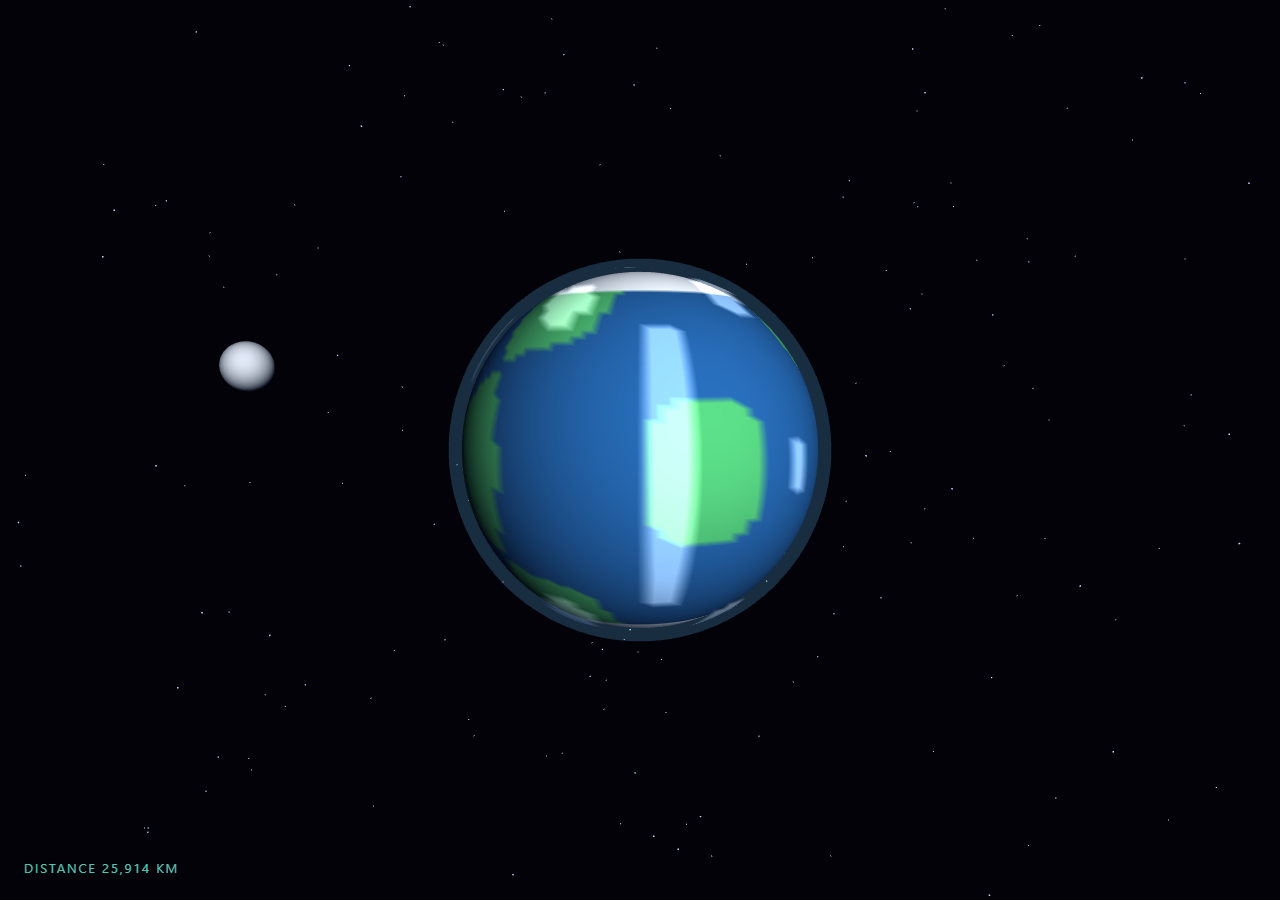
The Three.js Scroll Planet Approach snippet flies the camera from deep space into a close orbit around a procedurally colored planet, with GSAP's ScrollTrigger scrubbing a single 0–1 progress value that every other quantity — camera distance, swing angle, atmosphere glow, and a live distance HUD — is derived from each frame. It is the "arrival" counterpart to the starfield warp: instead of racing past stars forever, the scroll ends in a stable orbit around a destination.
A textureless planet painted per-vertex
The planet needs continents, oceans, and polar ice, but downloading an equirectangular texture would make the snippet depend on an external image. Instead, the sphere's vertices are colored directly: each vertex normal is fed into a cheap trigonometric noise expression (sin/cos products at different frequencies), and the result thresholds into land green or ocean blue, with anything above 0.86 on the Y axis painted ice white. Because MeshLambertMaterial supports vertexColors, the GPU interpolates smoothly between vertices and the 96-segment sphere reads as soft-edged continents with zero network requests.
Atmosphere and clouds without shaders
The atmosphere rim is the classic budget fresnel trick: a second sphere 7% larger than the planet rendered with side: THREE.BackSide, so only its far hemisphere's inside faces draw, producing a halo that hugs the limb. Its opacity is tied to scroll progress — barely visible from deep space, glowing at 0.38 opacity once you arrive — which sells the sensation of entering the atmosphere's optical thickness. Clouds are a third shell using the same vertex-color trick but with AdditiveBlending and depthWrite: false, rotating slightly faster than the surface so the planet feels alive even when the user stops scrolling.
Distance easing shaped for a braking burn
Mapping scroll linearly to distance would make the final moments feel abrupt — most of the planet's apparent growth happens in the last few units of approach. The snippet instead applies 1 - Math.pow(1 - p, 2.2) to the scrubbed progress, so distance closes quickly while the planet is small and flattens out near arrival, mimicking a deceleration burn. This is the same derive-from-one-value philosophy used in the portal gate sequence: ScrollTrigger scrubs one number, and the frame loop shapes it.
A swinging approach vector, not a straight line
Flying straight at a sphere is visually static — the silhouette just grows. The camera's position is computed on a circle whose angle advances 2.1 radians across the scroll, so the approach corkscrews a third of the way around the planet and the day/night terminator sweeps across the visible face during descent. Combined with an inclined moon whose orbital angle also advances with progress, there is always parallax between foreground and background to communicate motion.
Scroll-scrubbed but never frozen
Only the approach itself is scroll-driven. Planet rotation, cloud drift, the moon's base orbit, and a subtle sinusoidal camera bob all run off THREE.Clock elapsed time, so the scene keeps breathing when scrolling stops — the same split between scrubbed primary motion and clock-driven secondary motion used in the scroll camera path snippet. Scrolling back up reverses the entire arrival exactly, because nothing is fired one-shot; every visual state is a pure function of the current progress value and the clock.
Build with AI
Build, Understand, Optimize, and Extend It With AI
You do not need to reverse-engineer how a planet gets continents without textures or why the approach feels like a braking burn. Paste this snippet's HTML, CSS, and JS into an AI assistant like Claude and ask it to explain the vertex-color noise thresholding, the BackSide atmosphere trick, or why the distance easing is applied in the frame loop rather than on the tween. The same assistant can extend the scene for you — adding a ring system, city lights on the night side by brightening vertices facing away from the sun, a second flyby moon, or an entry-glow flash when progress crosses 0.9. It can also restyle the planet to match a brand palette by swapping the three THREE.Color values and the noise thresholds. Treat the code as a starting point to interrogate and reshape, not a finished artifact.
Prompt to recreate it
Copy this into your AI assistant of choice to build the effect from scratch, or as a jumping-off point for your own variant:
Build a "scroll-scrubbed planet approach" in plain HTML, CSS, and JavaScript using Three.js and GSAP's ScrollTrigger plugin, all loaded from a CDN (no bundler, no build step).

Requirements:
- A pinned full-viewport section with a canvas, WebGLRenderer, and PerspectiveCamera resized (including aspect) on window resize.
- A planet built from SphereGeometry (~96 segments) colored per-vertex via a color BufferAttribute: feed each vertex normal into a sum of sin/cos products, threshold the result into land/ocean colors, and paint vertices with |y| above ~0.86 as polar ice. Use MeshLambertMaterial with vertexColors: true and a DirectionalLight as the sun.
- An atmosphere rim from a sphere ~7% larger rendered with side: THREE.BackSide and a transparent MeshBasicMaterial whose opacity rises with scroll progress.
- A cloud shell: a third sphere slightly above the surface, vertex-colored white/black by a different noise expression, with AdditiveBlending and depthWrite: false, rotating slightly faster than the planet.
- A small moon on an inclined orbit whose angle advances from both clock time and scroll progress, plus a ~1200-point starfield distributed on a spherical shell.
- One GSAP tween with ease "none" scrubbing a plain progress value 0→1 on a ScrollTrigger (pin: true, start top top, end around +=450%, scrub ~0.6).
- In requestAnimationFrame: derive camera distance from progress through a braking curve like 140 − 122 × (1 − (1 − p)^2.2), advance the camera's orbital angle ~2.1 radians across the scroll so the terminator sweeps into view, add a small clock-driven vertical bob, and call camera.lookAt(planet).
- Derive a live "DISTANCE n KM" HUD from the same distance value, and fade out an intro overlay once progress passes ~0.03.
- Confirm scrolling back up reverses the entire arrival exactly — every visual state must be a pure function of the scrubbed progress and the clock, nothing fired one-shot.
Want to tighten it up first? Run this prompt through the AI Prompt Studio to score it across 8 quality dimensions, catch anti-patterns, and tune the wording for Claude, ChatGPT, or Gemini before you paste it in.
Source Code
<section class="pla-stage" id="plaStage">
  <div class="pla-intro"><p>Scroll ↓ to approach the planet</p></div>
  <canvas id="plaCanvas"></canvas>
  <div class="pla-hud">DISTANCE <span id="plaDist">98,000</span> KM</div>
</section>
<section class="pla-bottom"><p>Orbit established.</p></section>*{box-sizing:border-box;margin:0;padding:0}
html,body{background:#020208;color:#fff;font-family:system-ui,-apple-system,sans-serif}
.pla-bottom{min-height:70vh;display:flex;justify-content:center;align-items:center;color:#7d8fc4;font-size:15px;letter-spacing:.08em;text-transform:uppercase}
.pla-stage{height:100vh;position:relative;overflow:hidden;background:#020208}
.pla-intro{position:absolute;inset:0;display:flex;align-items:center;justify-content:center;text-align:center;padding:24px;pointer-events:none;z-index:5;color:#7d8fc4;font-size:15px;letter-spacing:.08em;text-transform:uppercase;transition:opacity .4s ease}
#plaCanvas{display:block;width:100%;height:100%}
.pla-hud{position:absolute;left:24px;bottom:24px;font-variant-numeric:tabular-nums;font-size:13px;letter-spacing:.14em;color:#5eead4;text-transform:uppercase;opacity:.85}const canvas = document.getElementById('plaCanvas');
const distEl = document.getElementById('plaDist');
const introEl = document.querySelector('.pla-intro');
const renderer = new THREE.WebGLRenderer({ canvas, antialias: true });
renderer.setPixelRatio(Math.min(window.devicePixelRatio, 2));
const scene = new THREE.Scene();
scene.background = new THREE.Color(0x020208);
const camera = new THREE.PerspectiveCamera(60, 1, 0.1, 600);
const sun = new THREE.DirectionalLight(0xfff4e0, 1.4);
sun.position.set(60, 20, 40);
scene.add(sun, new THREE.AmbientLight(0x223355, 0.5));
// The planet surface is vertex-colored noise on a sphere — continents and
// oceans painted per-vertex so no texture download is needed.
const planetGeo = new THREE.SphereGeometry(10, 96, 96);
const pos = planetGeo.attributes.position;
const colors = new Float32Array(pos.count * 3);
const ocean = new THREE.Color(0x1c4f8a), land = new THREE.Color(0x3f9d63), ice = new THREE.Color(0xdfeaf5);
const v = new THREE.Vector3();
for (let i = 0; i < pos.count; i++) {
v.fromBufferAttribute(pos, i).normalize();
const n = Math.sin(v.x * 5.1) * Math.cos(v.y * 4.3) + Math.sin(v.z * 6.7 + v.x * 2.2) * 0.6;
let c = n > 0.35 ? land : ocean;
if (Math.abs(v.y) > 0.86) c = ice;
colors[i * 3] = c.r; colors[i * 3 + 1] = c.g; colors[i * 3 + 2] = c.b;
}
planetGeo.setAttribute('color', new THREE.BufferAttribute(colors, 3));
const planet = new THREE.Mesh(planetGeo, new THREE.MeshLambertMaterial({ vertexColors: true }));
scene.add(planet);
// Atmosphere rim: a slightly larger BackSide sphere whose opacity rises as
// the camera gets close, standing in for a fresnel shader.
const atmo = new THREE.Mesh(
new THREE.SphereGeometry(10.7, 64, 64),
new THREE.MeshBasicMaterial({ color: 0x66bfff, transparent: true, opacity: 0.12, side: THREE.BackSide })
);
scene.add(atmo);
// Cloud shell rotating slightly faster than the surface.
const cloudGeo = new THREE.SphereGeometry(10.25, 64, 64);
const cpos = cloudGeo.attributes.position;
const calpha = new Float32Array(cpos.count * 3);
const white = new THREE.Color(0xffffff), none = new THREE.Color(0x000000);
for (let i = 0; i < cpos.count; i++) {
v.fromBufferAttribute(cpos, i).normalize();
const n = Math.sin(v.x * 8.3 + 2) * Math.cos(v.z * 7.1) > 0.55 ? white : none;
calpha[i * 3] = n.r; calpha[i * 3 + 1] = n.g; calpha[i * 3 + 2] = n.b;
}
cloudGeo.setAttribute('color', new THREE.BufferAttribute(calpha, 3));
const clouds = new THREE.Mesh(cloudGeo, new THREE.MeshLambertMaterial({
vertexColors: true, transparent: true, opacity: 0.45, blending: THREE.AdditiveBlending, depthWrite: false,
}));
scene.add(clouds);
// A small moon on an inclined orbit gives the approach a moving landmark.
const moon = new THREE.Mesh(new THREE.SphereGeometry(1.4, 32, 32), new THREE.MeshLambertMaterial({ color: 0x9aa3b2 }));
scene.add(moon);
const starGeo = new THREE.BufferGeometry();
const starPos = new Float32Array(1200 * 3);
for (let i = 0; i < 1200; i++) {
const r = 200 + Math.random() * 300;
const t = Math.random() * Math.PI * 2, p = Math.acos(2 * Math.random() - 1);
starPos[i * 3] = r * Math.sin(p) * Math.cos(t);
starPos[i * 3 + 1] = r * Math.cos(p);
starPos[i * 3 + 2] = r * Math.sin(p) * Math.sin(t);
}
starGeo.setAttribute('position', new THREE.BufferAttribute(starPos, 3));
scene.add(new THREE.Points(starGeo, new THREE.PointsMaterial({ color: 0xcdd6ff, size: 0.7, sizeAttenuation: true })));
gsap.registerPlugin(ScrollTrigger);
// One scrubbed progress value drives the whole approach; distance, swing
// angle, and atmosphere glow are all derived from it each frame.
const flight = { p: 0 };
gsap.to(flight, {
p: 1,
ease: 'none',
scrollTrigger: { trigger: '#plaStage', start: 'top top', end: '+=450%', scrub: 0.6, pin: true },
});
function resize() {
const w = canvas.clientWidth, h = canvas.clientHeight;
renderer.setSize(w, h, false);
camera.aspect = w / h;
camera.updateProjectionMatrix();
}
const clock = new THREE.Clock();
function animate() {
requestAnimationFrame(animate);
const t = clock.getElapsedTime();
const p = flight.p;
if (introEl) introEl.style.opacity = p > 0.03 ? '0' : '1';
// Ease the raw scrub so the final braking into orbit feels gradual:
// distance falls fast early and flattens near arrival.
const dist = 140 - 122 * (1 - Math.pow(1 - p, 2.2));
// The camera swings a third of the way around the planet while closing in,
// so the lit limb rotates into view during the approach.
const ang = -0.4 + p * 2.1;
camera.position.set(Math.sin(ang) * dist, 6 + Math.sin(t * 0.3) * 0.6 + p * -2, Math.cos(ang) * dist);
camera.lookAt(0, 0, 0);
planet.rotation.y = t * 0.03 + p * 1.2;
clouds.rotation.y = t * 0.045 + p * 1.5;
atmo.material.opacity = 0.08 + p * 0.3;
const ma = t * 0.25 + p * 4;
moon.position.set(Math.cos(ma) * 22, Math.sin(ma * 0.9) * 6, Math.sin(ma) * 22);
distEl.textContent = Math.max(400, Math.round((dist - 10) * 750)).toLocaleString();
renderer.render(scene, camera);
}
resize();
window.addEventListener('resize', resize);
animate();Step by step
How to Use
- 1Load the three CDN scriptsAdd three.min.js, gsap.min.js, and ScrollTrigger.min.js in that order before the snippet JS.
- 2Paste HTML, CSS, and JSA pinned deep-space view appears with the planet as a small disc, a drifting moon, and a live DISTANCE HUD in the corner.
- 3Scroll downThe camera closes in along a corkscrew path — the planet grows, the terminator sweeps across its face, and the atmosphere rim brightens.
- 4Watch the final approachThe power-curve easing flattens the last stretch so arrival into orbit feels like a braking burn rather than a sudden stop.
- 5Scroll back upThe whole approach reverses exactly — distance, glow, and HUD all derive from one scrubbed value, so nothing is one-shot.
- 6Recolor the planetChange the ocean, land, and ice THREE.Color values or the noise threshold (0.35) to redraw the continents instantly — no texture needed.
Real-world uses
Common Use Cases
Got questions?
Frequently Asked Questions
Each vertex of the SphereGeometry is colored directly through a color BufferAttribute. The vertex normal is fed into a sum of sin/cos products at different frequencies, and the result is thresholded: above 0.35 paints land green, below paints ocean blue, and any vertex with |y| > 0.86 becomes polar ice. MeshLambertMaterial with vertexColors: true interpolates between vertices, so the 96-segment sphere reads as soft continents with zero network requests.
A second sphere 7% larger than the planet is rendered with side: THREE.BackSide, so only the inside of its far hemisphere draws — visually a rim halo hugging the planet's limb. Its opacity is tied to the scrubbed progress value (0.08 in deep space up to ~0.38 in orbit), which imitates entering the atmosphere's optical thickness without writing GLSL.
The tween stays ease: "none" so one linear 0–1 value is shared by every derived quantity. Applying 1 − (1 − p)^2.2 only to the distance lets the camera brake late while the swing angle and moon advance stay linear — different easings per property from a single scrub, which one eased tween could not provide.
A straight-line approach at a sphere only changes silhouette size, which reads as a zoom rather than travel. Advancing the camera's orbital angle 2.1 radians during the approach sweeps the day/night terminator across the visible face and generates parallax against the moon and starfield, so the motion reads as flight through space.
Yes. Click JSX, Vue, Angular, or Tailwind to export a component. Build the scene inside a mount effect (useEffect / onMounted / ngAfterViewInit) against a canvas ref, and in the cleanup kill the ScrollTrigger instance, dispose the sphere geometries and materials, and call renderer.dispose() so the WebGL context and scroll pin are released on unmount.