Learn Coding Visually
Learn to code with interactive, live-preview playgrounds — HTML, CSS, JavaScript, React & more.
 HTML Playground42 lessons · Click-based · Live preview
 CSS PlaygroundLearn CSS with a live editor
 JavaScript Playground60 lessons · DOM · Async · Canvas
 React PlaygroundLearn React with a live code editor
 GSAP PlaygroundLearn GSAP animation interactively
 SVG Playground44 lessons · shapes · paths · animation
 SCSS Playground45 lessons · Sass modules · tokens
 Tailwind PlaygroundLearn Tailwind CSS with a live editor
 Bootstrap 5 Playground50 lessons · live preview
Three.js Scroll Crystal Bloom — GSAP Gem Cluster Reveal
Three.js Scroll Crystal Bloom · Scroll · Plain HTML, CSS & JS · Live preview
What's included
Features
About this UI Snippet
How to Build a Scroll-Triggered Crystal Bloom With Three.js and GSAP
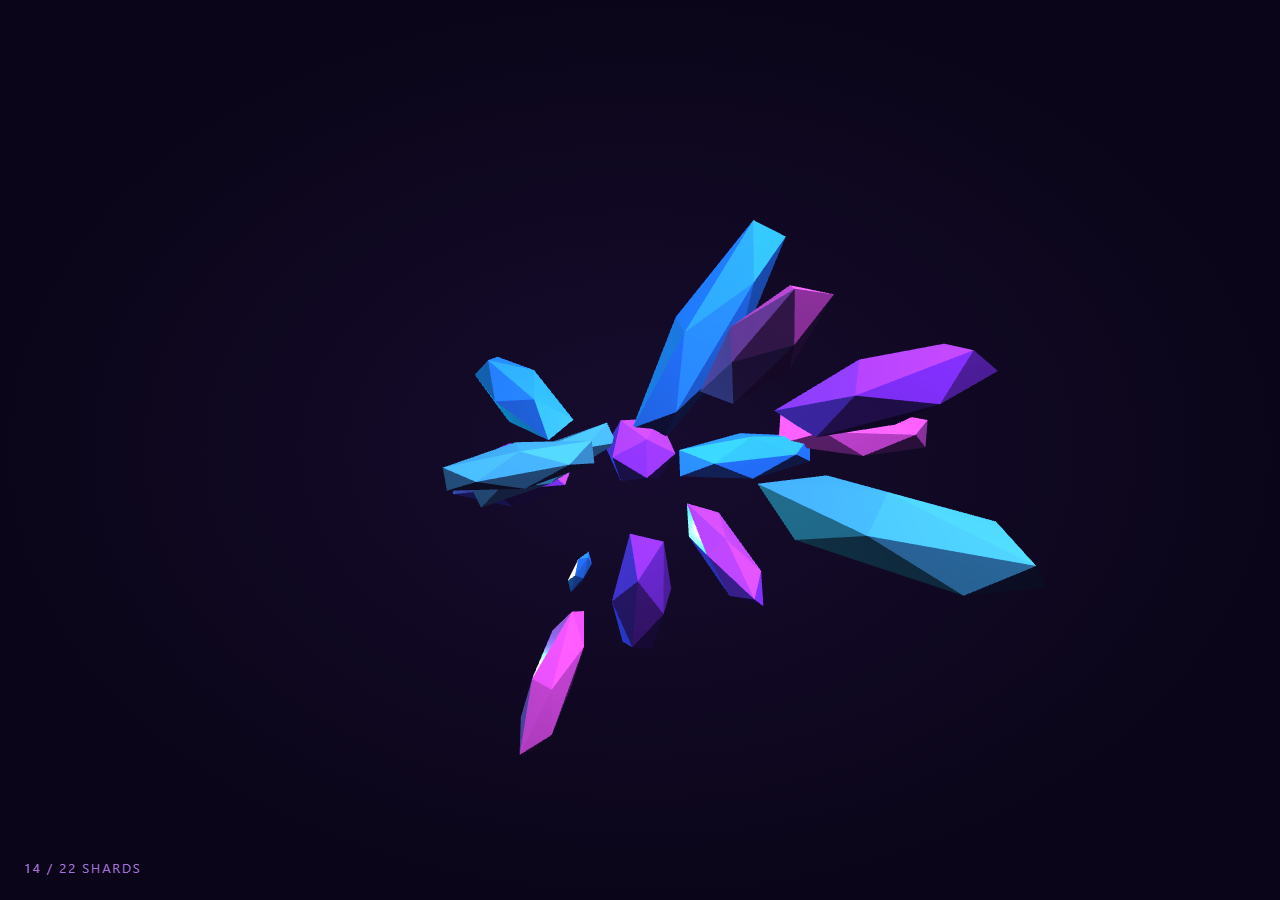
The Three.js Scroll Crystal Bloom snippet grows a cluster of gem-like shards out of a single seed crystal as the visitor scrolls — one small IcosahedronGeometry sits at the core, and roughly twenty elongated shards scale up around it in a staggered sequence, each catching light differently as MeshPhysicalMaterial refracts and reflects across its facets. The whole bloom is driven by one scrubbed number from GSAP's ScrollTrigger, exactly like the scrub pattern used in the scroll tunnel snippet, just applied to per-object scale instead of camera position.
Stretched icosahedra as crystal spikes
Rather than modeling custom gem geometry, each shard starts as a plain THREE.IcosahedronGeometry and gets non-uniformly scaled — squeezed on X and Z, stretched on Y — via geometry.scale(0.55, 1.6, 0.55) before it's ever added to the scene. A low-detail icosahedron already has flat triangular faces that catch light like facets; stretching it along one axis turns that same base shape into something that reads as a crystal spike rather than a round gem, with zero extra vertices to manage. The same trick underlies the faceted look in the crystal cluster snippet, though there it's static rather than scroll-driven.
Staggering the reveal so shards bloom in sequence
The naive approach — scaling every shard from the same scroll value — makes the whole cluster pop into existence at once, which looks like a glitch rather than a bloom. Instead each shard stores its own revealAt offset spread evenly across roughly the first 82% of the scrubbed range, plus a revealSpan window over which it grows. Every frame, the shard's local progress is computed as (t - revealAt) / revealSpan, clamped to 0–1, and run through an easeOutBack curve before being applied to mesh.scale. Because each shard reads the *same* global t but maps it through its *own* offset window, scrolling down triggers a cascading bloom and scrolling back up collapses the shards in the exact reverse order — no separate timeline or per-shard tween objects are needed.
Why easeOutBack instead of linear scale
A linearly scaled shard grows at a constant rate and looks mechanical. easeOutBack briefly overshoots past 1.0 before settling, which reads as the shard "popping" into place with a little spring — much closer to how a real crystal facet catching the light suddenly feels present. The overshoot only needs a few lines of cubic math (no easing library required) since the function is evaluated by hand every frame.
Positioning shards on a sphere with quaternions
Each shard's position comes from a random point on a sphere via spherical coordinates (theta, phi), and its orientation is set with mesh.quaternion.setFromUnitVectors(Vector3(0,1,0), dir) so the shard's stretched long axis points radially outward from the cluster's core along the same direction as its position. This is what makes the cluster look like crystals *growing outward* from a shared center rather than a scattered pile of random shapes — the direction used to place the shard is reused to orient it.
Feature-detecting MeshPhysicalMaterial's transmission
Not every three.js build exposes transmission, clearcoat, and thickness on MeshPhysicalMaterial — those properties were added in a later revision. The snippet checks 'transmission' in new THREE.MeshPhysicalMaterial() at runtime and, if present, configures a genuinely glass-like refractive material; otherwise it falls back to a MeshStandardMaterial with low roughness and high metalness that still looks glossy under the point lights, so the demo degrades gracefully rather than throwing on an older CDN pin.
Two colored point lights instead of one
A single light source on faceted geometry tends to leave half the cluster in flat shadow, hiding the very facets the material is meant to show off. A violet keyLight and a cyan rimLight are placed on opposite sides of the cluster, and the key light's position is animated in a slow circle tied to the same scrubbed t, so as the bloom progresses the highlight sweeps across newly revealed shards rather than sitting static. A HemisphereLight underneath provides just enough ambient fill that unlit facets read as dark gem rather than pure black. For a different lighting mood in the same gallery, compare this dual point-light rig to the single directional setup used in the scroll wave terrain snippet.
A live shard counter tied to the same progress value
The HUD's shard count is not a separate state machine — it increments the same loop that drives scale, counting any shard whose clamped local progress exceeds a small threshold. Deriving the HUD from the identical per-frame calculation as the visuals guarantees the number on screen always matches what's rendered, even mid-scroll-scrub.
Build with AI
Build, Understand, Optimize, and Extend It With AI
You do not need to work out the stagger math by hand. Paste this snippet's HTML, CSS, and JS into an AI assistant like Claude and ask it to explain why each shard stores its own revealAt and revealSpan instead of sharing the global scrubbed value directly, or why easeOutBack is computed inline rather than imported. The same assistant can help you extend the effect — ask it to vary shard geometry (try octahedra or custom BufferGeometry facets), add a shimmer pass where opacity briefly flickers as each shard reveals, or drive the bloom's color palette from a CSS custom property so it matches a page theme. It can also help you profile the transmission material's cost and suggest a cheaper fallback for mobile. Treat the code as a starting point to question and reshape, not a finished artifact.
Prompt to recreate it
Copy this into your AI assistant of choice to build the effect from scratch, or as a jumping-off point for your own variant:
Build a "scroll-triggered crystal bloom" in plain HTML, CSS, and JavaScript using Three.js, GSAP, and GSAP's ScrollTrigger plugin, all loaded from a CDN (no bundler, no build step).

Requirements:
- A pinned section containing a full-size canvas, with a WebGLRenderer and PerspectiveCamera sized to it and updated on window resize including aspect ratio.
- A small seed IcosahedronGeometry mesh at the origin using a refractive-looking material (MeshPhysicalMaterial with transmission/clearcoat if the loaded three.js version supports it, feature-detected at runtime, otherwise a glossy MeshStandardMaterial fallback), tinted a gem color.
- Roughly 20 additional "shard" meshes: elongated icosahedra (non-uniform geometry.scale on one axis) placed at random points on a sphere around the seed using spherical coordinates, each oriented via quaternion so its long axis points outward from the core along its placement direction.
- Each shard stores its own reveal offset and reveal span spread across the scrubbed progress range, so shards bloom in a staggered cascade rather than scaling up simultaneously.
- Register a GSAP tween on a ScrollTrigger targeting the pinned section, with pin: true, start at top top, a numeric scrub, and a multi-hundred-percent end, animating a single plain 0-1 progress value.
- Every animation frame (requestAnimationFrame, independent of the scroll callback), compute each shard's local progress from the global value and its offset/span, run it through an eased curve (e.g. a hand-written easeOutBack), and apply it to mesh.scale, clamping to avoid zero or negative scale.
- Add at least one ambient or hemisphere light plus two colored point lights positioned on opposite sides of the cluster so faceted geometry catches visible highlights, and slowly orbit one light in sync with scroll progress.
- Include a small HUD counting how many shards have crossed a reveal threshold, derived from the same per-frame calculation as the visuals.
- Confirm scrolling back up reverses the bloom in the correct staggered order, since progress is fully scrubbed rather than a one-way timer.
Want to tighten it up first? Run this prompt through the AI Prompt Studio to score it across 8 quality dimensions, catch anti-patterns, and tune the wording for Claude, ChatGPT, or Gemini before you paste it in.
Source Code
<section class="cbl-stage" id="cblStage">
  <div class="cbl-intro-overlay"><p>Scroll ↓ to grow the crystal</p></div>
  <canvas id="cblCanvas"></canvas>
  <div class="cbl-hud"><span id="cblCount">0</span> / <span id="cblTotal">0</span> shards</div>
</section>
<section class="cbl-bottom"><p>The cluster has fully bloomed.</p></section>*{box-sizing:border-box;margin:0;padding:0}
html,body{background:#0a0518;color:#fff;font-family:system-ui,-apple-system,sans-serif}
.cbl-bottom{min-height:70vh;display:flex;justify-content:center;align-items:center;color:#a78bce;font-size:15px;letter-spacing:.08em;text-transform:uppercase}
.cbl-stage{height:100vh;position:relative;overflow:hidden;background:radial-gradient(ellipse at center,#170c2e 0%,#0a0518 75%)}
.cbl-intro-overlay{position:absolute;inset:0;display:flex;align-items:center;justify-content:center;text-align:center;padding:24px;pointer-events:none;z-index:5;color:#a78bce;font-size:15px;letter-spacing:.08em;text-transform:uppercase;transition:opacity .4s ease;}
#cblCanvas{display:block;width:100%;height:100%}
.cbl-hud{position:absolute;left:24px;bottom:24px;font-variant-numeric:tabular-nums;font-size:13px;letter-spacing:.14em;color:#c084fc;text-transform:uppercase;opacity:.85}const canvas = document.getElementById('cblCanvas');
const countEl = document.getElementById('cblCount');
const totalEl = document.getElementById('cblTotal');
const renderer = new THREE.WebGLRenderer({ canvas, antialias: true, alpha: true });
renderer.setPixelRatio(Math.min(window.devicePixelRatio, 2));
const scene = new THREE.Scene();
const camera = new THREE.PerspectiveCamera(50, 1, 0.1, 100);
camera.position.set(0, 1.2, 9);
camera.lookAt(0, 0, 0);
// Lighting: a cool hemisphere fill plus two colored point lights so refractive
// facets pick up distinct highlights from different angles as the group rotates.
scene.add(new THREE.HemisphereLight(0x8b7bd8, 0x0a0518, 0.6));
const keyLight = new THREE.PointLight(0xc084fc, 2.2, 30);
keyLight.position.set(4, 5, 6);
scene.add(keyLight);
const rimLight = new THREE.PointLight(0x22d3ee, 1.4, 30);
rimLight.position.set(-5, -2, -4);
scene.add(rimLight);
const group = new THREE.Group();
scene.add(group);
// Gem-toned materials. transmission/clearcoat only exist on newer physical
// materials, so we feature-detect and fall back to a glossy standard material
// if the loaded three build doesn't support them.
const gemColors = [0x9d4edd, 0x22d3ee, 0x34d399, 0xf472b6];
function makeGemMaterial(color) {
const supportsTransmission = 'transmission' in new THREE.MeshPhysicalMaterial();
if (supportsTransmission) {
return new THREE.MeshPhysicalMaterial({
color,
roughness: 0.15,
metalness: 0,
transmission: 0.55,
thickness: 1.2,
clearcoat: 1,
clearcoatRoughness: 0.1,
ior: 1.6,
});
}
return new THREE.MeshStandardMaterial({ color, roughness: 0.12, metalness: 0.55 });
}
// The seed crystal: a small icosahedron at the cluster's core, always visible
// so the very start of the scroll shows a single tiny gem rather than nothing.
const seed = new THREE.Mesh(new THREE.IcosahedronGeometry(0.35, 0), makeGemMaterial(gemColors[0]));
group.add(seed);
// Shards are elongated icosahedra (scaled along one axis) scattered around the
// seed on a sphere. Each carries its own reveal offset so they bloom in a
// staggered sequence rather than popping in unison.
const SHARD_COUNT = 22;
const shards = [];
for (let i = 0; i < SHARD_COUNT; i++) {
const geo = new THREE.IcosahedronGeometry(0.4 + Math.random() * 0.35, 0);
// Stretch each shard along its local Y so it reads as a crystal spike rather
// than a round gem — icosahedra scaled non-uniformly still look faceted.
geo.scale(0.55, 1.6 + Math.random() * 0.8, 0.55);
const color = gemColors[i % gemColors.length];
const mesh = new THREE.Mesh(geo, makeGemMaterial(color));
const radius = 0.9 + Math.random() * 1.7;
const theta = Math.random() * Math.PI * 2;
const phi = Math.acos(Math.random() * 2 - 1);
const dir = new THREE.Vector3(
Math.sin(phi) * Math.cos(theta),
Math.sin(phi) * Math.sin(theta),
Math.cos(phi)
);
mesh.position.copy(dir.clone().multiplyScalar(radius));
// Point each shard's long axis roughly outward from the core so the cluster
// reads as crystals growing away from a shared center.
mesh.quaternion.setFromUnitVectors(new THREE.Vector3(0, 1, 0), dir);
mesh.rotateZ((Math.random() - 0.5) * 0.6);
mesh.scale.setScalar(0.0001);
shards.push({
mesh,
baseScale: 0.7 + Math.random() * 0.6,
revealAt: (i / SHARD_COUNT) * 0.82, // staggered scroll offset, 0-0.82
revealSpan: 0.14 + Math.random() * 0.08,
spinSpeed: (Math.random() - 0.5) * 0.6,
});
group.add(mesh);
}
totalEl.textContent = SHARD_COUNT;
const introEl = document.querySelector('.cbl-intro-overlay');
gsap.registerPlugin(ScrollTrigger);
// A single scrubbed 0-1 bloom value drives everything: seed growth, per-shard
// reveal, and overall cluster rotation. Nothing here depends on wall-clock time
// except the idle spin, so the bloom itself is perfectly reversible.
const bloom = { t: 0 };
gsap.to(bloom, {
t: 1,
ease: 'none',
scrollTrigger: {
trigger: '#cblStage',
start: 'top top',
end: '+=420%',
scrub: 0.6,
pin: true,
},
});
function resize() {
const w = canvas.clientWidth, h = canvas.clientHeight;
renderer.setSize(w, h, false);
camera.aspect = w / h;
camera.updateProjectionMatrix();
}
function easeOutBack(x) {
const c1 = 1.5, c3 = c1 + 1;
return 1 + c3 * Math.pow(x - 1, 3) + c1 * Math.pow(x - 1, 2);
}
function animate() {
requestAnimationFrame(animate);
if (introEl) introEl.style.opacity = (bloom.t > 0.03) ? '0' : '1';
const t = Math.max(0, Math.min(1, bloom.t));
// Seed grows from tiny to full size over the very first slice of scroll.
const seedT = Math.min(1, t / 0.15);
seed.scale.setScalar(0.3 + easeOutBack(seedT) * 0.7);
let revealed = 0;
shards.forEach((s) => {
const local = (t - s.revealAt) / s.revealSpan;
const clamped = Math.max(0, Math.min(1, local));
if (clamped > 0.02) revealed++;
const eased = easeOutBack(clamped);
s.mesh.scale.setScalar(Math.max(0.0001, eased * s.baseScale));
// Gentle continuous rotation on already-revealed shards so the cluster
// never looks frozen once fully bloomed.
s.mesh.rotation.y += s.spinSpeed * 0.01 * clamped;
});
countEl.textContent = revealed;
// The whole cluster slowly turns so light sweeps across newly revealed
// facets, and it turns a little faster once fully bloomed.
group.rotation.y += 0.0025 + t * 0.002;
group.rotation.x = Math.sin(t * Math.PI) * 0.15;
keyLight.position.x = 4 * Math.cos(t * 2);
keyLight.position.z = 6 * Math.sin(t * 2) + 2;
renderer.render(scene, camera);
}
resize();
window.addEventListener('resize', resize);
animate();Step by step
How to Use
- 1Load all three CDN scriptsAdd three.min.js, gsap.min.js, and ScrollTrigger.min.js from the CDN panel, in that order.
- 2Paste HTML, CSS, and JSA single seed crystal appears in a pinned 3D stage with a shard counter in the corner.
- 3Scroll downThe seed grows first, then roughly twenty gem shards bloom outward from the core in a staggered cascade.
- 4Scroll back upThe cluster collapses shard by shard in reverse order, since every reveal is derived from the scrubbed value.
- 5Retint the gemsEdit the gemColors array to swap amethyst, cyan, emerald, and pink for your own palette.
- 6Retune the bloom pacingChange SHARD_COUNT, revealSpan, or the ScrollTrigger end value (+=420%) for a denser cluster or a slower, longer bloom.
Real-world uses
Common Use Cases
Got questions?
Frequently Asked Questions
Each shard is assigned its own revealAt offset spread across most of the scrubbed range, so the same global t value maps to a different local progress window per shard. Scaling every shard from the identical t value would make the whole cluster pop into existence in one frame, which reads as a glitch; staggering the offsets turns it into a visible cascade that also reverses cleanly when scrolling back up.
The snippet checks for the transmission property at runtime with a feature-detection guard and, if it is missing, falls back to a MeshStandardMaterial with low roughness and high metalness. That still looks glossy and gem-like under the two point lights, so the effect degrades gracefully instead of throwing an error on an older pinned CDN version.
A linear scale-up looks mechanical and constant-speed, which does not read as a crystal snapping into place. easeOutBack briefly overshoots past full scale before settling back, mimicking a small physical spring, and it is cheap enough to compute inline every frame with a short cubic formula rather than pulling in an easing library.
Each shard is a low-poly icosahedron so triangle count stays small, but MeshPhysicalMaterial with transmission is comparatively expensive per-pixel because it samples a transmission render target. On lower-end devices you can drop clearcoat, disable transmission, or merge shards into fewer draw calls if frame rate matters more than refraction fidelity.
Click JSX, Vue, Angular, or Tailwind in the export panel. Create the scene, lights, seed, and shard meshes inside a mount effect against a canvas ref, register the ScrollTrigger tween there, and on cleanup kill the ScrollTrigger instance (or revert a gsap.context) plus call renderer.dispose() so the pinned section and WebGL context do not leak when the component unmounts.