Learn Coding Visually
Learn to code with interactive, live-preview playgrounds — HTML, CSS, JavaScript, React & more.
 HTML Playground42 lessons · Click-based · Live preview
 CSS PlaygroundLearn CSS with a live editor
 JavaScript Playground60 lessons · DOM · Async · Canvas
 React PlaygroundLearn React with a live code editor
 GSAP PlaygroundLearn GSAP animation interactively
 SVG Playground44 lessons · shapes · paths · animation
 SCSS Playground45 lessons · Sass modules · tokens
 Tailwind PlaygroundLearn Tailwind CSS with a live editor
 Bootstrap 5 Playground50 lessons · live preview
Three.js Scroll Shatter & Assemble — Crystal Debris Effect
Three.js Scroll Shatter & Assemble · Scroll · Plain HTML, CSS & JS · Live preview
What's included
Features
About this UI Snippet
How to Build a Scroll-Driven Shatter-to-Assemble Crystal With Three.js
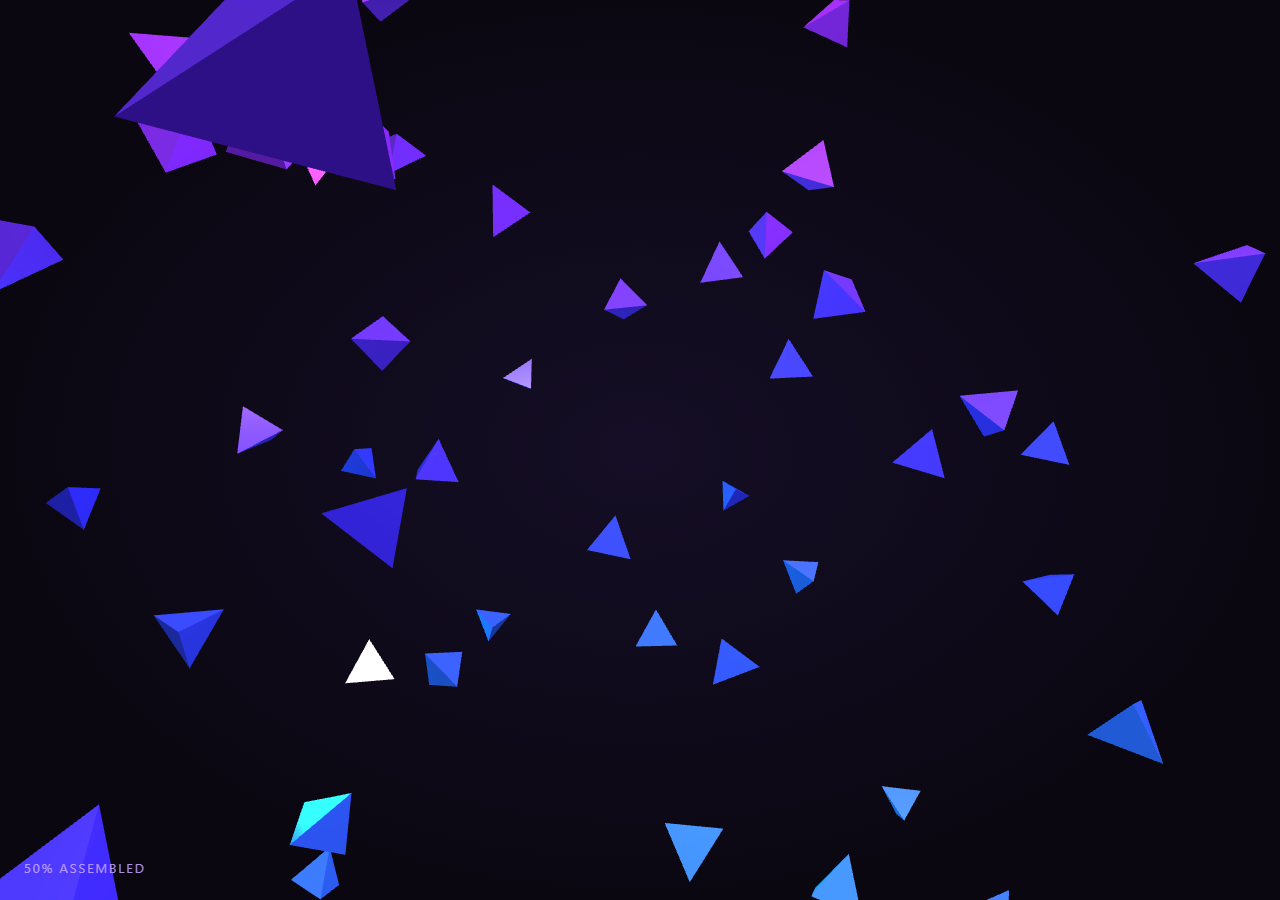
The Three.js Scroll Shatter & Assemble snippet starts with ninety glowing crystal fragments flung apart in space and, as the visitor scrolls through a pinned stage, flies every fragment inward until it locks into an exact position and orientation on the surface of an intact icosahedron. Unlike a flat wireframe effect, this one leans on real MeshStandardMaterial shading and multiple point lights so the debris reads as solid, faceted crystal rather than a silhouette.
Deriving fragment targets from a reference geometry
Rather than hand-placing ninety fragments, the snippet builds a throwaway THREE.IcosahedronGeometry purely as a source of face data — it is never added to the scene. For each triangular face, the three vertex positions are averaged into a face center, and that center (plus its normalized "outward" direction) becomes the target position and target orientation for one small THREE.TetrahedronGeometry fragment. This is the same trick used by the scroll particle assembly snippet — sample a reference shape's geometry data to generate per-piece targets — applied here to solid mesh fragments instead of points.
Position AND rotation both need lerping
A shattered object is not just displaced, it is also tumbled — each piece has a random orientation while airborne and a specific, deliberate orientation once seated on the assembled surface. Interpolating position alone would leave fragments sliding into place while still spinning at some random fixed angle, breaking the illusion entirely. The snippet therefore stores both a startQuat and targetQuat per fragment and calls quaternion.slerpQuaternions(startQuat, targetQuat, eased) every frame alongside position.lerpVectors. Quaternion slerp, not a naive linear interpolation of Euler angles, is required here — lerping Euler angles independently produces gimbal-locked, non-uniform rotation speed and can even take the visually wrong short-path/long-path turn, whereas slerp guarantees the shortest, constant-angular-velocity rotation between the two orientations.
Flinging fragments outward, not randomly
Each fragment's scattered starting position is generated by taking its own target's outward direction vector and multiplying it by a large random distance, then adding a small random offset. Flinging pieces outward *along their own final position's radial direction* — rather than to a fully random point in space — makes the shatter read as an explosion centered on the object, which looks physically plausible, instead of a random cloud that happens to coincide with a crystal shape once settled.
Why MeshStandardMaterial and three lights, not flat/wireframe
Wireframe or MeshBasicMaterial looks are cheap but read as flat outlines with no sense of solidity — fine for a tunnel's glowing walls, wrong for debris meant to look like heavy crystal. This snippet uses MeshStandardMaterial with metalness and roughness tuned for a glassy-metallic look, plus flatShading: true so each tetrahedron's facets catch light distinctly rather than smoothing into a sphere. Because a PBR-ish material only reacts to real lights, the scene adds an ambient fill, a violet PointLight as the key light, a cyan PointLight as a rim light from the opposite side, and a soft white DirectionalLight — without those, the fragments would render as flat black shapes no matter how correct their geometry is.
Height-based hue gradient for cohesion
Each fragment's base color and emissive color are derived from a hue computed off its target's Y position (0.68 + center.y / SHAPE_RADIUS * 0.12), giving the assembled crystal a subtle violet-to-cyan gradient from bottom to top rather than every facet being an identical flat color. This mirrors the gradient technique used for particle color in the galaxy formation snippet, adapted here from a radius-based gradient to a height-based one since the target shape is a solid rather than a disk.
Residual spin that fades with progress
To avoid pieces looking like they simply teleport-slide into their slots, each fragment carries a small constant per-frame spin (frag.spin) that is multiplied by (1 - eased) — meaning fragments tumble energetically while far from home and that tumble smoothly damps to zero exactly as they arrive, adding a sense of momentum bleeding off rather than an abrupt stop. Combined with the whole scene slowly orbiting once eased climbs, similar to the reveal rotation in crystal cluster, the finished crystal gets a satisfying weighty settle instead of a mechanical snap.
Build with AI
Build, Understand, Optimize, and Extend It With AI
You do not need to reverse-engineer how ninety independent fragments assemble into one coherent solid on scroll. Paste this snippet's HTML, CSS, and JS into an AI assistant like Claude and ask it to explain why slerpQuaternions is required for the rotation blend, or how sampling an IcosahedronGeometry's face data generates evenly distributed fragment targets. The same assistant can help you extend it — ask it to swap the target shape for a different polyhedron, add a shockwave ring that pulses outward at full assembly, or trigger a brief camera shake on the frame the crystal fully locks together. It can also help optimize further, for instance converting the ninety separate meshes into a single THREE.InstancedMesh so the draw call count drops to one. Treat the code as a conversation starter, not a finished artifact.
Prompt to recreate it
Copy this into your AI assistant of choice to build the effect from scratch, or as a jumping-off point for your own variant:
Build a "scroll-scrubbed shatter-to-assemble crystal" in plain HTML, CSS, and JavaScript using Three.js, GSAP, and GSAP's ScrollTrigger plugin, all loaded from a CDN (no bundler, no build step).

Requirements:
- A pinned section containing a full-size canvas, with a WebGLRenderer and PerspectiveCamera sized to it and updated on window resize including aspect ratio.
- Add an ambient light plus at least two point lights (or a point light and a directional light) with distinct colors so a MeshStandardMaterial reads with clear highlights and rim lighting instead of appearing flat black.
- Build a reference THREE.IcosahedronGeometry (or similar polyhedron) that is never added to the scene, purely to source per-face center positions and outward normal directions.
- For roughly 80-100 fragments, create a small THREE.TetrahedronGeometry mesh per fragment with MeshStandardMaterial (metalness, roughness, flatShading: true, and a color/emissive pair derived from a gradient across the fragment's position).
- For each fragment compute a target position/quaternion sitting on the reference shape's surface (oriented to face outward) and a scattered start position/quaternion (flung outward along that same radial direction to a random distance, with a fully randomized starting rotation).
- Register a GSAP tween on a ScrollTrigger targeting the pinned section, with pin: true, start at top top, a numeric scrub, and a multi-hundred-percent end, animating a single plain progress value from 0 to 1 with linear easing.
- Every animation frame (requestAnimationFrame, independent of the scroll callback), apply smoothstep easing to the scrubbed progress, then for every fragment lerp its position with Vector3.lerpVectors and slerp its rotation with Quaternion.slerpQuaternions between start and target by that eased value.
- Add a small per-fragment residual spin that is scaled by (1 - easedProgress) so tumbling fades out exactly as each piece arrives at its target.
- Slowly rotate the whole assembled group and ease the camera slightly closer once progress is high, for a satisfying final reveal.
- Confirm scrolling back up reverses the entire assembly into a shatter smoothly, since every fragment lerps/slerps between two fixed, precomputed transforms.
Want to tighten it up first? Run this prompt through the AI Prompt Studio to score it across 8 quality dimensions, catch anti-patterns, and tune the wording for Claude, ChatGPT, or Gemini before you paste it in.
Step by step
How to Use
- 1Load all three CDN scriptsAdd three.min.js, gsap.min.js, and ScrollTrigger.min.js from the CDN panel, in that order.
- 2Paste HTML, CSS, and JSNinety scattered crystal fragments appear, lit by point lights, inside a pinned 3D stage with a live "% assembled" read-out.
- 3Scroll downFragments fly inward, their tumble damping out as position and rotation both lerp into an intact glowing icosahedron.
- 4Scroll back upThe crystal shatters back apart exactly in reverse, since every fragment lerps between two fixed start/target transforms.
- 5Retune the lookAdjust FRAGMENTS for a coarser or finer shatter, or SHAPE_RADIUS to resize the assembled crystal.
- 6Adjust the pacingChange the ScrollTrigger end value (+=450%) for a slower dramatic assembly or a quicker snap-together.
Real-world uses
Common Use Cases
Got questions?
Frequently Asked Questions
A real shattered object tumbles while airborne and settles into a specific orientation once seated. If only position were lerped, every fragment would slide smoothly to its slot while still spinning at whatever random angle it started at, which breaks the illusion of a piece locking into place. Interpolating rotation via slerpQuaternions alongside position lerp means both translation and orientation resolve together.
Lerping Euler angle components independently can produce gimbal lock, uneven rotation speed, and sometimes rotates the long way around instead of the shortest path. THREE.Quaternion.slerpQuaternions interpolates along the shortest arc on the rotation sphere at constant angular velocity, which is the mathematically correct way to blend between two 3D orientations.
Manually authoring ninety fragment positions and orientations that plausibly cover a polyhedron's surface would be tedious and error-prone. Building a reference IcosahedronGeometry (never added to the scene) and reading its triangular face centers and normals gives evenly distributed, geometrically correct target transforms for free, keyed off THREE's own subdivision.
MeshStandardMaterial implements physically-based shading, so it only produces visible color where light actually reaches the surface — unlike MeshBasicMaterial, which ignores lighting entirely. The ambient light provides a shading floor, the violet PointLight acts as a key light for directional highlights, the cyan PointLight rims the far side so fragments do not go fully black in shadow, and the soft DirectionalLight adds an overall fill, together making the flat-shaded facets read as solid crystal.
Yes. Click JSX for a React component, Vue for a Vue 3 SFC, Angular for a standalone component, or Tailwind for a React + Tailwind version. Build the fragment meshes, lights, and GSAP ScrollTrigger inside a mount effect keyed to a canvas ref, and on unmount kill the ScrollTrigger instance (or revert a gsap.context), dispose each fragment's geometry and material, and call renderer.dispose() so lights, geometry, and the WebGL context do not leak between route changes.