

Learn Coding Visually
Learn to code with interactive, live-preview playgrounds — HTML, CSS, JavaScript, React & more.
 HTML Playground42 lessons · Click-based · Live preview
 CSS PlaygroundLearn CSS with a live editor
 JavaScript Playground60 lessons · DOM · Async · Canvas
 React PlaygroundLearn React with a live code editor
 GSAP PlaygroundLearn GSAP animation interactively
 SVG Playground44 lessons · shapes · paths · animation
 SCSS Playground45 lessons · Sass modules · tokens
 Tailwind PlaygroundLearn Tailwind CSS with a live editor
 Bootstrap 5 Playground50 lessons · live preview
Three.js Scroll Wave Terrain — GSAP Synthwave Grid
Three.js Scroll Wave Terrain · Scroll · Plain HTML, CSS & JS · Live preview
What's included
Features
About this UI Snippet
How to Build a Scroll-Driven Wave Terrain With Three.js and GSAP
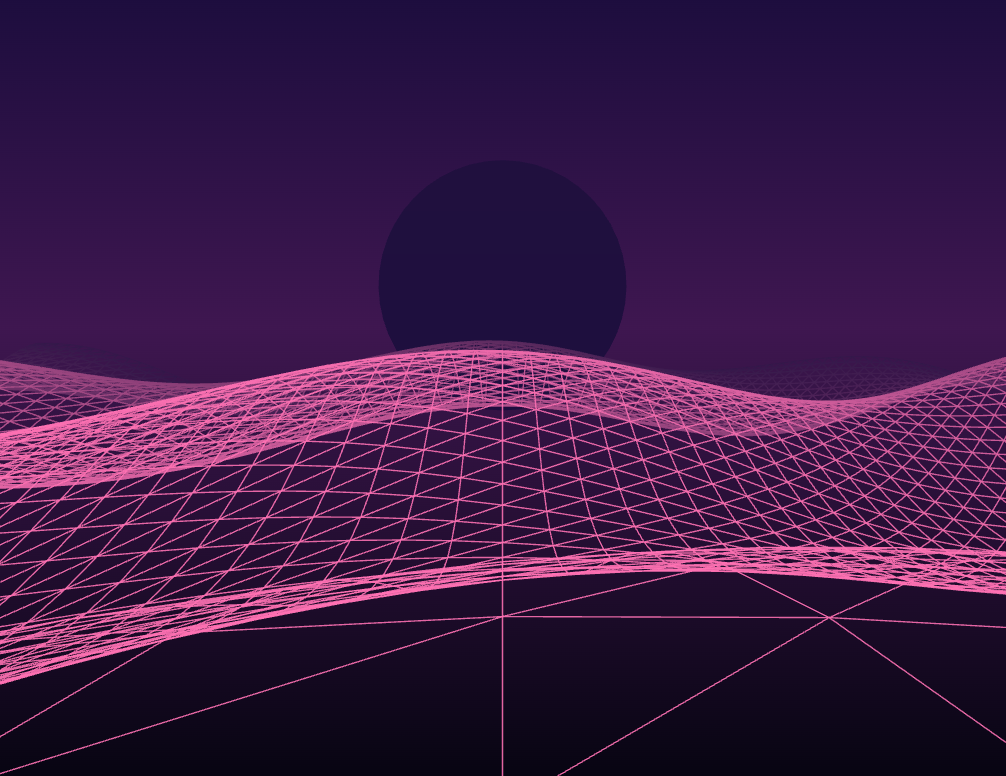
The Three.js Scroll Wave Terrain snippet starts with a perfectly flat wireframe plane and raises it into drifting synthwave hills as the visitor scrolls — the scrollbar controls the wave amplitude directly, not a timer — using core Three.js vertex displacement and GSAP's ScrollTrigger plugin, both loaded from a CDN.
Scroll controls amplitude, time controls flow
The effect cleanly separates two inputs. A scroll-scrubbed value amp runs from 0 to 1 and multiplies the height of every hill, so scrolling literally raises the landscape out of flatness. Meanwhile a real-time clock t shifts the wave pattern forward every frame, so the hills always drift toward the camera regardless of scroll. Pausing the scroll freezes the *height* of the terrain but not its *motion* — the frozen hills keep rolling, which is what makes the scene feel alive rather than stuck.
Original vertex positions are kept, not overwritten
A PlaneGeometry with an 80×80 subdivision is rotated flat onto the ground, and a copy of its starting vertex array is stored once. Every frame the height field is recomputed from those *original* X/Z coordinates rather than from the last frame's displaced positions. This matters: if you displaced the already-displaced vertices, errors would accumulate and the terrain would drift into garbage within seconds. Reading from the pristine base each time keeps the surface mathematically stable no matter how long it runs.
Two overlaid sine waves for organic hills
A single sine wave produces obvious, repetitive corrugations. Layering two waves at different frequencies and axes — one along X, one mixing X and Z — creates interference that reads as natural, non-repeating rolling terrain. Both waves are scaled by the same scroll amplitude and animated by the same time value, so the whole surface rises and drifts as one coherent field.
The camera dips as the hills grow
To keep the composition working across the whole scroll, the camera's height eases downward as amp increases and its look target lifts slightly. When the terrain is flat the camera sits high looking across an empty plane; as the hills rise the camera drops so they fill the frame dramatically. Both camera moves derive from the same scrubbed amplitude, so they reverse perfectly on scroll-up.
Synthwave backdrop with fog and a neon sun
A CircleGeometry sun sits on the horizon and linear Fog fades the far edge of the plane into the purple gradient background, hiding where the finite grid ends and concentrating detail near the camera. The CSS background gradient and the fog color are matched so the WebGL canvas blends seamlessly into the surrounding scroll sections.
scrub: 0.5, pinned, fully reversible
A small numeric scrub smooths the amplitude against noisy input, and pinning for +=400% gives the terrain room to rise gradually. Because the height, camera dip, and look target all derive from one scrubbed value, scrolling back up flattens the landscape exactly. This same vertex-displacement approach powers the particle wave snippet; here it drives a solid grid instead of points. Pair it with a scroll tunnel or starfield warp for a full retro-futurist scroll journey.
Build with AI
Build, Understand, Optimize, and Extend It With AI
You do not need to derive the math for stable animated terrain yourself. Paste this snippet's HTML, CSS, and JS into an AI assistant like Claude and ask it to explain why the code stores the original vertex positions and re-reads them every frame, or why two overlaid sine waves look more natural than one. The same assistant can help you extend it — ask it to color the hills by height for a heat-map look, replace the sine waves with simplex noise for craggier terrain, or add a second, slower-moving ridge layer behind the first. It can also move the displacement into a vertex shader so the CPU stops rewriting the buffer each frame, which matters at higher subdivisions. Treat the code as a starting point for a conversation, not a finished artifact.
Prompt to recreate it
Copy this into your AI assistant of choice to build the effect from scratch, or as a jumping-off point for your own variant:
Build a "scroll-driven wave terrain" in plain HTML, CSS, and JavaScript using Three.js, GSAP, and GSAP's ScrollTrigger plugin, all loaded from a CDN (no bundler, no build step).

Requirements:
- A pinned section containing a full-size canvas with a WebGLRenderer and PerspectiveCamera, sized and updated on window resize including aspect ratio, plus linear Fog whose color matches the CSS background gradient.
- Create a THREE.PlaneGeometry about 40x40 units with an 80x80 subdivision, rotated flat onto the ground, rendered as a wireframe. Store a copy of its starting vertex position array once.
- Add a CircleGeometry "sun" disc on the horizon for a synthwave backdrop.
- Register a GSAP tween on a ScrollTrigger targeting the pinned section, with pin: true, start at top top, a small numeric scrub (~0.5), and an end several hundred percent tall, animating one plain value amp from 0 to 1.
- Every animation frame (requestAnimationFrame), recompute each vertex's height from the STORED original X/Z (never the displaced positions) as the sum of two sine/cosine waves at different frequencies, scaled by amp and animated forward by a real-time clock so the hills drift toward the camera; set needsUpdate.
- Ease the camera's Y downward and lift its look target as amp increases, both derived from amp.
- Confirm scrolling back up flattens the plane exactly, since amp is fully scrubbed rather than a one-way timer, and confirm the hills keep drifting even when scrolling is paused.
Want to tighten it up first? Run this prompt through the AI Prompt Studio to score it across 8 quality dimensions, catch anti-patterns, and tune the wording for Claude, ChatGPT, or Gemini before you paste it in.
Source Code
<section class="wtr-top"><p>Scroll ↓ to raise the landscape</p></section>
<section class="wtr-stage" id="wtrStage">
  <canvas id="wtrCanvas"></canvas>
</section>
<section class="wtr-bottom"><p>The horizon settles.</p></section>*{box-sizing:border-box;margin:0;padding:0}
html,body{background:#060512;color:#fff;font-family:system-ui,-apple-system,sans-serif}
.wtr-top,.wtr-bottom{min-height:70vh;display:flex;justify-content:center;align-items:center;color:#8079a8;font-size:15px;letter-spacing:.08em;text-transform:uppercase}
.wtr-stage{height:100vh;position:relative;overflow:hidden;background:linear-gradient(180deg,#1a1140 0%,#3a1a52 42%,#060512 100%)}
#wtrCanvas{display:block;width:100%;height:100%}const canvas = document.getElementById('wtrCanvas');
const renderer = new THREE.WebGLRenderer({ canvas, antialias: true, alpha: true });
renderer.setPixelRatio(Math.min(window.devicePixelRatio, 2));
const scene = new THREE.Scene();
scene.fog = new THREE.Fog(0x1a1140, 8, 34);
const camera = new THREE.PerspectiveCamera(60, 1, 0.1, 100);
camera.position.set(0, 3.2, 9);
camera.lookAt(0, 0, -6);
// A flat plane laid out on the ground. Its vertices' original X/Z are kept so
// the height field can be recomputed each frame; scroll controls the wave
// amplitude, so the ground rises from perfectly flat into rolling hills.
const SEG = 80;
const geo = new THREE.PlaneGeometry(40, 40, SEG, SEG);
geo.rotateX(-Math.PI / 2);
const base = geo.attributes.position.array.slice();
const mat = new THREE.MeshBasicMaterial({ color: 0xf472b6, wireframe: true, transparent: true, opacity: 0.65 });
const terrain = new THREE.Mesh(geo, mat);
scene.add(terrain);
// A neon sun disc sitting on the horizon for a synthwave backdrop.
const sun = new THREE.Mesh(
new THREE.CircleGeometry(6, 48),
new THREE.MeshBasicMaterial({ color: 0xfbbf24 })
);
sun.position.set(0, 4, -24);
scene.add(sun);
gsap.registerPlugin(ScrollTrigger);
// 'amp' is the wave amplitude driven by scroll; 'flow' scrolls the pattern
// forward over real time so the hills always drift toward the camera.
const state = { amp: 0 };
gsap.to(state, {
amp: 1,
ease: 'none',
scrollTrigger: {
trigger: '#wtrStage',
start: 'top top',
end: '+=400%',
scrub: 0.5,
pin: true,
},
});
const pos = geo.attributes.position;
function resize() {
const w = canvas.clientWidth, h = canvas.clientHeight;
renderer.setSize(w, h, false);
camera.aspect = w / h;
camera.updateProjectionMatrix();
}
function animate() {
requestAnimationFrame(animate);
const t = performance.now() * 0.0005;
const amp = state.amp;
const arr = pos.array;
for (let i = 0; i < arr.length; i += 3) {
const x = base[i], z = base[i + 2];
// Two overlaid sine waves make organic-looking rolling hills; both are
// scaled by the scroll-driven amplitude and animated forward via 't'.
const h1 = Math.sin(x * 0.35 + t * 2) * 0.7;
const h2 = Math.cos(z * 0.5 + x * 0.2 + t * 1.4) * 0.9;
arr[i + 1] = (h1 + h2) * amp;
}
pos.needsUpdate = true;
// As the terrain rises, ease the camera lower so hills fill more of the view.
camera.position.y = 3.2 - amp * 1.4;
camera.lookAt(0, amp * 0.6, -6);
renderer.render(scene, camera);
}
resize();
window.addEventListener('resize', resize);
animate();Step by step
How to Use
- 1Load all three CDN scriptsAdd three.min.js, gsap.min.js, and ScrollTrigger.min.js from the CDN panel, in that order.
- 2Paste HTML, CSS, and JSA flat neon wireframe grid appears under a synthwave sun in a pinned 3D stage.
- 3Scroll downThe grid rises into rolling hills that drift toward the camera as the camera dips lower.
- 4Scroll back upThe hills flatten back to a plane exactly, since the amplitude is fully scrubbed.
- 5Reshape the terrainEdit the two sine-wave frequencies and amplitudes to change the character of the hills.
- 6Tune the pacingAdjust the ScrollTrigger end value (+=400%) for a slower or faster rise of the landscape.
Real-world uses
Common Use Cases
Got questions?
Frequently Asked Questions
Scroll controls one value (amp) that scales hill height, while a real-time clock (t) shifts the wave pattern forward every frame. This lets the terrain keep drifting toward the camera even when scrolling is paused — the height freezes but the motion does not, which keeps the scene feeling alive instead of stuck at a scroll position.
A copy of the plane's starting vertex array is stored once, and each frame the height is computed from those pristine X/Z coordinates. If you displaced the already-displaced vertices instead, small errors would compound and the surface would drift into garbage within seconds. Reading the base every frame keeps the terrain mathematically stable indefinitely.
A single sine wave produces obvious, repetitive corrugations. Overlaying two waves at different frequencies and axes creates interference that reads as natural, non-repeating rolling hills. Both are scaled by the same scroll amplitude and animated by the same clock, so the whole surface rises and drifts as one coherent field.
The camera's height eases downward and its look target lifts as amp increases, both derived from the same scrubbed value. When the plane is flat the camera looks across an empty surface from above; as the hills grow the camera drops so they fill the frame. Because both moves derive from amp, they reverse exactly on scroll-up.
Yes. Click JSX for a React component, Vue for a Vue 3 SFC, Angular for a standalone component, or Tailwind for a React + Tailwind version. Build the plane, store the base vertex array, and set up the GSAP timeline inside a mount effect against a canvas ref, and on cleanup kill the ScrollTrigger and call geometry.dispose() and renderer.dispose() so buffers and the WebGL context are freed on unmount.