More Scroll Snippets
Front-End Coding Playgrounds
Learn to code with interactive, live-preview playgrounds — HTML, CSS, JavaScript, React & more.
 HTML Playground42 lessons · Click-based · Live preview
 CSS PlaygroundLearn CSS with a live editor
 JavaScript Playground60 lessons · DOM · Async · Canvas
 React PlaygroundLearn React with a live code editor
 GSAP PlaygroundLearn GSAP animation interactively
 SCSS Playground45 lessons · Sass modules · tokens
 Tailwind PlaygroundLearn Tailwind CSS with a live editor
 Bootstrap 5 Playground50 lessons · live preview
Three.js Scroll Product Stages — GSAP Scrollytelling
Three.js Scroll Product Stages · Scroll · Plain HTML, CSS & JS · Live preview
What's included
Features
About this UI Snippet
How to Build an Apple-Style Scroll Product Showcase With Three.js and GSAP
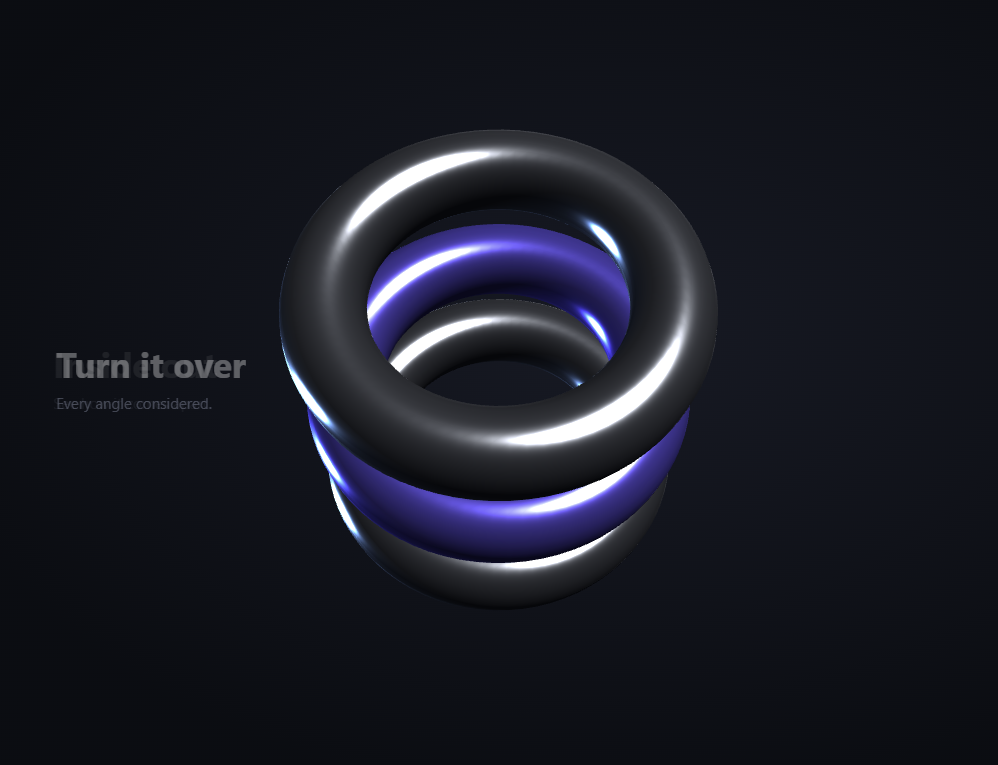
The Three.js Scroll Product Stages snippet turns a scroll into a guided product tour: a 3D object spins, flips, explodes into parts, and reassembles across four stages while synchronized captions cross-fade beside it — every beat driven by scroll position, not a timer — using core Three.js and GSAP's ScrollTrigger plugin, both loaded from a CDN. This is the "scrollytelling" pattern popularized by high-end product pages.
One continuous stage value, not four discrete steps
Instead of snapping between four separate states, the snippet scrubs a single value s continuously from 0 to 3 — literally "which stage are we on, fractionally." A value of 1.5 means the tour is exactly halfway between the second and third beats. Every visual property is then written as a piecewise function of s, so the stages don't jump; they flow into one another, and any scroll position produces a coherent in-between frame.
A segment helper for smooth piecewise motion
The heart of the effect is a small seg(s, from, to, a, b) helper that returns a before its range, b after it, and a smooth-stepped blend in between. The product's Y spin is one segment (stage 0→1), its X flip is another (1→2), and its explode-and-settle is a pair of overlapping segments (2→2.6 out, 2.6→3 back). Composing motion from these labelled ranges keeps each stage's behavior isolated and readable — you can retune when the flip happens without touching the spin.
A product that comes apart
The object is built as three stacked ring segments in a parent group, each remembering its resting Y offset. During the explode segment those offsets are scaled outward so the parts separate, then pulled back as the final stage settles. Because the parts are children of one group, the staged spin and flip still apply to the whole assembly while the explode acts only on the individual parts — two independent transforms layered cleanly.
Captions cross-fade by proximity to their stage
The four HTML captions are positioned over the canvas, and each frame their opacity is set from how close s is to that caption's index, with a small horizontal drift as they fade. Driving the text from the same scrubbed value as the 3D means copy and motion are always in lockstep — the "see how it comes apart" line reaches full opacity exactly as the product explodes, with no separate scroll listeners to fall out of sync.
Idle life on top of staged motion
A gentle continuous yaw and a slow sine wobble are added on top of the staged rotation, so the product never looks frozen when the visitor pauses mid-scroll. The staged transform gives the tour its structure; the idle motion keeps it feeling alive between beats.
scrub: 0.6, pinned, fully reversible
A numeric scrub smooths the scenario against noisy input, and pinning for +=500% gives each of the four stages a comfortable span. Because everything — rotation, explode, and text opacity — derives from the one scrubbed s, scrolling back up rewinds the entire tour precisely. This is the same pinned-scrub foundation as the scroll camera path, here choreographing an object instead of a camera. Pair it with a horizontal gallery of variants or a particle assembly intro.
Build with AI
Build, Understand, Optimize, and Extend It With AI
You do not need to hand-choreograph four product stages by trial and error. Paste this snippet's HTML, CSS, and JS into an AI assistant like Claude and ask it to explain why the tour uses one continuous stage value and how the seg() helper isolates each beat. The same assistant can help you extend it — ask it to load a real GLTF model in place of the ring parts, add a fifth stage that changes the product's color, or trigger a subtle camera dolly-in on the final beat. It can also refactor the choreography into a data-driven list of stages so you can add or reorder beats without editing the animation loop by hand. Treat the code as a starting point for a conversation, not a finished artifact.
Prompt to recreate it
Copy this into your AI assistant of choice to build the effect from scratch, or as a jumping-off point for your own variant:
Build a "scroll-driven product showcase" (scrollytelling) in plain HTML, CSS, and JavaScript using Three.js, GSAP, and GSAP's ScrollTrigger plugin, all loaded from a CDN (no bundler, no build step).

Requirements:
- A pinned section containing a full-size canvas with a WebGLRenderer, PerspectiveCamera, and ambient + directional + rim lighting, sized and updated on window resize including aspect ratio.
- Build a "product" as a parent THREE.Group containing about three separable parts (e.g. stacked torus rings), each storing its resting Y offset in userData; give one part an accent material.
- Overlay four absolutely-positioned HTML captions (heading + paragraph) beside the canvas.
- Register a GSAP tween on a ScrollTrigger targeting the pinned section, with pin: true, start at top top, a numeric scrub (~0.6), and an end several hundred percent tall, animating one plain value s continuously from 0 to 3 (one unit per stage).
- Write a helper seg(s, from, to, a, b) that returns a before its range, b after it, and a smooth-stepped blend within. Every animation frame, use it to compose: a Y spin over stage 0→1, an X flip over 1→2, and an explode-then-settle over 2→2.6 and 2.6→3 that scales each part's stored Y offset outward and back. Add a gentle idle yaw/wobble on top.
- Each frame, set each caption's opacity from how close s is to its index, with a small horizontal drift, so copy and motion stay in lockstep.
- Confirm scrolling back up rewinds the entire tour, since every property derives from the one scrubbed value rather than a timer.
Step by step
How to Use
- 1Load all three CDN scriptsAdd three.min.js, gsap.min.js, and ScrollTrigger.min.js from the CDN panel, in that order.
- 2Paste HTML, CSS, and JSA metallic 3D product appears in a pinned stage with four captions layered beside it.
- 3Scroll downThe product spins, flips, explodes into parts, and reassembles while captions cross-fade in sync.
- 4Scroll back upThe whole tour rewinds exactly, since every beat derives from one scrubbed stage value.
- 5Retime the stagesEdit the seg() ranges to change when the spin, flip, and explode happen without touching each other.
- 6Swap the product and copyReplace the ring parts with your own geometry and edit the four .prs-slide captions to match.
Real-world uses
Common Use Cases
Got questions?
Frequently Asked Questions
Scrubbing a single value s from 0 to 3 means any scroll position maps to a fractional stage, so the beats blend rather than snap. A value of 1.5 is a coherent halfway frame between stages two and three. Writing every visual property as a function of s guarantees smooth in-between frames at any scroll position.
seg(s, from, to, a, b) returns a before its range, b after it, and a smooth-stepped blend within. Each motion — the spin, the flip, the explode — is one or two labelled segments, so the stages stay isolated and readable. You can change when the flip happens by editing its range without affecting the spin.
It is built from three ring parts in a parent group, each storing its resting Y offset. During the explode segment those offsets scale outward to separate the parts, then a following segment pulls them back as the final stage settles. The staged spin and flip apply to the whole group while the explode acts only on the parts, layering two independent transforms.
Each frame, every caption's opacity is computed from how close the scrubbed stage value is to that caption's index, with a small horizontal drift. Because text and 3D read from the same value, the copy for a beat reaches full opacity exactly when that beat plays, with no separate scroll listeners that could drift out of sync.
Yes. Click JSX for a React component, Vue for a Vue 3 SFC, Angular for a standalone component, or Tailwind for a React + Tailwind version. Build the product group and GSAP timeline inside a mount effect against refs, render captions as JSX/template elements you fade via the scrubbed value, and on cleanup kill the ScrollTrigger and call renderer.dispose() so the pin and WebGL context are freed on unmount.