Learn Coding Visually
Learn to code with interactive, live-preview playgrounds — HTML, CSS, JavaScript, React & more.
 HTML Playground42 lessons · Click-based · Live preview
 CSS PlaygroundLearn CSS with a live editor
 JavaScript Playground60 lessons · DOM · Async · Canvas
 React PlaygroundLearn React with a live code editor
 GSAP PlaygroundLearn GSAP animation interactively
 SVG Playground44 lessons · shapes · paths · animation
 SCSS Playground45 lessons · Sass modules · tokens
 Tailwind PlaygroundLearn Tailwind CSS with a live editor
 Bootstrap 5 Playground50 lessons · live preview
Three.js Scroll City Flyover — GSAP Night Skyline Camera
Three.js Scroll City Flyover · Scroll · Plain HTML, CSS & JS · Live preview
What's included
Features
About this UI Snippet
How to Build a Scroll-Driven Night City Flyover With Three.js and GSAP
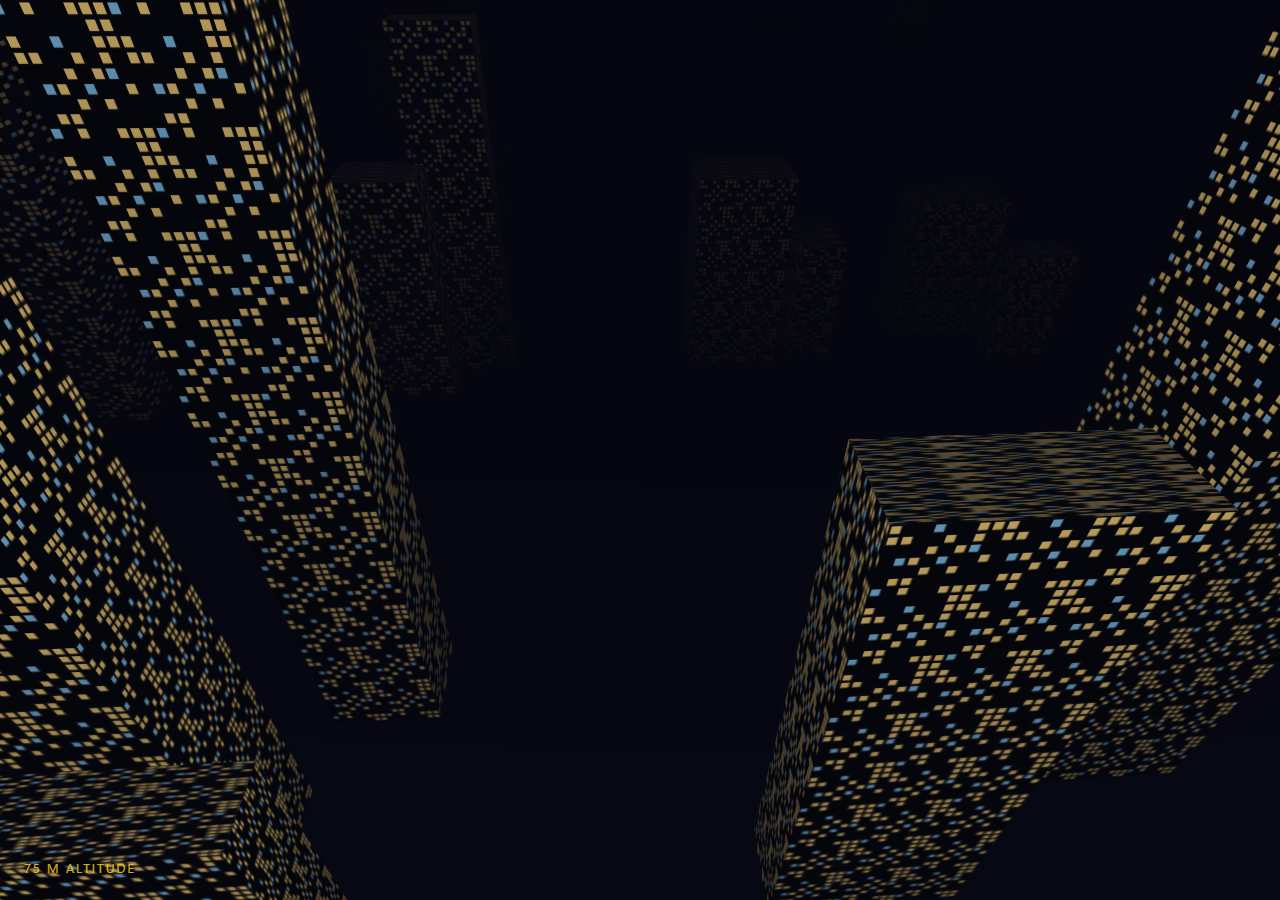
The Three.js Scroll City Flyover snippet takes the visitor from street level up over a low-poly night skyline as they scroll, banking and climbing the whole way, by pairing dozens of instanced-style THREE.BoxGeometry buildings with a single scrubbed progress value driven by GSAP's ScrollTrigger. Unlike the scroll tunnel, which threads a fixed curve, this scene is an open 3D city where the camera's start and end positions are simply two points that get interpolated and reshaped as scroll progress changes.
Buildings as boxes, not models
Every building is a plain THREE.BoxGeometry with randomized width, depth, and height, positioned in loosely staggered "blocks" that step backward along Z. There is no imported 3D model and no GLTF loader — the low-poly aesthetic is a deliberate choice, not a limitation, because flat-shaded boxes read clearly as a skyline silhouette from a distance while staying cheap enough to instantiate two hundred-plus of them without a frame hitch. Twenty-six blocks spaced ninety units apart give the camera a runway long enough that structures are always visible ahead, no matter how far the scroll has progressed.
Windows from a canvas texture, not an image file
Rather than shipping a window sprite as a static asset, the snippet draws one procedurally with the 2D Canvas API: a 128×128 grid of cells, each randomly left dark or filled with a warm or cool lit square, wrapped into a THREE.CanvasTexture with RepeatWrapping. Generating it in code means zero network requests, an easy knob to change the lit-window ratio or color balance, and a texture that tiles seamlessly across buildings of any size by adjusting repeat per mesh. A second, slightly larger box wraps each building body using this texture on an unlit MeshBasicMaterial, so the windows glow independent of scene lighting rather than needing an emissive map baked per building.
Two-mesh buildings instead of a custom shader
Each building is actually two overlapping meshes: an opaque MeshStandardMaterial body that receives the hemisphere and directional "moon" light, and a transparent window shell rendered just outside it. This sidesteps writing a custom shader to mix a lit body color with emissive window squares — two draw calls per building is a simple, debuggable trade that still reads correctly from any camera angle because the shell is only a fraction of a percent larger than the body.
One progress value drives climb, drift, and look target
A single flight.t value scrubs from 0 to 1 across the pinned stage, exactly like the pattern used in the scroll tunnel and scroll camera path snippets. Position is a straight lerpVectors between a low street-level start and a high rooftop-clearing end, but the vertical component is additionally smoothstepped through a separate climb curve so the rise reads as a takeoff arc rather than a diagonal line. A sine-based sideways drift, scaled by that same climb value, adds a gentle bank that only kicks in once the camera has real altitude to bank at.
Fog and background color locked together
FogExp2 uses the identical hex value as scene.background, the same technique as the tunnel snippet, so the far end of the city dissolves into open sky rather than hitting a visible draw-distance wall. This is what makes twenty-six blocks feel like an endless metropolis instead of a finite diorama with an edge.
Light streaks recycle instead of respawn
Sixty points drift past the camera to sell speed at altitude, where the buildings alone cross the frame too slowly to convey motion once the camera is high above the rooftops. Each frame nudges every streak's Z forward by a fixed amount and wraps it back by cityDepth once it passes the camera, so the same sixty-point BufferGeometry never needs particles added or removed — only one small typed-array write per frame. Pair this with a digital grid pulse HUD overlay or a starfield warp intro section for a fuller "descending into the city" scroll sequence.
Build with AI
Build, Understand, Optimize, and Extend It With AI
You do not need to piece together how a whole night skyline flyover works from scratch. Paste this snippet's HTML, CSS, and JS into an AI assistant like Claude and ask it to explain why the window texture is generated on a canvas instead of loaded as an image, or why buildings use two overlapping meshes rather than one shader-driven material. The same assistant can help you extend the scene, for instance adding blinking window lights over time, spawning a helicopter searchlight cone that sweeps as the camera passes, or merging the building bodies into an InstancedMesh for better performance on mobile. It can also help you retune the flight itself, like adding a banking turn around a specific landmark building at a chosen scroll percentage. Treat the code as a working draft to interrogate and reshape, not a finished, untouchable artifact.
Prompt to recreate it
Copy this into your AI assistant of choice to build the effect from scratch, or as a jumping-off point for your own variant:
Build a "scroll-scrubbed night city flyover" in plain HTML, CSS, and JavaScript using Three.js and GSAP's ScrollTrigger plugin, all loaded from a CDN (no bundler, no build step).

Requirements:
- A pinned section containing a full-size canvas, with a WebGLRenderer and PerspectiveCamera sized to it and updated on window resize including aspect ratio.
- Generate a procedural window texture at runtime using the 2D Canvas API (a grid of randomly lit warm/cool squares on a dark background), wrap it in a THREE.CanvasTexture with RepeatWrapping, and reuse it across all buildings.
- Populate a scene with 150-250 THREE.BoxGeometry buildings of randomized width, depth, and height, arranged in staggered blocks stepping backward along the Z axis, each built from two overlapping meshes: an opaque lit body and a transparent unlit window shell using the canvas texture with a per-mesh repeat value.
- Add a large ground plane and a night-sky background color, with THREE.FogExp2 using that identical color so the far end of the city fades into open sky.
- Add a small particle field (THREE.Points) of light streaks that drift past the camera and wrap around using modular arithmetic on their Z position instead of being respawned.
- Register a GSAP tween on a ScrollTrigger targeting the pinned section, with pin: true, start at top top, a numeric scrub around 0.8, and an end several hundred percent tall, animating a single plain value t from 0 to 1.
- Every animation frame (requestAnimationFrame, independent of the scroll callback), lerp camera position between a low street-level start point and a high rooftop-clearing end point using t, but pass a separately smoothstepped version of t through the vertical (Y) component so climbing reads as a takeoff arc, and add a sine-based sideways drift and matching Z-axis roll scaled by that same climb amount.
- Confirm scrolling back up reverses the entire flyover, since t is fully scrubbed rather than a one-way timer.
Want to tighten it up first? Run this prompt through the AI Prompt Studio to score it across 8 quality dimensions, catch anti-patterns, and tune the wording for Claude, ChatGPT, or Gemini before you paste it in.
Source Code
<section class="cty-stage" id="ctyStage">
  <div class="cty-intro-overlay"><p>Scroll ↓ to take off over the city</p></div>
  <canvas id="ctyCanvas"></canvas>
  <div class="cty-hud"><span id="ctyAlt">0</span> m altitude</div>
</section>
<section class="cty-bottom"><p>Cruising above the rooftops.</p></section>*{box-sizing:border-box;margin:0;padding:0}
html,body{background:#05060f;color:#fff;font-family:system-ui,-apple-system,sans-serif}
.cty-bottom{min-height:70vh;display:flex;justify-content:center;align-items:center;color:#7c83a6;font-size:15px;letter-spacing:.08em;text-transform:uppercase}
.cty-stage{height:100vh;position:relative;overflow:hidden;background:#05060f}
.cty-intro-overlay{position:absolute;inset:0;display:flex;align-items:center;justify-content:center;text-align:center;padding:24px;pointer-events:none;z-index:5;color:#7c83a6;font-size:15px;letter-spacing:.08em;text-transform:uppercase;transition:opacity .4s ease;}
#ctyCanvas{display:block;width:100%;height:100%}
.cty-hud{position:absolute;left:24px;bottom:24px;font-variant-numeric:tabular-nums;font-size:13px;letter-spacing:.14em;color:#facc15;text-transform:uppercase;opacity:.85}const canvas = document.getElementById('ctyCanvas');
const altEl = document.getElementById('ctyAlt');
const renderer = new THREE.WebGLRenderer({ canvas, antialias: true, alpha: true });
renderer.setPixelRatio(Math.min(window.devicePixelRatio, 2));
const SKY = 0x05060f;
const scene = new THREE.Scene();
scene.background = new THREE.Color(SKY);
scene.fog = new THREE.FogExp2(SKY, 0.012);
const camera = new THREE.PerspectiveCamera(65, 1, 0.1, 800);
// A tileable canvas texture of lit window squares is far cheaper than an
// image asset and lets every building reuse the same texture while still
// looking individually lit, since UV offset differs per box.
function buildWindowTexture() {
const size = 128;
const c = document.createElement('canvas');
c.width = c.height = size;
const ctx = c.getContext('2d');
ctx.fillStyle = '#05060a';
ctx.fillRect(0, 0, size, size);
const cell = 16;
for (let y = 0; y < size; y += cell) {
for (let x = 0; x < size; x += cell) {
if (Math.random() < 0.55) continue; // dark = unlit window / gap
const warm = Math.random() < 0.7;
ctx.fillStyle = warm ? 'rgba(255,214,120,0.95)' : 'rgba(140,210,255,0.9)';
ctx.fillRect(x + 2, y + 2, cell - 5, cell - 5);
}
}
const tex = new THREE.CanvasTexture(c);
tex.wrapS = tex.wrapT = THREE.RepeatWrapping;
return tex;
}
const windowTex = buildWindowTexture();
// Ground plane, tinted to read as wet asphalt under the fog.
const ground = new THREE.Mesh(
new THREE.PlaneGeometry(4000, 4000),
new THREE.MeshStandardMaterial({ color: 0x0a0b16, roughness: 1 })
);
ground.rotation.x = -Math.PI / 2;
ground.position.y = 0;
scene.add(ground);
scene.add(new THREE.HemisphereLight(0x9fb3ff, 0x0a0a12, 0.6));
const moon = new THREE.DirectionalLight(0xbcd4ff, 0.5);
moon.position.set(-40, 120, -60);
scene.add(moon);
// Buildings are grouped into city "blocks" scattered along Z so the flight
// path always has structures ahead regardless of scroll distance.
const buildings = [];
const bodyMat = new THREE.MeshStandardMaterial({ color: 0x11131f, roughness: 0.85, metalness: 0.1 });
function addBuilding(x, z, w, d, h) {
const body = new THREE.Mesh(new THREE.BoxGeometry(w, h, d), bodyMat);
body.position.set(x, h / 2, z);
scene.add(body);
// A slightly larger emissive shell using the window texture gives the
// lit-window look without per-building unique materials.
const glow = new THREE.Mesh(
new THREE.BoxGeometry(w * 1.002, h * 1.002, d * 1.002),
new THREE.MeshBasicMaterial({ map: windowTex, transparent: true, opacity: 0.9 })
);
glow.position.copy(body.position);
const repX = Math.max(1, Math.round(w / 6));
const repY = Math.max(1, Math.round(h / 6));
glow.material.map = windowTex.clone();
glow.material.map.needsUpdate = true;
glow.material.map.repeat.set(repX, repY);
scene.add(glow);
buildings.push(body);
}
const BLOCK_SPACING = 90;
const BLOCK_COUNT = 26; // long enough runway for the full scroll flight
for (let b = 0; b < BLOCK_COUNT; b++) {
const z = -b * BLOCK_SPACING;
const perBlock = 6 + Math.floor(Math.random() * 4);
for (let i = 0; i < perBlock; i++) {
const side = i % 2 === 0 ? -1 : 1;
const x = side * (18 + Math.random() * 70);
const w = 6 + Math.random() * 12;
const d = 6 + Math.random() * 12;
const h = 12 + Math.random() * 70;
addBuilding(x, z + (Math.random() - 0.5) * 40, w, d, h);
}
}
const cityDepth = BLOCK_COUNT * BLOCK_SPACING;
// A handful of light-streak particles drift past the camera to sell speed
// at altitude, where the buildings alone move too slowly across frame.
const streakCount = 60;
const streakGeo = new THREE.BufferGeometry();
const streakPos = new Float32Array(streakCount * 3);
for (let i = 0; i < streakCount; i++) {
streakPos[i * 3] = (Math.random() - 0.5) * 200;
streakPos[i * 3 + 1] = 10 + Math.random() * 90;
streakPos[i * 3 + 2] = -Math.random() * cityDepth;
}
streakGeo.setAttribute('position', new THREE.BufferAttribute(streakPos, 3));
const streaks = new THREE.Points(streakGeo, new THREE.PointsMaterial({
color: 0xfff6d8, size: 1.6, transparent: true, opacity: 0.8, sizeAttenuation: true,
}));
scene.add(streaks);
const introEl = document.querySelector('.cty-intro-overlay');
gsap.registerPlugin(ScrollTrigger);
// One scrubbed progress value drives the whole flight: low among the
// streets at t=0, high above the rooftops looking down at t=1.
const flight = { t: 0 };
gsap.to(flight, {
t: 1,
ease: 'none',
scrollTrigger: {
trigger: '#ctyStage',
start: 'top top',
end: '+=550%',
scrub: 0.8,
pin: true,
},
});
const startPos = new THREE.Vector3(0, 9, 20);
const endPos = new THREE.Vector3(0, 140, -cityDepth + 60);
const tmpPos = new THREE.Vector3();
const tmpLook = new THREE.Vector3();
function resize() {
const w = canvas.clientWidth, h = canvas.clientHeight;
renderer.setSize(w, h, false);
camera.aspect = w / h;
camera.updateProjectionMatrix();
}
function animate() {
requestAnimationFrame(animate);
if (introEl) introEl.style.opacity = (flight.t > 0.03) ? '0' : '1';
const t = flight.t;
// Ease the height curve separately from the forward travel so the rise
// feels like a takeoff rather than a straight diagonal line.
const climb = t * t * (3 - 2 * t); // smoothstep
tmpPos.lerpVectors(startPos, endPos, t);
tmpPos.y = THREE.MathUtils.lerp(startPos.y, endPos.y, climb);
// A gentle bank: drift sideways on a slow sine as altitude increases.
tmpPos.x += Math.sin(t * Math.PI * 2.4) * 14 * climb;
camera.position.copy(tmpPos);
tmpLook.set(tmpPos.x * 0.3, tmpPos.y - THREE.MathUtils.lerp(4, 60, climb), tmpPos.z - 40);
camera.lookAt(tmpLook);
camera.rotation.z = Math.sin(t * Math.PI * 2.4) * 0.12 * climb; // bank into the drift
const posAttr = streaks.geometry.attributes.position;
for (let i = 0; i < streakCount; i++) {
let z = posAttr.array[i * 3 + 2] + 0.6;
if (z > camera.position.z + 20) z -= cityDepth;
posAttr.array[i * 3 + 2] = z;
}
posAttr.needsUpdate = true;
altEl.textContent = Math.round(tmpPos.y);
renderer.render(scene, camera);
}
resize();
window.addEventListener('resize', resize);
animate();Step by step
How to Use
- 1Load all three CDN scriptsAdd three.min.js, gsap.min.js, and ScrollTrigger.min.js from the CDN panel, in that order, before the snippet JS.
- 2Paste HTML, CSS, and JSA pinned night skyline appears with a live altitude read-out in the bottom-left HUD.
- 3Scroll downThe camera climbs from street level, banking gently as it rises and flies forward over the rooftops.
- 4Scroll back upThe flyover reverses exactly since flight.t is fully scrubbed, not a one-shot timer.
- 5Retune the skylineAdjust BLOCK_COUNT, BLOCK_SPACING, or the width/depth/height random ranges in addBuilding calls to change city density.
- 6Change the flight pathEdit startPos and endPos, or the climb smoothstep curve, to fly lower, higher, or in a different direction.
Real-world uses
Common Use Cases
Got questions?
Frequently Asked Questions
Drawing the window grid with the 2D Canvas API means no network request, no asset licensing to worry about, and an easy code-level knob for lit-window ratio, cell size, and warm/cool color mix. Because the result is a THREE.CanvasTexture with RepeatWrapping, the same texture object tiles cleanly across buildings of wildly different sizes just by adjusting each mesh material's repeat value — an image asset would need careful UV unwrapping per box to avoid stretching.
A single custom material mixing a solid body color with emissive window squares would require either a hand-written shader or a baked texture unique to each building size. Layering a transparent, unlit window shell just outside an opaque lit body achieves the same visual result with two stock materials, keeping the code readable and easy to retune independent of scene lighting.
Position is linearly interpolated between a low start and a high end point, but the vertical component runs through a separate smoothstep curve (climb) so height rises slower at first and levels off near the top, reading as a takeoff arc. That same climb value scales a sine-based sideways drift and a matching camera.rotation.z roll, so banking only appears once the camera actually has altitude to bank at, rather than rolling while still low among the streets.
Flat BoxGeometry meshes are extremely cheap to rasterize and there is no per-frame geometry change, only per-frame camera and particle updates, so the scene holds a steady frame rate on modest hardware. For very large cities, merging the body meshes into a single THREE.InstancedMesh per material would cut draw calls further, the same optimization suggested for the ring meshes in the scroll tunnel snippet.
Yes. Click JSX for a React component, Vue for a Vue 3 SFC, Angular for a standalone component, or Tailwind for a React + Tailwind version. Build the scene, buildings, and GSAP timeline inside a mount effect against a canvas ref, and on cleanup kill the ScrollTrigger instance (or revert a gsap.context), dispose of the CanvasTexture and geometries, and call renderer.dispose() so WebGL resources and the scroll pin are released on unmount.