Source Code
<canvas id="dgpCanvas"></canvas>
<div class="dgp-badge">400 independent blocks</div>*{box-sizing:border-box;margin:0;padding:0}
html,body{width:100%;height:100%;overflow:hidden;background:#02040a}
#dgpCanvas{display:block;width:100%;height:100%}
.dgp-badge{position:fixed;right:18px;top:18px;padding:7px 13px;border-radius:7px;background:rgba(4,8,16,0.7);border:1px solid rgba(74,222,128,0.3);color:#bbf7d0;font:12px ui-monospace,monospace;backdrop-filter:blur(6px)}const canvas = document.getElementById('dgpCanvas');
const renderer = new THREE.WebGLRenderer({ canvas, antialias: true });
renderer.setPixelRatio(Math.min(window.devicePixelRatio, 2));
const scene = new THREE.Scene();
const camera = new THREE.PerspectiveCamera(45, 1, 0.1, 60);
camera.position.set(9, 11, 14);
camera.lookAt(0, 0, 0);
scene.add(new THREE.AmbientLight(0x0f2818, 0.7));
const light = new THREE.DirectionalLight(0x4ade80, 1);
light.position.set(6, 10, 4);
scene.add(light);
// Each block gets its OWN material instance (not a shared one) specifically
// so its opacity can animate independently — a shared material would tie
// every block's fade state to whichever block last changed it.
const GRID = 20;
const SPACING = 0.62;
const geometry = new THREE.BoxGeometry(0.46, 0.46, 0.46);
const blocks = [];
for (let x = 0; x < GRID; x++) {
for (let z = 0; z < GRID; z++) {
const material = new THREE.MeshStandardMaterial({
color: 0x22c55e,
emissive: 0x16a34a,
emissiveIntensity: 0.6,
transparent: true,
opacity: 0,
roughness: 0.5,
});
const mesh = new THREE.Mesh(geometry, material);
mesh.position.set((x - GRID / 2) * SPACING, 0, (z - GRID / 2) * SPACING);
scene.add(mesh);
blocks.push({
mesh,
material,
// Each block runs its own independent timer: it waits, rises and
// fades in, holds, then fades out — entirely decoupled from every
// other block's schedule.
delay: Math.random() * 6,
duration: 1.4 + Math.random() * 1.8,
elapsed: -Math.random() * 6, // stagger initial start so the grid isn't empty at t=0
});
}
}
function resize() {
const w = canvas.clientWidth, h = canvas.clientHeight;
renderer.setSize(w, h, false);
camera.aspect = w / h;
camera.updateProjectionMatrix();
}
const clock = new THREE.Clock();
function animate() {
requestAnimationFrame(animate);
const dt = clock.getDelta();
blocks.forEach(b => {
b.elapsed += dt;
if (b.elapsed < 0) return; // still in its initial random delay
const progress = (b.elapsed % (b.duration + b.delay)) / b.duration;
if (progress > 1) {
// In the "resting, invisible" portion of this block's cycle.
b.material.opacity = 0;
b.mesh.scale.y = 0.05;
return;
}
// A triangular envelope: rises to full opacity at the cycle's
// midpoint, then falls back to zero — a simple, cheap fade in/out
// shape without needing an easing library.
const envelope = progress < 0.5 ? progress * 2 : (1 - progress) * 2;
b.material.opacity = envelope * 0.95;
b.mesh.scale.y = 0.05 + envelope * 1.3;
b.mesh.position.y = (b.mesh.scale.y * 0.46) / 2 - 0.05;
});
renderer.render(scene, camera);
}
resize();
window.addEventListener('resize', resize);
animate();Learn Coding Visually
Learn to code with interactive, live-preview playgrounds — HTML, CSS, JavaScript, React & more.
 HTML Playground42 lessons · Click-based · Live preview
 CSS PlaygroundLearn CSS with a live editor
 JavaScript Playground60 lessons · DOM · Async · Canvas
 React PlaygroundLearn React with a live code editor
 GSAP PlaygroundLearn GSAP animation interactively
 SVG Playground44 lessons · shapes · paths · animation
 SCSS Playground45 lessons · Sass modules · tokens
 Tailwind PlaygroundLearn Tailwind CSS with a live editor
 Bootstrap 5 Playground50 lessons · live preview
Three.js Digital Grid Pulse — Independently Fading WebGL Cube Field
Three.js Digital Grid Pulse · Animations · Plain HTML, CSS & JS · Live preview
What's included
Features
About this UI Snippet
How to Build an Independently Pulsing Three.js Digital Grid
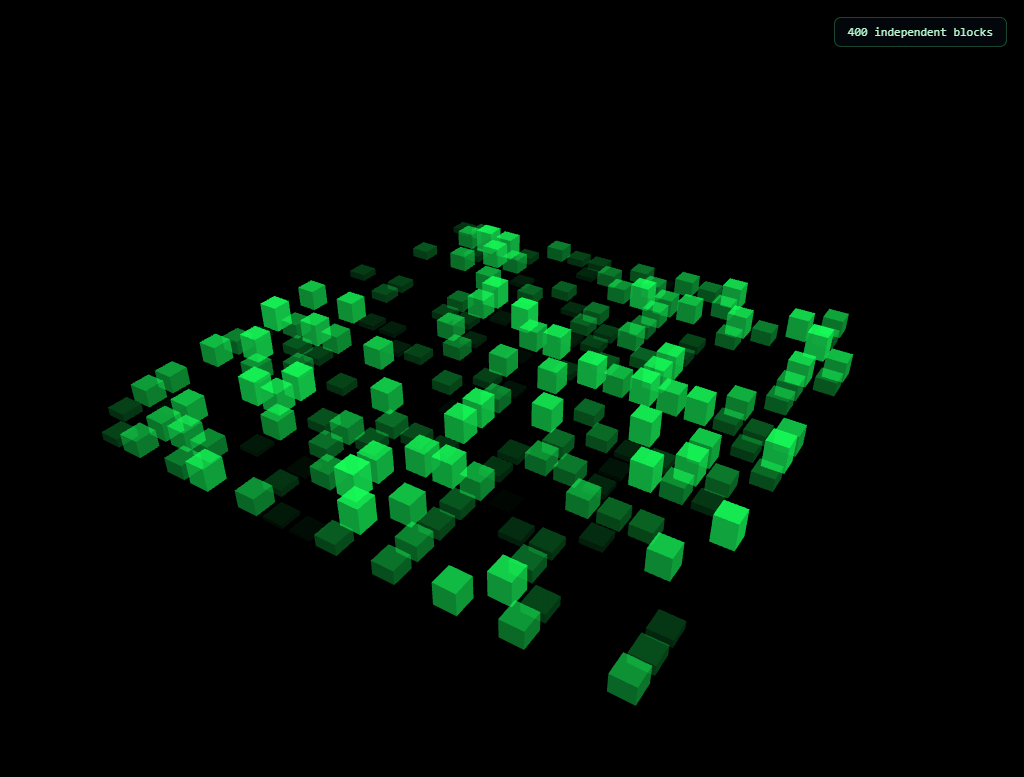
The Three.js Digital Grid Pulse snippet fills a floor-plane grid with 400 small emissive cubes, each one rising up, glowing, and fading back down entirely on its own random schedule — a "digital data" or matrix-like aesthetic — using per-block materials and a triangular fade envelope, with core Three.js loaded from a CDN.
Why every block needs its own material instance
It would be tempting, for performance, to share one MeshStandardMaterial across all 400 cube meshes — but this snippet deliberately creates a brand-new material for every single block. The reason is direct: a material's opacity is a property of the *material*, not the mesh. If every block shared one material object, animating any single block's opacity would instantly change the opacity of all 400 blocks simultaneously, since they'd all be reading from the exact same object. Independent per-block fading strictly requires independent per-block materials — a rare case where more object instances, not fewer, is the correct choice.
Each block owns its own timer, not a shared clock
Every block stores its own delay (a random initial wait), duration (how long its rise-glow-fade cycle takes), and elapsed (its personal running clock, deliberately started at a random *negative* value so blocks don't all begin their very first cycle at the same instant). Because THREE.Clock().getDelta() is added into every block's own elapsed value independently every frame, no two blocks are ever perfectly synchronized — the grid reads as a field of independently-blinking data points rather than a single wave sweeping through in lockstep.
A triangular envelope, not a sine wave
Rather than a smooth sine-based fade, this snippet computes a simple triangular shape: opacity ramps linearly up to full brightness at the cycle's halfway point, then ramps linearly back down to zero. This is deliberately snappier and more "digital" feeling than a smooth sine curve — a small, characterful choice that reinforces the matrix/data aesthetic more than an eased fade would, and it requires nothing more than a conditional and two multiplications, no easing library.
Scale and position move together with opacity
As a block's envelope value rises, its Y-axis scale grows alongside its opacity, and its Y position is recalculated so it always appears to grow *upward from the floor plane* rather than expanding from its own center in both directions. This coupling — three properties (opacity, scale, position) all derived from one shared envelope number — is what makes each block read as physically emerging from the ground rather than simply materializing in place.
Modulo arithmetic creates the repeating cycle
Each block's progress is computed as (elapsed % (duration + delay)) / duration, using JavaScript's modulo operator to wrap the ever-increasing elapsed time back into a repeating window. Whenever that wrapped value exceeds 1, the block is in its "resting, invisible" phase between pulses — explicitly forced to zero opacity and minimum scale — before its next cycle begins.
Where this technique applies
Independently-timed per-object pulse cycles are the standard technique behind matrix-style data visualizations, equalizer bar grids, and any "field of independently blinking things" effect. Pair it with a network graph for a "raw data versus connected structure" pairing, or contrast its snappy, digital fade against the smooth, continuous motion of the particle wave.
Build with AI
Build, Understand, Optimize, and Extend It With AI
You do not have to guess why each block needs its own material by trial and error. Paste this snippet's HTML, CSS, and JS into an AI coding assistant like Claude and ask it to explain exactly why sharing one material across all 400 cubes would break independent fading, or how the modulo-based progress calculation produces a repeating pulse cycle from an ever-increasing elapsed time value. The same assistant can help optimize it, for instance checking whether per-block materials could be pooled and reused once a block finishes its cycle instead of persisting 400 separate material objects for the page's entire lifetime, or whether the grid could use InstancedMesh with a custom per-instance attribute for opacity instead of individual meshes. It is also useful for extending the effect: ask it to make blocks near the mouse cursor pulse more frequently than distant ones, color-code blocks by their current envelope value instead of one fixed color for all of them, or trigger a wave of pulses that visibly ripples outward from a clicked point. Treat the code less like a finished artifact and more like a starting point for a conversation.
Prompt to recreate it
Copy this into your AI assistant of choice to build the effect from scratch, or as a jumping-off point for your own variant:
Build an "independently pulsing digital grid" in plain HTML, CSS, and JavaScript using Three.js loaded from a CDN (no bundler, no build step) — a floor grid of small cubes that each rise, glow, and fade on their own random schedule.

Requirements:
- A full-viewport canvas with a WebGLRenderer sized to match it, updated on window resize including camera aspect ratio, with a camera angled to look down at a floor-plane grid, lit by ambient plus directional light.
- Create a grid of at least 300 small cube meshes arranged flat on a floor plane, sharing one geometry, but giving every single cube its own separate material instance (not a shared material) using a physically-based material with emissive glow and transparency enabled, starting at zero opacity.
- For each cube, store its own random delay value, its own random duration value, and its own elapsed-time tracker initialized to a random negative starting value so cubes do not all begin their first animation cycle simultaneously.
- Use a Clock (or equivalent accumulated real-time delta) to advance every cube's own elapsed-time tracker independently every animation frame — do not use a single shared global timer for all cubes.
- For each cube, compute a repeating cycle progress value using the modulo operator on its elapsed time against the sum of its duration and delay, divided by its duration; while that value is negative (still in the initial delay) or greater than 1 (in the resting phase), the cube must render at zero opacity and minimum scale.
- While a cube's progress value is between 0 and 1, compute a triangular envelope: ramping linearly from 0 up to 1 as progress goes from 0 to 0.5, then linearly back down to 0 as progress goes from 0.5 to 1 — do not use a sine wave or any easing library for this envelope.
- Use that same envelope value to simultaneously drive the cube's material opacity, its vertical scale, and its vertical position (so it appears to grow upward from the floor plane as it fades in, rather than expanding from its own center or fading in place).
Want to tighten it up first? Run this prompt through the AI Prompt Studio to score it across 8 quality dimensions, catch anti-patterns, and tune the wording for Claude, ChatGPT, or Gemini before you paste it in.
Step by step
How to Use
- 1Load the Three.js CDNAdd three.min.js from the CDN panel — no add-ons are required for this snippet.
- 2Paste HTML, CSS, and JSA 20x20 grid of cubes appears, each rising and fading independently on its own schedule.
- 3Watch the field pulseNo two blocks are synchronized, since each tracks its own random delay and duration.
- 4Adjust grid sizeChange GRID and SPACING to trade block density and coverage area for performance.
- 5Tune the pulse timingAdjust the random duration and delay ranges for a busier or calmer, more sparsely-blinking field.
- 6Resize the windowRenderer size and camera aspect ratio update automatically.
Real-world uses
Common Use Cases
Got questions?
Frequently Asked Questions
Opacity is a property of a material object, not of an individual mesh. If all 400 cubes shared one material, changing that material's opacity to animate any single block would simultaneously change the opacity of every block referencing that same material object. Independent per-block fading requires each block to hold its own separate material instance.
Each block tracks its own delay, duration, and elapsed time values, all randomized independently at creation. Because each block's elapsed time is also initialized to a different random negative starting value (staggering when its very first cycle begins) and advances using its own accumulated frame delta, no two blocks' cycles ever line up exactly, even though they all use the same underlying animation logic.
A triangular envelope (linear rise to the midpoint, then linear fall) is snappier and more mechanical-feeling than a smooth sine curve, which suits a digital or data-like aesthetic better. It is also simpler to compute — just a conditional and two multiplications — with no easing function or library required.
A block's Y-axis scale and Y position are both recalculated from the same envelope value that drives its opacity. Coupling these three properties together means each block visibly grows upward from the floor plane as it fades in, rather than simply becoming transparent in place, which reads as more physically grounded and deliberate.
Yes. Narrow the random duration and delay ranges for shorter, more frequent pulses across the whole grid (a busier feel), or widen them for longer, sparser pulses with more blocks resting invisibly at any given moment (a calmer feel).
Yes. Click JSX for a React component, Vue for a Vue 3 SFC, Angular for a standalone component, or Tailwind for a React + Tailwind CSS utility-class version. Build the blocks array inside a mount effect so materials are only created once, and call renderer.dispose() plus dispose each block's own material on cleanup to free GPU memory.