Source Code
<section class="txg-top"><p>Scroll ↓ to form the word</p></section>
<section class="txg-stage" id="txgStage">
  <canvas id="txgCanvas"></canvas>
</section>
<section class="txg-bottom"><p>Every particle knew its letter.</p></section>*{box-sizing:border-box;margin:0;padding:0}
html,body{background:#04060e;color:#fff;font-family:system-ui,-apple-system,sans-serif}
.txg-top,.txg-bottom{min-height:70vh;display:flex;justify-content:center;align-items:center;color:#6f7aa0;font-size:15px;letter-spacing:.08em;text-transform:uppercase}
.txg-stage{height:100vh;position:relative;overflow:hidden;background:radial-gradient(60% 60% at 50% 45%,#0c1226,#04060e)}
#txgCanvas{display:block;width:100%;height:100%}const canvas = document.getElementById('txgCanvas');
const renderer = new THREE.WebGLRenderer({ canvas, antialias: true, alpha: true });
renderer.setPixelRatio(Math.min(window.devicePixelRatio, 2));
const scene = new THREE.Scene();
const camera = new THREE.PerspectiveCamera(55, 1, 0.1, 100);
camera.position.set(0, 0, 13);
// Sample a word drawn to an offscreen 2D canvas: every lit pixel becomes a
// target position for one particle. This turns any text or logo into a
// particle target field with no font loader or 3D text geometry needed.
const WORD = 'HELLO';
const tc = document.createElement('canvas');
tc.width = 360; tc.height = 120;
const ctx = tc.getContext('2d');
ctx.fillStyle = '#fff';
ctx.font = 'bold 96px system-ui, sans-serif';
ctx.textAlign = 'center';
ctx.textBaseline = 'middle';
ctx.fillText(WORD, tc.width / 2, tc.height / 2 + 4);
const img = ctx.getImageData(0, 0, tc.width, tc.height).data;
const targets = [];
const step = 3; // sampling stride — smaller = denser text
for (let y = 0; y < tc.height; y += step) {
for (let x = 0; x < tc.width; x += step) {
if (img[(y * tc.width + x) * 4 + 3] > 128) {
targets.push(
(x - tc.width / 2) * 0.035,
-(y - tc.height / 2) * 0.035,
(Math.random() - 0.5) * 0.4
);
}
}
}
const COUNT = targets.length / 3;
const scattered = new Float32Array(COUNT * 3);
const positions = new Float32Array(COUNT * 3);
const colors = new Float32Array(COUNT * 3);
for (let i = 0; i < COUNT; i++) {
const i3 = i * 3;
scattered[i3] = (Math.random() - 0.5) * 22;
scattered[i3 + 1] = (Math.random() - 0.5) * 14;
scattered[i3 + 2] = (Math.random() - 0.5) * 10;
const c = new THREE.Color().setHSL(0.55 + (targets[i3] * 0.03), 0.8, 0.62);
colors[i3] = c.r; colors[i3 + 1] = c.g; colors[i3 + 2] = c.b;
}
positions.set(scattered);
const geo = new THREE.BufferGeometry();
geo.setAttribute('position', new THREE.BufferAttribute(positions, 3));
geo.setAttribute('color', new THREE.BufferAttribute(colors, 3));
const points = new THREE.Points(geo, new THREE.PointsMaterial({
size: 0.08, vertexColors: true, transparent: true, opacity: 0.95,
blending: THREE.AdditiveBlending, depthWrite: false,
}));
scene.add(points);
gsap.registerPlugin(ScrollTrigger);
const state = { p: 0 };
gsap.to(state, {
p: 1, ease: 'none',
scrollTrigger: {
trigger: '#txgStage', start: 'top top', end: '+=380%', scrub: 0.5, pin: true,
},
});
const posAttr = geo.getAttribute('position');
function resize() {
const w = canvas.clientWidth, h = canvas.clientHeight;
renderer.setSize(w, h, false);
camera.aspect = w / h;
camera.updateProjectionMatrix();
}
function animate() {
requestAnimationFrame(animate);
const p = state.p * state.p * (3 - 2 * state.p);
const arr = posAttr.array;
for (let i = 0; i < COUNT; i++) {
const i3 = i * 3;
arr[i3] = scattered[i3] + (targets[i3] - scattered[i3]) * p;
arr[i3 + 1] = scattered[i3 + 1] + (targets[i3 + 1] - scattered[i3 + 1]) * p;
arr[i3 + 2] = scattered[i3 + 2] + (targets[i3 + 2] - scattered[i3 + 2]) * p;
}
posAttr.needsUpdate = true;
// A gentle sway once formed, so the word floats rather than sits rigid.
points.rotation.y = Math.sin(performance.now() * 0.0004) * 0.12 * p;
renderer.render(scene, camera);
}
resize();
window.addEventListener('resize', resize);
animate();Learn Coding Visually
Learn to code with interactive, live-preview playgrounds — HTML, CSS, JavaScript, React & more.
 HTML Playground42 lessons · Click-based · Live preview
 CSS PlaygroundLearn CSS with a live editor
 JavaScript Playground60 lessons · DOM · Async · Canvas
 React PlaygroundLearn React with a live code editor
 GSAP PlaygroundLearn GSAP animation interactively
 SVG Playground44 lessons · shapes · paths · animation
 SCSS Playground45 lessons · Sass modules · tokens
 Tailwind PlaygroundLearn Tailwind CSS with a live editor
 Bootstrap 5 Playground50 lessons · live preview
Three.js Scroll Text Particles — GSAP Word Formation Effect
Three.js Scroll Text Particles · Scroll · Plain HTML, CSS & JS · Live preview
What's included
Features
About this UI Snippet
How to Form Text From Particles on Scroll With Three.js and GSAP
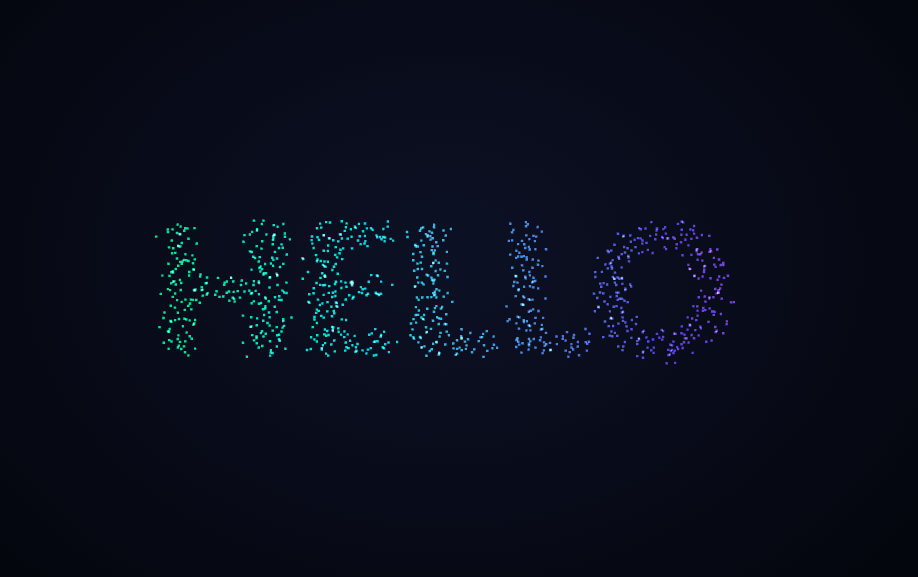
The Three.js Scroll Text Particles snippet scatters a cloud of glowing points and flies them into the exact shape of a word as the visitor scrolls — the scrollbar drives the formation directly, not a timer — by sampling text from a hidden 2D canvas and animating a Three.js Points cloud with GSAP's ScrollTrigger plugin, all loaded from a CDN.
Text becomes targets by sampling a 2D canvas
The clever part is how the word turns into 3D positions without any font loader or extruded text geometry. The word is drawn once to an offscreen <canvas>, then getImageData gives the raw pixels. The code walks the pixel grid on a stride, and every pixel whose alpha is above a threshold becomes one target position — its canvas X/Y mapped into scene space, with a tiny random Z so the word has a little thickness. Change the WORD string and the particle field reshapes itself automatically; the technique works for any text, or a logo drawn to the same canvas.
Sampling stride controls density
A step of 3 means every third pixel in each axis becomes a particle. Lowering it packs in more, denser particles for crisp, readable type; raising it thins the word into a sparse, impressionistic form. This one number trades particle count (and therefore GPU cost) against legibility, letting the same code scale from a light accent to a dense, solid word.
Two positions per particle, blended by scroll
Exactly as in a general particle assembly, each point stores a random scattered position and its sampled text target. Scroll moves a single value p from 0 to 1, and every frame the live position is a linear blend between the two. Because the expensive text sampling happens once at startup, each frame is only cheap arithmetic — the word forms and dissolves smoothly no matter how many particles the sampling produced.
Smooth-step so the word snaps into focus
The raw scroll progress is passed through the p * p * (3 - 2p) smooth-step curve before driving the blend, so the particles ease into their letters rather than arriving at a constant rate. The word appears to resolve and lock into legibility near the end of the scroll, which a linear blend never delivers.
Additive glow and a float once formed
The PointsMaterial uses additive blending with depth writes off, so overlapping particles glow toward white and the letters read as luminous rather than flat. A gentle sway — scaled by p so it only kicks in once the word is formed — keeps the finished type floating instead of sitting rigidly, and disappears again as the word dissolves.
scrub: 0.5, pinned, fully reversible
A small numeric scrub smooths the formation against noisy input, and pinning gives the word room to assemble gradually. This shares its engine with the scroll particle assembly snippet, which targets a sphere instead of sampled text. Pair it with a scroll tunnel intro or dissolve the word into a depth parallax field.
Build with AI
Build, Understand, Optimize, and Extend It With AI
You do not need to load a 3D font just to make particles spell a word. Paste this snippet's HTML, CSS, and JS into an AI assistant like Claude and ask it to explain how the offscreen canvas and getImageData turn text into particle targets, and why the sampling stride controls both density and cost. The same assistant can help you extend it — ask it to cycle through several words by re-sampling and re-tweening the targets, draw an SVG logo to the canvas instead of text, or add a per-particle stagger so the letters assemble left to right. It can also move the blend into a shader so the CPU stops rewriting the position buffer each frame at high particle counts. Treat the code as a starting point for a conversation, not a finished artifact.
Prompt to recreate it
Copy this into your AI assistant of choice to build the effect from scratch, or as a jumping-off point for your own variant:
Build a "scroll-driven particle text formation" in plain HTML, CSS, and JavaScript using Three.js, GSAP, and GSAP's ScrollTrigger plugin, all loaded from a CDN (no bundler, no build step).

Requirements:
- A pinned section containing a full-size canvas with a WebGLRenderer and PerspectiveCamera, sized and updated on window resize including aspect ratio.
- Draw a word to an offscreen 2D canvas with a bold font, read its pixels with getImageData, and sample the pixel grid on a stride: every sufficiently opaque pixel becomes a target position, its canvas X/Y mapped into scene space with a small random Z. This defines the particle count.
- Build a THREE.Points cloud where each particle also has a random scattered position and a per-particle color derived from its horizontal position; use additive blending with depthWrite off.
- Register a GSAP tween on a ScrollTrigger targeting the pinned section, with pin: true, start at top top, a small numeric scrub (~0.5), and an end a few hundred percent tall, animating one plain value p from 0 to 1.
- Every animation frame (requestAnimationFrame), pass p through a smooth-step curve and rewrite the position buffer in place as a linear blend from each particle's scattered position to its sampled target; set needsUpdate. Add a gentle sway scaled by p so the word floats only once formed.
- Confirm scrolling back up dissolves the word back into the cloud, since p is fully scrubbed rather than a one-way timer, and that changing the word string reshapes the field.
Want to tighten it up first? Run this prompt through the AI Prompt Studio to score it across 8 quality dimensions, catch anti-patterns, and tune the wording for Claude, ChatGPT, or Gemini before you paste it in.
Step by step
How to Use
- 1Load all three CDN scriptsAdd three.min.js, gsap.min.js, and ScrollTrigger.min.js from the CDN panel, in that order.
- 2Paste HTML, CSS, and JSA scattered cloud of glowing particles appears in a pinned 3D stage.
- 3Scroll downThe particles fly together into the exact shape of the word, tied directly to scroll position.
- 4Scroll back upThe word dissolves back into the cloud exactly, since the formation is fully scrubbed.
- 5Change the wordEdit the WORD constant — the particle field re-samples and reshapes itself with no other changes.
- 6Tune densityLower the sampling step for denser, crisper text or raise it for a sparser, lighter form.
Real-world uses
Common Use Cases
Got questions?
Frequently Asked Questions
The word is drawn once to an offscreen 2D canvas, then getImageData returns its pixels. The code samples the pixel grid on a stride and turns every sufficiently opaque pixel into a target position, mapping its canvas X/Y into scene space with a small random Z. This turns any text — or a logo drawn to the same canvas — into a 3D particle target field, no font loader or extruded text geometry required.
The step is how many pixels to skip between samples. A step of 3 samples every third pixel; lowering it produces more, denser particles for crisp readable type, while raising it thins the word into a sparse impressionistic form. It is the single knob that trades particle count and GPU cost against legibility.
Each particle stores a random scattered position and its sampled text target. Scroll moves one value p from 0 to 1, and every frame the live position is a linear blend between the two, passed through a smooth-step curve. Because the text sampling runs once at startup, each frame is only cheap arithmetic, so the word forms and dissolves smoothly regardless of particle count.
Yes. Edit the WORD constant and the field re-samples and reshapes automatically. To use a logo, draw an image or SVG to the same offscreen canvas before calling getImageData — every opaque pixel becomes a target, so any monochrome shape works exactly like text does.
Yes. Click JSX for a React component, Vue for a Vue 3 SFC, Angular for a standalone component, or Tailwind for a React + Tailwind version. Do the canvas sampling and build the Points cloud and GSAP timeline inside a mount effect against a canvas ref, and on cleanup kill the ScrollTrigger and call geometry.dispose() and renderer.dispose() so buffers and the WebGL context are freed on unmount.