Source Code
<section class="dpx-top"><p>Scroll ↓ to drift through the layers</p></section>
<section class="dpx-stage" id="dpxStage">
  <canvas id="dpxCanvas"></canvas>
  <h1 class="dpx-title" id="dpxTitle">DEPTH</h1>
</section>
<section class="dpx-bottom"><p>Near and far moved apart.</p></section>*{box-sizing:border-box;margin:0;padding:0}
html,body{background:#070a14;color:#fff;font-family:system-ui,-apple-system,sans-serif}
.dpx-top,.dpx-bottom{min-height:70vh;display:flex;justify-content:center;align-items:center;color:#71809e;font-size:15px;letter-spacing:.08em;text-transform:uppercase}
.dpx-stage{height:100vh;position:relative;overflow:hidden;background:radial-gradient(80% 70% at 50% 40%,#101832,#070a14)}
#dpxCanvas{display:block;width:100%;height:100%}
.dpx-title{position:absolute;left:0;right:0;top:50%;transform:translateY(-50%);text-align:center;font-size:clamp(48px,13vw,180px);font-weight:800;letter-spacing:.04em;color:#e5edff;mix-blend-mode:overlay;pointer-events:none}const canvas = document.getElementById('dpxCanvas');
const renderer = new THREE.WebGLRenderer({ canvas, antialias: true, alpha: true });
renderer.setPixelRatio(Math.min(window.devicePixelRatio, 2));
const scene = new THREE.Scene();
const camera = new THREE.PerspectiveCamera(55, 1, 0.1, 200);
camera.position.set(0, 0, 14);
scene.add(new THREE.AmbientLight(0x5566aa, 0.9));
const key = new THREE.PointLight(0x93c5fd, 1.4, 120); key.position.set(6, 8, 20); scene.add(key);
// Shapes spread across three depth bands. Each shape records its home
// position and a per-depth "speed" so nearer shapes react more to scroll and
// the pointer than distant ones — the essence of parallax.
const geoms = [
new THREE.IcosahedronGeometry(1, 0),
new THREE.TorusGeometry(0.8, 0.3, 12, 40),
new THREE.OctahedronGeometry(1),
new THREE.DodecahedronGeometry(0.9),
];
const palette = [0x60a5fa, 0xf472b6, 0xfbbf24, 0x34d399, 0xa78bfa];
const shapes = [];
for (let i = 0; i < 34; i++) {
const z = -5 - Math.random() * 45; // depth: near (~-5) to far (~-50)
const depth = (z + 5) / -45; // 0 near … 1 far
const mat = new THREE.MeshStandardMaterial({
color: palette[i % palette.length], metalness: 0.3, roughness: 0.5,
transparent: true, opacity: 0.35 + (1 - depth) * 0.6,
});
const mesh = new THREE.Mesh(geoms[i % geoms.length], mat);
const spread = 10 + depth * 26;
mesh.position.set((Math.random() - 0.5) * spread, (Math.random() - 0.5) * spread * 0.7, z);
const s = 0.5 + (1 - depth) * 1.6;
mesh.scale.setScalar(s);
mesh.userData = {
home: mesh.position.clone(),
speed: 1 - depth, // near shapes move most
spin: (Math.random() - 0.5) * 0.01,
};
scene.add(mesh);
shapes.push(mesh);
}
gsap.registerPlugin(ScrollTrigger);
// Scroll drifts the whole field: near shapes rise fast, far shapes barely
// move, and the camera dollies slightly inward for added depth cueing.
const drift = { y: 0, z: 0 };
gsap.to(drift, {
y: 1, z: 1,
ease: 'none',
scrollTrigger: {
trigger: '#dpxStage',
start: 'top top',
end: '+=420%',
scrub: 0.7,
pin: true,
},
});
// Pointer parallax layered on top of scroll parallax.
const mouse = { x: 0, y: 0 };
window.addEventListener('pointermove', (e) => {
mouse.x = (e.clientX / window.innerWidth - 0.5) * 2;
mouse.y = (e.clientY / window.innerHeight - 0.5) * 2;
});
function resize() {
const w = canvas.clientWidth, h = canvas.clientHeight;
renderer.setSize(w, h, false);
camera.aspect = w / h;
camera.updateProjectionMatrix();
}
function animate() {
requestAnimationFrame(animate);
shapes.forEach((m) => {
const u = m.userData;
// Scroll lifts each shape by an amount proportional to its parallax speed.
m.position.y = u.home.y + drift.y * u.speed * 22;
// Pointer nudges nearer shapes more than far ones.
m.position.x = u.home.x + mouse.x * u.speed * 2.2;
m.rotation.x += u.spin; m.rotation.y += u.spin * 1.3;
});
camera.position.z = 14 - drift.z * 5;
camera.position.y = -mouse.y * 0.8;
camera.lookAt(0, 0, -20);
renderer.render(scene, camera);
}
resize();
window.addEventListener('resize', resize);
animate();Learn Coding Visually
Learn to code with interactive, live-preview playgrounds — HTML, CSS, JavaScript, React & more.
 HTML Playground42 lessons · Click-based · Live preview
 CSS PlaygroundLearn CSS with a live editor
 JavaScript Playground60 lessons · DOM · Async · Canvas
 React PlaygroundLearn React with a live code editor
 GSAP PlaygroundLearn GSAP animation interactively
 SVG Playground44 lessons · shapes · paths · animation
 SCSS Playground45 lessons · Sass modules · tokens
 Tailwind PlaygroundLearn Tailwind CSS with a live editor
 Bootstrap 5 Playground50 lessons · live preview
Three.js Scroll Depth Parallax — GSAP Multi-Layer 3D Drift
Three.js Scroll Depth Parallax · Scroll · Plain HTML, CSS & JS · Live preview
What's included
Features
About this UI Snippet
How to Build a Multi-Layer 3D Depth Parallax on Scroll With Three.js and GSAP
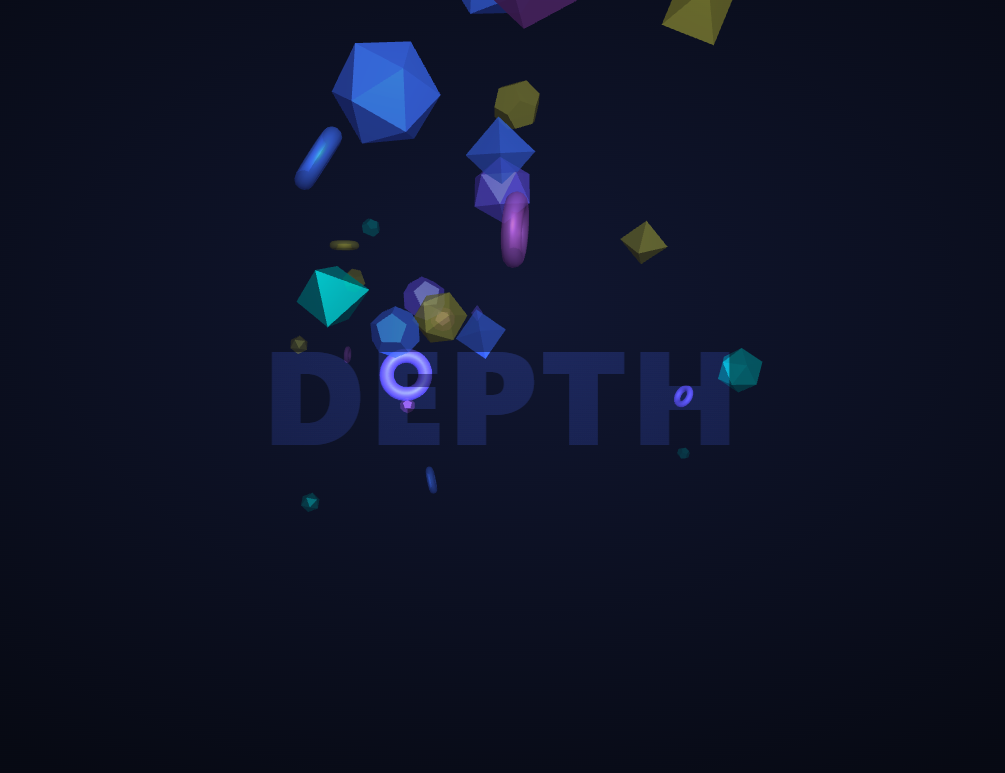
The Three.js Scroll Depth Parallax snippet scatters 34 translucent shapes across three depth bands and drifts them as the visitor scrolls, with near shapes racing upward while distant ones barely move — the classic parallax cue for depth — layering GSAP's ScrollTrigger with pointer tracking over core Three.js, all loaded from a CDN.
Depth encoded as a per-shape speed
Real parallax comes from one rule: closer things move more than farther things. Each shape is placed at a random Z between about -5 (near) and -50 (far), and from that Z a normalized depth value (0 near, 1 far) is computed once. That value becomes a speed of 1 - depth, stored on the shape. Scroll then lifts every shape by its home Y plus a drift scaled by its own speed, so the front layer surges while the back layer drifts lazily — depth you can feel without any explicit "layer" grouping.
Home position plus offset, never absolute
Every shape remembers its home position at startup, and each frame its live position is home plus a scroll-and-pointer offset. Nothing is ever set to an absolute coordinate mid-animation. This keeps the parallax perfectly reversible — at scroll position zero every shape is exactly back home — and means adding a shape is just one more entry in the field with its own remembered origin.
Size, opacity, and spread also read depth
Depth doesn't only drive motion. Nearer shapes are scaled larger, rendered more opaque, and scattered across a tighter spread, while far shapes are smaller, more transparent, and flung wider. Because all four properties derive from the same depth value, a shape reads as genuinely near or far the instant it appears — the motion parallax then reinforces a hierarchy the static frame already establishes.
Pointer parallax layered on scroll parallax
On top of the scroll drift, pointer movement nudges each shape horizontally — again scaled by its speed — and tilts the camera slightly. This produces a second, independent axis of parallax so the scene responds to the mouse even when the visitor isn't scrolling, giving the composition a living, holographic quality. The two parallax sources add cleanly because both are expressed as offsets from the home position.
A camera dolly for extra depth cueing
As scroll progresses, the camera itself dollies inward a few units, which subtly changes the perspective convergence and amplifies the sense of moving into the field rather than merely watching it shift. The dolly is driven by the same scrubbed value as the drift, so it too reverses exactly on scroll-up.
scrub: 0.7, pinned, and mix-blend text
A numeric scrub smooths both parallax sources against noisy input, and an overlaid title using mix-blend-mode: overlay sits between the depth bands so shapes appear to pass in front of and behind the type. This same offset-from-home technique underpins the parallax hero snippet in 2D; here it runs in real 3D depth. Pair it with a scroll particle assembly or a color morph centerpiece.
Build with AI
Build, Understand, Optimize, and Extend It With AI
You do not have to invent the math that makes near things move faster than far things. Paste this snippet's HTML, CSS, and JS into an AI assistant like Claude and ask it to explain how depth is turned into a per-shape speed and why every shape stores a home position. The same assistant can help you extend it — ask it to add a third, mouse-independent slow drift so the field breathes on its own, tint shapes by depth for an atmospheric-perspective haze, or spawn new shapes at the far plane and recycle them as they pass the camera for an endless field. It can also optimize the scene by merging same-geometry shapes into instanced meshes to cut draw calls. Treat the code as a starting point for a conversation, not a finished artifact.
Prompt to recreate it
Copy this into your AI assistant of choice to build the effect from scratch, or as a jumping-off point for your own variant:
Build a "3D depth parallax field" driven by scroll and pointer in plain HTML, CSS, and JavaScript using Three.js, GSAP, and GSAP's ScrollTrigger plugin, all loaded from a CDN (no bundler, no build step).

Requirements:
- A pinned section containing a full-size canvas with a WebGLRenderer, PerspectiveCamera, and ambient + point lighting, sized and updated on window resize including aspect ratio.
- Scatter about 34 shapes (mixed geometries) across a Z range from about -5 (near) to -50 (far). For each, compute a normalized depth (0 near, 1 far) and derive: a speed of 1 - depth, a larger scale / higher opacity / tighter spread when near, and store the shape's home position and a small spin in userData.
- Register a GSAP tween on a ScrollTrigger targeting the pinned section, with pin: true, start at top top, a numeric scrub (~0.7), and an end several hundred percent tall, animating plain drift values from 0 to 1.
- Add a pointermove listener that records a normalized -1..1 mouse position.
- Every animation frame (requestAnimationFrame), set each shape's position to its home plus (a) a vertical scroll offset scaled by its speed and (b) a horizontal pointer offset scaled by its speed; spin each shape. Dolly the camera inward using the scroll value and tilt it slightly with the pointer.
- Confirm that at scroll position zero with the pointer centered, every shape is exactly at its home position, so the parallax is fully reversible with no accumulation.
Want to tighten it up first? Run this prompt through the AI Prompt Studio to score it across 8 quality dimensions, catch anti-patterns, and tune the wording for Claude, ChatGPT, or Gemini before you paste it in.
Step by step
How to Use
- 1Load all three CDN scriptsAdd three.min.js, gsap.min.js, and ScrollTrigger.min.js from the CDN panel, in that order.
- 2Paste HTML, CSS, and JSA field of translucent 3D shapes appears at varying depths behind an overlaid title.
- 3Scroll downNear shapes rise quickly while distant ones barely move, and the camera dollies gently inward.
- 4Move the pointerShapes shift horizontally by depth and the camera tilts, adding a second parallax axis.
- 5Scroll back upEvery shape returns exactly to its home position, since all motion is an offset from home.
- 6Tune density and depthChange the shape count, Z range, or drift multipliers to make the parallax subtler or more extreme.
Real-world uses
Common Use Cases
Got questions?
Frequently Asked Questions
Each shape sits at a random Z, from which a normalized depth (0 near, 1 far) yields a speed of 1 - depth. Scroll lifts every shape by an amount scaled by its own speed, so near shapes move a lot and far shapes barely move. That single rule — closer moves more — is the entire basis of the parallax sense of depth.
Each frame a shape's position is its remembered home plus a scroll-and-pointer offset, never an absolute coordinate. This makes the parallax perfectly reversible (at scroll zero everything is home) and prevents drift accumulation, and it means adding a shape is just one more entry with its own remembered origin.
Yes. Nearer shapes are scaled larger, more opaque, and packed into a tighter spread; far shapes are smaller, more transparent, and spread wider. All derive from the same depth value, so a shape looks convincingly near or far the moment it renders, and the motion parallax reinforces a hierarchy the static frame already shows.
Both are expressed as offsets from each shape's home position — scroll adds a vertical offset scaled by speed, pointer adds a horizontal one — so they simply sum. Because neither writes an absolute position, they compose cleanly and both reverse to zero independently when scroll returns to the top and the pointer is centered.
Yes. Click JSX for a React component, Vue for a Vue 3 SFC, Angular for a standalone component, or Tailwind for a React + Tailwind version. Build the shape field and GSAP timeline inside a mount effect against a canvas ref, attach the pointermove listener in the same effect, and on cleanup remove the listener, kill the ScrollTrigger, and call renderer.dispose() so listeners and the WebGL context are released on unmount.