Learn Coding Visually
Learn to code with interactive, live-preview playgrounds — HTML, CSS, JavaScript, React & more.
 HTML Playground42 lessons · Click-based · Live preview
 CSS PlaygroundLearn CSS with a live editor
 JavaScript Playground60 lessons · DOM · Async · Canvas
 React PlaygroundLearn React with a live code editor
 GSAP PlaygroundLearn GSAP animation interactively
 SVG Playground44 lessons · shapes · paths · animation
 SCSS Playground45 lessons · Sass modules · tokens
 Tailwind PlaygroundLearn Tailwind CSS with a live editor
 Bootstrap 5 Playground50 lessons · live preview
Three.js Scroll Lightning Energy Orb — GSAP Charge-Up Effect
Three.js Scroll Lightning Energy Orb · Scroll · Plain HTML, CSS & JS · Live preview
What's included
Features
About this UI Snippet
How to Build a Scroll-Charged Lightning Energy Orb With Three.js and GSAP
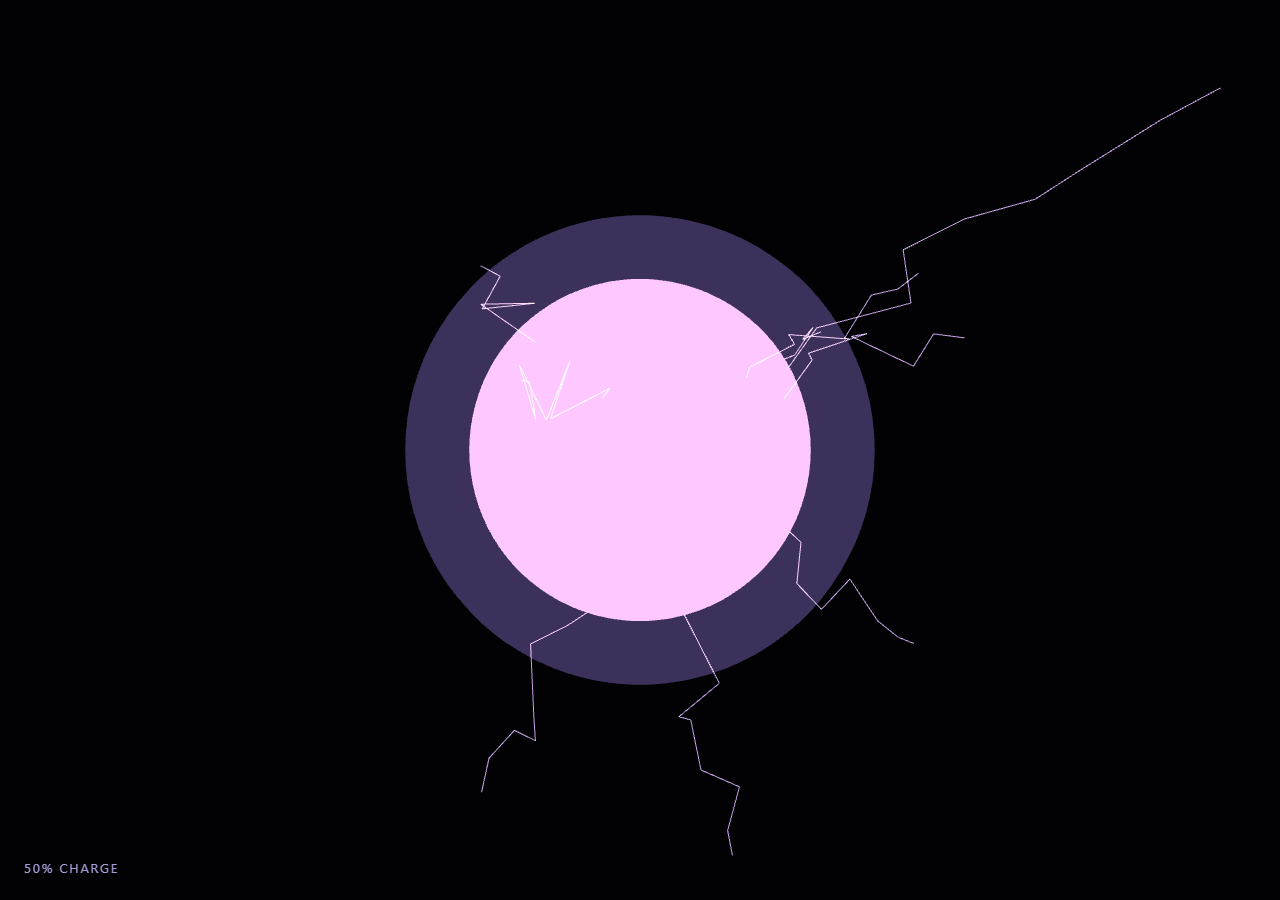
The Three.js Scroll Lightning Energy Orb snippet builds a glowing sphere that swells, brightens, and crackles with jagged lightning arcs as the visitor scrolls, climaxing in a rapid-fire discharge burst near the end of the pinned stage. A single scrubbed charge.t value, driven by GSAP ScrollTrigger, feeds every visual channel — scale, emissive intensity, point-light brightness, and bolt frequency — so the whole buildup reverses cleanly on scroll-up.
A fresnel-like rim glow without writing a shader
Convincing energy-orb glow usually means a fresnel shader that brightens edges facing away from the camera. This snippet fakes that effect with pure geometry: a second sphere, glow, sits scaled up around the core and is rendered with side: THREE.BackSide. Because only its inner (back-facing) surface is drawn, and additive blending stacks its light onto whatever is behind it, the silhouette edges of the glow sphere read as a soft halo that thickens exactly where the sphere curves away from the camera — the same visual cue a real fresnel term produces, achieved with a stock MeshBasicMaterial instead of custom GLSL.
Why bolts are rebuilt, not tweened
A naive lightning effect might animate a fixed jagged line's vertices smoothly from one shape to another. Real electricity doesn't ease between two paths — it re-strikes along an entirely new, unpredictable route every time. The snippet's jaggedPath() function generates a fresh set of midpoints, displaced with random jitter that peaks at the middle of the bolt and tapers toward both anchored ends, and regenerateBolts() is called on a short randomized timer rather than once. Regenerating the geometry's position attribute in place (needsUpdate = true) every 45-260ms, instead of allocating new BufferGeometry objects, is what keeps the flicker both visually chaotic and cheap: one shared Float32Array sized for the maximum possible bolt count is reused and partially overwritten every cycle.
setDrawRange caps the visible bolt count
Just like the reveal technique in the constellation web snippet, the bolt geometry is allocated once at its maximum size (26 bolts × 9 segments) and geometry.setDrawRange() decides how many of those segments actually render this cycle. Early in the charge sequence only 2-3 bolts are visible; as t climbs toward 1 the count target grows toward the maximum, and during the final discharge window the snippet forces the full 26-bolt count on every flicker tick for a sustained crackling burst. No bolt geometry is ever added to or removed from the scene graph — only the draw range and the buffer contents change.
Charge intensity is layered, not switched
Rather than a single value driving one property, t fans out into several coordinated channels: core.scale grows toward 1.9×, emissiveIntensity ramps from 1.0 toward roughly 3.4, and the THREE.PointLight intensity climbs from 1.5 toward 6.5 — each also gets a small Math.sin(clock * 6) flicker term scaled by t, so the orb visibly hums harder as it charges rather than just growing uniformly brighter. A slower independent Math.sin(clock * 3.2) breathing term is blended in at every charge level so the orb never looks perfectly static even at t = 0.
The discharge climax is a state change, not a curve
Rather than trying to encode a sudden burst into the easing curve itself, the animation loop checks t > 0.88 each frame and flips a discharging boolean. Once true, the bolt regeneration timer switches to a much shorter, tighter random interval and always requests the maximum bolt count, producing a visibly distinct rapid-fire climax in the last stretch of scroll rather than a smooth continuation of the earlier gradual buildup — similar in spirit to how the magnetic particles snippet flips into a distinct release state past a threshold.
PointLight intensity gives the flicker physical weight
Because coreLight is a real THREE.PointLight positioned at the orb's center, its intensity swings are what sell the crackle as *energy* rather than just moving lines — nearby geometry (or, in a customized scene, other props) would visibly brighten and dim in sync with each bolt cycle. Pairing an emissive-material core with an actual dynamic light source is a lightweight combination also used by the holographic globe and galaxy formation snippets to make glowing scroll effects feel like they cast real light rather than being flat, self-illuminated shapes.
Build with AI
Build, Understand, Optimize, and Extend It With AI
You don't need to reverse-engineer how a single charge value drives an orb's scale, glow, and lightning all at once. Paste this snippet's HTML, CSS, and JS into an AI assistant like Claude and ask it to explain why the glow shell uses THREE.BackSide instead of a fresnel shader, or why the discharge climax is implemented as a boolean state flip rather than baked into the GSAP easing curve. The same assistant can help you extend the effect — ask it to add a screen-shake camera jitter timed to each discharge burst, tint the bolts by a customizable color theme, or trigger a full-screen flash overlay at the exact moment t crosses the discharge threshold. It can also help optimize further, for example pooling bolt line objects if you push MAX_BOLTS much higher. Treat the code as a starting point to interrogate and reshape, not a finished artifact.
Prompt to recreate it
Copy this into your AI assistant of choice to build the effect from scratch, or as a jumping-off point for your own variant:
Build a "scroll-charged lightning energy orb" in plain HTML, CSS, and JavaScript using Three.js and GSAP's ScrollTrigger plugin, all loaded from a CDN (no bundler, no build step).

Requirements:
- A pinned section containing a full-size canvas, with a WebGLRenderer and PerspectiveCamera sized to it and updated on window resize including aspect ratio.
- A core THREE.Mesh using SphereGeometry and an emissive MeshStandardMaterial, plus a slightly larger second sphere rendered with THREE.BackSide and additive blending as a cheap fresnel-style rim glow, both centered at the origin.
- A THREE.PointLight at the orb's center whose intensity is driven by the same charge value as the orb's visuals.
- A lightning-bolt system: one preallocated BufferGeometry sized for a maximum bolt count times a fixed segment count, rendered as a single THREE.LineSegments with additive blending. Each bolt is a jagged polyline between a point near the orb's surface and a random point beyond it, built by displacing intermediate points with random jitter that tapers toward both ends.
- Regenerate the bolt buffer's contents (not new geometry objects) on a short randomized timer, calling needsUpdate on the position attribute, and use geometry.setDrawRange to control how many bolts are actually visible.
- Register a GSAP tween on a ScrollTrigger targeting the pinned section, with pin: true, start at top top, a numeric scrub, and a multi-hundred-percent end, animating a single plain charge value t from 0 to 1.
- Every animation frame (requestAnimationFrame, independent of the scroll callback), use t to drive the orb's scale, its material's emissiveIntensity, the PointLight's intensity, and the target bolt count/frequency, all increasing together as t rises.
- Add a discrete "discharge" state once t passes a high threshold (e.g. 0.88) that forces a much higher bolt frequency and the maximum bolt count for a climactic burst, distinct from the gradual buildup below the threshold.
- Confirm scrolling back up smoothly reduces scale, brightness, and bolt frequency back down, since every visual channel derives from the same reversible scrubbed t value.
Want to tighten it up first? Run this prompt through the AI Prompt Studio to score it across 8 quality dimensions, catch anti-patterns, and tune the wording for Claude, ChatGPT, or Gemini before you paste it in.
Source Code
<section class="lgo-stage" id="lgoStage">
  <div class="lgo-intro-overlay"><p>Scroll ↓ to charge the core</p></div>
  <canvas id="lgoCanvas"></canvas>
  <div class="lgo-hud"><span id="lgoCharge">0</span>% charge</div>
</section>
<section class="lgo-bottom"><p>Discharge complete.</p></section>*{box-sizing:border-box;margin:0;padding:0}
html,body{background:#020103;color:#fff;font-family:system-ui,-apple-system,sans-serif}
.lgo-bottom{min-height:70vh;display:flex;justify-content:center;align-items:center;color:#a78bfa;font-size:15px;letter-spacing:.08em;text-transform:uppercase}
.lgo-stage{height:100vh;position:relative;overflow:hidden;background:#020103}
.lgo-intro-overlay{position:absolute;inset:0;display:flex;align-items:center;justify-content:center;text-align:center;padding:24px;pointer-events:none;z-index:5;color:#a78bfa;font-size:15px;letter-spacing:.08em;text-transform:uppercase;transition:opacity .4s ease;}
#lgoCanvas{display:block;width:100%;height:100%}
.lgo-hud{position:absolute;left:24px;bottom:24px;font-variant-numeric:tabular-nums;font-size:13px;letter-spacing:.14em;color:#c4b5fd;text-transform:uppercase;opacity:.85}const canvas = document.getElementById('lgoCanvas');
const chargeEl = document.getElementById('lgoCharge');
const renderer = new THREE.WebGLRenderer({ canvas, antialias: true, alpha: true });
renderer.setPixelRatio(Math.min(window.devicePixelRatio, 2));
const scene = new THREE.Scene();
const camera = new THREE.PerspectiveCamera(55, 1, 0.1, 100);
camera.position.set(0, 0, 12);
// Core: an emissive sphere. MeshStandardMaterial's emissive channel lets the
// orb read as "lit from within" without any actual light source required.
const coreGeo = new THREE.SphereGeometry(1.6, 48, 48);
const coreMat = new THREE.MeshStandardMaterial({
color: 0x4c1d95,
emissive: 0x8b5cf6,
emissiveIntensity: 1.2,
roughness: 0.35,
metalness: 0.1,
});
const core = new THREE.Mesh(coreGeo, coreMat);
scene.add(core);
// Glow shell: a slightly larger sphere rendered from the BACK face only, with
// additive blending. Viewed from outside, only the silhouette edges of a
// back-face sphere are visible through the front faces' culling, producing a
// cheap fresnel-like rim glow with zero custom shader code.
const glowGeo = new THREE.SphereGeometry(1.6, 48, 48);
const glowMat = new THREE.MeshBasicMaterial({
color: 0xa78bfa,
transparent: true,
opacity: 0.35,
side: THREE.BackSide,
blending: THREE.AdditiveBlending,
depthWrite: false,
});
const glow = new THREE.Mesh(glowGeo, glowMat);
glow.scale.setScalar(1.35);
scene.add(glow);
const coreLight = new THREE.PointLight(0x8b5cf6, 2, 30);
scene.add(coreLight);
scene.add(new THREE.AmbientLight(0x1a1030, 1));
// Lightning bolts: each bolt is a jittered polyline from a point near the
// orb's surface out to a random point beyond it. Rebuilding the midpoints
// every few frames (rather than once) is what makes them read as crackling
// electricity instead of static wire props.
const MAX_BOLTS = 26;
const SEGMENTS_PER_BOLT = 9;
const boltGeo = new THREE.BufferGeometry();
const boltPositions = new Float32Array(MAX_BOLTS * SEGMENTS_PER_BOLT * 2 * 3);
boltGeo.setAttribute('position', new THREE.BufferAttribute(boltPositions, 3));
boltGeo.setDrawRange(0, 0);
const boltMat = new THREE.LineBasicMaterial({
color: 0xd8b4fe,
transparent: true,
opacity: 0.9,
blending: THREE.AdditiveBlending,
depthWrite: false,
});
const bolts = new THREE.LineSegments(boltGeo, boltMat);
scene.add(bolts);
function randOnSphere(radius) {
const theta = Math.random() * Math.PI * 2;
const phi = Math.acos(2 * Math.random() - 1);
return new THREE.Vector3(
radius * Math.sin(phi) * Math.cos(theta),
radius * Math.sin(phi) * Math.sin(theta),
radius * Math.cos(phi)
);
}
// Build a jagged path between two points by displacing intermediate points
// perpendicular-ish to the straight line with shrinking jitter toward the ends.
function jaggedPath(start, end, segments) {
const pts = [start];
for (let i = 1; i < segments; i++) {
const f = i / segments;
const base = start.clone().lerp(end, f);
const wobble = Math.sin(f * Math.PI) * 0.9; // most jitter mid-bolt, tapers at both ends
base.x += (Math.random() - 0.5) * wobble;
base.y += (Math.random() - 0.5) * wobble;
base.z += (Math.random() - 0.5) * wobble;
pts.push(base);
}
pts.push(end);
return pts;
}
let activeBoltCount = 0;
function regenerateBolts(count) {
activeBoltCount = Math.min(count, MAX_BOLTS);
const arr = boltGeo.getAttribute('position').array;
for (let b = 0; b < activeBoltCount; b++) {
const start = randOnSphere(1.7);
const reach = 2.2 + Math.random() * 3.2;
const end = start.clone().normalize().multiplyScalar(1.7 + reach);
// Bias the outward end sideways so bolts fan out rather than all pointing radially.
end.x += (Math.random() - 0.5) * 2;
end.y += (Math.random() - 0.5) * 2;
const path = jaggedPath(start, end, SEGMENTS_PER_BOLT);
for (let s = 0; s < SEGMENTS_PER_BOLT; s++) {
const p0 = path[s], p1 = path[s + 1];
const o = (b * SEGMENTS_PER_BOLT + s) * 6;
arr[o] = p0.x; arr[o + 1] = p0.y; arr[o + 2] = p0.z;
arr[o + 3] = p1.x; arr[o + 4] = p1.y; arr[o + 5] = p1.z;
}
}
boltGeo.getAttribute('position').needsUpdate = true;
boltGeo.setDrawRange(0, activeBoltCount * SEGMENTS_PER_BOLT * 2);
}
const introEl = document.querySelector('.lgo-intro-overlay');
gsap.registerPlugin(ScrollTrigger);
// Single scrubbed charge value drives scale, light intensity, and bolt
// frequency/count together, so scrolling up smoothly de-charges the orb.
const charge = { t: 0 };
gsap.to(charge, {
t: 1,
ease: 'none',
scrollTrigger: {
trigger: '#lgoStage',
start: 'top top',
end: '+=450%',
scrub: 0.6,
pin: true,
},
});
function resize() {
const w = canvas.clientWidth, h = canvas.clientHeight;
renderer.setSize(w, h, false);
camera.aspect = w / h;
camera.updateProjectionMatrix();
}
let clock = 0;
let flickerTimer = 0;
let discharging = false;
let dischargeTimer = 0;
function animate() {
requestAnimationFrame(animate);
if (introEl) introEl.style.opacity = (charge.t > 0.03) ? '0' : '1';
clock += 0.016;
const t = Math.max(0, Math.min(1, charge.t));
chargeEl.textContent = Math.round(t * 100);
// Scale and brightness ramp with charge; a mild sine adds a "breathing" pulse on top.
const breathe = 1 + Math.sin(clock * 3.2) * 0.02 * (0.3 + t);
const scale = (1 + t * 0.9) * breathe;
core.scale.setScalar(scale);
glow.scale.setScalar(scale * 1.35);
coreMat.emissiveIntensity = 1.0 + t * 2.4 + Math.sin(clock * 6) * 0.15 * t;
coreLight.intensity = 1.5 + t * 5 + Math.sin(clock * 6) * 0.6 * t;
core.rotation.y += 0.003 + t * 0.01;
glow.rotation.y -= 0.002;
// Peak discharge burst: within the last slice of scroll, force a sustained
// high-count flicker instead of the normal interval-based crackle.
discharging = t > 0.88;
flickerTimer -= 0.016;
if (flickerTimer <= 0) {
if (discharging) {
regenerateBolts(MAX_BOLTS);
flickerTimer = 0.045 + Math.random() * 0.04; // rapid-fire near climax
} else {
// Frequency and reach both grow with charge: fewer, calmer bolts early,
// more frequent and numerous bolts as charge builds.
const count = Math.round(2 + t * 14);
regenerateBolts(count);
flickerTimer = 0.22 - t * 0.15 + Math.random() * 0.08;
}
}
renderer.render(scene, camera);
}
resize();
window.addEventListener('resize', resize);
animate();Step by step
How to Use
- 1Load all three CDN scriptsAdd three.min.js, gsap.min.js, and ScrollTrigger.min.js from the CDN panel, in that order.
- 2Paste HTML, CSS, and JSA dim violet orb renders in a pinned 3D stage with a live charge-percentage HUD.
- 3Scroll downThe orb grows, brightens, and crackles with more frequent lightning bolts, climaxing in a rapid discharge burst near full scroll.
- 4Scroll back upThe orb calms and shrinks smoothly, since scale, light intensity, and bolt count are all derived from the same reversible charge.t value.
- 5Retune the bolt lookAdjust SEGMENTS_PER_BOLT or the wobble multiplier in jaggedPath() for smoother or more jagged arcs, and MAX_BOLTS for a denser climax.
- 6Tune the charge timingChange the ScrollTrigger end value (+=450%) for a slower build, or the 0.88 discharge threshold for an earlier or later climax.
Real-world uses
Common Use Cases
Got questions?
Frequently Asked Questions
Real electricity re-strikes along a new unpredictable path each time rather than smoothly morphing between two shapes. The snippet calls jaggedPath() with fresh random jitter on a short timer and overwrites the shared position buffer in place, which produces a convincingly chaotic flicker while staying cheap, since no new geometry objects are ever allocated during the effect.
The bolt geometry is preallocated at its maximum possible size (26 bolts) once at startup. Growing or shrinking geometry.setDrawRange each cycle changes how many of those already-uploaded segments the GPU rasterizes, which avoids the cost of allocating, adding, and removing THREE.Object3D instances from the scene graph every flicker tick — the same pattern used for edge reveals in the constellation web snippet.
The scrubbed charge value t still eases linearly the whole way from 0 to 1. The climax comes from the animation loop itself checking t > 0.88 each frame and flipping a discharging boolean, which switches the bolt regeneration to a much shorter random interval and forces the maximum bolt count — a discrete state change layered on top of the continuous scrub, rather than something baked into the ScrollTrigger tween.
No — the bolt buffer is small (at most 26 bolts times 9 segments times 2 endpoints times 3 floats), and the update only writes to a typed array already resident on the GPU before flagging needsUpdate, so no new WebGL buffers are created. This is dramatically cheaper than allocating new BufferGeometry instances or Line objects on every flicker, which would pressure the garbage collector and cause visible frame hitches on lower-end devices.
Yes. Click JSX for a React component, Vue for a Vue 3 SFC, Angular for a standalone component, or Tailwind for a React + Tailwind version. Build the core, glow shell, light, and bolt geometry inside a mount effect against a canvas ref, and on cleanup kill the ScrollTrigger instance (or revert a gsap.context), dispose the geometries and materials, and call renderer.dispose() so nothing leaks when the component unmounts.