Source Code
<canvas id="globeCanvas"></canvas>
<div class="hg-badge">Wireframe globe · radar pulse</div>*{box-sizing:border-box;margin:0;padding:0}
html,body{width:100%;height:100%;overflow:hidden;background:#020409}
#globeCanvas{display:block;width:100%;height:100%;cursor:grab}
#globeCanvas:active{cursor:grabbing}
.hg-badge{position:fixed;left:18px;top:18px;padding:7px 13px;border-radius:7px;background:rgba(4,10,16,0.7);border:1px solid rgba(34,211,238,0.3);color:#a5f3fc;font:12px ui-monospace,monospace;backdrop-filter:blur(6px)}const canvas = document.getElementById('globeCanvas');
const renderer = new THREE.WebGLRenderer({ canvas, antialias: true, alpha: true });
renderer.setPixelRatio(Math.min(window.devicePixelRatio, 2));
const scene = new THREE.Scene();
const camera = new THREE.PerspectiveCamera(48, 1, 0.1, 40);
camera.position.set(0, 0, 7);
const controls = new THREE.OrbitControls(camera, renderer.domElement);
controls.enableDamping = true;
controls.dampingFactor = 0.06;
controls.autoRotate = true;
controls.autoRotateSpeed = 0.9;
controls.minDistance = 4;
controls.maxDistance = 14;
scene.add(new THREE.AmbientLight(0x0e7490, 0.5));
const light = new THREE.PointLight(0x22d3ee, 1.8, 30);
light.position.set(4, 4, 6);
scene.add(light);
// A wireframe sphere gives the classic "hologram globe" latitude/longitude
// look for free — no custom line-drawing needed, just a normal
// SphereGeometry rendered with wireframe: true.
const globe = new THREE.Mesh(
new THREE.SphereGeometry(2, 24, 16),
new THREE.MeshBasicMaterial({ color: 0x22d3ee, wireframe: true, transparent: true, opacity: 0.5 })
);
scene.add(globe);
// A second, slightly larger, near-invisible sphere with backside rendering
// adds a soft inner glow at the globe's silhouette edge — a cheap
// stand-in for real rim lighting or Fresnel shading.
const glow = new THREE.Mesh(
new THREE.SphereGeometry(2.08, 24, 16),
new THREE.MeshBasicMaterial({ color: 0x67e8f9, transparent: true, opacity: 0.08, side: THREE.BackSide })
);
scene.add(glow);
// Small marker dots on the globe's surface, placed using the same
// spherical-coordinate formula used elsewhere in this library, standing
// in for "cities" or "data points" on a network globe.
const MARKER_COUNT = 10;
const markers = [];
for (let i = 0; i < MARKER_COUNT; i++) {
const theta = Math.random() * Math.PI * 2;
const phi = Math.acos(2 * Math.random() - 1);
const r = 2.02;
const pos = new THREE.Vector3(
r * Math.sin(phi) * Math.cos(theta),
r * Math.sin(phi) * Math.sin(theta),
r * Math.cos(phi)
);
const marker = new THREE.Mesh(
new THREE.SphereGeometry(0.045, 8, 8),
new THREE.MeshBasicMaterial({ color: 0xfef08a })
);
marker.position.copy(pos);
globe.add(marker);
markers.push(marker);
}
// Radar "ping" rings: flat rings that spawn at zero scale, grow outward
// while fading, and get recycled once fully faded — the same
// spawn-grow-fade-recycle pattern used for any repeating pulse effect.
const RING_COUNT = 4;
const rings = [];
for (let i = 0; i < RING_COUNT; i++) {
const ring = new THREE.Mesh(
new THREE.RingGeometry(0.9, 1, 48),
new THREE.MeshBasicMaterial({ color: 0x22d3ee, transparent: true, opacity: 0, side: THREE.DoubleSide })
);
ring.rotation.x = Math.PI / 2;
scene.add(ring);
rings.push({ mesh: ring, life: (i / RING_COUNT) });
}
function resize() {
const w = canvas.clientWidth, h = canvas.clientHeight;
renderer.setSize(w, h, false);
camera.aspect = w / h;
camera.updateProjectionMatrix();
}
const PULSE_SPEED = 0.006;
function animate() {
requestAnimationFrame(animate);
globe.rotation.y += 0.0016;
rings.forEach(r => {
r.life += PULSE_SPEED;
if (r.life > 1) r.life -= 1;
const scale = 0.4 + r.life * 3.2;
r.mesh.scale.setScalar(scale);
r.mesh.material.opacity = (1 - r.life) * 0.5;
});
controls.update();
renderer.render(scene, camera);
}
resize();
window.addEventListener('resize', resize);
animate();Learn Coding Visually
Learn to code with interactive, live-preview playgrounds — HTML, CSS, JavaScript, React & more.
 HTML Playground42 lessons · Click-based · Live preview
 CSS PlaygroundLearn CSS with a live editor
 JavaScript Playground60 lessons · DOM · Async · Canvas
 React PlaygroundLearn React with a live code editor
 GSAP PlaygroundLearn GSAP animation interactively
 SVG Playground44 lessons · shapes · paths · animation
 SCSS Playground45 lessons · Sass modules · tokens
 Tailwind PlaygroundLearn Tailwind CSS with a live editor
 Bootstrap 5 Playground50 lessons · live preview
Three.js Holographic Globe — Wireframe WebGL Radar Sphere
Three.js Holographic Globe · Animations · Plain HTML, CSS & JS · Live preview
What's included
Features
About this UI Snippet
How to Build a Sci-Fi Holographic Globe in Three.js
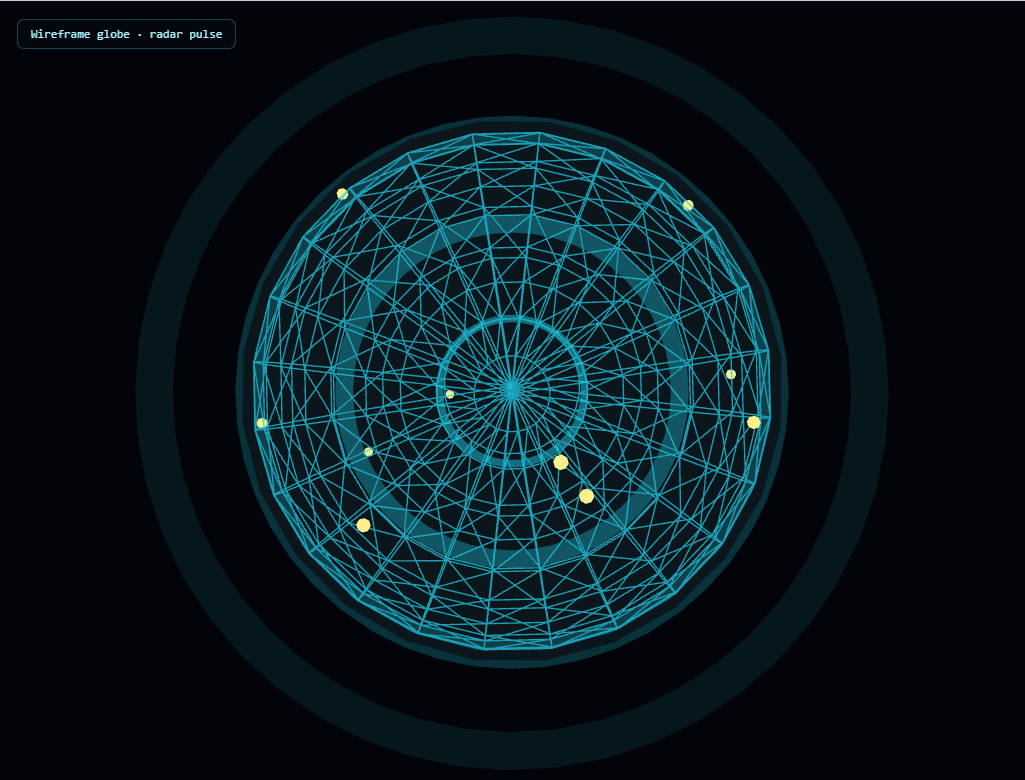
The Three.js Holographic Globe snippet renders a glowing, wireframe sphere — the classic sci-fi "network globe" look — with glowing data-point markers and continuously expanding, fading radar-ping rings, using core Three.js and OrbitControls both loaded from a CDN.
Wireframe SphereGeometry gives the latitude/longitude look for free
Rather than manually drawing latitude and longitude lines with custom Line geometry, the snippet simply renders a normal SphereGeometry with wireframe: true on its material. Three.js's sphere geometry is already built from a grid of latitude and longitude segments internally — setting wireframe mode just reveals that existing triangulated grid structure, immediately producing the recognizable globe-lines look with zero extra geometry work.
A second, larger backside sphere fakes a rim glow
True Fresnel-style rim lighting (where edges of a curved surface glow brighter than its center, viewed head-on) requires a custom shader. This snippet fakes the same effect cheaply: a second sphere, very slightly larger than the wireframe globe, rendered with side: THREE.BackSide and very low opacity, sits just outside it. Because BackSide rendering only draws the *interior* surface of that larger sphere (the side facing inward, toward the camera when looking at the globe's edge), it reads as a soft, glowing halo exactly where the globe's silhouette edge is, without any shader code at all.
Data markers placed with the same spherical-coordinate formula used elsewhere
The small glowing "city" or "data point" markers on the globe's surface use the identical uniform-spherical-distribution formula from the network graph snippet — a random azimuthal angle, a polar angle derived from an arc-cosine, projected onto a fixed radius just outside the globe's surface. Because each marker is added as a *child* of the globe mesh rather than the scene directly, every marker automatically rotates along with the globe with zero additional per-marker rotation code.
Radar pings: a spawn-grow-fade-recycle cycle, not one-shot animations
Each of four ring meshes tracks its own life value from 0 to 1, looping back to 0 once it passes 1. That single value simultaneously drives two things every frame: the ring's scale (growing from small to large) and its opacity (fading from visible to fully transparent) — both derived from the same life number, just mapped differently. Because the four rings' life values are initialized at evenly staggered starting points (i / RING_COUNT), they're never all pulsing in sync; a new ring is always mid-expansion while another is just fading out, producing a continuous, overlapping pulse rather than four rings flashing in unison.
One shared value driving two visual properties
Both the rim-glow sphere and the radar pings demonstrate the same underlying idea: deriving multiple visual properties (scale and opacity, or glow color and edge position) from a single tracked number is what keeps looping, pulsing effects feeling coordinated rather than like several independent animations that happen to run near each other.
Where this technique applies
The wireframe-sphere-plus-radar-ping combination is the standard visual shorthand for "network," "global reach," "scanning," or "tracking" concepts across tech and sci-fi interfaces. Pair it with a network graph for a "local nodes, global reach" two-scene visual, or contrast its cool, technical wireframe look against the warm, faceted glow of the crystal cluster.
Build with AI
Build, Understand, Optimize, and Extend It With AI
You do not have to guess why the rim glow or radar rings work through trial and error. Paste this snippet's HTML, CSS, and JS into an AI coding assistant like Claude and ask it to explain exactly why rendering a larger sphere with BackSide produces a glow effect at the silhouette edge specifically, or how a single life value drives both a ring's scale and its opacity in a coordinated way. The same assistant can help optimize it, for instance checking whether the sphere's segment count could be lowered for a cleaner, less busy wireframe look, or whether the radar rings could share one geometry instance instead of four separate ones. It is also useful for extending the effect: ask it to make clicking a marker highlight it and show a label with real data, animate connecting arcs between pairs of markers to represent live traffic, or vary each ring's color based on a category instead of using one fixed color for all of them. Treat the code less like a finished artifact and more like a starting point for a conversation.
Prompt to recreate it
Copy this into your AI assistant of choice to build the effect from scratch, or as a jumping-off point for your own variant:
Build a "holographic globe" in plain HTML, CSS, and JavaScript using Three.js and its OrbitControls addon, both loaded from a CDN (no bundler, no build step, no external texture or line-drawing library).

Requirements:
- A full-viewport canvas with a WebGLRenderer sized to match it, updated on window resize including camera aspect ratio, plus OrbitControls with damping, idle auto-rotation, and a bounded zoom range.
- Render a sphere geometry with wireframe mode enabled on its material (not a custom line-based globe) to produce a latitude/longitude grid look, using a glowing accent color and partial transparency.
- Add a second sphere slightly larger than the wireframe globe, using a material with back-side rendering only, a matching or complementary glow color, and very low opacity, to fake a soft rim-light glow around the globe's silhouette edge without writing a custom shader.
- Place at least 8 small glowing marker spheres on the wireframe globe's surface using a proper uniform spherical-coordinate distribution (not independent random X/Y/Z), and add each marker as a child of the globe mesh specifically, so they inherit its rotation automatically.
- Create at least three flat ring meshes (using a ring geometry, not a torus), each tracking its own "life" value that continuously increases and wraps back to zero; use that single life value to drive both the ring's current scale (growing as life increases) and its current opacity (fading as life increases), and rotate each ring flat so it lies in the same plane, centered on the scene.
- Initialize each ring's life value at a different, evenly-staggered starting point so the rings are never all at the same stage of their expand-and-fade cycle simultaneously — at least one ring should always be mid-expansion while another is fading out.
- Rotate the globe continuously and independently of the OrbitControls auto-rotation.
Want to tighten it up first? Run this prompt through the AI Prompt Studio to score it across 8 quality dimensions, catch anti-patterns, and tune the wording for Claude, ChatGPT, or Gemini before you paste it in.
Step by step
How to Use
- 1Load both CDN scriptsAdd three.min.js and OrbitControls.js from the CDN panel, in that order.
- 2Paste HTML, CSS, and JSA wireframe globe with glowing markers and expanding radar rings appears immediately.
- 3Drag to inspectRotate the camera to see the markers and rim glow from any angle; release to resume auto-rotation.
- 4Watch the radar pulseFour staggered rings continuously expand and fade, always with at least one mid-pulse.
- 5Adjust marker countChange MARKER_COUNT for more or fewer glowing data points on the globe's surface.
- 6Tune the pulse speedAdjust PULSE_SPEED for a faster, more urgent radar feel or a slower, calmer scan.
Real-world uses
Common Use Cases
Got questions?
Frequently Asked Questions
A standard THREE.SphereGeometry is already internally built from a grid of latitude and longitude segments. Setting wireframe: true on its material simply reveals that existing triangulated grid structure as visible lines, rather than requiring any custom line-drawing geometry.
A second sphere, slightly larger than the wireframe globe, is rendered with side: THREE.BackSide and very low opacity. BackSide rendering only draws a surface's interior face, so viewed from outside, only the parts of that larger sphere angled toward the camera near the globe's silhouette edge become visible, producing a soft glow effect with no shader code required.
Each marker mesh is added as a child of the globe mesh using globe.add(marker), rather than being added directly to the scene. Because Three.js applies a parent's transform to all of its children automatically, rotating the globe rotates every marker along with it with zero additional per-marker code.
Each ring tracks a single life value that continuously increases from 0 to 1 and then wraps back to 0. That one value is used twice: to compute the ring's current scale (mapped so it grows as life increases) and its current opacity (mapped so it fades as life increases) — both properties derive from the same underlying number, which is why they always stay in sync with each other.
Each ring's life value is initialized to a different starting point, evenly spaced across the 0-to-1 range (ring index divided by the total ring count). Because they all advance at the same speed but started at different points, they're always at different stages of the expand-and-fade cycle, producing a continuous, overlapping pulse rather than four rings flashing in unison.
Yes. Click JSX for a React component, Vue for a Vue 3 SFC, Angular for a standalone component, or Tailwind for a React + Tailwind CSS utility-class version. Build the globe, markers, and rings inside a mount effect, and call controls.dispose() plus renderer.dispose() on cleanup.