
Learn Coding Visually
Learn to code with interactive, live-preview playgrounds — HTML, CSS, JavaScript, React & more.
 HTML Playground42 lessons · Click-based · Live preview
 CSS PlaygroundLearn CSS with a live editor
 JavaScript Playground60 lessons · DOM · Async · Canvas
 React PlaygroundLearn React with a live code editor
 GSAP PlaygroundLearn GSAP animation interactively
 SVG Playground44 lessons · shapes · paths · animation
 SCSS Playground45 lessons · Sass modules · tokens
 Tailwind PlaygroundLearn Tailwind CSS with a live editor
 Bootstrap 5 Playground50 lessons · live preview
Three.js Scroll Constellation Web — GSAP Star Chart Reveal
Three.js Scroll Constellation Web · Scroll · Plain HTML, CSS & JS · Live preview
What's included
Features
About this UI Snippet
How to Build a Scroll-Revealed Constellation Web With Three.js and GSAP
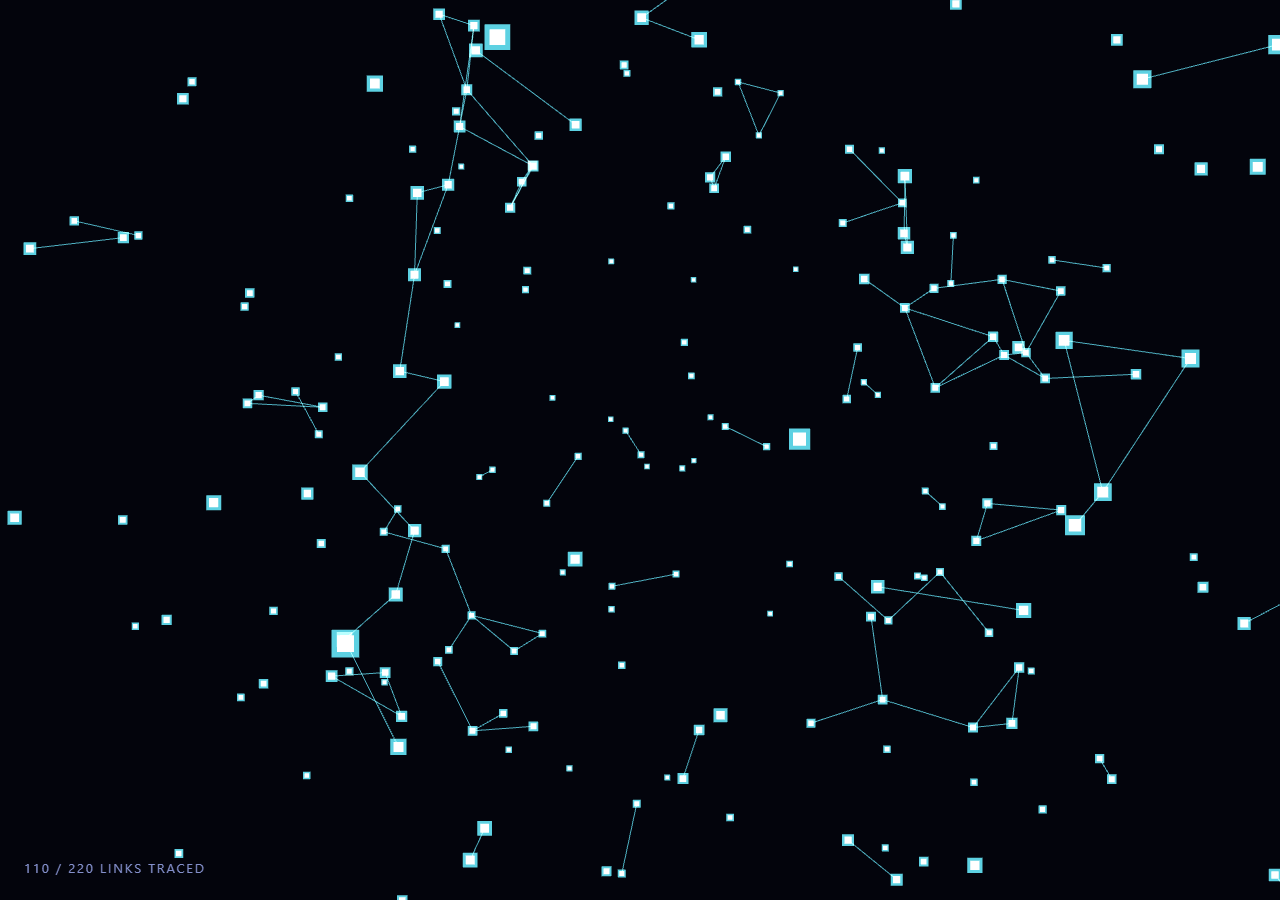
The Three.js Scroll Constellation Web snippet scatters a field of stars through 3D space and, as the visitor scrolls, progressively wires them together into glowing constellation lines — not with a particle system that fades in randomly, but with a precomputed, sorted list of edges whose reveal is driven directly by the scrollbar via a single scrubbed value.
Stars are generated once, positions frozen forever
At load time, 260 points are scattered inside a hollow sphere shell using spherical coordinates (theta/phi sampled from a uniform sphere distribution, radius randomized between 14 and 40 units) and written into a Float32Array backing a THREE.BufferGeometry. Those positions are never touched again. Freezing the star field up front is what lets the edge list computed in the next step stay valid for the lifetime of the scene — there is no need to recompute distances every frame because nothing moves relative to anything else, only the camera and the whole group rotate together.
A precomputed, sorted edge list instead of per-frame distance checks
Naively, you might loop over every star pair every frame and draw a line if they're close enough — that's an O(n²) distance check running 60 times a second for no reason, since the stars are static. Instead, the snippet loops over all pairs exactly once at startup, keeps only pairs closer than a threshold distance, and sorts the resulting candidate list by distance ascending. That sorted array becomes the fixed script for the whole scroll journey: edge 0 is the shortest link in the sky, edge 219 is the longest kept link, and scrolling simply decides how far into that script the reveal has progressed.
setDrawRange is the entire reveal mechanism
The line geometry is built once as a single THREE.BufferGeometry holding all edges as line-segment pairs, wrapped in one THREE.LineSegments object with additive blending for a glow-on-black look. Revealing more of the constellation as scroll progresses does not mean rebuilding that geometry, re-uploading a new attribute buffer, or adding new mesh objects — it means calling lineGeo.setDrawRange(0, revealedCount * 2) with a growing count. The GPU already has every possible edge in VRAM; the draw range just tells it how much of the array to actually rasterize this frame. That single call is why the reveal has effectively zero per-scroll-frame cost regardless of how many total edges exist, and why scrolling back up instantly un-reveals lines with no extra bookkeeping — shrinking the draw range is exactly as cheap as growing it.
Flashing a star the moment its first edge lands
To make each newly formed link feel like a discovery rather than a line silently appearing, the snippet tracks, for every star index touched by a newly revealed edge, a small expiry time in a flashUntil array. A second, parallel THREE.Points cloud sitting exactly on top of the star positions uses a per-vertex pulseSize attribute and additive blending to render as a soft cyan glow; each frame, any star whose flash window hasn't expired gets a temporary opacity boost proportional to how much of its 0.6-second flash window remains. This is a similar technique to the star-highlighting used in the network graph snippet, adapted here so it's driven by scroll position rather than user interaction.
Continuous rotation layered on top of discrete reveal
The reveal progress (t, scrubbed 0 to 1 across the pinned stage) and the ambient parallax rotation are deliberately kept independent: rotation advances every animation frame regardless of scroll state, while the edge count only changes when t changes. This separation means the constellation still feels alive — drifting gently, like the starfield warp backdrop — even when the visitor pauses mid-scroll with the scrollbar completely still, rather than freezing into a static image the moment scrolling stops.
Why LineBasicMaterial with additive blending, not a shader
A custom shader could draw fading gradient lines or animate line width, but for a webbing effect of thin glowing threads, THREE.LineBasicMaterial with blending: THREE.AdditiveBlending and depthWrite: false gets a convincing neon-on-black look for free: overlapping lines brighten where they cross, exactly like real light does, and there is no depth-fighting because nothing needs to write to the depth buffer for a wireframe web. This keeps the whole snippet dependency-free beyond three.js and GSAP, the same constraint followed by the holographic globe and comet trail snippets in this gallery.
Build with AI
Build, Understand, Optimize, and Extend It With AI
You don't have to puzzle out how a fixed star field turns into an animated reveal on your own. Paste this snippet's HTML, CSS, and JS into an AI assistant like Claude and ask it to explain why the edge list is sorted by distance before the scroll animation even begins, or why setDrawRange is preferable to adding and removing line objects. The same assistant can help extend the effect — ask it to color edges by a "constellation group" so the web resolves into named clusters, add drifting nebula-style background particles behind the stars, or trigger a camera dolly-in toward the most recently completed constellation. It can also help you profile and optimize, for example replacing the manual pulse-tracking loop with a small object pool if you push the star count much higher. Treat the code as a working draft to question and reshape, not a final answer.
Prompt to recreate it
Copy this into your AI assistant of choice to build the effect from scratch, or as a jumping-off point for your own variant:
Build a "scroll-revealed constellation web" in plain HTML, CSS, and JavaScript using Three.js and GSAP's ScrollTrigger plugin, all loaded from a CDN (no bundler, no build step).

Requirements:
- A pinned section containing a full-size canvas, with a WebGLRenderer and PerspectiveCamera sized to it and updated on window resize including aspect ratio.
- Scatter roughly 250-300 stars inside a hollow sphere volume using spherical coordinates, stored once in a Float32Array-backed BufferGeometry rendered as THREE.Points, and never mutated afterward.
- At load time, compute all star pairs within a fixed distance threshold, sort the resulting list ascending by distance, and cap it at a reasonable maximum (e.g. 200-250 edges) to keep the constellation legible.
- Build one THREE.BufferGeometry holding every edge as a line-segment vertex pair, rendered via a single THREE.LineSegments with additive blending and depthWrite disabled, starting with geometry.setDrawRange(0, 0).
- Register a GSAP tween on a ScrollTrigger targeting the pinned section, with pin: true, start at top top, a numeric scrub, and a multi-hundred-percent end, animating a single plain progress value t from 0 to 1.
- Every animation frame (requestAnimationFrame, independent of the scroll callback), map t to a target edge count and call geometry.setDrawRange(0, targetCount * 2) only when the count changes — never rebuild the geometry or its attributes during scroll.
- When new edges are revealed, briefly flash their two endpoint stars using a secondary Points cloud with a per-vertex size/opacity attribute that decays over a fraction of a second.
- Apply a slow continuous rotation to the whole scene, independent of the scroll-driven reveal, for ambient parallax.
- Confirm scrolling back up shrinks the draw range and instantly un-reveals edges, with no extra bookkeeping beyond the same setDrawRange call.
Want to tighten it up first? Run this prompt through the AI Prompt Studio to score it across 8 quality dimensions, catch anti-patterns, and tune the wording for Claude, ChatGPT, or Gemini before you paste it in.
Source Code
<section class="cwb-stage" id="cwbStage">
  <div class="cwb-intro-overlay"><p>Scroll ↓ to chart the sky</p></div>
  <canvas id="cwbCanvas"></canvas>
  <div class="cwb-hud"><span id="cwbCount">0</span> / <span id="cwbTotal">0</span> links traced</div>
</section>
<section class="cwb-bottom"><p>The constellation is complete.</p></section>*{box-sizing:border-box;margin:0;padding:0}
html,body{background:#03040c;color:#fff;font-family:system-ui,-apple-system,sans-serif}
.cwb-bottom{min-height:70vh;display:flex;justify-content:center;align-items:center;color:#7c83a6;font-size:15px;letter-spacing:.08em;text-transform:uppercase}
.cwb-stage{height:100vh;position:relative;overflow:hidden;background:#03040c}
.cwb-intro-overlay{position:absolute;inset:0;display:flex;align-items:center;justify-content:center;text-align:center;padding:24px;pointer-events:none;z-index:5;color:#7c83a6;font-size:15px;letter-spacing:.08em;text-transform:uppercase;transition:opacity .4s ease;}
#cwbCanvas{display:block;width:100%;height:100%}
.cwb-hud{position:absolute;left:24px;bottom:24px;font-variant-numeric:tabular-nums;font-size:13px;letter-spacing:.14em;color:#a5b4fc;text-transform:uppercase;opacity:.8}const canvas = document.getElementById('cwbCanvas');
const countEl = document.getElementById('cwbCount');
const totalEl = document.getElementById('cwbTotal');
const renderer = new THREE.WebGLRenderer({ canvas, antialias: true, alpha: true });
renderer.setPixelRatio(Math.min(window.devicePixelRatio, 2));
const scene = new THREE.Scene();
const camera = new THREE.PerspectiveCamera(60, 1, 0.1, 200);
camera.position.set(0, 0, 42);
// A fixed field of stars scattered through a sphere volume. Positions never
// change after creation, so the edge list computed below stays valid forever.
const STAR_COUNT = 260;
const starPositions = new Float32Array(STAR_COUNT * 3);
const starVec = [];
for (let i = 0; i < STAR_COUNT; i++) {
const r = 14 + Math.random() * 26;
const theta = Math.random() * Math.PI * 2;
const phi = Math.acos(2 * Math.random() - 1);
const v = new THREE.Vector3(
r * Math.sin(phi) * Math.cos(theta),
r * Math.sin(phi) * Math.sin(theta),
r * Math.cos(phi)
);
starVec.push(v);
starPositions[i * 3] = v.x;
starPositions[i * 3 + 1] = v.y;
starPositions[i * 3 + 2] = v.z;
}
const starGeo = new THREE.BufferGeometry();
starGeo.setAttribute('position', new THREE.BufferAttribute(starPositions, 3));
const starMat = new THREE.PointsMaterial({
color: 0xdbeafe,
size: 0.55,
sizeAttenuation: true,
transparent: true,
opacity: 0.9,
});
const starField = new THREE.Points(starGeo, starMat);
scene.add(starField);
// A second, sparse point cloud reused as "pulse" markers — one per star,
// invisible until that star's first edge appears, then briefly flashed big.
const pulseSizes = new Float32Array(STAR_COUNT).fill(0);
const pulseGeo = new THREE.BufferGeometry();
pulseGeo.setAttribute('position', new THREE.BufferAttribute(starPositions.slice(), 3));
pulseGeo.setAttribute('pulseSize', new THREE.BufferAttribute(pulseSizes, 1));
const pulseMat = new THREE.PointsMaterial({
color: 0x67e8f9,
size: 0.1,
sizeAttenuation: true,
transparent: true,
opacity: 0,
blending: THREE.AdditiveBlending,
depthWrite: false,
});
const pulseField = new THREE.Points(pulseGeo, pulseMat);
scene.add(pulseField);
// Precompute a fixed, sorted edge list by nearest-neighbor distance. Building
// this once at load time (rather than every frame) is what makes the reveal
// cheap: scroll only ever moves a draw-range cursor through a static array.
const candidates = [];
for (let i = 0; i < STAR_COUNT; i++) {
for (let j = i + 1; j < STAR_COUNT; j++) {
const d = starVec[i].distanceTo(starVec[j]);
if (d < 7.5) candidates.push({ i, j, d });
}
}
candidates.sort((a, b) => a.d - b.d);
// Cap the total edge count so the web reads as constellations, not a mesh blob.
const edges = candidates.slice(0, Math.min(220, candidates.length));
const linePositions = new Float32Array(edges.length * 2 * 3);
edges.forEach((e, idx) => {
const a = starVec[e.i], b = starVec[e.j];
const o = idx * 6;
linePositions[o] = a.x; linePositions[o + 1] = a.y; linePositions[o + 2] = a.z;
linePositions[o + 3] = b.x; linePositions[o + 4] = b.y; linePositions[o + 5] = b.z;
});
const lineGeo = new THREE.BufferGeometry();
lineGeo.setAttribute('position', new THREE.BufferAttribute(linePositions, 3));
// Start fully hidden — setDrawRange(0, 0) renders nothing without touching
// the underlying buffer, so revealing edges never re-uploads geometry.
lineGeo.setDrawRange(0, 0);
const lineMat = new THREE.LineBasicMaterial({
color: 0x67e8f9,
transparent: true,
opacity: 0.75,
blending: THREE.AdditiveBlending,
depthWrite: false,
});
const lines = new THREE.LineSegments(lineGeo, lineMat);
scene.add(lines);
totalEl.textContent = edges.length;
const introEl = document.querySelector('.cwb-intro-overlay');
gsap.registerPlugin(ScrollTrigger);
const web = { t: 0 };
gsap.to(web, {
t: 1,
ease: 'none',
scrollTrigger: {
trigger: '#cwbStage',
start: 'top top',
end: '+=450%',
scrub: 0.6,
pin: true,
},
});
function resize() {
const w = canvas.clientWidth, h = canvas.clientHeight;
renderer.setSize(w, h, false);
camera.aspect = w / h;
camera.updateProjectionMatrix();
}
let revealedCount = 0;
const flashUntil = new Float32Array(STAR_COUNT); // clock time each star's flash should fade by
let clock = 0;
function animate() {
requestAnimationFrame(animate);
if (introEl) introEl.style.opacity = (web.t > 0.03) ? '0' : '1';
clock += 0.016;
const t = Math.max(0, Math.min(1, web.t));
const targetCount = Math.round(t * edges.length);
// Only touch the geometry when the target actually changes, and only ever
// grow/shrink the draw range — never rebuild the buffer or attributes.
if (targetCount !== revealedCount) {
if (targetCount > revealedCount) {
for (let k = revealedCount; k < targetCount; k++) {
const e = edges[k];
// Flash whichever endpoint hasn't been lit yet, right as its first edge appears.
flashUntil[e.i] = clock + 0.6;
flashUntil[e.j] = clock + 0.6;
}
}
revealedCount = targetCount;
lineGeo.setDrawRange(0, revealedCount * 2);
countEl.textContent = revealedCount;
}
const sizes = pulseGeo.getAttribute('pulseSize');
let anyPulse = false;
for (let i = 0; i < STAR_COUNT; i++) {
const remain = flashUntil[i] - clock;
if (remain > 0) {
sizes.array[i] = 1.6 * (remain / 0.6);
anyPulse = true;
} else if (sizes.array[i] !== 0) {
sizes.array[i] = 0;
}
}
if (anyPulse) sizes.needsUpdate = true;
// PointsMaterial has one uniform size for the whole cloud, so the flash is
// approximated by nudging overall opacity — cheap and visually sufficient.
pulseMat.opacity = anyPulse ? 0.9 : 0;
pulseMat.size = 0.9;
// Gentle continuous parallax rotation, independent of the reveal progress,
// so the web still feels alive even while paused mid-scroll.
starField.rotation.y += 0.0009;
lines.rotation.y += 0.0009;
pulseField.rotation.y += 0.0009;
starField.rotation.x = Math.sin(clock * 0.05) * 0.08;
lines.rotation.x = starField.rotation.x;
pulseField.rotation.x = starField.rotation.x;
camera.position.x = Math.sin(t * Math.PI * 0.4) * 4;
camera.lookAt(0, 0, 0);
renderer.render(scene, camera);
}
resize();
window.addEventListener('resize', resize);
animate();Step by step
How to Use
- 1Load all three CDN scriptsAdd three.min.js, gsap.min.js, and ScrollTrigger.min.js from the CDN panel, in that order.
- 2Paste HTML, CSS, and JSA dark star field renders in a pinned 3D stage with a live link-count HUD.
- 3Scroll downConstellation lines connect nearby stars one by one, each new link briefly flashing its endpoints.
- 4Scroll back upThe web un-draws itself instantly, since revealedCount and setDrawRange track scroll position directly.
- 5Retune the web densityChange the distance threshold (7.5) in the candidate-pair loop or the edges.slice cap (220) to make a sparser or denser sky.
- 6Tune the reveal lengthChange the ScrollTrigger end value (+=450%) for a slower or faster constellation reveal.
Real-world uses
Common Use Cases
Got questions?
Frequently Asked Questions
The stars never move relative to each other, so their pairwise distances never change after the scene loads. Running the O(n²) distance check once at startup and caching a sorted, capped edge list means the animation loop does zero geometry math for connectivity — it only reads a cursor position into a static array, which is dramatically cheaper than re-evaluating every pair 60 times a second.
Adding and removing THREE.Object3D instances triggers scene-graph updates and extra draw calls, and rebuilding a BufferGeometry re-uploads its attributes to the GPU. setDrawRange keeps one BufferGeometry with every possible edge already resident in VRAM and simply tells the GPU how many vertices to rasterize this frame, so revealing (or hiding) hundreds of edges is a single cheap integer write with no allocation or re-upload.
The main star field uses one PointsMaterial shared by all 260 points, so its size and opacity apply uniformly and cannot spotlight a single star. A second Points object sharing the same positions but carrying a per-vertex pulseSize attribute and additive blending can be driven independently, letting individual stars flash without touching or duplicating the base star field.
No — the heaviest work (the O(n²) candidate search) runs once during setup with only 260 stars, and every scroll-frame update is O(1) beyond a small loop over active flashes. The GPU cost is a single Points draw call and a single LineSegments draw call with a bounded vertex count, well within budget even on integrated graphics and mid-range mobile GPUs.
Yes. Click JSX for a React component, Vue for a Vue 3 SFC, Angular for a standalone component, or Tailwind for a React + Tailwind version. Build the star field, edge list, and ScrollTrigger tween inside a mount effect against a canvas ref, and on cleanup kill the ScrollTrigger instance (or revert a gsap.context), dispose the geometries and materials, and call renderer.dispose() so nothing leaks when the component unmounts.