Source Code
<canvas id="cometCanvas"></canvas>*{box-sizing:border-box;margin:0;padding:0}
html,body{width:100%;height:100%;overflow:hidden;background:#020208}
#cometCanvas{display:block;width:100%;height:100%}const canvas = document.getElementById('cometCanvas');
const renderer = new THREE.WebGLRenderer({ canvas, antialias: true, alpha: true });
renderer.setPixelRatio(Math.min(window.devicePixelRatio, 2));
const scene = new THREE.Scene();
const camera = new THREE.PerspectiveCamera(55, 1, 0.1, 60);
camera.position.set(0, 2, 16);
scene.add(new THREE.AmbientLight(0x1e293b, 0.6));
// Faint static background stars give the comet somewhere to fly in front
// of — otherwise the trail would read as floating in an empty void with
// no sense of scale or depth.
const STAR_COUNT = 800;
const starPositions = new Float32Array(STAR_COUNT * 3);
for (let i = 0; i < STAR_COUNT; i++) {
starPositions[i * 3] = (Math.random() - 0.5) * 60;
starPositions[i * 3 + 1] = (Math.random() - 0.5) * 34;
starPositions[i * 3 + 2] = (Math.random() - 0.5) * 40 - 10;
}
const starGeo = new THREE.BufferGeometry();
starGeo.setAttribute('position', new THREE.BufferAttribute(starPositions, 3));
const stars = new THREE.Points(starGeo, new THREE.PointsMaterial({ color: 0x94a3b8, size: 0.035, transparent: true, opacity: 0.6 }));
scene.add(stars);
const head = new THREE.Mesh(
new THREE.SphereGeometry(0.16, 16, 16),
new THREE.MeshBasicMaterial({ color: 0xfef9c3 })
);
scene.add(head);
// The trail is a fixed-size pool of particles, each recording a past
// position of the comet's head plus an age. Every frame, one new trail
// particle is spawned at the comet's CURRENT position and the oldest,
// fully-faded particle in the pool is recycled to become it — the same
// recycling pattern used by the starfield warp snippet, applied to a
// following trail instead of an approaching field.
const TRAIL_LENGTH = 140;
const trailPositions = new Float32Array(TRAIL_LENGTH * 3);
const trailAges = new Float32Array(TRAIL_LENGTH).fill(1); // 1 = fully faded / available
let trailWriteIndex = 0;
const trailGeo = new THREE.BufferGeometry();
trailGeo.setAttribute('position', new THREE.BufferAttribute(trailPositions, 3));
const trailColors = new Float32Array(TRAIL_LENGTH * 3);
trailGeo.setAttribute('color', new THREE.BufferAttribute(trailColors, 3));
const trailMaterial = new THREE.PointsMaterial({ size: 0.11, vertexColors: true, transparent: true, depthWrite: false, blending: THREE.AdditiveBlending });
const trail = new THREE.Points(trailGeo, trailMaterial);
scene.add(trail);
const trailPosAttr = trailGeo.getAttribute('position');
const trailColorAttr = trailGeo.getAttribute('color');
// The comet loops along a simple Lissajous-style path — two sine waves at
// different frequencies on different axes — which reliably produces a
// non-repeating-looking loop without needing an authored spline path.
function cometPositionAt(time) {
return new THREE.Vector3(
Math.sin(time * 0.6) * 9,
Math.sin(time * 0.9) * 3.2,
Math.cos(time * 0.6) * 9 - 4
);
}
function resize() {
const w = canvas.clientWidth, h = canvas.clientHeight;
renderer.setSize(w, h, false);
camera.aspect = w / h;
camera.updateProjectionMatrix();
}
let t = 0;
const FADE_SPEED = 0.02;
function animate() {
requestAnimationFrame(animate);
t += 0.01;
const pos = cometPositionAt(t);
head.position.copy(pos);
// Spawn one new trail particle per frame at the comet's current
// position, overwriting the oldest slot in the fixed-size pool.
trailPositions[trailWriteIndex * 3] = pos.x;
trailPositions[trailWriteIndex * 3 + 1] = pos.y;
trailPositions[trailWriteIndex * 3 + 2] = pos.z;
trailAges[trailWriteIndex] = 0;
trailWriteIndex = (trailWriteIndex + 1) % TRAIL_LENGTH;
for (let i = 0; i < TRAIL_LENGTH; i++) {
trailAges[i] = Math.min(1, trailAges[i] + FADE_SPEED);
const brightness = 1 - trailAges[i];
trailColorAttr.setXYZ(i, brightness, brightness * 0.85, brightness * 0.55);
}
trailPosAttr.needsUpdate = true;
trailColorAttr.needsUpdate = true;
stars.rotation.y += 0.00012;
renderer.render(scene, camera);
}
resize();
window.addEventListener('resize', resize);
animate();Learn Coding Visually
Learn to code with interactive, live-preview playgrounds — HTML, CSS, JavaScript, React & more.
 HTML Playground42 lessons · Click-based · Live preview
 CSS PlaygroundLearn CSS with a live editor
 JavaScript Playground60 lessons · DOM · Async · Canvas
 React PlaygroundLearn React with a live code editor
 GSAP PlaygroundLearn GSAP animation interactively
 SVG Playground44 lessons · shapes · paths · animation
 SCSS Playground45 lessons · Sass modules · tokens
 Tailwind PlaygroundLearn Tailwind CSS with a live editor
 Bootstrap 5 Playground50 lessons · live preview
Three.js Comet Trail — Looping WebGL Meteor With Fading Particle Tail
Three.js Comet Trail · Animations · Plain HTML, CSS & JS · Live preview
What's included
Features
About this UI Snippet
How to Build a Comet With a Fading Trail in Three.js
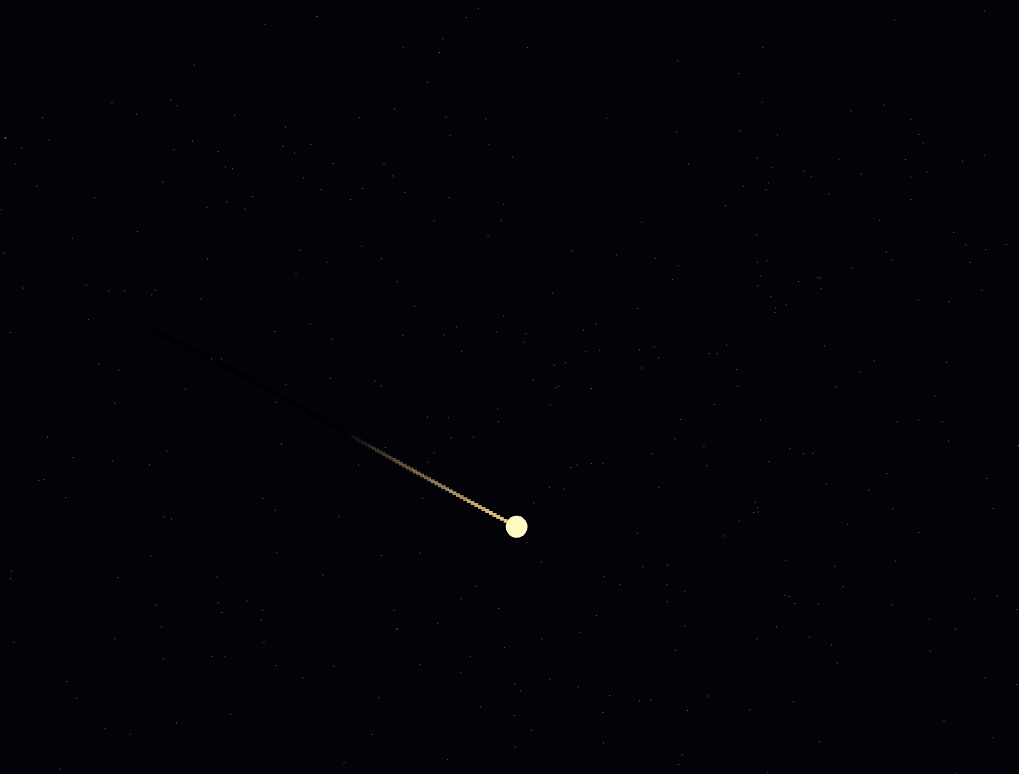
The Three.js Comet Trail snippet flies a glowing comet head along a continuously looping path, leaving behind a particle trail that glows brightest right behind the head and fades smoothly to nothing further back — built from a fixed-size recycled particle pool and a simple two-axis sine path, using core Three.js loaded from a CDN.
A Lissajous-style path instead of an authored spline
Rather than hand-placing waypoints along a curve, the comet's position at any moment is computed directly from cometPositionAt(time) — X and Z driven by sine and cosine of the time value at one frequency, Y driven by sine at a *different* frequency. Because the X/Z and Y frequencies don't share a simple ratio, the resulting 3D loop never retraces exactly the same path twice within any short viewing window, giving a comet flight path that looks organic and non-repeating despite being entirely deterministic math.
A fixed-size recycled pool, not a growing array
The trail never allocates a new particle as the comet flies — it maintains exactly TRAIL_LENGTH particle slots from the very first frame, forever. Each frame, exactly one slot (tracked by a simple wrapping trailWriteIndex) gets overwritten with the comet's *current* position and its age reset to zero. This "always overwrite the next slot in a fixed ring" approach is the standard pattern for any bounded-length trail, motion blur, or particle-limited effect — the same recycling philosophy used in the starfield warp snippet, just spawning behind a moving object instead of resetting particles that reach the camera.
Age drives color, and color is the entire fade effect
Every trail particle carries its own age value, starting at 0 the instant it's spawned and creeping toward 1 every frame thereafter (clamped so it never exceeds 1). That age is converted directly into a brightness value — 1 - age — which feeds every particle's vertex color. There's no separate opacity animation or shrinking scale involved: a particle simply gets darker and darker as it ages, until it's rendered as black and visually disappears against the dark background, at which point its slot is eventually recycled by the write index looping back around.
Warm color drifting toward black, not toward transparent
Rather than fading each particle's *alpha* toward zero, this snippet fades its *color* toward black — multiplying a warm, comet-tail palette (slightly orange-tinted) by the shrinking brightness value. Combined with additive blending, this produces a trail that looks like it's genuinely cooling and dimming, similar to embers or a fading spark, rather than simply becoming more see-through.
Additive blending makes the head-adjacent trail glow brightest
Because newly-spawned trail particles cluster most densely right behind the comet's head (it moves a small, consistent distance each frame), and THREE.AdditiveBlending sums overlapping particle colors rather than letting one occlude another, the section of trail immediately behind the head reads as noticeably brighter and denser than the thinning tail further back — exactly the visual hierarchy a comet trail should have, achieved without any explicit "brighten near the head" logic.
A static starfield gives the scene scale
A field of 800 faint, unmoving background points (very slightly rotating for ambient life) gives the eye a fixed reference frame — without it, the comet and its trail would read as floating in a scale-less void with no sense of how large or fast the loop actually is.
Where this technique applies
The fixed-pool, age-to-color trail pattern generalizes to sparks, magic wand trails, sword-swing motion trails, or any effect where something needs to leave a fading trace behind its movement. Pair this snippet with a starfield warp for a fuller space-themed scene, or contrast its glowing, additive trail against the flat, opaque look of the instanced cube wave.
Build with AI
Build, Understand, Optimize, and Extend It With AI
You do not have to work out the particle recycling and fade logic by tracing every array by hand. Paste this snippet's HTML, CSS, and JS into an AI coding assistant like Claude and ask it to explain exactly why the trail's particle pool never grows even though a new particle spawns every frame, or how the age-to-brightness conversion produces a fade-to-black effect without any opacity animation at all. The same assistant can help optimize it, for instance checking whether the trail could spawn a particle every other frame instead of every frame for a sparser but cheaper tail, or whether the per-particle color recalculation loop could skip particles that are already fully faded to black. It is also useful for extending the effect: ask it to spawn a small burst of extra particles whenever the comet passes closest to the camera, vary the trail's color based on the comet's current speed instead of a fixed palette, or add a second, smaller comet on a different Lissajous path for a two-comet scene. Treat the code less like a finished artifact and more like a starting point for a conversation.
Prompt to recreate it
Copy this into your AI assistant of choice to build the effect from scratch, or as a jumping-off point for your own variant:
Build a looping "comet with a fading trail" in plain HTML, CSS, and JavaScript using Three.js loaded from a CDN (no bundler, no build step) — a glowing head flying a continuous path, leaving a recycled, fading particle trail behind it.

Requirements:
- A full-viewport canvas with a WebGLRenderer sized to match it, updated on window resize including camera aspect ratio, with a static, faint background starfield of at least 500 points for scale reference.
- A small glowing sphere mesh representing the comet's head, whose position every frame is computed directly from a function of a continuously incrementing time value using sine and cosine on at least two axes with different, non-matching frequencies (a Lissajous-style path), not from an authored list of waypoints.
- A trail rendered as a single THREE.Points object backed by a fixed-size BufferGeometry with a set number of particle slots (at least 100) allocated once at startup and never resized afterward.
- Track a separate "age" value per trail particle slot in a plain typed array, alongside a wrapping write-index counter.
- Every animation frame, write the comet head's current position into the particle slot at the current write index, reset that slot's age to zero, and advance the write index by one, wrapping back to zero once it reaches the end of the array — this is how a new trail particle spawns and an old one is recycled, without ever allocating new array elements.
- Every frame, increase every particle's age by a fixed small amount (capped at a maximum value), and convert each particle's age into a brightness value that decreases as age increases; write that brightness, multiplied against a warm base color, directly into the particle's vertex color attribute — do not use opacity or alpha to achieve the fade, only color value.
- Render the trail with vertex colors enabled and additive blending, so densely-clustered newer particles near the comet's current position visually glow brighter than older, more sparsely distributed particles further back in the trail.
Want to tighten it up first? Run this prompt through the AI Prompt Studio to score it across 8 quality dimensions, catch anti-patterns, and tune the wording for Claude, ChatGPT, or Gemini before you paste it in.
Step by step
How to Use
- 1Load the Three.js CDNAdd three.min.js from the CDN panel — no add-ons are required for this snippet.
- 2Paste HTML, CSS, and JSA glowing comet begins looping immediately, leaving a fading trail behind it.
- 3Watch the loopThe path never retraces exactly, since its X/Z and Y sine frequencies don't share a simple ratio.
- 4Adjust trail lengthChange TRAIL_LENGTH for a longer, more persistent tail or a shorter, tighter one.
- 5Tune the fade speedAdjust FADE_SPEED for a trail that dims quickly (short, sharp tail) or slowly (long, lingering glow).
- 6Change the flight pathEdit the frequencies and radii inside cometPositionAt() for a different loop shape.
Real-world uses
Common Use Cases
Got questions?
Frequently Asked Questions
The comet's X and Z position use sine and cosine of time at one frequency, while its Y position uses sine at a different, unrelated frequency. Because those frequencies don't share a simple whole-number ratio, the combined 3D path takes a very long time to return to exactly the same shape, so within any normal viewing session it reads as organic and non-repeating despite being fully deterministic.
No. The trail is a fixed-size pool of exactly TRAIL_LENGTH particle slots, allocated once at startup. Every frame, precisely one slot — tracked by a wrapping write index — gets overwritten with the comet's current position and its age reset to zero. The pool never grows; it only ever recycles its existing fixed set of slots.
Each particle stores its own age value, starting at 0 when spawned and increasing by a fixed amount every frame until it caps at 1. That age is converted into a brightness value (1 minus age) which is written directly into the particle's vertex color, multiplied against a warm base palette — so the particle simply gets darker and darker until it blends into the black background.
Rather than animating opacity toward zero, this snippet fades each particle's color toward black by scaling it against the shrinking brightness value. Combined with additive blending, this produces a cooling-ember look — the trail dims and darkens rather than becoming see-through, which reads as more like a physical afterglow than a simple fade-out.
Because the comet moves a small, consistent distance each frame, newly-spawned particles naturally cluster most densely in the area immediately behind the head. Additive blending sums the colors of overlapping particles rather than letting one hide another, so that denser, newer cluster of particles reads as visibly brighter than the sparser, older particles further back in the tail.
Yes. Click JSX for a React component, Vue for a Vue 3 SFC, Angular for a standalone component, or Tailwind for a React + Tailwind CSS utility-class version. Keep the trail arrays and write index in refs so they persist across renders, build the pool inside a mount effect, and call renderer.dispose() plus cancelAnimationFrame on cleanup.