Source Code
<canvas id="cubeCanvas"></canvas>
<div class="icw-badge">2,500 instances · 1 draw call</div>*{box-sizing:border-box;margin:0;padding:0}
html,body{width:100%;height:100%;overflow:hidden;background:#070a14}
#cubeCanvas{display:block;width:100%;height:100%}
.icw-badge{position:fixed;left:18px;top:18px;padding:7px 13px;border-radius:7px;background:rgba(14,20,38,0.7);border:1px solid rgba(96,165,250,0.25);color:#bcd4f5;font:12px ui-monospace,monospace;letter-spacing:.02em;backdrop-filter:blur(6px)}const canvas = document.getElementById('cubeCanvas');
const renderer = new THREE.WebGLRenderer({ canvas, antialias: true });
renderer.setPixelRatio(Math.min(window.devicePixelRatio, 2));
const scene = new THREE.Scene();
const camera = new THREE.PerspectiveCamera(45, 1, 0.1, 100);
camera.position.set(16, 14, 16);
camera.lookAt(0, 0, 0);
scene.add(new THREE.AmbientLight(0x334155, 0.7));
const dir = new THREE.DirectionalLight(0x93c5fd, 1.2);
dir.position.set(8, 12, 6);
scene.add(dir);
// InstancedMesh draws every cube in a SINGLE GPU draw call. Only the base
// geometry and material are created once; every cube's individual position
// and scale live purely in a per-instance transform matrix.
const GRID = 50;
const SPACING = 0.62;
const COUNT = GRID * GRID;
const geometry = new THREE.BoxGeometry(0.42, 0.42, 0.42);
const material = new THREE.MeshStandardMaterial({ color: 0x60a5fa, metalness: 0.3, roughness: 0.4 });
const mesh = new THREE.InstancedMesh(geometry, material, COUNT);
scene.add(mesh);
const dummy = new THREE.Object3D();
const offsets = [];
let i = 0;
for (let x = 0; x < GRID; x++) {
for (let z = 0; z < GRID; z++) {
const px = (x - GRID / 2) * SPACING;
const pz = (z - GRID / 2) * SPACING;
offsets.push({ x: px, z: pz, dist: Math.sqrt(px * px + pz * pz) });
i++;
}
}
function resize() {
const w = canvas.clientWidth, h = canvas.clientHeight;
renderer.setSize(w, h, false);
camera.aspect = w / h;
camera.updateProjectionMatrix();
}
let t = 0;
function animate() {
requestAnimationFrame(animate);
t += 0.035;
for (let idx = 0; idx < COUNT; idx++) {
const o = offsets[idx];
// Radial ripple: height is a function of each cube's distance from the
// grid center and the shared clock, so waves visibly radiate outward
// from the middle rather than sweeping in one flat direction.
const wave = Math.sin(o.dist * 0.5 - t) * 0.5 + 0.5;
const y = wave * 1.6;
const scaleY = 0.3 + wave * 1.1;
dummy.position.set(o.x, y, o.z);
dummy.scale.set(1, scaleY, 1);
dummy.updateMatrix();
mesh.setMatrixAt(idx, dummy.matrix);
}
mesh.instanceMatrix.needsUpdate = true;
scene.rotation.y += 0.0015;
renderer.render(scene, camera);
}
resize();
window.addEventListener('resize', resize);
animate();Learn Coding Visually
Learn to code with interactive, live-preview playgrounds — HTML, CSS, JavaScript, React & more.
 HTML Playground42 lessons · Click-based · Live preview
 CSS PlaygroundLearn CSS with a live editor
 JavaScript Playground60 lessons · DOM · Async · Canvas
 React PlaygroundLearn React with a live code editor
 GSAP PlaygroundLearn GSAP animation interactively
 SVG Playground44 lessons · shapes · paths · animation
 SCSS Playground45 lessons · Sass modules · tokens
 Tailwind PlaygroundLearn Tailwind CSS with a live editor
 Bootstrap 5 Playground50 lessons · live preview
Three.js Instanced Cube Wave — GPU-Instanced WebGL Grid Animation
Three.js Instanced Cube Wave · Animations · Plain HTML, CSS & JS · Live preview
What's included
Features
About this UI Snippet
How to Animate Thousands of Cubes With Three.js InstancedMesh
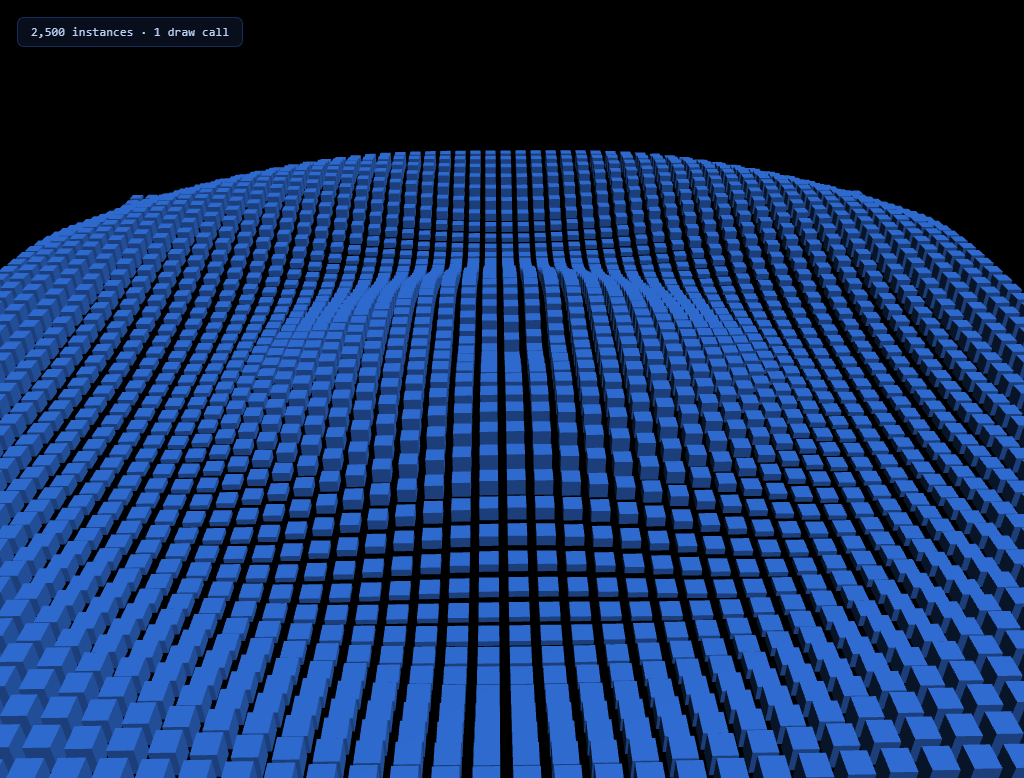
The Three.js Instanced Cube Wave snippet animates a 50×50 grid — 2,500 individual cubes — rippling outward from the center like a pond struck by a stone, while every single cube is rendered in one GPU draw call using THREE.InstancedMesh, loaded from Three.js's core CDN build with no extra dependencies.
One geometry, one material, thousands of transforms
Creating 2,500 separate THREE.Mesh objects — each with its own geometry reference, material, and matrix — would issue 2,500 individual draw calls to the GPU every frame, which collapses frame rate almost immediately past a few hundred objects. InstancedMesh inverts this: it holds exactly one shared geometry and one shared material, plus a buffer of per-instance transform matrices. The GPU renders all 2,500 cubes in a single call, reading each instance's own position and scale from that shared buffer — the same core technique that lets modern games render forests, crowds, and particle debris fields with negligible per-object cost.
A reusable dummy Object3D writes each instance's matrix
Three.js has no per-instance .position or .scale property to set directly — instead, the snippet reuses a single, invisible THREE.Object3D (dummy) as scratch space every frame: set its position and scale, call updateMatrix(), then copy that matrix into the mesh via mesh.setMatrixAt(index, dummy.matrix). Reusing one dummy object for all 2,500 writes, rather than creating a fresh Object3D per cube per frame, avoids needless garbage collection pressure in a loop that already runs 60 times a second.
Radial distance drives the ripple, not a flat directional sweep
Every cube's height is computed from Math.sin(distanceFromCenter * frequency - time), where distanceFromCenter is precomputed once per cube at startup and cached. Because the wave's phase depends on radial distance rather than a single X or Z coordinate, the ripple visibly radiates outward in expanding rings from the grid's center — exactly like a real water ripple — rather than sweeping across the grid in one flat, unconvincing direction.
Height and vertical scale move together for a "spike" feel
Each cube's Y position rises with the wave, but its Y-axis *scale* also stretches proportionally at the same time, so rising cubes appear to stretch upward from the ground plane rather than simply floating up as rigid blocks. This two-property coupling — position and scale sharing the same underlying wave value — is a small detail that makes the grid read as flexible, spike-like terrain instead of a field of hovering boxes.
Flagging instanceMatrix.needsUpdate, once per frame
Just like a regular BufferAttribute, the shared instance matrix buffer only re-uploads to the GPU when explicitly flagged. Setting mesh.instanceMatrix.needsUpdate = true once, after all 2,500 individual setMatrixAt calls for that frame, batches the entire update into a single GPU buffer upload rather than 2,500 separate ones.
Where instancing matters beyond cubes
This exact pattern — one shared geometry/material, a scratch Object3D, and a per-instance matrix buffer — is how you'd efficiently render a forest of trees, a crowd of characters, a field of grass, or thousands of UI particles in any WebGL scene. Compare its GPU-instanced efficiency against a particle wave built from raw points, or contrast the rigid grid here with the free-floating motion of a particle network.
Build with AI
Build, Understand, Optimize, and Extend It With AI
You do not have to work out the instancing pattern by trial and error. Paste this snippet's HTML, CSS, and JS into an AI coding assistant like Claude and ask it to explain exactly why InstancedMesh only needs one geometry and one material for 2,500 visually independent cubes, or how the reusable dummy Object3D avoids per-frame memory allocation while still writing a unique transform for every instance. The same assistant can help optimize it, for instance checking whether the per-cube distance-from-center calculation could be precomputed into a typed array for faster lookups, or whether frustum culling could skip updating instances currently off-screen. It is also useful for extending the effect: ask it to add per-instance color variation using InstancedMesh's instanceColor buffer, drive the wave height from live audio frequency data instead of time, or trigger a ripple from a specific clicked point using raycasting instead of always originating at the grid center. Treat the code less like a finished artifact and more like a starting point for a conversation.
Prompt to recreate it
Copy this into your AI assistant of choice to build the effect from scratch, or as a jumping-off point for your own variant:
Build an animated "instanced cube wave" grid in plain HTML, CSS, and JavaScript using Three.js loaded from a CDN (no bundler, no build step) — thousands of cubes rippling outward from the center, rendered in a single GPU draw call.

Requirements:
- A full-viewport canvas with a WebGLRenderer sized to match it, updated on window resize including camera aspect ratio, with directional and ambient lighting so a standard (non-basic) material shows visible shading.
- A grid of at least 2,000 small cube instances built using a single THREE.InstancedMesh with one shared BoxGeometry and one shared MeshStandardMaterial — do not create individual THREE.Mesh objects per cube.
- Precompute and cache each cube's grid position and its distance from the grid's center once at startup, rather than recalculating distance every animation frame.
- Reuse a single scratch THREE.Object3D every frame to compute each instance's transform: set its position and scale based on that cube's cached distance and a shared, continuously incrementing time value fed through a sine function, call its matrix-update method, then copy the resulting matrix into the instanced mesh at that cube's index.
- The wave's height (Y position) must be a function of each cube's distance from the center combined with time, so the animation visibly radiates outward in expanding rings rather than sweeping in one flat direction across the grid.
- Couple each cube's vertical scale to the same wave value used for its height, so rising cubes appear to stretch upward rather than simply translating as rigid, unscaled blocks.
- After updating every instance's matrix for the current frame, flag the instanced mesh's instance matrix buffer as needing a GPU update exactly once per frame, not once per instance.
- Add a slow, continuous rotation to the entire grid or scene for a subtle sense of camera movement, independent of the wave animation itself.
Want to tighten it up first? Run this prompt through the AI Prompt Studio to score it across 8 quality dimensions, catch anti-patterns, and tune the wording for Claude, ChatGPT, or Gemini before you paste it in.
Step by step
How to Use
- 1Load the Three.js CDNAdd three.min.js from the CDN panel — InstancedMesh is part of core Three.js.
- 2Paste HTML, CSS, and JSA 50x50 grid of cubes appears immediately, rippling outward from the center.
- 3Watch the ripple radiateHeight and scale are driven by each cube's distance from the grid center, so waves expand outward continuously.
- 4Tune grid size and spacingAdjust GRID and SPACING to trade cube density and coverage area for performance.
- 5Change the wave shapeEdit the sine formula's frequency and speed multipliers for tighter or looser ripples.
- 6Resize the windowRenderer size and camera aspect ratio update automatically on resize.
Real-world uses
Common Use Cases
Got questions?
Frequently Asked Questions
Each individual THREE.Mesh issues its own draw call to the GPU every frame; 2,500 of them would overwhelm most devices well before reaching 60fps. InstancedMesh shares one geometry and one material across all instances and renders them in a single draw call, with only a per-instance transform matrix varying between cubes — the standard technique for rendering large numbers of similar objects efficiently.
THREE.InstancedMesh has no per-instance .position or .scale property to set directly. The snippet reuses one scratch THREE.Object3D every frame: set its position and scale, call updateMatrix(), then copy the resulting matrix into the instanced mesh with setMatrixAt(index, dummy.matrix). Reusing one object for all 2,500 writes avoids creating new objects in a loop that runs 60 times per second.
Each cube's wave phase is calculated from its precomputed distance from the grid's center, not from a single X or Z coordinate. Because sine of (distance - time) produces the same value for every cube at a given radius simultaneously, the wave visibly forms expanding concentric rings, matching how a real ripple propagates outward from a disturbance.
No — call mesh.instanceMatrix.needsUpdate = true exactly once per frame, after the loop that updates every instance's matrix has finished. Setting it inside the loop on every iteration would be redundant and wasteful; the GPU buffer only needs the flag once before the next render call reads it.
Yes. Raise GRID for more cubes at a higher GPU cost (cost scales with the square of GRID, since it's a two-dimensional grid), or lower it for a sparser, cheaper effect. Adjust SPACING alongside it to keep the grid covering roughly the same physical area.
Yes. Click JSX for a React component, Vue for a Vue 3 SFC, Angular for a standalone component, or Tailwind for a React + Tailwind CSS utility-class version. Create the InstancedMesh, dummy Object3D, and offsets array inside a mount effect so they persist across renders without recreating the geometry, and call renderer.dispose() plus geometry.dispose()/material.dispose() on cleanup to free GPU memory.