Learn Coding Visually
Learn to code with interactive, live-preview playgrounds — HTML, CSS, JavaScript, React & more.
 HTML Playground42 lessons · Click-based · Live preview
 CSS PlaygroundLearn CSS with a live editor
 JavaScript Playground60 lessons · DOM · Async · Canvas
 React PlaygroundLearn React with a live code editor
 GSAP PlaygroundLearn GSAP animation interactively
 SVG Playground44 lessons · shapes · paths · animation
 SCSS Playground45 lessons · Sass modules · tokens
 Tailwind PlaygroundLearn Tailwind CSS with a live editor
 Bootstrap 5 Playground50 lessons · live preview
Three.js Scroll Fabric Ripple — GSAP Cloth Wind Effect
Three.js Scroll Fabric Ripple · Scroll · Plain HTML, CSS & JS · Live preview
What's included
Features
About this UI Snippet
How to Build a Scroll-Driven Fabric Ripple With Three.js and GSAP
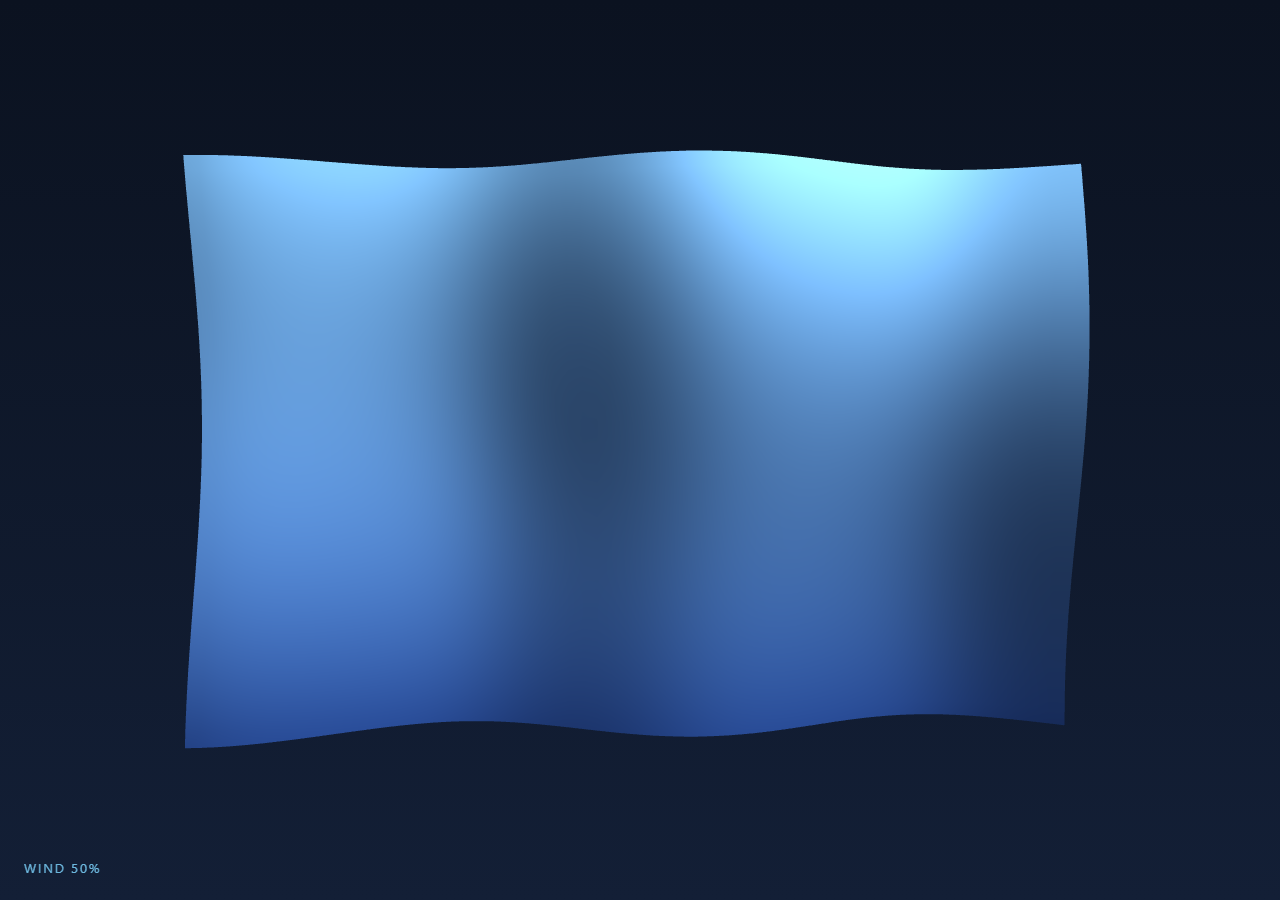
The Three.js Scroll Fabric Ripple snippet turns a plain PlaneGeometry into a suspended banner that catches the wind as the visitor scrolls — nearly taut at the top of the section, increasingly billowing and wave-like the further down they go. There is no cloth physics library involved; the entire effect is layered sine-wave displacement of vertex positions, scaled by a single value scrubbed with GSAP's ScrollTrigger, following the same one-number-drives-everything pattern as the scroll tunnel snippet.
Why a high segment count matters more here than almost anywhere else
The plane is built with PlaneGeometry(WIDTH, HEIGHT, 60, 40) — sixty segments across, forty down. A coarse plane (say 8x6) would turn the same sine math into a blocky, faceted ripple where each wave crest is visibly made of a handful of flat triangles. Cloth reads as fabric specifically because the curvature between crest and trough is smooth, which only happens when there are enough vertices for the displacement to sample the sine function at a fine enough interval. This is the same reasoning behind the dense grid in the scroll wave terrain snippet, just applied to a vertical banner instead of a ground plane.
Displacing from a cached rest pose, not the live geometry
Every frame the snippet writes new Z values into geometry.attributes.position.array, but the X and Y inputs to the sine functions are read from basePositions — a plain Float32Array copy of the geometry's original flat positions taken once, before any animation starts. Computing displacement from the live (already-displaced) array instead of a fixed rest pose is a common mistake: each frame's wave would compound on top of the previous frame's wave, and the fabric would drift and grow more extreme over time instead of oscillating around a stable rest shape.
Recomputing normals is not optional
After the Z values change, the snippet calls geometry.computeVertexNormals() immediately after flagging posAttr.needsUpdate = true. Skipping this step is the single most common bug when displacing geometry by hand: the vertex *positions* move, but MeshStandardMaterial lights the surface using vertex *normals*, and those normals were computed once for the flat rest pose. Without recomputing them, the ripples visibly move but stay lit as if the surface were still perfectly flat — the folds have no shading, so they read as geometrically inert regardless of how much the mesh actually deforms. Recomputing normals every frame is the line that makes the lighting respond to the ripples at all.
Layering three sine terms instead of one
A single Math.sin(x * frequency + time) sweep produces a wave that looks uniform and mechanical — real fabric never oscillates at one clean frequency. The snippet sums three terms: a primary wave along X, a secondary wave along Y with its own frequency and a small X-dependent phase shift, and a slow diagonal "travel" term that moves along both axes at once. None of the three ever fully cancels or reinforces the others, so the combined surface has the irregular, layered motion of a real hung cloth catching gusts from slightly different directions, without needing a full cloth-physics simulation.
Wind strength as the only thing scroll actually controls
Rather than scrubbing a position or rotation, the ScrollTrigger tween drives one abstract value — wind.t, 0 to 1 — and every wave parameter (amplitude, both frequencies) is derived from it each frame: amp = 0.05 + t * 0.55. At t = 0 the banner is nearly flat, like fabric held taut; as t climbs toward 1 both the amplitude and frequency increase together, so the cloth doesn't just move more, it visibly gets *more turbulent*. Because the underlying clock variable keeps advancing regardless of scroll direction, scrolling back up smoothly relaxes the same fabric back toward taut rather than snapping.
Vertex colors for a gradient with zero texture loading
Instead of a fabric texture (which would need loading and UV setup for no strong visual gain at this scale), the snippet bakes a vertical color gradient directly into a color BufferAttribute, interpolating from a deep blue hem to a light sky tone at the top, and enables it with vertexColors: true on the material. This is a cheap technique worth reusing anywhere a smooth tonal gradient is wanted on geometry that already needs a custom attribute pass — no image request, no UV mapping, and it composites correctly with the standard material's lighting response, similar to how the liquid metal sphere snippet also leans on material properties over textures for its look.
Build with AI
Build, Understand, Optimize, and Extend It With AI
You do not need to derive the wave-layering math from scratch. Paste this snippet's HTML, CSS, and JS into an AI assistant like Claude and ask it to explain why the displacement reads from a cached rest-pose array instead of the live position attribute, or why normals are recomputed every frame instead of once at startup. The same assistant can help you extend the effect — ask it to add a mouse-driven local disturbance that pushes the cloth outward near the cursor, drape the plane using a proper Verlet cloth simulation instead of pure sine displacement for physical accuracy, or map a logo texture onto the banner with correct UVs alongside the existing vertex-color gradient. It can also help you profile the per-frame CPU cost and suggest moving the displacement into a custom vertex shader if you need many more segments. Treat the code as a starting point to interrogate and rebuild, not a finished artifact.
Prompt to recreate it
Copy this into your AI assistant of choice to build the effect from scratch, or as a jumping-off point for your own variant:
Build a "scroll-driven fabric ripple" in plain HTML, CSS, and JavaScript using Three.js, GSAP, and GSAP's ScrollTrigger plugin, all loaded from a CDN (no bundler, no build step).

Requirements:
- A pinned section containing a full-size canvas, with a WebGLRenderer and PerspectiveCamera sized to it and updated on window resize including aspect ratio.
- A THREE.PlaneGeometry with a high segment count (around 60x40) representing a suspended cloth or banner, rendered with a MeshStandardMaterial using side: THREE.DoubleSide.
- Bake a vertical color gradient into the geometry using a custom vertex color BufferAttribute (interpolating between two colors based on each vertex's Y position) and enable vertexColors on the material, rather than loading a texture.
- Before any animation starts, cache a copy of the geometry's original flat position attribute array (e.g. via .slice()) to use as the stable input to the displacement math every frame.
- Register a GSAP tween on a ScrollTrigger targeting the pinned section, with pin: true, start at top top, a numeric scrub, and a multi-hundred-percent end, animating a single plain 0-1 "wind" progress value.
- Every animation frame (requestAnimationFrame, independent of the scroll callback), derive wave amplitude and frequency from the scrubbed wind value, then for every vertex compute a new Z offset by summing at least two or three sine terms with different frequencies, phases, and axes (using the cached X/Y positions as inputs, not the live displaced array), and write the result into the live position attribute's Z component.
- After updating positions, set position.needsUpdate = true and call geometry.computeVertexNormals() so lighting responds correctly to the new surface shape.
- Add ambient and directional lighting so the ripple folds are visibly shaded.
- Confirm scrolling back up smoothly relaxes the cloth back toward its flatter starting state, since wind strength is fully scrubbed rather than a one-way timer.
Want to tighten it up first? Run this prompt through the AI Prompt Studio to score it across 8 quality dimensions, catch anti-patterns, and tune the wording for Claude, ChatGPT, or Gemini before you paste it in.
Source Code
<section class="frp-stage" id="frpStage">
  <div class="frp-intro-overlay"><p>Scroll ↓ to catch the wind</p></div>
  <canvas id="frpCanvas"></canvas>
  <div class="frp-hud">Wind <span id="frpWind">0</span>%</div>
</section>
<section class="frp-bottom"><p>The banner has settled.</p></section>*{box-sizing:border-box;margin:0;padding:0}
html,body{background:#0b1220;color:#fff;font-family:system-ui,-apple-system,sans-serif}
.frp-bottom{min-height:70vh;display:flex;justify-content:center;align-items:center;color:#8ea3c4;font-size:15px;letter-spacing:.08em;text-transform:uppercase}
.frp-stage{height:100vh;position:relative;overflow:hidden;background:linear-gradient(180deg,#0b1220 0%,#131f36 100%)}
.frp-intro-overlay{position:absolute;inset:0;display:flex;align-items:center;justify-content:center;text-align:center;padding:24px;pointer-events:none;z-index:5;color:#8ea3c4;font-size:15px;letter-spacing:.08em;text-transform:uppercase;transition:opacity .4s ease;}
#frpCanvas{display:block;width:100%;height:100%}
.frp-hud{position:absolute;left:24px;bottom:24px;font-variant-numeric:tabular-nums;font-size:13px;letter-spacing:.14em;color:#7dd3fc;text-transform:uppercase;opacity:.85}const canvas = document.getElementById('frpCanvas');
const windEl = document.getElementById('frpWind');
const renderer = new THREE.WebGLRenderer({ canvas, antialias: true, alpha: true });
renderer.setPixelRatio(Math.min(window.devicePixelRatio, 2));
const scene = new THREE.Scene();
const camera = new THREE.PerspectiveCamera(45, 1, 0.1, 100);
camera.position.set(0, 0.4, 10);
camera.lookAt(0, 0, 0);
scene.add(new THREE.AmbientLight(0x8899bb, 0.5));
const sun = new THREE.DirectionalLight(0xffffff, 1.2);
sun.position.set(4, 6, 5);
scene.add(sun);
const fill = new THREE.DirectionalLight(0x5588ff, 0.4);
fill.position.set(-5, -2, -3);
scene.add(fill);
// High segment counts are what make per-vertex sine displacement look like
// fabric instead of a blocky ripple — the cloth needs enough vertices for the
// wave curvature to read smoothly between crests and troughs.
const WIDTH = 8, HEIGHT = 5.2, SEG_X = 60, SEG_Y = 40;
const geometry = new THREE.PlaneGeometry(WIDTH, HEIGHT, SEG_X, SEG_Y);
// A subtle vertical color gradient baked into vertex colors, from a deep base
// tone at the bottom hem to a lighter tone at the top — cheap to compute once
// and it sells the idea of light raking across a hung banner.
const colorAttr = new Float32Array((SEG_X + 1) * (SEG_Y + 1) * 3);
const posAttr = geometry.attributes.position;
const topColor = new THREE.Color(0x8fd3ff);
const bottomColor = new THREE.Color(0x1f3b73);
for (let i = 0; i < posAttr.count; i++) {
const y = posAttr.getY(i);
const v = (y + HEIGHT / 2) / HEIGHT;
const c = bottomColor.clone().lerp(topColor, v);
colorAttr[i * 3] = c.r;
colorAttr[i * 3 + 1] = c.g;
colorAttr[i * 3 + 2] = c.b;
}
geometry.setAttribute('color', new THREE.BufferAttribute(colorAttr, 3));
const material = new THREE.MeshStandardMaterial({
vertexColors: true,
roughness: 0.85,
metalness: 0.05,
side: THREE.DoubleSide,
});
const cloth = new THREE.Mesh(geometry, material);
scene.add(cloth);
// Cache original X/Y so displacement is always computed from the flat rest
// pose rather than accumulating drift from the previous frame's Z values.
const basePositions = posAttr.array.slice();
const introEl = document.querySelector('.frp-intro-overlay');
gsap.registerPlugin(ScrollTrigger);
// One scrubbed value drives wind strength: 0 = taut and nearly flat,
// 1 = fully billowing. Everything about the ripple is a function of this.
const wind = { t: 0 };
gsap.to(wind, {
t: 1,
ease: 'none',
scrollTrigger: {
trigger: '#frpStage',
start: 'top top',
end: '+=400%',
scrub: 0.6,
pin: true,
},
});
let clock = 0;
function resize() {
const w = canvas.clientWidth, h = canvas.clientHeight;
renderer.setSize(w, h, false);
camera.aspect = w / h;
camera.updateProjectionMatrix();
}
function animate() {
requestAnimationFrame(animate);
if (introEl) introEl.style.opacity = (wind.t > 0.03) ? '0' : '1';
clock += 0.016;
const t = Math.max(0, Math.min(1, wind.t));
windEl.textContent = Math.round(t * 100);
// Amplitude and frequency both scale with scroll progress: at t=0 the waves
// are nearly imperceptible (taut banner), at t=1 they billow with visible
// layered motion (fabric caught mid-gust).
const amp = 0.05 + t * 0.55;
const freqX = 1.1 + t * 0.6;
const freqY = 0.8 + t * 0.4;
const arr = posAttr.array;
for (let i = 0; i < posAttr.count; i++) {
const bx = basePositions[i * 3];
const by = basePositions[i * 3 + 1];
// Layering two sine waves at different frequencies/phases avoids the
// uniform, mechanical look a single sine sweep produces, and a slow
// diagonal traveling term keeps the whole sheet from ever fully freezing.
const wave1 = Math.sin(bx * freqX + clock * 1.4) * amp;
const wave2 = Math.sin(by * freqY - clock * 1.1 + bx * 0.3) * amp * 0.6;
const travel = Math.sin((bx + by) * 0.5 - clock * 0.8) * amp * 0.25;
arr[i * 3 + 2] = wave1 + wave2 + travel;
}
posAttr.needsUpdate = true;
// Vertex normals must be recomputed after displacing Z each frame, or the
// MeshStandardMaterial keeps lighting the flat rest-pose normals and the
// ripples read as geometrically flat regardless of how much they move.
geometry.computeVertexNormals();
cloth.rotation.y = Math.sin(clock * 0.1) * 0.04 * (0.3 + t);
renderer.render(scene, camera);
}
resize();
window.addEventListener('resize', resize);
animate();Step by step
How to Use
- 1Load all three CDN scriptsAdd three.min.js, gsap.min.js, and ScrollTrigger.min.js from the CDN panel, in that order.
- 2Paste HTML, CSS, and JSA near-flat banner appears in a pinned 3D stage with a live wind-strength readout.
- 3Scroll downAmplitude and frequency both climb, so the cloth ripples more and faster, like wind picking up.
- 4Scroll back upThe banner relaxes back toward taut, since amplitude is fully derived from the scrubbed wind value.
- 5Restyle the gradientEdit topColor and bottomColor to match your palette, or swap vertex colors for a texture map if you need a logo.
- 6Retune the ripple feelAdjust the amp/freqX/freqY formulas or the ScrollTrigger end value (+=400%) for calmer or stormier motion.
Real-world uses
Common Use Cases
Got questions?
Frequently Asked Questions
MeshStandardMaterial shades a surface using its vertex normals, which are computed once from a mesh's geometry and do not update automatically when you move vertices by hand. After the ripple loop writes new Z values into the position attribute, the normals still describe the original flat plane unless computeVertexNormals() is called again, so skipping it leaves the folds visually moving but completely unlit — the lighting has to be recalculated every frame the shape changes.
The sine displacement needs stable X and Y inputs to stay centered on a consistent rest shape. If you read bx and by from the array after it has already been displaced by Z on a previous frame, the wave math keeps operating on a moving target, and small numerical drift compounds frame after frame until the cloth stretches or degrades instead of oscillating in place. A one-time Float32Array snapshot of the flat pose avoids that entirely.
A single sine sweep at one frequency produces motion that looks too regular and mechanical for cloth, since real fabric responds to overlapping air currents rather than one clean oscillation. Summing a primary wave, a cross-axis secondary wave with a phase offset, and a slow diagonal travel term produces an irregular, non-repeating surface that reads as genuine billowing without needing a physics engine.
At 60x40 segments the plane has roughly 2,500 vertices, and the CPU loop plus computeVertexNormals() comfortably run at 60fps on typical hardware since both operations are simple per-vertex math with no allocations inside the loop. If you push segment counts much higher for a large hero banner, consider throttling the update to every other frame or moving the displacement into a vertex shader for very high vertex counts.
Click JSX, Vue, Angular, or Tailwind in the export panel. Build the geometry, cached base positions, material, and ScrollTrigger tween inside a mount effect against a canvas ref, run the displacement loop in requestAnimationFrame, and on cleanup cancel the animation frame, kill the ScrollTrigger instance (or revert a gsap.context), and call renderer.dispose() so the pinned section and WebGL context are released when the component unmounts.