Learn Coding Visually
Learn to code with interactive, live-preview playgrounds — HTML, CSS, JavaScript, React & more.
 HTML Playground42 lessons · Click-based · Live preview
 CSS PlaygroundLearn CSS with a live editor
 JavaScript Playground60 lessons · DOM · Async · Canvas
 React PlaygroundLearn React with a live code editor
 GSAP PlaygroundLearn GSAP animation interactively
 SVG Playground44 lessons · shapes · paths · animation
 SCSS Playground45 lessons · Sass modules · tokens
 Tailwind PlaygroundLearn Tailwind CSS with a live editor
 Bootstrap 5 Playground50 lessons · live preview
Three.js Scroll Spiral Staircase Climb — WebGL Camera Rig
Three.js Scroll Spiral Staircase Climb · Scroll · Plain HTML, CSS & JS · Live preview
What's included
Features
About this UI Snippet
How to Build a Scroll-Driven Spiral Staircase Camera Climb With Three.js and GSAP
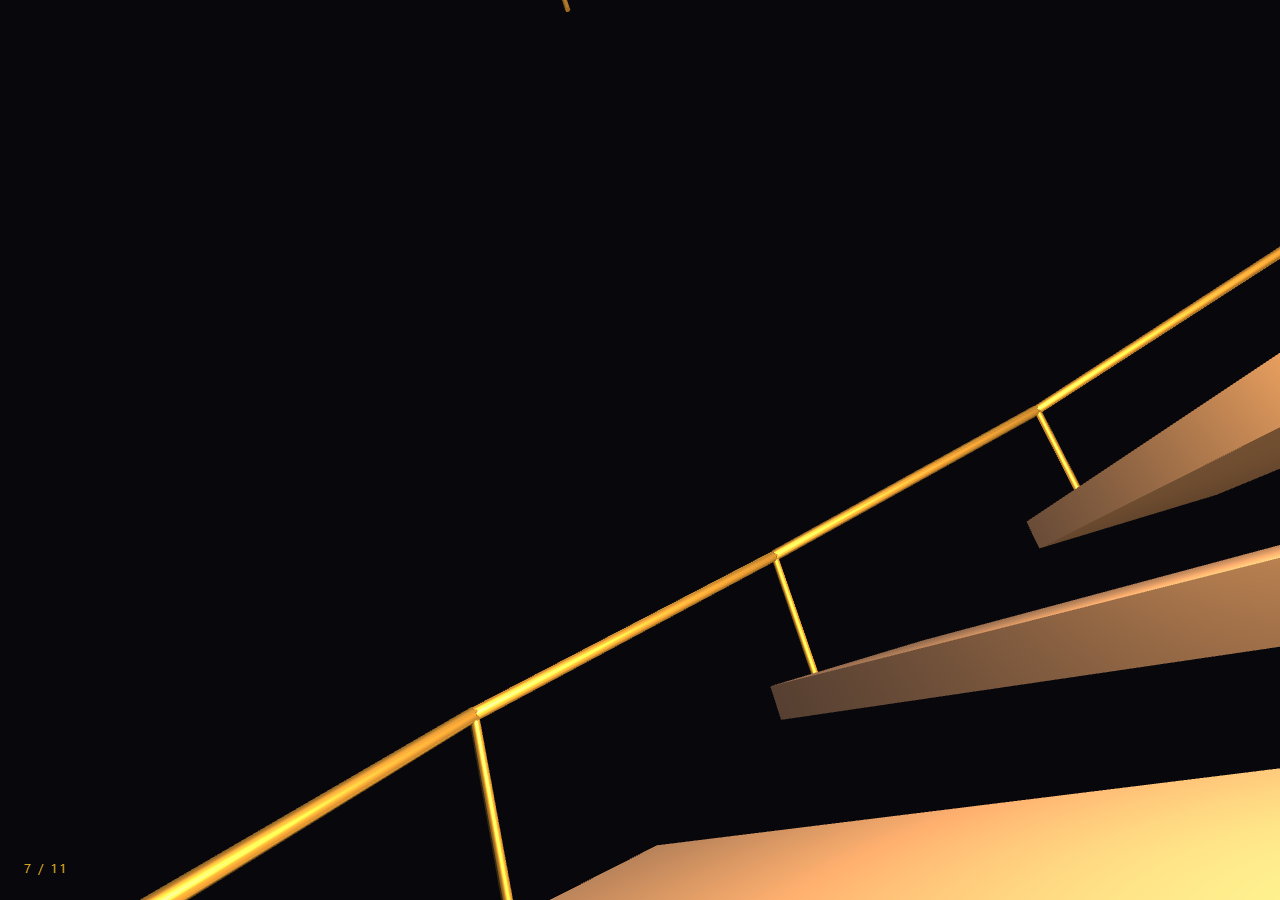
The Three.js Scroll Spiral Staircase Climb snippet builds a full helix of stair treads around a central post and sends the camera up it as the visitor scrolls, using nothing more exotic than trigonometry, a handful of point lights, and one scrubbed progress value that both the geometry and the camera share.
One helix formula generates the whole structure
Every tread, railing segment, and the camera's own path are positioned with the same function, helixPoint(i), which returns x = cos(angle) * RADIUS, z = sin(angle) * RADIUS, y = i * RISE for a step index i. Because geometry and camera motion both come from one formula, retuning RADIUS, RISE, or ANGLE_STEP reshapes the entire staircase — tighter spiral, taller risers, steeper pitch — without the camera ever drifting out of alignment with the treads. This is the same "one curve drives both the world and the camera" idea used in the scroll tunnel snippet, applied here with simple trig instead of a spline.
Treads as fanned, rotated boxes rather than a lathe
Each step is a plain THREE.BoxGeometry tread positioned at a scaled-down helix point and rotated around Y by -i * ANGLE_STEP so its long edge faces tangent to the spiral, the way a real stair tread is angled to the direction of travel rather than the direction to the center post. A lathe-generated spiral ramp would look smoother but reads as a slide, not stairs; discrete boxes at a fixed angular step is what makes each tread register individually as the camera passes it.
Railings built from short cylinder segments, not a swept tube
A mathematically "correct" helical railing would use THREE.TubeGeometry along a helix curve, but that adds another curve object and another set of parameters to keep in sync with the treads. Instead, each railing segment is a short THREE.CylinderGeometry stretched and rotated between two consecutive helixPoint() calls with quaternion.setFromUnitVectors(), reusing the exact same step index the treads use. The seams between segments are invisible at the climb's speed, and the approach avoids introducing a second geometry system just for the handrail.
Point lights that brighten as the camera nears them
Six THREE.PointLight instances are spaced evenly up the helix at zero initial intensity. Every frame, each light's intensity is recomputed from its vertical distance to the camera — the closer the camera's Y position gets to a light's height, the brighter it glows, capped by Math.max(0, 1.6 - dist * 0.35). A single ambient light would leave the whole stairwell flatly lit and give no sense of progress; lights that individually bloom as you approach and fade behind you are what make the climb feel like it has distinct floors, similar in spirit to the depth cues used in scroll depth parallax.
Fog hides both ends of an unbounded-feeling stairwell
FogExp2 set to the same color as the page background swallows the treads and railing far above and below the camera's current position. Without it, ninety treads rendered all at once would be visible simultaneously stacked into the distance, which breaks the illusion of climbing through a real, dim stairwell — fog is what keeps the visible section feeling local to wherever the camera currently is, echoing the same trick the tunnel snippet uses to hide its tube's finite length.
A time-based bob and sway, deliberately decoupled from scroll
The vertical position and look target are entirely driven by the scrubbed climb.t value, but a small additional bob and sway are layered on top using THREE.Clock's elapsed wall-clock time rather than scroll progress. Tying the bob to scroll would make it stutter or freeze whenever the user pauses scrolling mid-page; tying it to real elapsed time keeps the "footsteps" motion alive and continuous even while the climb itself is paused, which reads as a much more physical, embodied camera rather than a detached dolly shot.
Look-ahead targeting keeps the turn feeling walked, not watched
Just like a first-person camera following a curved path needs to look where it's going rather than at a fixed point, this rig aims camera.lookAt() at helixPoint(i + 1.4) — a step and a half ahead of the camera's current position — so the view banks gently into each turn of the spiral. Paired with the scroll camera path snippet's straight-line dolly technique, this staircase shows the same look-ahead principle applied to a rotating, rising path instead of a flat one.
Build with AI
Build, Understand, Optimize, and Extend It With AI
You do not need to work out how a single trig function can drive an entire staircase and a walking camera on your own. Paste this snippet's HTML, CSS, and JS into an AI assistant like Claude and ask it to explain why helixPoint() is reused for the treads, railings, and camera path, or why the walking bob is tied to elapsed time rather than scroll progress. The same assistant can help you extend it — ask it to add landing platforms every dozen steps where the helix flattens out, texture the treads with a wood or stone material map, or add ambient footstep audio synced to the bob's sine wave. It can also help you optimize the scene, for instance merging the railing's many small cylinder segments into a single BufferGeometry to cut draw calls. Treat the code as a working starting point to question and reshape, not a finished artifact.
Prompt to recreate it
Copy this into your AI assistant of choice to build the effect from scratch, or as a jumping-off point for your own variant:
Build a "scroll-scrubbed spiral staircase climb" in plain HTML, CSS, and JavaScript using Three.js and GSAP with the ScrollTrigger plugin, all loaded from a CDN (no bundler, no build step, no ES imports).

Requirements:
- A pinned section containing a full-size canvas, with a WebGLRenderer and PerspectiveCamera sized to it and updated on window resize including aspect ratio.
- Define one function that maps a step index to a 3D helix point using x = cos(angle) * radius, z = sin(angle) * radius, y = index * riseHeight, where angle = index * angleStepPerTread.
- Build roughly 80-100 stair treads as individually rotated BoxGeometry meshes positioned along that helix (scaled slightly inward from the camera's radius) and rotated to face the tangent direction of travel, around a central cylindrical newel post.
- Build a simple railing by stringing short CylinderGeometry segments between consecutive helix points at railing height, oriented with quaternion.setFromUnitVectors, plus thin baluster posts beneath each segment.
- Add roughly 5-6 THREE.PointLight instances spaced evenly up the helix at railing height, each starting at zero intensity, and recompute every light's intensity every frame based on its distance to the camera's current height so lights brighten as the camera approaches and dim as it passes.
- Add THREE.FogExp2 matching the page background color so treads far above and below the camera's current position fade out.
- Register a GSAP tween on a ScrollTrigger targeting the pinned section, with pin: true, start at top top, a numeric scrub, and a multi-hundred-percent end, animating a single plain step-index value from 0 to near the top of the staircase.
- Inside a requestAnimationFrame loop (independent of the scroll callback), set the camera position from the same helix function at the current scrubbed step index (raised to eye height), and call camera.lookAt on the helix point roughly 1-2 steps ahead so the camera banks into each turn. Layer a small sinusoidal vertical bob and lateral sway driven by THREE.Clock's elapsed wall-clock time (not scroll) on top of the camera position for a walking feel.
- Confirm scrolling back up reverses the climb exactly, since camera position is derived purely from the scrubbed step-index value.
Want to tighten it up first? Run this prompt through the AI Prompt Studio to score it across 8 quality dimensions, catch anti-patterns, and tune the wording for Claude, ChatGPT, or Gemini before you paste it in.
Source Code
<section class="stc-stage" id="stcStage">
  <div class="stc-intro-overlay"><p>Scroll ↓ to begin the climb</p></div>
  <canvas id="stcCanvas"></canvas>
  <div class="stc-hud"><span id="stcFloor">1</span> / <span id="stcFloorMax">12</span></div>
</section>
<section class="stc-bottom"><p>You've reached the top of the stairwell.</p></section>*{box-sizing:border-box;margin:0;padding:0}
html,body{background:#07070c;color:#fff;font-family:system-ui,-apple-system,sans-serif}
.stc-bottom{min-height:70vh;display:flex;justify-content:center;align-items:center;color:#7c83a6;font-size:15px;letter-spacing:.08em;text-transform:uppercase}
.stc-stage{height:100vh;position:relative;overflow:hidden;background:#07070c}
.stc-intro-overlay{position:absolute;inset:0;display:flex;align-items:center;justify-content:center;text-align:center;padding:24px;pointer-events:none;z-index:5;color:#7c83a6;font-size:15px;letter-spacing:.08em;text-transform:uppercase;transition:opacity .4s ease;}
#stcCanvas{display:block;width:100%;height:100%}
.stc-hud{position:absolute;left:24px;bottom:24px;font-variant-numeric:tabular-nums;font-size:13px;letter-spacing:.14em;color:#fbbf24;text-transform:uppercase;opacity:.85}const canvas = document.getElementById('stcCanvas');
const floorEl = document.getElementById('stcFloor');
const floorMaxEl = document.getElementById('stcFloorMax');
const renderer = new THREE.WebGLRenderer({ canvas, antialias: true, alpha: true });
renderer.setPixelRatio(Math.min(window.devicePixelRatio, 2));
const scene = new THREE.Scene();
scene.fog = new THREE.FogExp2(0x07070c, 0.03);
const camera = new THREE.PerspectiveCamera(65, 1, 0.1, 150);
// Every step, the railing, and the camera itself all walk the same helix
// parametrization, so the camera is guaranteed to stay centered on the
// stairs no matter how the radius or rise-per-step is retuned.
const RADIUS = 5.2;
const RISE = 0.62;
const ANGLE_STEP = 0.52;
const STEP_COUNT = 90;
function helixPoint(i) {
const angle = i * ANGLE_STEP;
return new THREE.Vector3(
Math.cos(angle) * RADIUS,
i * RISE,
Math.sin(angle) * RADIUS
);
}
// Central newel post the treads cantilever from.
const postGeo = new THREE.CylinderGeometry(0.35, 0.35, STEP_COUNT * RISE + 6, 16);
const postMat = new THREE.MeshStandardMaterial({ color: 0x2b2b38, roughness: 0.6, metalness: 0.2 });
const post = new THREE.Mesh(postGeo, postMat);
post.position.y = (STEP_COUNT * RISE) / 2;
scene.add(post);
// Treads: flat boxes fanned out from the post, each rotated to face along
// the helix's tangent direction so they read as steps rather than random
// floating slabs.
const treadGeo = new THREE.BoxGeometry(3.6, 0.22, 1.3);
const treadMat = new THREE.MeshStandardMaterial({ color: 0x8b6f4e, roughness: 0.75, metalness: 0.05 });
const steps = [];
for (let i = 0; i < STEP_COUNT; i++) {
const p = helixPoint(i);
const tread = new THREE.Mesh(treadGeo, treadMat);
tread.position.set(p.x * 0.55, p.y, p.z * 0.55);
tread.rotation.y = -i * ANGLE_STEP;
scene.add(tread);
steps.push(tread);
}
// Railings: short angled tube segments strung between consecutive helix
// points at railing height, approximating a continuous handrail without
// the cost of a full swept-tube geometry per revolution.
const railMat = new THREE.MeshStandardMaterial({ color: 0xd4a94a, roughness: 0.4, metalness: 0.6, emissive: 0x3a2a05, emissiveIntensity: 0.3 });
for (let i = 0; i < STEP_COUNT - 1; i++) {
const a = helixPoint(i);
const b = helixPoint(i + 1);
a.y += 1.05; b.y += 1.05;
const mid = a.clone().add(b).multiplyScalar(0.5);
const len = a.distanceTo(b);
const rail = new THREE.Mesh(new THREE.CylinderGeometry(0.045, 0.045, len, 6), railMat);
rail.position.copy(mid);
rail.quaternion.setFromUnitVectors(new THREE.Vector3(0, 1, 0), b.clone().sub(a).normalize());
scene.add(rail);
// A slim baluster below each rail segment ties it visually to the tread.
const baluster = new THREE.Mesh(new THREE.CylinderGeometry(0.03, 0.03, 1.05, 6), railMat);
baluster.position.set(a.x, a.y - 0.525, a.z);
scene.add(baluster);
}
// Point lights spaced up the stairwell — each brightens as the camera
// approaches it, which is what makes the climb feel lit floor by floor
// instead of by one flat ambient wash.
const LIGHT_COUNT = 9;
const lights = [];
for (let i = 0; i < LIGHT_COUNT; i++) {
const stepIndex = (i / (LIGHT_COUNT - 1)) * (STEP_COUNT - 1);
const p = helixPoint(stepIndex);
const light = new THREE.PointLight(0xffcf8a, 0, 20);
light.position.set(p.x * 0.3, p.y + 1.8, p.z * 0.3);
scene.add(light);
lights.push({ light, y: p.y });
}
// A soft sky/ground fill so the treads always read even between the point
// lights — without it the camera passes through pitch-black gaps mid-climb.
scene.add(new THREE.HemisphereLight(0x5a5a7a, 0x2a2418, 0.9));
scene.add(new THREE.AmbientLight(0x33334a, 1));
const introEl = document.querySelector('.stc-intro-overlay');
gsap.registerPlugin(ScrollTrigger);
// One scrubbed value walks a virtual "step index" from the bottom of the
// helix to the top; camera position and look direction are both derived
// from it every frame, so scrolling up walks back down the stairs.
const climb = { t: 0 };
gsap.to(climb, {
t: STEP_COUNT - 4,
ease: 'none',
scrollTrigger: {
trigger: '#stcStage',
start: 'top top',
end: '+=550%',
scrub: 0.8,
pin: true,
},
});
floorMaxEl.textContent = Math.round((STEP_COUNT - 4) / 7.5);
function resize() {
const w = canvas.clientWidth, h = canvas.clientHeight;
renderer.setSize(w, h, false);
camera.aspect = w / h;
camera.updateProjectionMatrix();
}
const clock = new THREE.Clock();
function animate() {
requestAnimationFrame(animate);
if (introEl) introEl.style.opacity = (climb.t > 0.15) ? '0' : '1';
const time = clock.getElapsedTime();
const i = climb.t;
const p = helixPoint(i);
const ahead = helixPoint(i + 1.4);
// Walking bob: a small vertical and lateral sinusoid tied to elapsed
// time (not scroll) so it reads as footsteps rather than a scroll jitter.
const bob = Math.sin(time * 6) * 0.045;
const sway = Math.cos(time * 3) * 0.03;
camera.position.set(p.x * 0.55 + sway, p.y + 2.05 + bob, p.z * 0.55);
camera.up.set(0, 1, 0);
camera.lookAt(ahead.x * 0.55, ahead.y + 1.9, ahead.z * 0.55);
camera.rotation.z = Math.sin(time * 6) * 0.01; // subtle walking tilt
lights.forEach(({ light, y }) => {
const dist = Math.abs(camera.position.y - (y + 1.8));
light.intensity = Math.max(0, 2.1 - dist * 0.22);
});
post.rotation.y = 0; // post stays static; only the camera and lit stairs move past it
floorEl.textContent = Math.max(1, Math.round(i / 7.5) + 1);
renderer.render(scene, camera);
}
resize();
window.addEventListener('resize', resize);
animate();Step by step
How to Use
- 1Load all three CDN scriptsAdd three.min.js, gsap.min.js, and ScrollTrigger.min.js from the CDN panel, in that order.
- 2Paste HTML, CSS, and JSA pinned 3D stage appears with a spiral staircase and a live floor-count read-out.
- 3Scroll downThe camera climbs the helix, tilting and swaying like footsteps as point lights brighten floor by floor.
- 4Scroll back upThe climb reverses exactly, since camera height and angle are derived from one scrubbed step index.
- 5Reshape the staircaseAdjust RADIUS, RISE, or ANGLE_STEP to make the spiral tighter, taller, or steeper; change STEP_COUNT for more or fewer treads.
- 6Retune the pacingChange the ScrollTrigger end value (+=550%) for a longer, slower ascent, or adjust the light falloff constants for a darker climb.
Real-world uses
Common Use Cases
Got questions?
Frequently Asked Questions
Sharing one parametric function guarantees geometric consistency: the camera is always centered on the stairs and at the correct height for whatever step index it represents, and changing the spiral radius or rise per step reshapes the treads, railing, and camera path all at once instead of requiring three separate edits kept manually in sync.
A THREE.LatheGeometry spiral would produce a continuous smooth ramp that reads visually as a slide rather than a staircase. Discrete BoxGeometry treads placed at a fixed angular step and rotated to face the tangent direction is what makes each individual step register as the camera passes it, matching how a real staircase is perceived one tread at a time.
A single ambient light lights the whole stairwell evenly and gives no sense of progress or depth. Recomputing each of the six point lights' intensity every frame based on how close the camera's current height is to that light's position creates a floor-by-floor brightening and dimming pattern, which is what makes a long uniform climb feel like it is divided into distinct, memorable segments.
If the bob and sway were driven by the scrubbed scroll value, they would freeze the instant the user stops scrolling, which looks unnatural for a "walking" motion. Driving them from THREE.Clock's wall-clock elapsed time instead keeps the subtle footstep bob continuous and alive whether the user is actively scrolling or paused mid-climb, reinforcing the feeling of an embodied camera rather than a detached dolly shot.
Yes. Click JSX for a React component, Vue for a Vue 3 SFC, Angular for a standalone component, or Tailwind for a React + Tailwind version. Build the helix geometry, lights, and GSAP ScrollTrigger tween inside a mount effect against a canvas ref, and on cleanup kill the ScrollTrigger instance (or revert a gsap.context), dispose the tread, railing, and post geometries and materials, and call renderer.dispose() so the WebGL context and scroll pin are released on unmount.