Learn Coding Visually
Learn to code with interactive, live-preview playgrounds — HTML, CSS, JavaScript, React & more.
 HTML Playground42 lessons · Click-based · Live preview
 CSS PlaygroundLearn CSS with a live editor
 JavaScript Playground60 lessons · DOM · Async · Canvas
 React PlaygroundLearn React with a live code editor
 GSAP PlaygroundLearn GSAP animation interactively
 SVG Playground44 lessons · shapes · paths · animation
 SCSS Playground45 lessons · Sass modules · tokens
 Tailwind PlaygroundLearn Tailwind CSS with a live editor
 Bootstrap 5 Playground50 lessons · live preview
Three.js Scroll Gear Train — GSAP Mechanical Ratios
Three.js Scroll Gear Train Mechanism · Scroll · Plain HTML, CSS & JS · Live preview
What's included
Features
About this UI Snippet
How to Build a Scroll-Driven Gear Train With Three.js and GSAP
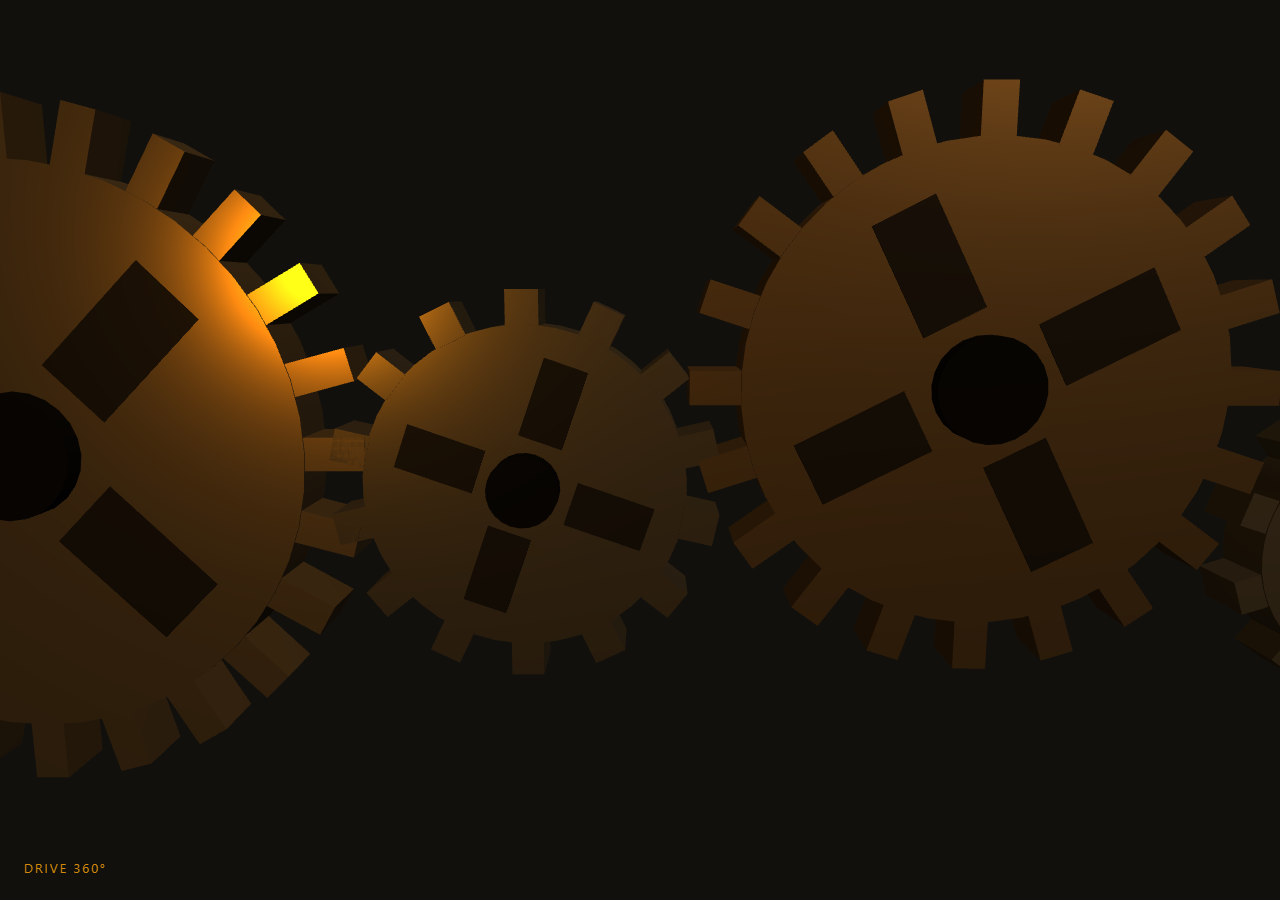
The Three.js Scroll Gear Train Mechanism snippet builds five interlocking brass gears procedurally — disc, teeth, hub, and spoke cutouts — and lets scroll act as the crank: GSAP's ScrollTrigger scrubs the driver gear's angle, and every downstream gear derives its rotation through the real tooth-count ratios, counter-rotating at each mesh point exactly as physical gears would. The scene reads as a machine because the math underneath is the machine's math.
Procedural gears from primitives
Each gear is a Group: a CylinderGeometry disc rotated flat, N tooth boxes placed around the rim at (cos a, sin a) × (r + 0.1r) with each tooth rotated a + π/2 to point radially outward, a smaller dark hub cylinder, and four dark wedge boxes that fake spoke cutouts on the face. Building gears in code rather than loading a model means tooth count is a real parameter — and tooth count is exactly what the animation math needs. Tooth width derives from circumference, (2πr / teeth) × 0.45, so any radius/teeth combination produces a plausible gear with correct-looking pitch.
Real gear ratios, not decorative spinning
Most gear animations on the web rotate everything at arbitrary speeds and hope nobody looks closely. Here each gear's angle is computed by chaining angle × (teethPrev / teethCurrent) down the train while flipping direction at every mesh — the actual kinematics of spur gears. The 24-tooth driver turning twice (4π across the scroll) spins the 10-tooth fourth gear nearly five times in the opposite direction. Because ratios are exact and both gears in each pair carry a half-tooth phase offset (π / teeth on alternating gears), teeth visibly interleave through the mesh point instead of clipping through each other — the detail that sells the whole illusion.
Scroll as the crank handle
The single scrubbed value here is not an abstract progress fraction but the driver's angle itself, tweened from 0 to 4π with ease: 'none'. That framing matters: scrolling *is* cranking, at a fixed mechanical advantage, and scrolling backwards runs the machine in reverse — which is free, since every gear's angle is a pure function of the driver's. The HUD converts the same value to degrees, so users see DRIVE 720° at full scroll. This is the purest expression of the derive-everything pattern used across this series, from the portal gate sequence to the Rubik's cube assembly.
A dolly that follows power through the train
The camera starts on the big slow driver and dollies rightward along the zigzagging train as the drive angle accrues, ending close on the smallest, fastest gear — following the power flow, like a documentary camera would. Position and look-at both derive from normalized drive progress, with a small clock-time bob so the shot never feels locked off. Warm directional and amber point lights against high-metalness, mid-roughness MeshStandardMaterial give the brass look; fog matched to the dark background swallows the train's far end.
Where to take it
Because ratios are parameter-driven, the train doubles as a live mechanism diagram: change any teeth value and both the geometry and the motion update coherently. Add a chain of number counters geared to each wheel for an odometer effect, or pair it with the clockwork feel of scroll timeline dots for process storytelling. For a more organic machine aesthetic, the fabric ripple snippet shows the same scrub philosophy applied to soft surfaces instead of rigid bodies.
Build with AI
Build, Understand, Optimize, and Extend It With AI
You do not need to derive spur-gear kinematics yourself. Paste this snippet's HTML, CSS, and JS into an AI assistant like Claude and ask it to explain the ratio chain, the half-tooth phase offset that prevents clipping, or why the scrubbed value is the driver angle rather than a progress fraction. The same assistant can extend the machine — adding a belt-driven flywheel, a piston converting the last gear's rotation to linear motion with proper crank math, gear teeth counts pulled from your product's actual numbers (team size, years, releases) with the HUD explaining the ratio, or an idler gear inserted mid-train to demonstrate direction changes. It can also convert the tooth boxes to an ExtrudeGeometry involute profile if you want machinist-accurate teeth. Treat the code as a starting point to interrogate and reshape, not a finished artifact.
Prompt to recreate it
Copy this into your AI assistant of choice to build the effect from scratch, or as a jumping-off point for your own variant:
Build a "scroll-cranked gear train" in plain HTML, CSS, and JavaScript using Three.js and GSAP's ScrollTrigger plugin, all loaded from a CDN (no bundler, no build step).

Requirements:
- A pinned full-viewport section with a canvas, WebGLRenderer, PerspectiveCamera (resized with aspect on window resize), warm ambient + directional key light, an amber PointLight, and Fog matched to a dark background.
- A makeGear(radius, teeth, thickness, color) factory returning a THREE.Group: a flat CylinderGeometry disc, N BoxGeometry teeth around the rim (width = 2πr/teeth × 0.45, each at position (cos a, sin a) × 1.1r with rotation a + π/2), a narrow dark hub cylinder, and four dark wedge boxes faking spoke cutouts. High metalness (~0.85), mid roughness for a brass look.
- A train of five gears from a specs array (radius, teeth, color), positioned left to right with spacing = sum of neighboring pitch radii, zigzagging vertically. Alternating gears get an initial rotation.z of π/teeth (half-tooth phase) so teeth interleave at mesh points.
- One GSAP tween (ease "none") scrubbing the DRIVER ANGLE itself from 0 to 4π on a ScrollTrigger with pin: true and end ~+=400%, scrub ~0.4.
- Each frame, chain angles down the train: angle = prevAngle × (prevTeeth / thisTeeth), flipping rotation direction at every mesh, and apply baseZ + angle × dir per gear — exact spur-gear kinematics, never decorative speeds.
- A camera that dollies along the train as drive progress accrues, ending near the smallest/fastest gear, with a slight clock-driven bob and lookAt tracking the dolly.
- A HUD showing the driver angle in degrees, and an intro overlay fading once the angle passes ~0.05.
- Confirm scrolling backwards runs the entire machine in reverse with teeth still interleaving cleanly.
Want to tighten it up first? Run this prompt through the AI Prompt Studio to score it across 8 quality dimensions, catch anti-patterns, and tune the wording for Claude, ChatGPT, or Gemini before you paste it in.
Source Code
<section class="gtr-stage" id="gtrStage">
  <div class="gtr-intro"><p>Scroll ↓ to turn the machine</p></div>
  <canvas id="gtrCanvas"></canvas>
  <div class="gtr-hud">DRIVE <span id="gtrRot">0</span>°</div>
</section>
<section class="gtr-bottom"><p>Every tooth in mesh.</p></section>*{box-sizing:border-box;margin:0;padding:0}
html,body{background:#12100c;color:#fff;font-family:system-ui,-apple-system,sans-serif}
.gtr-bottom{min-height:70vh;display:flex;justify-content:center;align-items:center;color:#a89a7c;font-size:15px;letter-spacing:.08em;text-transform:uppercase}
.gtr-stage{height:100vh;position:relative;overflow:hidden;background:#12100c}
.gtr-intro{position:absolute;inset:0;display:flex;align-items:center;justify-content:center;text-align:center;padding:24px;pointer-events:none;z-index:5;color:#a89a7c;font-size:15px;letter-spacing:.08em;text-transform:uppercase;transition:opacity .4s ease}
#gtrCanvas{display:block;width:100%;height:100%}
.gtr-hud{position:absolute;left:24px;bottom:24px;font-variant-numeric:tabular-nums;font-size:13px;letter-spacing:.14em;color:#f59e0b;text-transform:uppercase;opacity:.85}const canvas = document.getElementById('gtrCanvas');
const rotEl = document.getElementById('gtrRot');
const introEl = document.querySelector('.gtr-intro');
const renderer = new THREE.WebGLRenderer({ canvas, antialias: true });
renderer.setPixelRatio(Math.min(window.devicePixelRatio, 2));
const scene = new THREE.Scene();
scene.background = new THREE.Color(0x12100c);
scene.fog = new THREE.Fog(0x12100c, 40, 110);
const camera = new THREE.PerspectiveCamera(50, 1, 0.1, 200);
scene.add(new THREE.AmbientLight(0xffe8c4, 0.4));
const key = new THREE.DirectionalLight(0xffd9a0, 1.1);
key.position.set(12, 18, 14);
scene.add(key);
const fill = new THREE.PointLight(0xf59e0b, 0.6, 80);
fill.position.set(-10, 4, 8);
scene.add(fill);
// A gear = disc + teeth boxes + hub, merged into one Group per gear so a
// single rotation.z drives the whole assembly.
function makeGear(radius, teeth, thickness, color) {
const g = new THREE.Group();
const mat = new THREE.MeshStandardMaterial({ color, roughness: 0.45, metalness: 0.85 });
const disc = new THREE.Mesh(new THREE.CylinderGeometry(radius, radius, thickness, 48), mat);
disc.rotation.x = Math.PI / 2;
g.add(disc);
const toothW = (2 * Math.PI * radius / teeth) * 0.45;
for (let i = 0; i < teeth; i++) {
const tooth = new THREE.Mesh(new THREE.BoxGeometry(toothW, radius * 0.22, thickness * 0.95), mat);
const a = (i / teeth) * Math.PI * 2;
tooth.position.set(Math.cos(a) * (radius + radius * 0.1), Math.sin(a) * (radius + radius * 0.1), 0);
tooth.rotation.z = a + Math.PI / 2;
g.add(tooth);
}
const hub = new THREE.Mesh(new THREE.CylinderGeometry(radius * 0.22, radius * 0.22, thickness * 1.7, 24),
new THREE.MeshStandardMaterial({ color: 0x2b2115, roughness: 0.3, metalness: 0.9 }));
hub.rotation.x = Math.PI / 2;
g.add(hub);
// Spoke cutout illusion: four dark wedge boxes on the disc face.
for (let i = 0; i < 4; i++) {
const spoke = new THREE.Mesh(new THREE.BoxGeometry(radius * 0.5, radius * 0.28, thickness * 1.02),
new THREE.MeshStandardMaterial({ color: 0x1a140c, roughness: 0.6, metalness: 0.6 }));
const a = (i / 4) * Math.PI * 2 + Math.PI / 4;
spoke.position.set(Math.cos(a) * radius * 0.55, Math.sin(a) * radius * 0.55, 0);
spoke.rotation.z = a;
g.add(spoke);
}
return g;
}
// The train: teeth counts set the exact ratios; neighbors counter-rotate.
// Positions chain left → right, each spaced by the sum of pitch radii.
const specs = [
{ r: 6, teeth: 24, color: 0xb08d57 },
{ r: 3.4, teeth: 14, color: 0x8f7a5a },
{ r: 5, teeth: 20, color: 0xa77b3e },
{ r: 2.6, teeth: 10, color: 0x9c8a6a },
{ r: 4.2, teeth: 17, color: 0xb08d57 },
];
const gears = [];
let cx = -14;
specs.forEach((s, i) => {
const g = makeGear(s.r, s.teeth, 1.4, s.color);
if (i > 0) cx += specs[i - 1].r * 1.1 + s.r * 1.1 + 0.25;
// Alternate vertical offset so the train zigzags instead of lying flat.
g.position.set(cx, (i % 2 ? -1 : 1) * (i * 0.7), i * -0.0);
// Half-tooth phase offset on alternating gears so teeth interleave.
g.rotation.z = (i % 2) ? Math.PI / s.teeth : 0;
scene.add(g);
gears.push({ g, teeth: s.teeth, baseZ: g.rotation.z, x: cx, y: g.position.y });
});
gsap.registerPlugin(ScrollTrigger);
const drive = { angle: 0 };
gsap.to(drive, {
angle: Math.PI * 4, // two full driver turns across the scroll
ease: 'none',
scrollTrigger: { trigger: '#gtrStage', start: 'top top', end: '+=400%', scrub: 0.4, pin: true },
});
function resize() {
const w = canvas.clientWidth, h = canvas.clientHeight;
renderer.setSize(w, h, false);
camera.aspect = w / h;
camera.updateProjectionMatrix();
}
const clock = new THREE.Clock();
function animate() {
requestAnimationFrame(animate);
const t = clock.getElapsedTime();
const a = drive.angle;
if (introEl) introEl.style.opacity = a > 0.05 ? '0' : '1';
// Gear ratios: each gear's angle derives from the driver through the
// chain of tooth ratios, alternating direction at every mesh point.
let angle = a, dir = 1;
gears.forEach((gear, i) => {
if (i > 0) {
angle = angle * (gears[i - 1].teeth / gear.teeth);
dir *= -1;
}
gear.g.rotation.z = gear.baseZ + angle * dir * (i === 0 ? 1 : 1);
});
// Camera dollies along the train as the drive turns, ending on the
// smallest, fastest gear.
const prog = Math.min(1, a / (Math.PI * 4));
const lookX = -14 + prog * 26;
camera.position.set(lookX * 0.8, 3 + Math.sin(t * 0.3) * 0.5, 24 - prog * 7);
camera.lookAt(lookX, 0, 0);
rotEl.textContent = Math.round(a * 180 / Math.PI);
renderer.render(scene, camera);
}
resize();
window.addEventListener('resize', resize);
animate();Step by step
How to Use
- 1Load the three CDN scriptsAdd three.min.js, gsap.min.js, and ScrollTrigger.min.js in that order before the snippet JS.
- 2Paste HTML, CSS, and JSA pinned zigzag train of five brass gears sits motionless under warm light with a DRIVE 0° HUD.
- 3Scroll to crankThe big driver turns with your scroll; each downstream gear counter-rotates at its exact tooth ratio — the small 10-tooth gear visibly races.
- 4Watch the mesh pointsHalf-tooth phase offsets keep teeth interleaving cleanly through each contact point rather than clipping.
- 5Scroll back upThe machine runs in reverse — every gear angle is a pure function of the driver angle, so backwards is free.
- 6Re-gear the trainEdit the specs array: radius, teeth, and color per gear. Ratios, spacing, and phase offsets all recompute from teeth counts automatically.
Real-world uses
Common Use Cases
Got questions?
Frequently Asked Questions
The frame loop walks the train carrying an angle: for each gear after the driver it multiplies by teethPrev / teethCurrent and flips sign, which is the physical law of spur gears (equal tooth velocity at the contact point). Because every angle derives from the single scrubbed driver angle, the gears can never drift out of mesh no matter how fast or how far the user scrolls in either direction.
Alternating gears start with a rotation offset of π / teeth — half a tooth pitch. With that phase shift, one gear's tooth aligns with its neighbor's gap at the contact point, and since the ratio math advances both at matched surface speed, the interleave is preserved through the whole rotation. Without the offset the ratios would still be correct, but teeth would sit tip-to-tip and pass through each other.
It removes one layer of indirection: the tween IS the crank. Tweening angle from 0 to 4π means the HUD is a unit conversion, gear angles are ratio multiplications, and camera progress is a normalization — every consumer derives what it needs. A 0–1 value would work identically but every use site would multiply by 4π first.
makeGear() assembles a Group from primitives: a flat CylinderGeometry disc, N BoxGeometry teeth placed around the rim at angle a with rotation a + π/2 so they point radially, a narrow hub cylinder, and four dark wedges suggesting spoke cutouts. Tooth width is (2πr / teeth) × 0.45, derived from circumference, so pitch looks right for any parameter combination — and one Group rotation.z turns the entire assembly.
Yes. Use the JSX, Vue, Angular, or Tailwind export buttons. Build the gears and ScrollTrigger inside a mount effect against a canvas ref, update the HUD through a ref rather than state, and on cleanup kill the ScrollTrigger, traverse each gear group disposing geometries and materials, and call renderer.dispose() to release the WebGL context and unpin the section.