Learn Coding Visually
Learn to code with interactive, live-preview playgrounds — HTML, CSS, JavaScript, React & more.
 HTML Playground42 lessons · Click-based · Live preview
 CSS PlaygroundLearn CSS with a live editor
 JavaScript Playground60 lessons · DOM · Async · Canvas
 React PlaygroundLearn React with a live code editor
 GSAP PlaygroundLearn GSAP animation interactively
 SVG Playground44 lessons · shapes · paths · animation
 SCSS Playground45 lessons · Sass modules · tokens
 Tailwind PlaygroundLearn Tailwind CSS with a live editor
 Bootstrap 5 Playground50 lessons · live preview
Three.js Synthwave Terrain — Infinite Retro Wireframe Grid Landscape
Three.js Synthwave Terrain · Animations · Plain HTML, CSS & JS · Live preview
What's included
Features
About this UI Snippet
How to Build an Infinite Synthwave Wireframe Terrain in Three.js
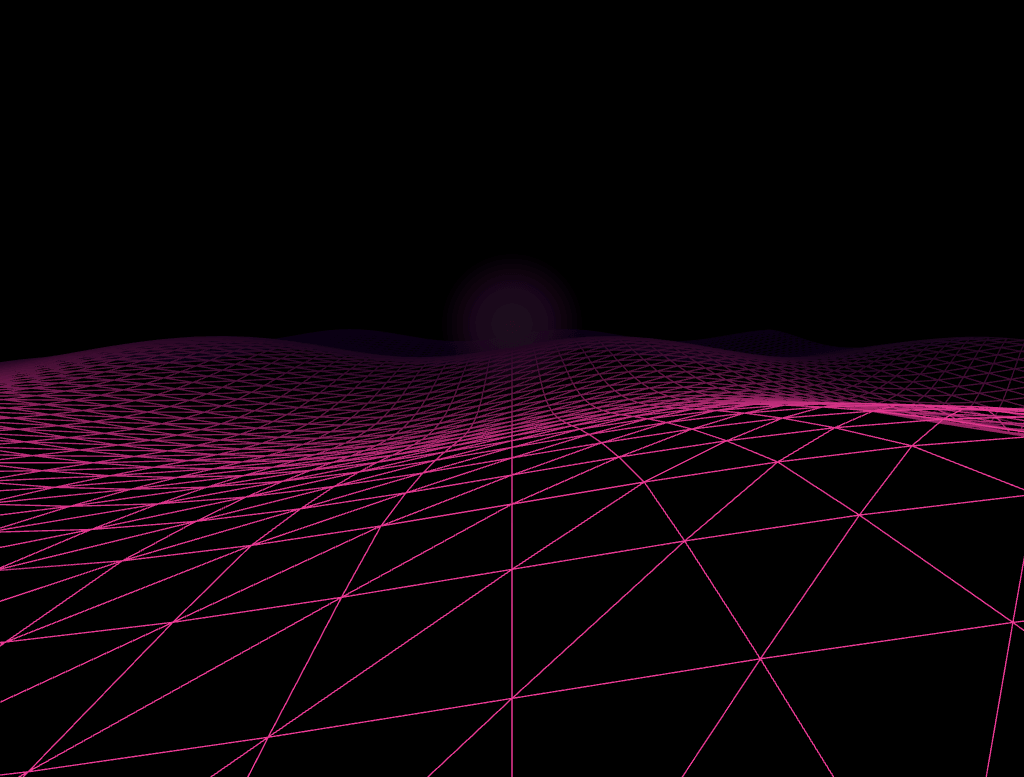
The Three.js Synthwave Terrain snippet recreates the retro-futuristic wireframe landscape aesthetic — a glowing pink grid stretching to a foggy horizon under a gradient sun — using two seamlessly-looping wireframe planes, exponential fog, and a canvas-drawn sprite texture, all with core Three.js loaded from a CDN and zero external image assets.
Two tiles, not one endless plane
Rendering a genuinely infinite terrain would require regenerating geometry forever, which isn't practical. Instead, the snippet builds exactly two identical wireframe grid tiles, placed back-to-back along the Z axis. Every frame, both tiles move slightly toward the camera; the moment either tile has traveled a full tile-length past the camera, its Z position snaps backward by *two* tile-lengths — placing it immediately behind its partner again, invisible to the viewer since it happens off-screen at the far end of the fog. This two-tile relay is the standard, cheap technique behind endless-scrolling roads, rivers, and terrain in countless games and demos.
The height field comes from the same sine-wave technique as water
Before the scrolling animation ever starts, each grid's vertices are displaced once using Math.sin(x * freq) + Math.cos(z * freq) — the exact same overlapping-wave technique used in the particle wave snippet, just applied once to build a static rolling-hills shape rather than recalculated every frame for a moving ripple. Because both tiles run through the identical height formula, their edges match up perfectly where they meet, with no visible seam or height mismatch at the boundary.
Exponential fog does the atmospheric heavy lifting
THREE.FogExp2 fades objects toward the fog color based on an exponential falloff with distance, rather than the more clinical linear fog. This is what makes the wireframe grid's far edge dissolve smoothly into the background instead of appearing to end abruptly at a hard clipping line — and it's also doing double duty by visually hiding the exact moment each tile snaps back into position at the far end of the scene.
A sun sprite drawn with 2D canvas, not an image file
The glowing sun is a THREE.Sprite — a flat, camera-facing quad — textured with a CanvasTexture built from a plain 2D <canvas> radial gradient (warm center fading through pink to fully transparent). This is a genuinely useful technique beyond this one snippet: any soft glow, particle sprite, or gradient billboard in Three.js can be generated on the fly this way, entirely in JavaScript, with no image file to host or load.
Wireframe as an aesthetic choice, not a debugging leftover
Setting wireframe: true on a MeshBasicMaterial is often used for debugging geometry — here it's the entire point. Combined with a saturated magenta color and additive-feeling transparency, the wireframe grid reads immediately as the classic retro-computer-graphics look associated with 1980s synthwave album art and film title sequences.
A tilted, fixed camera, not a free-look one
The camera never moves or rotates on its own beyond a small fixed downward tilt set once at startup — the *illusion* of forward motion comes entirely from the grid tiles scrolling toward the camera, not from the camera actually traveling through space. This is a cheaper and more controllable approach than moving the camera along a path, since the terrain's motion speed is the only variable that needs adjusting.
Where this technique extends
The two-tile relay-scroll pattern generalizes to any endless-terrain effect — rivers, roads, star tunnels, or infinite corridors. Pair this snippet with a starfield warp for a full synthwave "drive into space" sequence, or contrast its retro wireframe aesthetic against the smooth, lit surface of the particle wave.
Build with AI
Build, Understand, Optimize, and Extend It With AI
You do not have to reverse-engineer the endless-scroll illusion by watching the animation alone. Paste this snippet's HTML, CSS, and JS into an AI coding assistant like Claude and ask it to explain exactly why two tiles are needed instead of one, or how the position-reset math guarantees the tiles never visibly overlap or gap during the loop. The same assistant can help optimize it, for instance checking whether the grid segment count could be lowered for mobile devices without a noticeable quality loss, or whether the fog density could be tuned to better hide the reset point at different scroll speeds. It is also useful for extending the effect: ask it to add a second, differently-colored grid layer scrolling at a different speed for a parallax depth effect, animate the sun's vertical position to simulate a sunrise or sunset, or add scattered glowing "star" sprites in the sky using the same canvas-texture technique as the sun. Treat the code less like a finished artifact and more like a starting point for a conversation.
Prompt to recreate it
Copy this into your AI assistant of choice to build the effect from scratch, or as a jumping-off point for your own variant:
Build an infinite "synthwave wireframe terrain" in plain HTML, CSS, and JavaScript using Three.js loaded from a CDN (no bundler, no build step, no external image assets) — a retro, endlessly-scrolling neon grid landscape.

Requirements:
- A full-viewport canvas with a WebGLRenderer sized to match it, updated on window resize including camera aspect ratio, with a fixed camera position tilted slightly downward and never moved during the animation.
- Add exponential fog to the scene (not linear fog), matching the background color, dense enough to dissolve the far horizon smoothly.
- Create a glowing sun using a Sprite whose texture is generated at runtime from a 2D canvas element: paint a radial gradient onto that canvas (a warm center color fading through a mid-tone to fully transparent) and wrap it in a canvas-based texture, with no external image file.
- Build a wireframe terrain height field using a PlaneGeometry with a reasonable subdivision count, rotated to lie flat, with each vertex's height displaced once using a combination of sine and cosine functions of its X and Z coordinates (a static rolling-hills shape, not animated per frame).
- Create exactly two identical instances of that wireframe grid geometry, positioned back-to-back along one axis (one starting where the other ends).
- Every animation frame, move both grid tiles toward the camera along that axis by a small fixed speed value; whenever either tile's position passes a threshold equivalent to one tile-length beyond the camera, reset its position by subtracting two tile-lengths, so it reappears directly behind its partner with no visible gap or overlap.
- Render the grid with a wireframe material in a saturated, glowing color (e.g. magenta or pink) with partial transparency, and ensure both tiles use exactly the same height-field formula so their shared edge lines up seamlessly.
Want to tighten it up first? Run this prompt through the AI Prompt Studio to score it across 8 quality dimensions, catch anti-patterns, and tune the wording for Claude, ChatGPT, or Gemini before you paste it in.
Step by step
How to Use
- 1Load the Three.js CDNAdd three.min.js from the CDN panel — no add-ons are required for this snippet.
- 2Paste HTML, CSS, and JSThe grid terrain and glowing sun appear immediately, scrolling toward the camera endlessly.
- 3Watch the seamless loopFog hides the moment each tile resets, so the scroll appears to continue forever with no visible seam.
- 4Tune scroll speedAdjust the SPEED constant for a slower cruise or a faster, more dramatic drive.
- 5Retint the sceneChange the grid color, fog color, and sun gradient stops together for a different neon palette.
- 6Resize the windowRenderer size and camera aspect ratio update automatically.
Real-world uses
Common Use Cases
Got questions?
Frequently Asked Questions
Exactly two identical wireframe grid tiles are placed back-to-back along the Z axis. Every frame both tiles move slightly toward the camera; the moment a tile has traveled a full tile-length past the camera, its position snaps backward by two tile-lengths, placing it immediately behind its partner again. Because that reset happens far away in the fog, it is never visibly noticeable.
Both tiles are built by the exact same buildGrid() function, running the identical sine-and-cosine height formula on the same geometry dimensions. Because the height at any given X/Z coordinate is always calculated the same way regardless of which tile it belongs to, the edge where two tiles meet lines up perfectly with no height mismatch.
THREE.FogExp2 fades visibility based on an exponential falloff with distance rather than a straight linear ramp, which produces a smoother, more natural-looking dissolve into the horizon. It also conveniently hides the exact far-distance point where each tile's position resets, since that area is already heavily obscured by fog.
A plain 2D canvas element is created in memory (never appended to the page), a radial gradient is painted onto it from a warm center color fading through pink to fully transparent, and that canvas is wrapped in a THREE.CanvasTexture applied to a Sprite material. This produces a soft, glowing image entirely through code, with no external asset to host or load.
Yes. The SPEED constant controls how much each tile moves toward the camera every frame — raise it for a faster, more dramatic drive-through feel, or lower it for a slow, ambient cruise.
Yes. Click JSX for a React component, Vue for a Vue 3 SFC, Angular for a standalone component, or Tailwind for a React + Tailwind CSS utility-class version. Build the grid tiles and sun sprite inside a mount effect so the geometry and canvas texture are only created once, and call renderer.dispose() plus cancelAnimationFrame on cleanup.