Learn Coding Visually
Learn to code with interactive, live-preview playgrounds — HTML, CSS, JavaScript, React & more.
 HTML Playground42 lessons · Click-based · Live preview
 CSS PlaygroundLearn CSS with a live editor
 JavaScript Playground60 lessons · DOM · Async · Canvas
 React PlaygroundLearn React with a live code editor
 GSAP PlaygroundLearn GSAP animation interactively
 SVG Playground44 lessons · shapes · paths · animation
 SCSS Playground45 lessons · Sass modules · tokens
 Tailwind PlaygroundLearn Tailwind CSS with a live editor
 Bootstrap 5 Playground50 lessons · live preview
Three.js Scroll Voxel Tower Build — GSAP Block Drop
Three.js Scroll Voxel Tower Build · Scroll · Plain HTML, CSS & JS · Live preview
What's included
Features
About this UI Snippet
How to Build a Scroll-Driven Voxel Tower With Three.js and GSAP
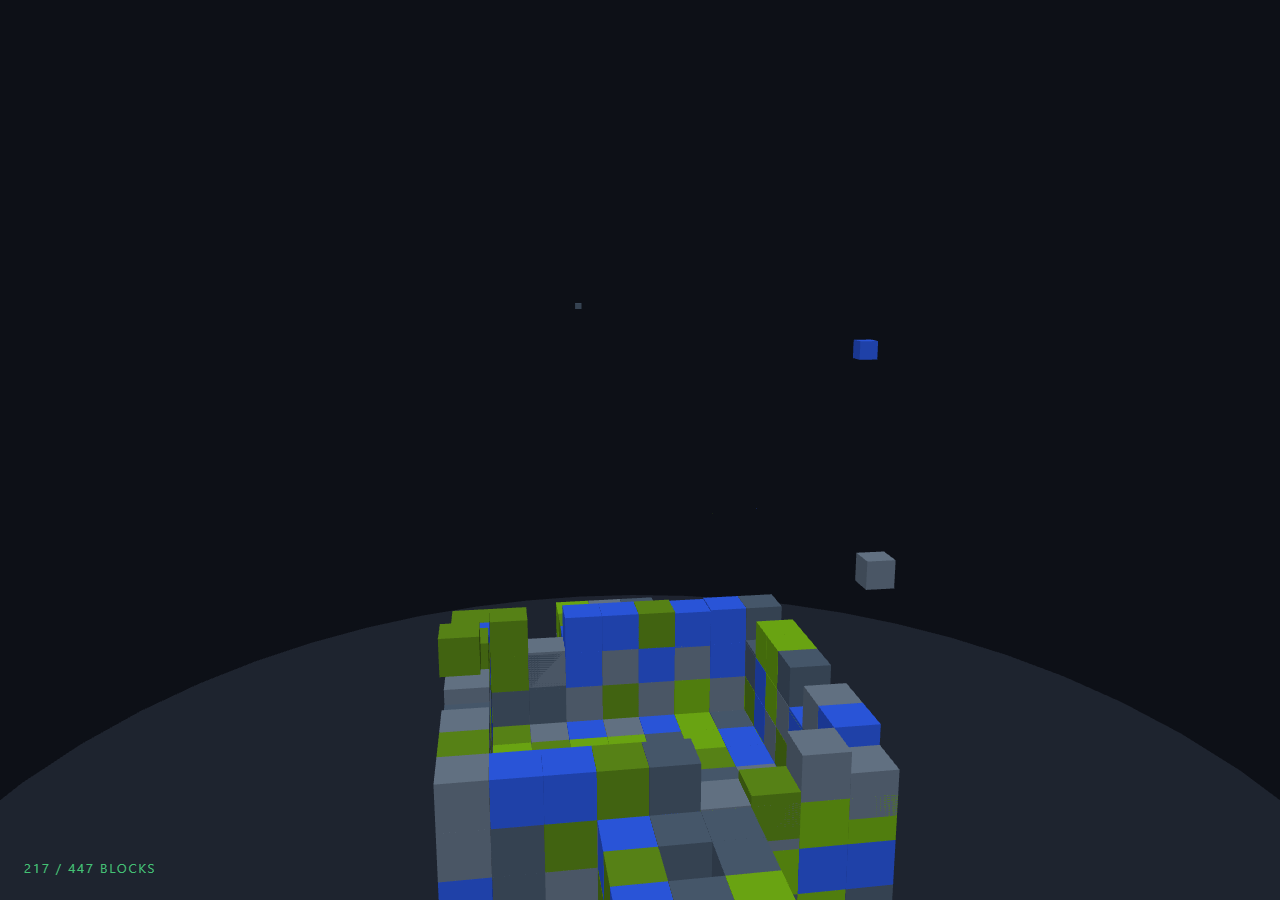
The Three.js Scroll Voxel Tower Build snippet drops a few hundred voxel blocks out of the sky, one after another, assembling a tapering tower with setbacks, a spire, and side wings as the user scrolls — each block popping in with an easeOutBack overshoot while a crane-style camera tracks the rising build front. GSAP's ScrollTrigger scrubs one progress value; every block simply owns a slice of it.
A voxel plan, not hardcoded geometry
The tower is described as data before any mesh exists: a ring() helper pushes hollow square courses of grid coordinates into a plan array, called with shrinking half-widths (4, then 3, then 2) to produce classic skyscraper setbacks, topped by a four-block spire and flanked by two small wings. Because the plan is plain coordinates, swapping in any other voxel shape — a logo, a character, letters — means replacing the plan-building loop and nothing else. The hollow-ring optimization also matters: interior blocks that would never be visible are simply never created, keeping the mesh count to the visible shell.
Per-block scroll slices instead of tweens
With hundreds of blocks, creating one GSAP tween per block would work but allocates hundreds of tween objects for what is pure arithmetic. Instead, block i maps its local progress from the global value as (p − start) / win, where start distributes blocks evenly across the scroll and win is sized so roughly fourteen blocks are airborne at any moment. This is the same slice pattern that drives the domino run and the peel in the exploded view — a stagger that is a pure function of one scrubbed number, hence perfectly reversible.
Mason-order shuffling within each course
Blocks sort bottom-up by level, but within a level they shuffle using a seeded sin-hash — the same deterministic randomness technique as the Rubik's cube assembly. Without the shuffle, each course would sweep in reading order like a printer; with it, blocks land scattered around the ring like a mason laying bricks, while determinism keeps every scroll-up/scroll-down cycle identical.
easeOutBack landings and scale pop-in
Each falling block interpolates from a randomized drop height down to its slot through easeOutBack, whose characteristic overshoot dips the block a hair below its rest position and settles it back up — reading as a bounce without running any physics. Simultaneously the block's scale ramps from near-zero over the first third of its slice, hiding the visual pop of a box appearing mid-air. Blocks outside their slice sit at scale 0.001 rather than visible = false, so toggling requires no scene-graph churn.
A crane camera that tracks the build front
The camera height and look-at target both derive from p × maxLevel, so the view cranes upward exactly as fast as the tower tops out, while a slow clock-driven orbit plus a scroll-linked 1.4-radian swing keeps the silhouette rotating through profile views. Fog matched to the background swallows the ground plate edges, focusing attention on the build. The HUD counts blocks whose slice has completed — the same honest arrival counting used by the portal gate sequence — so the number reflects blocks actually landed, not raw scroll percentage.
Build with AI
Build, Understand, Optimize, and Extend It With AI
You do not need to hand-derive the slice math or voxel plan. Paste this snippet's HTML, CSS, and JS into an AI assistant like Claude and ask it to explain how per-block scroll slices replace tweens, why the within-course shuffle must be seeded, or how easeOutBack fakes an impact settle. The same assistant can generate a new plan array from a description ("build a chess rook", "build the letters HI"), convert the blocks to a single InstancedMesh with per-instance matrices updated in the frame loop if you push the count into the thousands, or add a dust-puff sprite at each landing keyed to the exact frame a block's slice completes. Treat the code as a starting point to interrogate and reshape, not a finished artifact.
Prompt to recreate it
Copy this into your AI assistant of choice to build the effect from scratch, or as a jumping-off point for your own variant:
Build a "scroll-driven voxel tower build" in plain HTML, CSS, and JavaScript using Three.js and GSAP's ScrollTrigger plugin, all loaded from a CDN (no bundler, no build step).

Requirements:
- A pinned full-viewport section with a canvas, WebGLRenderer, PerspectiveCamera (resized with aspect on window resize), ambient plus directional light, a cylinder ground plate, and Fog matched to the background color.
- A voxel plan as pure data first: a ring(cx, cz, halfWidth, y) helper that pushes hollow square courses of {x, y, z} grid coordinates (solid only at ground level), called with shrinking half-widths (4→3→2) for skyscraper setbacks, plus a 4-block spire and two small side wings. Interior blocks of upper floors must never be created.
- Sort the plan bottom-up by level, shuffling WITHIN each level via a seeded sin-hash (no Math.random) so courses fill in scattered mason order deterministically.
- One BoxGeometry block mesh per coordinate with a color from a small palette (seeded pick), initial scale 0.001, each storing its target Y and a randomized drop-from height ~14–24 units above.
- One GSAP tween (ease "none") scrubbing p 0→1 on a ScrollTrigger with pin: true and end ~+=500%.
- Per-block scroll slices in the frame loop: block i animates across [i/n × (1 − win), + win] where win keeps ~14 blocks airborne simultaneously; local progress drives scale pop-in over its first third and an easeOutBack fall from dropFrom to targetY.
- A crane camera whose height and lookAt target derive from p × maxLevel so it tracks the build front, plus a slow clock orbit and a scroll-linked ~1.4 radian swing.
- A HUD "placed / total BLOCKS" that counts blocks whose slice has completed (local progress ≥ 1), and an intro overlay fading once p passes 0.02.
- Confirm scrolling up launches blocks back skyward in exact reverse order.
Want to tighten it up first? Run this prompt through the AI Prompt Studio to score it across 8 quality dimensions, catch anti-patterns, and tune the wording for Claude, ChatGPT, or Gemini before you paste it in.
Source Code
<section class="vxl-stage" id="vxlStage">
  <div class="vxl-intro"><p>Scroll ↓ to build the tower</p></div>
  <canvas id="vxlCanvas"></canvas>
  <div class="vxl-hud"><span id="vxlCount">0</span> / <span id="vxlTotal">0</span> BLOCKS</div>
</section>
<section class="vxl-bottom"><p>Topped out.</p></section>*{box-sizing:border-box;margin:0;padding:0}
html,body{background:#0d1017;color:#fff;font-family:system-ui,-apple-system,sans-serif}
.vxl-bottom{min-height:70vh;display:flex;justify-content:center;align-items:center;color:#8a93a8;font-size:15px;letter-spacing:.08em;text-transform:uppercase}
.vxl-stage{height:100vh;position:relative;overflow:hidden;background:#0d1017}
.vxl-intro{position:absolute;inset:0;display:flex;align-items:center;justify-content:center;text-align:center;padding:24px;pointer-events:none;z-index:5;color:#8a93a8;font-size:15px;letter-spacing:.08em;text-transform:uppercase;transition:opacity .4s ease}
#vxlCanvas{display:block;width:100%;height:100%}
.vxl-hud{position:absolute;left:24px;bottom:24px;font-variant-numeric:tabular-nums;font-size:13px;letter-spacing:.14em;color:#4ade80;text-transform:uppercase;opacity:.85}const canvas = document.getElementById('vxlCanvas');
const countEl = document.getElementById('vxlCount');
const totalEl = document.getElementById('vxlTotal');
const introEl = document.querySelector('.vxl-intro');
const renderer = new THREE.WebGLRenderer({ canvas, antialias: true });
renderer.setPixelRatio(Math.min(window.devicePixelRatio, 2));
const scene = new THREE.Scene();
scene.background = new THREE.Color(0x0d1017);
scene.fog = new THREE.Fog(0x0d1017, 60, 140);
const camera = new THREE.PerspectiveCamera(50, 1, 0.1, 300);
scene.add(new THREE.AmbientLight(0xffffff, 0.55));
const sun = new THREE.DirectionalLight(0xfff1d6, 1.0);
sun.position.set(30, 50, 20);
scene.add(sun);
// Ground plate the tower rises from.
const ground = new THREE.Mesh(
new THREE.CylinderGeometry(26, 26, 1, 48),
new THREE.MeshLambertMaterial({ color: 0x161b26 })
);
ground.position.y = -0.5;
scene.add(ground);
// Build the voxel plan: a tapering tower with setbacks, a spire, and side
// wings — enough silhouette variation that the build order stays readable.
function rand(seed) {
const x = Math.sin(seed * 91.7 + 47.3) * 24634.6345;
return x - Math.floor(x);
}
const V = 1.6, plan = [];
function ring(cx, cz, half, y) {
for (let x = -half; x <= half; x++) for (let z = -half; z <= half; z++) {
if (Math.abs(x) === half || Math.abs(z) === half) plan.push({ x: cx + x, y, z: cz + z });
else if (y === 0) plan.push({ x: cx + x, y, z: cz + z });
}
}
let level = 0;
for (let h = 0; h < 5; h++) ring(0, 0, 4, level++);
for (let h = 0; h < 5; h++) ring(0, 0, 3, level++);
for (let h = 0; h < 4; h++) ring(0, 0, 2, level++);
for (let h = 0; h < 4; h++) plan.push({ x: 0, y: level + h, z: 0 });
// Side wings
for (let h = 0; h < 3; h++) { ring(6, 0, 1, h); ring(-6, 0, 1, h); }
// Sort bottom-up, shuffling within a level via the seeded hash so courses
// fill in a scattered mason-like order rather than sweeping row by row.
plan.sort((a, b) => a.y - b.y || rand(a.x * 31 + a.z * 7 + a.y) - rand(b.x * 31 + b.z * 7 + b.y));
const palette = [0x334155, 0x475569, 0x3f6212, 0x4d7c0f, 0x1e40af];
const blocks = plan.map((c, i) => {
const shade = palette[Math.floor(rand(i + 999) * palette.length)];
const m = new THREE.Mesh(
new THREE.BoxGeometry(V, V, V),
new THREE.MeshLambertMaterial({ color: shade })
);
m.position.set(c.x * V, c.y * V + V / 2, c.z * V);
m.scale.setScalar(0.001);
scene.add(m);
// Each block drops from above its slot; drop height varies for life.
return { m, targetY: c.y * V + V / 2, dropFrom: c.y * V + 14 + rand(i) * 10, level: c.y };
});
totalEl.textContent = blocks.length;
const maxLevel = Math.max.apply(null, plan.map(c => c.y));
gsap.registerPlugin(ScrollTrigger);
const build = { p: 0 };
gsap.to(build, {
p: 1,
ease: 'none',
scrollTrigger: { trigger: '#vxlStage', start: 'top top', end: '+=500%', scrub: 0.5, pin: true },
});
function resize() {
const w = canvas.clientWidth, h = canvas.clientHeight;
renderer.setSize(w, h, false);
camera.aspect = w / h;
camera.updateProjectionMatrix();
}
const clock = new THREE.Clock();
function easeOutBack(x) {
const c1 = 1.70158, c3 = c1 + 1;
return 1 + c3 * Math.pow(x - 1, 3) + c1 * Math.pow(x - 1, 2);
}
function animate() {
requestAnimationFrame(animate);
const t = clock.getElapsedTime();
const p = build.p;
if (introEl) introEl.style.opacity = p > 0.02 ? '0' : '1';
// Each block owns a slice of the scroll: block i animates across
// [i/n, i/n + win]. A wide window keeps several blocks airborne at once.
const n = blocks.length, win = 14 / n;
let placed = 0;
for (let i = 0; i < n; i++) {
const start = (i / n) * (1 - win);
const lp = Math.min(1, Math.max(0, (p - start) / win));
const b = blocks[i];
if (lp <= 0) { b.m.scale.setScalar(0.001); continue; }
if (lp >= 1) placed++;
const e = easeOutBack(Math.min(1, lp));
b.m.scale.setScalar(Math.min(1, lp * 3));
b.m.position.y = b.dropFrom + (b.targetY - b.dropFrom) * e;
}
countEl.textContent = placed;
// The camera cranes upward tracking the current build front.
const front = (p * (maxLevel + 4)) * V;
const ang = 0.6 + t * 0.06 + p * 1.4;
camera.position.set(Math.sin(ang) * 34, 8 + front * 0.8, Math.cos(ang) * 34);
camera.lookAt(0, Math.min(front * 0.7, maxLevel * V * 0.6) + 3, 0);
renderer.render(scene, camera);
}
resize();
window.addEventListener('resize', resize);
animate();Step by step
How to Use
- 1Load the three CDN scriptsAdd three.min.js, gsap.min.js, and ScrollTrigger.min.js in that order before the snippet JS.
- 2Paste HTML, CSS, and JSA pinned scene shows an empty ground plate with a 0 / n BLOCKS HUD; the camera drifts slowly around it.
- 3Scroll to buildBlocks rain down course by course in scattered mason order, each landing with an easeOutBack settle as the counter climbs.
- 4Follow the craneThe camera rises with the build front and swings 1.4 radians around the tower, revealing setbacks, spire, and wings in profile.
- 5Scroll back upBlocks launch back into the sky in exact reverse order — per-block slices are pure functions of the scrubbed value.
- 6Build your own shapeReplace the plan-building loops with any list of {x, y, z} grid coordinates — a logo, initials, a rook — and everything else adapts automatically.
Real-world uses
Common Use Cases
Got questions?
Frequently Asked Questions
A staggered timeline plays; this scene scrubs. Scrubbing a timeline with hundreds of member tweens works but allocates a tween object per block and makes the stagger window awkward to reason about. Computing local progress as (p − i/n × (1 − win)) / win per frame is a few multiplications per block, keeps several blocks airborne at once via the window width, and reverses perfectly since it is stateless arithmetic.
The ring() helper only pushes coordinates where |x| or |z| equals the ring half-width — the hollow shell — except at ground level where the full plate is kept. Interior blocks of upper floors would never be visible from any camera angle, so they are never instantiated: for this plan that roughly halves the mesh count versus solid courses, directly cutting draw calls.
easeOutBack's cubic overshoots its target — the block travels slightly past its rest Y then settles back. Applied to a fall from above, the overshoot dips it into the slot and back up a fraction, which the eye reads as an impact settle. It is one easing function evaluated on the block's slice progress, versus integrating velocity and restitution per frame in a physics engine.
Both hide the block, but flipping visible would still be fine here; scale keeps the code branch-free since scale also animates the pop-in over the slice's first third. Unplaced blocks render as sub-pixel specks that the fog and distance hide completely, and the per-frame cost of a hidden-by-scale box is negligible at these counts.
Yes. Export via JSX, Vue, Angular, or Tailwind. Construct the plan, blocks, and ScrollTrigger in a mount effect against a canvas ref; drive the HUD counter through a ref, not state, since it changes every frame. On cleanup kill the ScrollTrigger, dispose each block's geometry and material (or share one BoxGeometry across all blocks to make disposal a single call), and call renderer.dispose().