

Learn Coding Visually
Learn to code with interactive, live-preview playgrounds — HTML, CSS, JavaScript, React & more.
 HTML Playground42 lessons · Click-based · Live preview
 CSS PlaygroundLearn CSS with a live editor
 JavaScript Playground60 lessons · DOM · Async · Canvas
 React PlaygroundLearn React with a live code editor
 GSAP PlaygroundLearn GSAP animation interactively
 SVG Playground44 lessons · shapes · paths · animation
 SCSS Playground45 lessons · Sass modules · tokens
 Tailwind PlaygroundLearn Tailwind CSS with a live editor
 Bootstrap 5 Playground50 lessons · live preview
ScrollTo Anchor Nav — Free GSAP ScrollToPlugin Snippet
ScrollTo Anchor Nav · Navigation · Plain HTML, CSS & JS · Live preview
What's included
Features
About this UI Snippet
ScrollTo Anchor Nav — Eased Anchor Scrolling You Actually Control
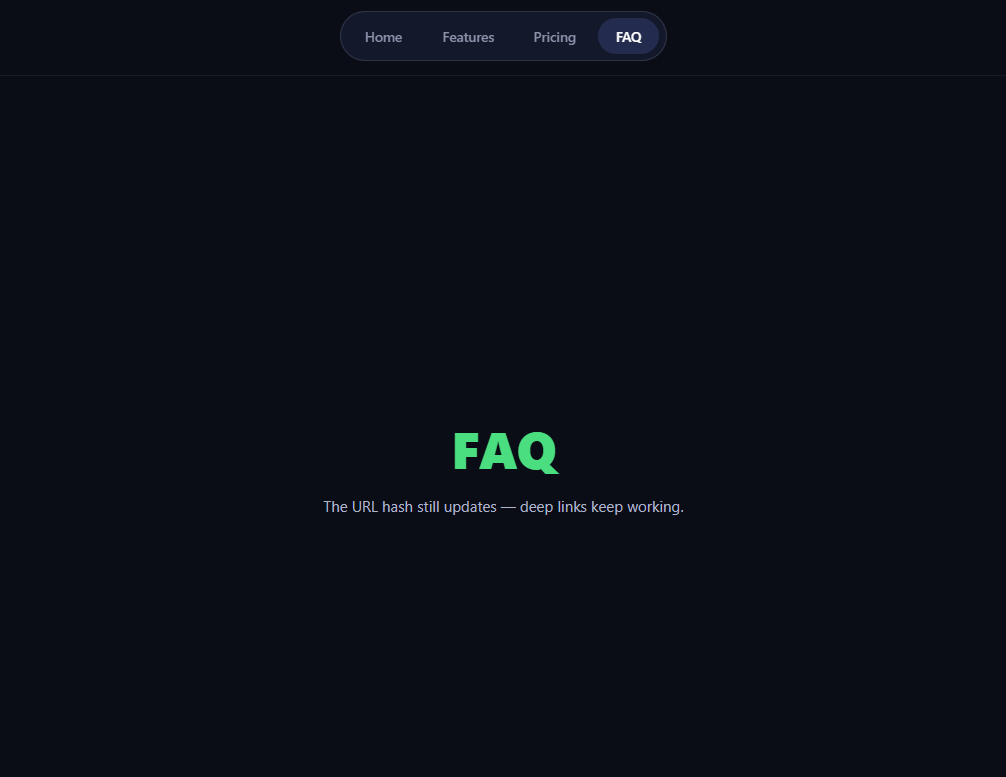
CSS scroll-behavior: smooth gives you exactly one animation: the browser's fixed curve, no offset, no interruption handling, no completion callback. This sticky pill nav uses GSAP's ScrollToPlugin instead — every anchor click glides with a chosen ease over a chosen duration, lands *below* the sticky nav thanks to offsetY, hands the scrollbar back instantly if the user intervenes, and updates the URL hash on arrival.
scrollTo tweens the scroll position like any property
gsap.to(window, { scrollTo: { y: '#san-pricing' } }) treats the window's scroll position as a tweenable value: pick duration: 1 and power2.inOut and the journey accelerates out and brakes in like every other GSAP motion. Selectors, pixel numbers, 'max', and other elements' positions are all valid y values — and because it's a real tween, it sequences into timelines, can be paused, and reports onComplete.
offsetY solves the sticky-header cover-up
Native anchors scroll the target's top edge to the viewport's top edge — directly underneath any fixed or sticky header. offsetY: 76 lands the section 76px shy, exactly clearing the pill nav's height plus margin. This is the single most common reason teams abandon CSS smooth scrolling (its equivalent, scroll-margin-top, must be maintained on every *target*; offsetY lives once, at the *initiator*).
autoKill is scroll-jacking etiquette
A one-second programmatic scroll is an eternity if the user changes their mind. With autoKill: true, the moment any manual scroll input arrives (wheel, touch, keyboard), the tween kills itself and the user has full control — no rubber-banding, no fighting the scrollbar. Without it, the tween would keep re-asserting its trajectory against the user's input, the cardinal sin of scroll-jacking.
The hash updates without the jump
Clicking calls preventDefault() (or the browser would teleport instantly), then onComplete writes the hash via history.replaceState — so deep links and back-button state stay meaningful, but the write happens *after* arrival and never triggers the native jump. replaceState (vs pushState) keeps intra-page hops from polluting back-button history.
Active tracking by nearest-to-offset-line
The scroll listener highlights whichever section's top is closest to the 76px offset line — the same line scrollTo lands on, so a nav click always ends with its own link active. Nearest-distance beats threshold-crossing logic at the document's ends, where the last section may never reach the line. The listener is passive and does trivial math; for heavier pages, an IntersectionObserver approach like scroll spy nav trades precision for zero per-scroll work.
Note the CSS: scroll-behavior stays auto
If the page sets scroll-behavior: smooth, the browser would *also* smooth GSAP's scroll writes, double-easing every frame into mush. Keeping it auto gives the plugin full authority — a classic integration gotcha.
Customizing it
Tune duration/ease per distance (a common trick: scale duration by pixels traveled), scroll a container instead of the window (gsap.to('#panel', ...)), or pair the x axis for horizontal journeys. Related: observer-highlighted scroll spy nav, the scroll to top button, section decks in observer fullpage, and page-length context from a scroll progress bar.
Build with AI
Build, Understand, Optimize, and Extend It With AI
You don't have to work out GSAP's ScrollToPlugin option interactions on your own. Paste this snippet's HTML, CSS, and JS into an AI coding assistant like Claude and ask it to explain exactly why offsetY has to live on the tween rather than as scroll-margin-top on each target, or how autoKill detects manual scroll input mid-tween. The same assistant can help optimize it, for instance checking whether the plain scroll listener that recomputes nearest-distance for every section on every scroll event should be throttled or replaced with an IntersectionObserver for pages with many sections. It is equally useful for extending the behavior: ask it to animate a progress dot along the pill nav as the active section changes, support horizontal scrolling for a side-scrolling gallery, or persist the active section across a page reload from the URL hash. Treat the code less like a finished artifact and more like a starting point for a conversation.
Prompt to recreate it
Copy this into your AI assistant of choice to build the effect from scratch, or as a jumping-off point for your own variant:
Build a sticky pill navigation with eased anchor scrolling in plain HTML, CSS, and JavaScript using GSAP and its ScrollToPlugin (loaded from a CDN, no build step).

Requirements:
- A sticky nav bar of pill-shaped links, each pointing to a section id, sitting above four or more full-height sections.
- Clicking a link must prevent the default instant jump and instead run a gsap.to(window, { scrollTo: {...} }) tween with a real duration and an eased curve like power2.inOut, not the browser's built-in scroll-behavior: smooth.
- The scrollTo target must include an offsetY (matching the nav's height plus its margin) so the destination section's heading lands fully clear of the sticky nav instead of underneath it.
- The tween must set autoKill: true so that if the user scrolls, touches, or presses a key mid-flight, the animated scroll stops immediately and hands control back, with no fighting the scrollbar.
- On tween completion, update the URL hash via history.replaceState (not pushState, and without triggering the native jump) so deep links keep working without polluting back-button history.
- Add a scroll listener that highlights whichever nav link corresponds to the section whose top edge is currently closest to the same offset line the scrollTo tween lands on, so a clicked link ends up self-consistently active.
- Explicitly keep the page's CSS scroll-behavior set to auto, and be able to explain why leaving it as smooth would cause the browser to re-smooth (double-ease) every scroll position GSAP writes.
Want to tighten it up first? Run this prompt through the AI Prompt Studio to score it across 8 quality dimensions, catch anti-patterns, and tune the wording for Claude, ChatGPT, or Gemini before you paste it in.
Source Code
<nav class="san-nav" id="sanNav">
  <a href="#san-home" class="san-link is-active">Home</a>
  <a href="#san-features" class="san-link">Features</a>
  <a href="#san-pricing" class="san-link">Pricing</a>
  <a href="#san-faq" class="san-link">FAQ</a>
</nav>
<section class="san-sec" id="san-home" style="--sa:#818cf8"><h2>Home</h2><p>Click the nav — GSAP eases the journey there.</p></section>
<section class="san-sec" id="san-features" style="--sa:#22d3ee"><h2>Features</h2><p>offsetY keeps the sticky nav from covering the headline.</p></section>
<section class="san-sec" id="san-pricing" style="--sa:#c084fc"><h2>Pricing</h2><p>autoKill hands control back the moment you scroll manually.</p></section>
<section class="san-sec" id="san-faq" style="--sa:#4ade80"><h2>FAQ</h2><p>The URL hash still updates — deep links keep working.</p></section>*{box-sizing:border-box;margin:0;padding:0}
html{scroll-behavior:auto}
body{font-family:system-ui,-apple-system,sans-serif;background:#0b0d16;color:#fff}
.san-nav{position:sticky;top:12px;z-index:10;display:flex;gap:4px;width:fit-content;margin:12px auto;padding:6px;border-radius:99px;background:rgba(20,26,46,.9);border:1px solid rgba(255,255,255,.12);backdrop-filter:blur(8px)}
.san-link{padding:9px 18px;border-radius:99px;color:#8a90a8;text-decoration:none;font-size:13.5px;font-weight:600;transition:color .25s,background .25s}
.san-link:hover{color:#fff}
.san-link.is-active{color:#fff;background:#232c4e}
.san-sec{min-height:100vh;display:flex;flex-direction:column;align-items:center;justify-content:center;gap:12px;text-align:center;padding:24px;border-top:1px solid rgba(255,255,255,.06)}
.san-sec h2{font-size:clamp(30px,5.6vw,52px);font-weight:800;letter-spacing:-.02em;color:var(--sa)}
.san-sec p{color:#aeb4ca;font-size:15px;max-width:420px;line-height:1.6}gsap.registerPlugin(ScrollToPlugin);
var links = document.querySelectorAll('.san-link');
var NAV_OFFSET = 76;
links.forEach(function (link) {
link.addEventListener('click', function (e) {
e.preventDefault();
var target = link.getAttribute('href');
gsap.to(window, {
duration: 1,
ease: 'power2.inOut',
scrollTo: {
y: target,
offsetY: NAV_OFFSET,
// autoKill stops the tween instantly if the user scrolls,
// instead of fighting them for the scrollbar.
autoKill: true
},
onComplete: function () {
history.replaceState(null, '', target);
}
});
});
});
// Active link tracking: highlight the section nearest the offset line.
var sections = document.querySelectorAll('.san-sec');
window.addEventListener('scroll', function () {
var best = 0, bestDist = Infinity;
sections.forEach(function (sec, i) {
var d = Math.abs(sec.getBoundingClientRect().top - NAV_OFFSET);
if (d < bestDist) { bestDist = d; best = i; }
});
links.forEach(function (l, i) { l.classList.toggle('is-active', i === best); });
}, { passive: true });Step by step
How to Use
- 1Add the GSAP CDNsInclude gsap and ScrollToPlugin from the CDN panel.
- 2Paste HTML, CSS, and JSA sticky pill nav floats over four sections.
- 3Click PricingThe page eases there, landing clear of the nav.
- 4Interrupt a scrollWheel mid-flight — autoKill yields instantly.
- 5Check the URLThe hash updates on arrival, jump-free.
- 6Retune the journeyduration, ease, and offsetY are three numbers.
Real-world uses
Common Use Cases
Got questions?
Frequently Asked Questions
Control: CSS smooth scrolling has one browser-defined curve, no duration choice, no completion callback, no interruption policy, and its offset fix (scroll-margin-top) must be maintained per target. ScrollToPlugin gives you duration, any ease, offsetY at the call site, autoKill for user handoff, onComplete for hash updates, and timeline composability.
Native anchor behavior scrolls the target's top to the viewport's very top — straight under any sticky or fixed header. offsetY: 76 stops the journey 76px short, so headlines land just below the pill nav. One constant at the initiator covers every target, and the active-tracking logic uses the same line so clicks always end self-consistent.
The plugin watches the scroll position each tick; if it ever differs from where the tween just put it — meaning a wheel, touch, or key contributed — it kills the tween immediately. The user gets the scrollbar back mid-flight with no rubber-banding. onAutoKill even lets you react, e.g. clearing a pending active-link change.
The default anchor action teleports instantly — that's why the click is preventDefault-ed. Writing the hash afterward via history.replaceState preserves deep-linking and shareable URLs without triggering the native jump, and replaceState (unlike pushState) keeps five section hops from becoming five back-button steps.
scroll-behavior: smooth must stay off — the browser would re-smooth every frame the tween writes, double-easing into mush (this snippet pins it to auto). ScrollSmoother, by contrast, composes correctly: ScrollToPlugin writes the real scroll position and ScrollSmoother glides content toward it, so the pairing feels natural.
Register the plugin at module scope and fire tweens from click handlers — no mount effect needed for the scrolls themselves; only the active-tracking listener belongs in useEffect/onMounted/ngAfterViewInit with removal in the cleanup. In SPA routing, run the scroll after navigation commits (React useEffect on route change, Vue router afterEach). The pill nav is a natural Tailwind composition of sticky, backdrop-blur, and rounded-full.