Learn Coding Visually
Learn to code with interactive, live-preview playgrounds — HTML, CSS, JavaScript, React & more.
 HTML Playground42 lessons · Click-based · Live preview
 CSS PlaygroundLearn CSS with a live editor
 JavaScript Playground60 lessons · DOM · Async · Canvas
 React PlaygroundLearn React with a live code editor
 GSAP PlaygroundLearn GSAP animation interactively
 SVG Playground44 lessons · shapes · paths · animation
 SCSS Playground45 lessons · Sass modules · tokens
 Tailwind PlaygroundLearn Tailwind CSS with a live editor
 Bootstrap 5 Playground50 lessons · live preview
Observer Fullpage Sections — Free GSAP Snippet
Observer Fullpage Sections · Scroll · Plain HTML, CSS & JS · Live preview
What's included
Features
About this UI Snippet
Observer Fullpage Sections — Gesture-Driven Slides Without a Scrollbar
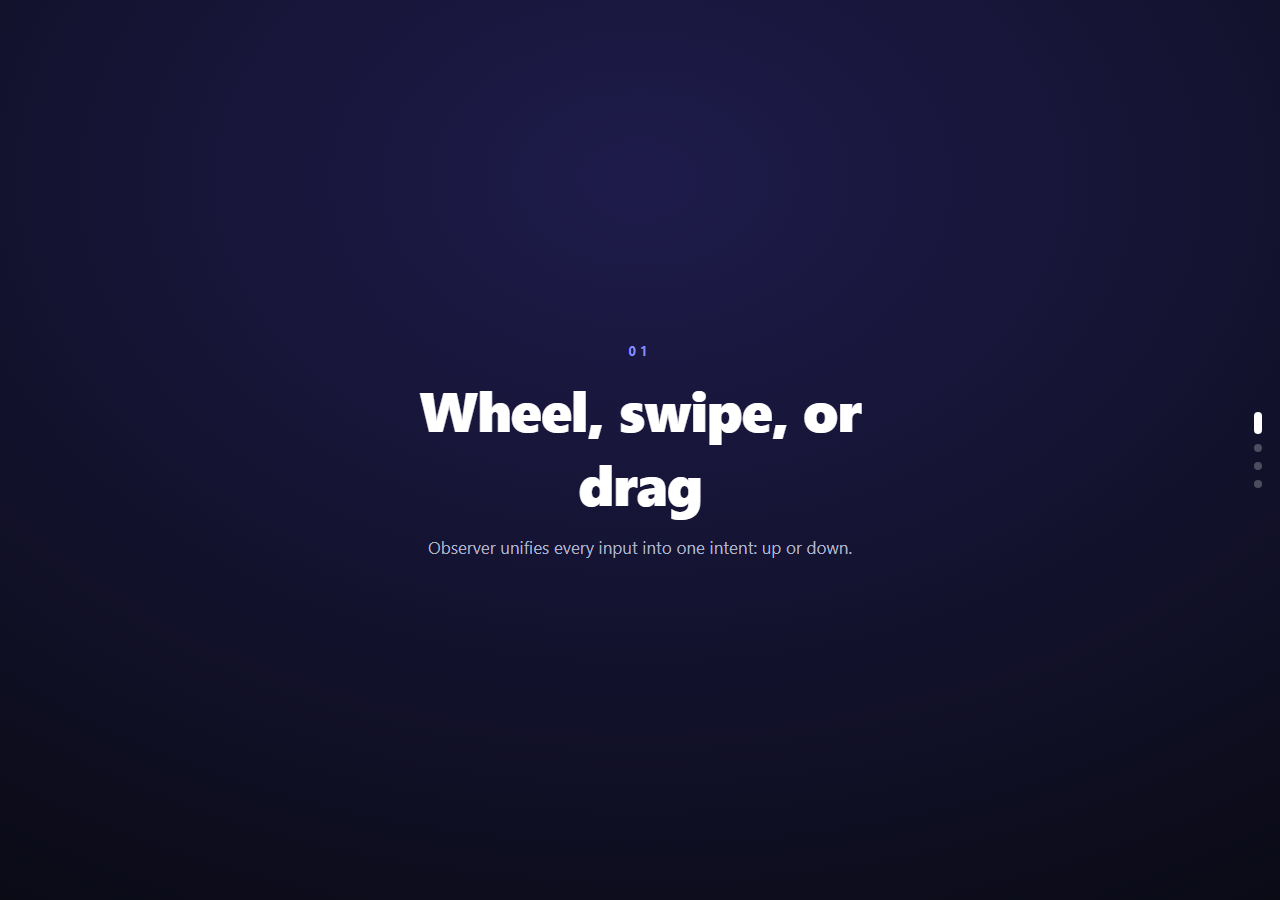
Fullpage section navigation — one wheel flick or swipe advances one full-screen slide — is the awwwards-site pattern that normal scrolling can't express, because the page doesn't actually scroll. This snippet builds it with GSAP's Observer plugin: sections are absolutely stacked, the document has zero scroll height, and every input gesture is translated into a single "go up / go down" intent that plays an animated hand-off.
Observer is input normalization, not scrolling
Observer.create({ type: 'wheel,touch,pointer' }) listens to mouse wheels, trackpad gestures, touch swipes, and pointer drags, and distills them into onUp/onDown callbacks (note the inversion: swiping *up* means the user wants to go *down* the deck, so onUp advances). Wheels report line deltas, trackpads flood pixel deltas, touch is positional — Observer absorbs those differences so navigation logic is two lines. preventDefault: true stops any native scrolling or overscroll bounce from leaking through.
tolerance filters intent from noise
tolerance: 12 requires 12px of accumulated movement before a callback fires — the difference between "resting a finger" and "swiping." Combined with the animating lock, one physical gesture maps to exactly one section change: trackpads that emit dozens of momentum events after a flick can't machine-gun through the deck, because everything during the transition is ignored and the residual momentum falls below tolerance by completion.
The hand-off is layered, not a plain slide
The incoming section slides from full viewport height while the outgoing one moves only −18% and dims — a parallax depth cue that reads as the new section sliding *over* the old, like sheets of paper. The incoming section's inner content also travels 40% further with a fade, arriving slightly after its background (that 0.25 offset), which gives every transition a two-plane richness one flat slide lacks. z-index is set per transition so the mover is always on top, and visibility gates which sections exist to the compositor at all.
Direction is a parameter, so reverse is free
goto(index, dir) takes the travel direction (+1/−1) and multiplies every yPercent by it: downward navigation slides sections up from below; upward navigation replays the identical choreography mirrored. One function handles both, and the boundary guard (index < 0 || index >= length) makes the deck's ends dead-stop naturally.
Why sections are stacked, not in a scroll container
With position: absolute; inset: 0 on every section and overflow: hidden on the page, there is no scroll position to manage, no snap points to fight, and no scrollbar to distract — state is just the current integer. This differs fundamentally from CSS scroll-snap (see full page scroll): snap keeps native scrolling and its physics; Observer replaces scrolling with *staged transitions* you fully choreograph.
Dots are generated and synced
The rail builds one dot per section at init and goto() swaps the active class, stretching the current dot into a pill — the only affordance revealing deck position, echoing the scroll sticky features pattern.
Customizing it
Retheme via each section's --sb/--sa variables, swap the hand-off for crossfades or horizontal slides (change the axis), or add keyboard arrows by calling goto() from a keydown listener. Related: snap-based full page scroll, pinned deck effects in scroll fade stack, and section-travel dots in page dots nav.
Build with AI
Build, Understand, Optimize, and Extend It With AI
You don't have to trace the Observer callback wiring and the layered timeline by hand. Paste this snippet's HTML, CSS, and JS into an AI coding assistant like Claude and ask it to explain exactly why onUp triggers forward navigation while onDown goes back, or how the tolerance value combined with the animating flag stops a single trackpad flick from skipping through several sections at once. The same assistant is useful for optimizing it too — ask whether four absolutely positioned full-viewport sections stays cheap with many more slides, or whether swapping visibility for a lighter opacity-only approach changes paint cost. It is just as good for extending the deck: have it add keyboard arrow-key navigation that calls goto directly, support horizontal instead of vertical travel by swapping the yPercent axis, or generate the dot rail and section count from a data array instead of hardcoded markup. Treat the code less like a finished artifact and more like a starting point for a conversation.
Prompt to recreate it
Copy this into your AI assistant of choice to build the effect from scratch, or as a jumping-off point for your own variant:
Build a gesture-driven "fullpage sections" deck in plain HTML, CSS, and JavaScript using GSAP with its Observer plugin (load both from a CDN) — the page itself must never scroll.

Requirements:
- Several full-viewport sections stacked with position: absolute and inset: 0 inside a fixed-height, overflow-hidden wrapper, so there is no scroll height on the document at all. Only the first section starts visible; the rest start hidden via visibility.
- Register a single Observer with type set to wheel, touch, and pointer combined, preventDefault enabled, and a tolerance value (e.g. around 10-15px) so it takes deliberate movement, not incidental jitter, to fire a callback.
- Wire Observer's onUp callback to advance to the next section and onDown to go to the previous one, matching the natural inversion where swiping/scrolling up means moving forward through the deck.
- Write one goto(index, direction) function that guards against animating while a transition is already in progress and against navigating past the first or last section, then builds a GSAP timeline that: slides the incoming section in a full viewport height from the direction of travel, moves the outgoing section only a small fraction of the viewport height while fading it, and animates the incoming section's inner text content in on a separate, slightly delayed tween so it arrives after its background — creating a layered, two-plane parallax hand-off rather than a flat slide.
- After the transition completes, hide the outgoing section with visibility so it stops being part of layout/paint, and release the animating lock.
- Generate a small dot indicator rail with one dot per section, and toggle an active class on the current dot every time goto runs, with the active dot visually distinct (e.g. stretched into a pill) from the rest.
Want to tighten it up first? Run this prompt through the AI Prompt Studio to score it across 8 quality dimensions, catch anti-patterns, and tune the wording for Claude, ChatGPT, or Gemini before you paste it in.
Source Code
<div class="obf-app">
  <section class="obf-sec" style="--sb:#1e1b4b;--sa:#818cf8"><div class="obf-inner"><span>01</span><h2>Wheel, swipe, or drag</h2><p>Observer unifies every input into one intent: up or down.</p></div></section>
  <section class="obf-sec" style="--sb:#082f49;--sa:#22d3ee"><div class="obf-inner"><span>02</span><h2>No scrollbar at all</h2><p>The page never scrolls — sections animate in and out instead.</p></div></section>
  <section class="obf-sec" style="--sb:#3b0764;--sa:#c084fc"><div class="obf-inner"><span>03</span><h2>One gesture, one section</h2><p>A tolerance threshold and a lock flag keep navigation deliberate.</p></div></section>
  <section class="obf-sec" style="--sb:#052e16;--sa:#4ade80"><div class="obf-inner"><span>04</span><h2>The end. Or go back up.</h2><p>Swipe upward to travel back through the deck.</p></div></section>
  <div class="obf-dots" id="obfDots"></div>
</div>*{box-sizing:border-box;margin:0;padding:0}
html,body{height:100%;overflow:hidden}
body{font-family:system-ui,-apple-system,sans-serif;background:#0b0d16;color:#fff}
.obf-app{position:relative;height:100vh}
.obf-sec{position:absolute;inset:0;display:flex;align-items:center;justify-content:center;visibility:hidden;background:radial-gradient(110% 110% at 50% 20%,var(--sb),#07080d)}
.obf-inner{text-align:center;max-width:560px;padding:24px}
.obf-inner span{font-size:13px;font-weight:700;letter-spacing:.3em;color:var(--sa)}
.obf-inner h2{font-size:clamp(30px,6vw,56px);font-weight:800;letter-spacing:-.02em;margin:12px 0 14px}
.obf-inner p{color:#aeb4ca;font-size:clamp(14px,2.2vw,17px);line-height:1.6}
.obf-dots{position:fixed;right:18px;top:50%;transform:translateY(-50%);display:flex;flex-direction:column;gap:10px}
.obf-dots i{width:8px;height:8px;border-radius:99px;background:rgba(255,255,255,.25);transition:background .3s,height .3s}
.obf-dots i.is-active{background:#fff;height:22px}gsap.registerPlugin(Observer);
var sections = gsap.utils.toArray('.obf-sec');
var dotsWrap = document.getElementById('obfDots');
sections.forEach(function () { dotsWrap.appendChild(document.createElement('i')); });
var dots = dotsWrap.children;
var current = 0;
var animating = false;
// Show the first section without animation.
gsap.set(sections[0], { visibility: 'visible' });
dots[0].classList.add('is-active');
function goto(index, dir) {
if (animating || index < 0 || index >= sections.length) return;
animating = true;
var out = sections[current];
var inn = sections[index];
var tl = gsap.timeline({
defaults: { duration: 0.9, ease: 'power2.inOut' },
onComplete: function () {
gsap.set(out, { visibility: 'hidden' });
animating = false;
}
});
gsap.set(inn, { visibility: 'visible', zIndex: 2 });
gsap.set(out, { zIndex: 1 });
tl.fromTo(inn, { yPercent: dir * 100 }, { yPercent: 0 }, 0)
.fromTo(out, { yPercent: 0 }, { yPercent: dir * -18, opacity: 0.4 }, 0)
.fromTo(inn.querySelector('.obf-inner'),
{ yPercent: dir * 40, opacity: 0 },
{ yPercent: 0, opacity: 1, duration: 0.7 }, 0.25)
.set(out, { opacity: 1 });
dots[current].classList.remove('is-active');
dots[index].classList.add('is-active');
current = index;
}
// Observer merges wheel, touch, and pointer-drag into onUp / onDown.
Observer.create({
type: 'wheel,touch,pointer',
tolerance: 12,
preventDefault: true,
onDown: function () { goto(current - 1, -1); },
onUp: function () { goto(current + 1, 1); }
});Step by step
How to Use
- 1Add the GSAP CDNsInclude gsap and Observer from the CDN panel.
- 2Paste HTML, CSS, and JSSection 01 renders; the page has no scrollbar.
- 3Wheel or swipe downThe next section slides over with parallax.
- 4Try rapid flickingThe lock and tolerance keep it one-per-gesture.
- 5Swipe back upThe same choreography plays mirrored.
- 6Add a sectionOne more .obf-sec — dots and bounds adapt.
Real-world uses
Common Use Cases
Got questions?
Frequently Asked Questions
Raw input events: wheel deltas, touch moves, and pointer drags. It normalizes their wildly different units and rhythms into simple directional callbacks — onUp, onDown, onLeft, onRight — with velocity and delta data attached. Since sections are absolutely stacked and the document has no scroll height, those intents drive animations directly instead of moving a scroll position.
Two mechanisms: tolerance: 12 requires meaningful accumulated movement before firing, and an animating flag makes goto() ignore every input during the 0.9s transition. Trackpad momentum keeps emitting events after the flick, but they land inside the locked window and their residual deltas fall under tolerance afterward — so one gesture, one section.
Observer names callbacks after the gesture's physical direction: swiping your finger (or wheeling) upward is how you move down a page. So onUp means "content should advance" and onDown means "travel back." It feels inverted in code and completely natural in use — the same inversion native scrolling has always had.
Three staggered movements: the incoming section travels 100% of the viewport, the outgoing one recedes only −18% while dimming (so the new sheet visibly slides over the old), and the incoming inner content moves 40% further with a fade, landing 0.25s after its own background. Different distances on different planes is parallax — applied to a transition.
Scroll-snap keeps real scrolling — native physics, a scrollbar, partial states mid-drag — and snaps the resting position. Observer replaces scrolling entirely: no scroll position exists, every transition is a choreographed timeline you author, and inputs are gated to discrete steps. Snap is better for content pages; Observer is better for staged, presentation-like decks.
Create the Observer and section refs in a mount effect — useEffect, onMounted, or ngAfterViewInit — and call observer.kill() in the cleanup so listeners and preventDefault release on unmount (critical, or the page stays scroll-locked after route changes). Keep current/animating in refs, not state — re-renders mid-transition would fight the timeline. Sections and dots render naturally from an array with Tailwind classes.