
Learn Coding Visually
Learn to code with interactive, live-preview playgrounds — HTML, CSS, JavaScript, React & more.
 HTML Playground42 lessons · Click-based · Live preview
 CSS PlaygroundLearn CSS with a live editor
 JavaScript Playground60 lessons · DOM · Async · Canvas
 React PlaygroundLearn React with a live code editor
 GSAP PlaygroundLearn GSAP animation interactively
 SVG Playground44 lessons · shapes · paths · animation
 SCSS Playground45 lessons · Sass modules · tokens
 Tailwind PlaygroundLearn Tailwind CSS with a live editor
 Bootstrap 5 Playground50 lessons · live preview
Three.js Scroll Wireframe Globe Spin — Disk-to-Sphere Reveal
Three.js Scroll Wireframe Globe Spin · Scroll · Plain HTML, CSS & JS · Live preview
What's included
Features
About this UI Snippet
How to Build a Scroll-Driven Wireframe Globe Spin-Up With Three.js
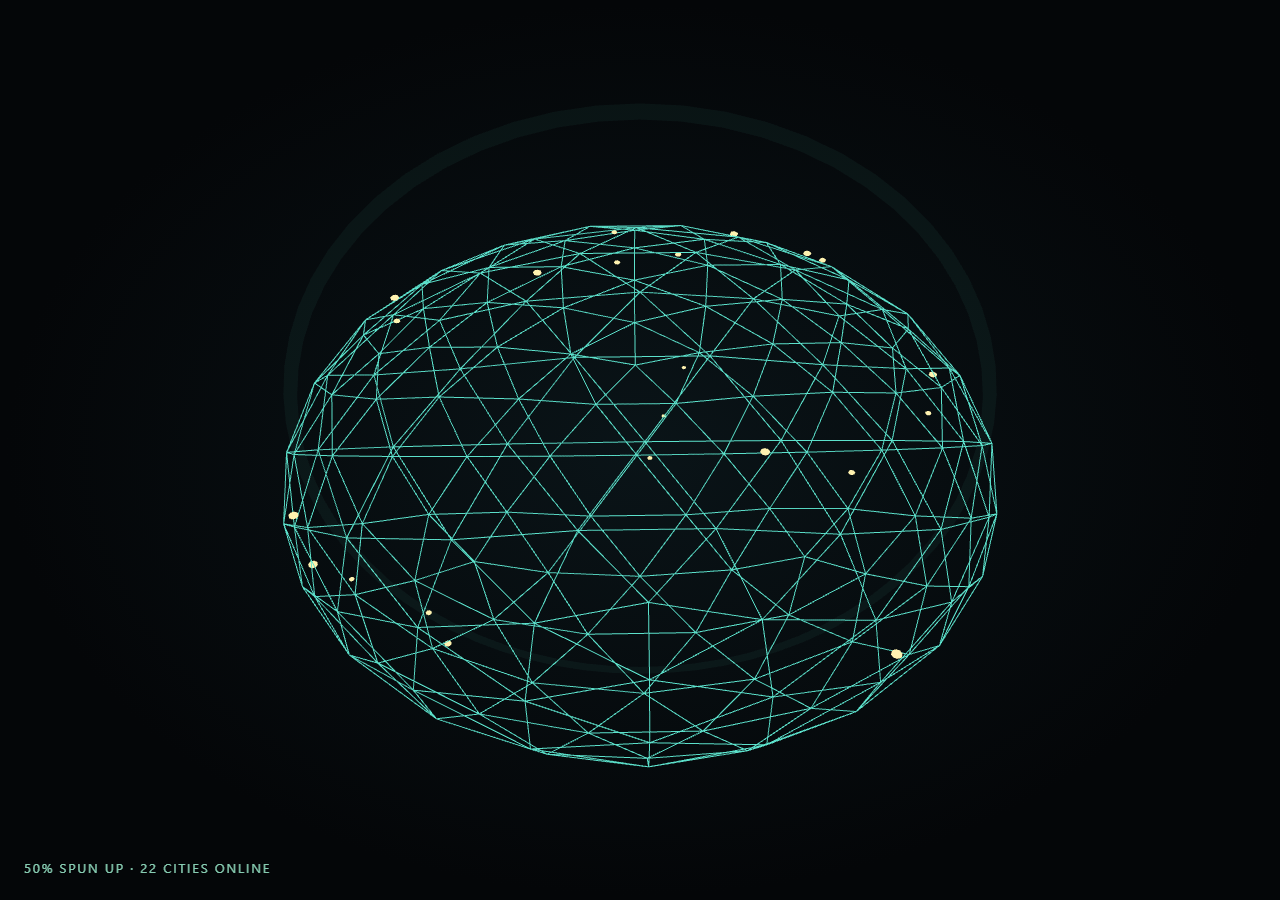
The Three.js Scroll Wireframe Globe Spin Up snippet starts with a wireframe sphere squashed nearly flat along one axis — reading as a 2D disk — and, as the visitor scrolls through a pinned stage, scales it back up to a full sphere while its rotation speed ramps and small city markers light up one by one across its wireframe surface.
A squashed sphere reads convincingly as a flat disk
Rather than swapping between a separate 2D circle mesh and a 3D sphere mesh, this snippet uses one THREE.IcosahedronGeometry(4, 3) wireframe sphere for the entire effect, scaling its y axis down to a tiny fraction (flatness) at the start. A wireframe sphere viewed nearly edge-on along its flattened axis reads visually as a flat disk of crossing lines, and a matching RingGeometry edge outline reinforces that disk silhouette at the very start of the scroll, fading out as flatness grows back toward 1. This single-geometry approach avoids ever needing to swap meshes or cross-fade materials.
Spin-up speed scales with progress squared, not linearly
The globe's rotation increment each frame is multiplied by eased * eased, so the globe barely rotates while still flat and disk-like, and picks up meaningfully more spin speed only in the back half of the scroll range — a spin-up curve that feels like a physical flywheel accelerating rather than an object rotating at a constant rate throughout. The globe simultaneously tilts from a steep rotation.x angle back toward level as eased climbs, so the "flat disk" reads as being viewed nearly face-on at the start and levels out into a natural equatorial view once fully formed.
City markers placed once via spherical coordinates, lit progressively
Each of the forty-plus city markers gets a fixed direction vector computed once from a random latitude/longitude pair, converted to Cartesian coordinates on a unit sphere. Every frame, each marker's live position is that direction scaled to the globe's surface radius, and a marker only renders at visible scale once eased passes an individually staggered threshold (0.15 + cityT * 0.75) — meaning cities light up in a spread-out, sequential-feeling pattern across the whole second half of the scroll rather than all appearing simultaneously. This staggered-threshold reveal pattern is the same technique used per-panel in origami crane unfold, applied here to city points instead of paper panels.
City marker InstancedMesh mirrors the globe's own transform
Rather than recomputing flattening and rotation separately for the city markers, the city InstancedMesh's own rotation and scale are set to copy the globe mesh's rotation and scale every frame, so the cities stay glued to the globe's wireframe surface through the entire spin-up and flattening transition without any extra per-marker transform math.
Fully reversible spin-down
Because flatness, rotation speed, edge opacity, and every city's lit/unlit threshold are all direct functions of the same eased progress value, scrolling back up smoothly reverses every layer at once: cities wink out from the most-recently-lit backward, rotation slows back toward a near-standstill, and the globe visibly flattens back into a 2D-reading disk.
Build with AI
Build, Understand, Optimize, and Extend It With AI
You do not need to reverse-engineer how a flat wireframe disk convincingly spins up into a full 3D globe with lighting-up cities. Paste this snippet's HTML, CSS, and JS into an AI assistant like Claude and ask it to explain why a single scaled sphere works better than swapping meshes, or how the staggered per-city litThreshold produces a sequential reveal from one progress value. The same assistant can help you extend it — ask it to add great-circle arc lines connecting lit cities, texture-map a real world outline onto the wireframe, or add a subtle atmosphere glow shell around the finished globe. Treat the code as a conversation starter, not a finished artifact.
Prompt to recreate it
Copy this into your AI assistant of choice to build the effect from scratch, or as a jumping-off point for your own variant:
Build a "scroll-scrubbed wireframe globe spin-up" in plain HTML, CSS, and JavaScript using Three.js, GSAP, and GSAP's ScrollTrigger plugin, all loaded from a CDN (no bundler, no build step).

Requirements:
- A pinned section containing a full-size canvas, with a WebGLRenderer and PerspectiveCamera sized to the canvas element (not window.innerWidth/innerHeight) and updated on window resize including aspect ratio.
- Create one wireframe sphere mesh (e.g. THREE.IcosahedronGeometry with a MeshBasicMaterial using wireframe: true) and scale it down to a small fraction on one axis at rest so it reads visually as a flat 2D disk, plus a thin RingGeometry outline mesh reinforcing that disk edge.
- Compute a fixed set of city marker positions once at startup using random latitude/longitude pairs converted to Cartesian direction vectors on a unit sphere, and render all markers through a single THREE.InstancedMesh.
- Register a GSAP tween on a ScrollTrigger targeting the pinned section, with pin: true, start at top top, a numeric scrub, and a multi-hundred-percent end, animating a single plain progress value from 0 to 1 with linear easing.
- Every animation frame, apply smoothstep easing to the scrubbed progress, then scale the globe's flattened axis back up toward 1 by that eased value, tilt it from a steep starting angle back toward level, and increase its rotation speed using eased raised to a power greater than 1 so spin-up accelerates rather than staying linear.
- Fade out the disk-edge ring's opacity as the globe un-flattens.
- Give each city marker its own individually staggered reveal threshold derived from its index (so cities light up spread across the scroll range rather than all at once), scale each marker toward zero when the live progress is below its threshold and toward a visible size once above it, and make the city InstancedMesh copy the globe mesh's own rotation and scale every frame so markers stay glued to the wireframe surface.
- Track and display both an overall spin-up percentage and a live count of currently lit cities.
- Confirm scrolling back up reverses every layer smoothly: cities wink out, rotation slows, and the globe flattens back into a 2D-reading disk, since every property is a direct function of the shared progress value.
Want to tighten it up first? Run this prompt through the AI Prompt Studio to score it across 8 quality dimensions, catch anti-patterns, and tune the wording for Claude, ChatGPT, or Gemini before you paste it in.
Source Code
<section class="wgs-stage" id="wgsStage">
  <div class="wgs-intro-overlay"><p>Scroll ↓ to spin the flat disk up into a wireframe globe</p></div>
  <canvas id="wgsCanvas"></canvas>
  <div class="wgs-hud"><span id="wgsPct">0</span>% spun up · <span id="wgsCities">0</span> cities online</div>
</section>
<section class="wgs-bottom"><p>A fully rotating wireframe globe, cities lit across every continent.</p></section>*{box-sizing:border-box;margin:0;padding:0}
html,body{background:#040608;color:#fff;font-family:system-ui,-apple-system,sans-serif}
.wgs-bottom{min-height:70vh;display:flex;justify-content:center;align-items:center;color:#7fb8c9;font-size:15px;letter-spacing:.08em;text-transform:uppercase;text-align:center;padding:0 24px}
.wgs-stage{height:100vh;position:relative;overflow:hidden;background:radial-gradient(ellipse at center,#0a1418 0%,#040608 70%)}
.wgs-intro-overlay{position:absolute;inset:0;display:flex;align-items:center;justify-content:center;text-align:center;padding:24px;pointer-events:none;z-index:5;color:#7fb8c9;font-size:15px;letter-spacing:.08em;text-transform:uppercase;transition:opacity .4s ease;}
#wgsCanvas{display:block;width:100%;height:100%}
.wgs-hud{position:absolute;left:24px;bottom:24px;font-variant-numeric:tabular-nums;font-size:13px;letter-spacing:.14em;color:#9ff0d0;text-transform:uppercase;opacity:.85}const canvas = document.getElementById('wgsCanvas');
const pctEl = document.getElementById('wgsPct');
const citiesEl = document.getElementById('wgsCities');
const renderer = new THREE.WebGLRenderer({ canvas, antialias: true, alpha: true });
renderer.setPixelRatio(Math.min(window.devicePixelRatio, 2));
const scene = new THREE.Scene();
const camera = new THREE.PerspectiveCamera(48, 1, 0.1, 200);
camera.position.set(0, 0, 13);
camera.lookAt(0, 0, 0);
scene.add(new THREE.AmbientLight(0x1a3a44, 1.2));
const key = new THREE.PointLight(0x6ee6d0, 1.2, 80);
key.position.set(8, 8, 10);
scene.add(key);
// The globe starts nearly flat (scale.y tiny) to read as a 2D disk, then
// scales up to a full sphere while spin-up ramps its rotation speed.
const globeGeo = new THREE.IcosahedronGeometry(4, 3);
const globeMat = new THREE.MeshBasicMaterial({ color: 0x5ee6d0, wireframe: true, transparent: true, opacity: 0.85 });
const globe = new THREE.Mesh(globeGeo, globeMat);
scene.add(globe);
// A thin disk edge ring reinforces the "flat disk" starting read, faded out
// once the globe has mostly spun up into 3D.
const edgeGeo = new THREE.RingGeometry(3.9, 4.05, 64);
const edgeMat = new THREE.MeshBasicMaterial({ color: 0x5ee6d0, transparent: true, opacity: 0.5, side: THREE.DoubleSide });
const edge = new THREE.Mesh(edgeGeo, edgeMat);
scene.add(edge);
// City markers: small glowing points placed on the sphere surface via
// lat/long, lit up progressively as scroll progresses.
const CITY_COUNT = 46;
const cityGeo = new THREE.SphereGeometry(0.07, 8, 8);
const cityMat = new THREE.MeshBasicMaterial({ color: 0xfff2b0 });
const cityMesh = new THREE.InstancedMesh(cityGeo, cityMat, CITY_COUNT);
scene.add(cityMesh);
const dummy = new THREE.Object3D();
const cityDirs = [];
for (let i = 0; i < CITY_COUNT; i++) {
const lat = (Math.random() - 0.5) * Math.PI * 0.85;
const lon = Math.random() * Math.PI * 2;
const dir = new THREE.Vector3(
Math.cos(lat) * Math.cos(lon),
Math.sin(lat),
Math.cos(lat) * Math.sin(lon)
);
cityDirs.push(dir);
}
const introEl = document.querySelector('.wgs-intro-overlay');
gsap.registerPlugin(ScrollTrigger);
const form = { t: 0 };
gsap.to(form, {
t: 1,
ease: 'none',
scrollTrigger: {
trigger: '#wgsStage',
start: 'top top',
end: '+=450%',
scrub: 0.6,
pin: true,
},
});
function resize() {
const w = canvas.clientWidth, h = canvas.clientHeight;
renderer.setSize(w, h, false);
camera.aspect = w / h;
camera.updateProjectionMatrix();
}
let spin = 0;
function animate() {
requestAnimationFrame(animate);
if (introEl) introEl.style.opacity = (form.t > 0.03) ? '0' : '1';
const t = form.t;
const eased = t * t * (3 - 2 * t);
const flatness = 0.045 + eased * 0.955;
globe.scale.set(1, flatness, 1);
spin += 0.0014 * (0.15 + eased * eased * 1.4);
globe.rotation.y = spin;
globe.rotation.x = (1 - eased) * 1.35;
edge.material.opacity = Math.max(0, 0.5 - eased * 0.9);
edge.rotation.x = (1 - eased) * 1.35;
let litCount = 0;
for (let i = 0; i < CITY_COUNT; i++) {
const dir = cityDirs[i];
const cityT = i / CITY_COUNT;
const litThreshold = 0.15 + cityT * 0.75;
const lit = eased > litThreshold;
if (lit) litCount++;
dummy.position.set(dir.x * 4.02, dir.y * 4.02, dir.z * 4.02);
dummy.scale.setScalar(lit ? (0.6 + Math.sin(spin * 6 + i) * 0.15) : 0.0001);
dummy.updateMatrix();
cityMesh.setMatrixAt(i, dummy.matrix);
}
cityMesh.instanceMatrix.needsUpdate = true;
cityMesh.rotation.y = globe.rotation.y;
cityMesh.rotation.x = globe.rotation.x;
cityMesh.scale.copy(globe.scale);
const camDist = 13 - eased * 2.5;
camera.position.set(0, 0, camDist);
camera.lookAt(0, 0, 0);
pctEl.textContent = Math.round(eased * 100);
citiesEl.textContent = litCount;
renderer.render(scene, camera);
}
resize();
window.addEventListener('resize', resize);
animate();Step by step
How to Use
- 1Load all three CDN scriptsAdd three.min.js, gsap.min.js, and ScrollTrigger.min.js from the CDN panel, in that order.
- 2Paste HTML, CSS, and JSA flat wireframe disk appears inside a pinned 3D stage with a live "% spun up" and city count read-out.
- 3Scroll downThe disk scales up into a full wireframe globe, rotation speed ramps up, and city markers light up progressively.
- 4Scroll back upThe globe flattens back into a disk and cities wink out in reverse, since every layer is a function of one progress value.
- 5Retune the globeChange CITY_COUNT for more or fewer markers, or the IcosahedronGeometry detail level for a finer or coarser wireframe.
- 6Adjust the pacingChange the ScrollTrigger end value (+=450%) or the per-city litThreshold formula to retime the reveal.
Real-world uses
Common Use Cases
Got questions?
Frequently Asked Questions
Swapping between two different meshes (a flat circle and a 3D sphere) would require cross-fading materials or opacity to hide the transition seam. Scaling a single wireframe IcosahedronGeometry down to near-zero on one axis produces a convincing flat-disk silhouette using the exact same geometry that becomes the full globe, so there is only ever one mesh to animate and no seam to hide.
Multiplying the per-frame rotation increment by eased * eased means the globe barely spins while still flat and disk-shaped, and only picks up meaningfully faster rotation in roughly the back half of the scroll range. This reads as a flywheel spinning up rather than an object rotating at a constant, unchanging rate the entire time, which would look mechanical rather than physical.
Each city marker's InstancedMesh transform (rotation and scale) is set to directly copy the globe mesh's own rotation and scale every frame, after the marker's local position is already placed on the unit-sphere surface. This means the markers automatically inherit the same flattening and spin as the globe without any separate per-marker flattening math.
Each city index computes its own litThreshold as 0.15 + (index / CITY_COUNT) * 0.75, spreading thresholds across most of the scroll range. A marker only renders at visible scale once the live eased progress exceeds its own threshold, so cities light up in a staggered, spread-out sequence rather than all popping in simultaneously at one point in the scroll.
Yes. Click JSX for a React component, Vue for a Vue 3 SFC, Angular for a standalone component, or Tailwind for a React + Tailwind version. Build the globe geometry, city InstancedMesh, and GSAP ScrollTrigger inside a mount effect keyed to a canvas ref, and on unmount kill the ScrollTrigger instance, dispose geometries/materials, and call renderer.dispose().