
Learn Coding Visually
Learn to code with interactive, live-preview playgrounds — HTML, CSS, JavaScript, React & more.
 HTML Playground42 lessons · Click-based · Live preview
 CSS PlaygroundLearn CSS with a live editor
 JavaScript Playground60 lessons · DOM · Async · Canvas
 React PlaygroundLearn React with a live code editor
 GSAP PlaygroundLearn GSAP animation interactively
 SVG Playground44 lessons · shapes · paths · animation
 SCSS Playground45 lessons · Sass modules · tokens
 Tailwind PlaygroundLearn Tailwind CSS with a live editor
 Bootstrap 5 Playground50 lessons · live preview
Scroll Canvas Starfield Warp Speed — Perspective-Projected Canvas2D Stars
Scroll Canvas Starfield Warp Speed · Scroll · Plain HTML, CSS & JS · Live preview
What's included
Features
About this UI Snippet
How to Build a Scroll-Driven Starfield Warp-Speed Effect With Canvas2D
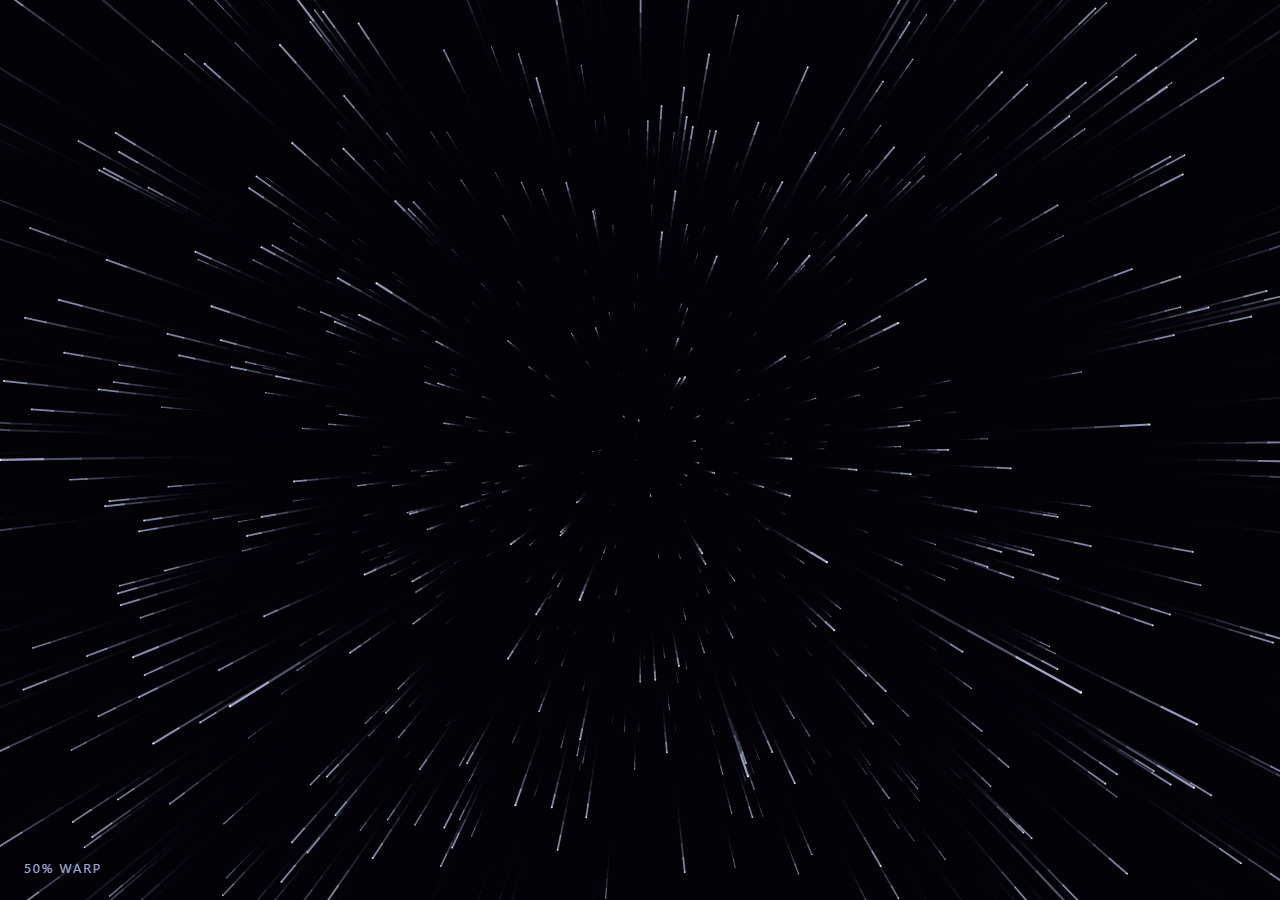
The Scroll Canvas Starfield Warp Speed snippet places several hundred stars in 3D space around a fixed camera, projects each one to 2D with a classic perspective divide, and streaks them into motion trails whose length grows with scroll-driven speed — the entire "jump to lightspeed" effect from a handful of Canvas2D primitives and no 3D engine.
3D coordinates, projected by hand
Each star has a fixed (x, y) position on a plane and a z depth that decreases every frame, simulating the camera flying forward through the field. The 2D screen position is computed with a textbook perspective-divide formula: screenX = centerX + x * (focalLength / z) — as z shrinks toward the camera, the same fixed x maps to an increasingly large offset from center, which is exactly why stars appear to radiate outward as they approach.
Streaks from cached previous positions, not a particle trail buffer
Rather than maintaining a history buffer of recent positions per star, each star simply remembers its *previous frame's* projected screen coordinates (prevScreenX/prevScreenY) and draws one line segment from there to its current position every frame. At low speed the segment is imperceptibly short and reads as a dot; at warp speed the segment stretches into a long streak — the streak length is an emergent property of how far the star moved between two frames, not something separately animated.
Fading background instead of clearRect for an ambient tail
Painting a low-alpha dark rectangle over the canvas each frame (rather than fully clearing it) leaves the faintest ghost of the previous few frames' streaks, reinforcing the sense of velocity without needing a second rendering pass — the same trail technique used in Scroll Canvas Generative Flow Field.
Recycling stars that pass the camera or leave frame
When a star's z drops below a small threshold (it has "passed" the camera) or its projected screen position leaves the visible canvas bounds, it is reseeded at a fresh random (x, y) and a far z, ready to fly in again — keeping the star count constant without ever resizing the underlying typed arrays.
Speed as a squared function of scroll progress
speed = 2 + warp * warp * 46 uses warp squared rather than linear, so the field stays a gentle, slow drift for the first portion of the scroll and only truly explodes into warp streaks in the final stretch — a deliberate pacing choice, not an accident of the perspective math.
Customizing it
Change focalLength for a wider or narrower field of view, adjust the speed formula's exponent and multiplier for a different acceleration curve, or tint the star and streak colors for a different palette. Pair it with Scroll Canvas Generative Flow Field for a related Canvas2D particle-motion technique.
Build with AI
Build, Understand, Optimize, and Extend It With AI
You don't have to derive perspective-projection math or streak rendering from scratch. Paste this snippet's HTML, CSS, and JS into an AI coding assistant like Claude and ask it to explain exactly how the focalLength / z perspective divide produces the radiating-outward motion as stars approach the camera, and why drawing a line from each star's previous screen position to its current one is enough to produce convincing motion streaks without a trail buffer. The same assistant is useful for extending the effect: ask it to add a subtle camera-shake at maximum warp, color-shift distant stars cooler and near stars warmer, or add a hyperspace flash transition at the moment warp reaches 100%. Treat the code as a conversation starter, not a finished artifact.
Prompt to recreate it
Copy this into your AI assistant of choice to build the effect from scratch, or as a jumping-off point for your own variant:
Build a "scroll-driven starfield warp speed" effect in plain HTML, CSS, and JavaScript using Canvas2D (no Three.js, no 3D engine) plus GSAP and GSAP's ScrollTrigger plugin loaded from a CDN (no bundler, no build step).

Requirements:
- A pinned section containing a full-size canvas with a 2D rendering context, resized to match its display size and device pixel ratio.
- Several hundred stars, each with a fixed x/y position on a plane and a z depth, stored in flat typed arrays (such as Float32Array) allocated once — never allocate new arrays or objects inside the render loop.
- Every animation frame, decrease each star's z depth by a speed value (simulating the camera flying forward), then project the star to 2D screen coordinates using a perspective-divide formula: screenX = centerX + x * (focalLength / z), and the equivalent for screenY.
- Cache each star's previous frame's projected screen position and, each frame, draw a short line segment from that previous position to the newly computed current position — this is what produces motion streaks whose length grows naturally with speed, without maintaining a separate trail history buffer.
- Recycle (reseed at a fresh random x/y and a far z) any star whose z drops below a small threshold (it has passed the camera) or whose projected screen position leaves the visible canvas bounds.
- Produce a faint ambient trail effect by painting a low-alpha translucent dark rectangle over the entire canvas at the start of each frame instead of calling clearRect.
- Register a GSAP tween on a ScrollTrigger targeting the pinned section, with pin: true, start at top top, a numeric scrub, and a multi-hundred-percent end, animating a single plain warp progress value from 0 to 1 with linear easing.
- Derive the per-frame star speed from that warp value using a non-linear (for example squared) relationship, so the field stays a slow, gentle drift for most of the scroll range and only accelerates dramatically into streaking warp speed near the end.
- Confirm scrolling back up smoothly decelerates the field back to its slow resting drift.
Want to tighten it up first? Run this prompt through the AI Prompt Studio to score it across 8 quality dimensions, catch anti-patterns, and tune the wording for Claude, ChatGPT, or Gemini before you paste it in.
Source Code
<section class="wsp-stage" id="wspStage">
  <div class="wsp-intro-overlay"><p>Scroll ↓ to jump to warp speed</p></div>
  <canvas id="wspCanvas"></canvas>
  <div class="wsp-hud"><span id="wspPct">0</span>% warp</div>
</section>
<section class="wsp-bottom"><p>A perspective-projected starfield, accelerating with your scroll.</p></section>*{box-sizing:border-box;margin:0;padding:0}
html,body{background:#020208;color:#fff;font-family:system-ui,-apple-system,sans-serif}
.wsp-bottom{min-height:70vh;display:flex;justify-content:center;align-items:center;color:#8a97c9;font-size:15px;letter-spacing:.08em;text-transform:uppercase;text-align:center;padding:0 24px}
.wsp-stage{height:100vh;position:relative;overflow:hidden;background:#020208}
.wsp-intro-overlay{position:absolute;inset:0;display:flex;align-items:center;justify-content:center;text-align:center;padding:24px;pointer-events:none;z-index:5;color:#dfe6ff;font-size:15px;letter-spacing:.08em;text-transform:uppercase;text-shadow:0 2px 16px rgba(0,0,0,.7);transition:opacity .4s ease}
#wspCanvas{display:block;width:100%;height:100%}
.wsp-hud{position:absolute;left:24px;bottom:24px;font-variant-numeric:tabular-nums;font-size:13px;letter-spacing:.14em;color:#b7c4ff;text-transform:uppercase;opacity:.85}const canvas = document.getElementById('wspCanvas');
const ctx = canvas.getContext('2d');
const pctEl = document.getElementById('wspPct');
const introEl = document.querySelector('.wsp-intro-overlay');
const DPR = Math.min(window.devicePixelRatio || 1, 2);
let W = 0, H = 0, CX = 0, CY = 0;
const COUNT = 700;
// x, y are fixed 3D-ish coordinates on a plane centered at the origin;
// z is depth, decreasing toward the camera every frame. prevScreenX/Y cache
// last frame's projected 2D position so each star can be drawn as a short
// streak from its previous projection to its current one.
const sx = new Float32Array(COUNT);
const sy = new Float32Array(COUNT);
const sz = new Float32Array(COUNT);
const prevScreenX = new Float32Array(COUNT);
const prevScreenY = new Float32Array(COUNT);
const hasPrev = new Uint8Array(COUNT);
function seedStar(i, randomizeZ) {
sx[i] = (Math.random() * 2 - 1) * 1000;
sy[i] = (Math.random() * 2 - 1) * 1000;
sz[i] = randomizeZ ? Math.random() * 1000 + 40 : 1000;
hasPrev[i] = 0;
}
function resize() {
W = canvas.clientWidth; H = canvas.clientHeight;
CX = W / 2; CY = H / 2;
canvas.width = Math.floor(W * DPR);
canvas.height = Math.floor(H * DPR);
ctx.setTransform(DPR, 0, 0, DPR, 0, 0);
ctx.fillStyle = '#020208';
ctx.fillRect(0, 0, W, H);
for (let i = 0; i < COUNT; i++) seedStar(i, true);
}
gsap.registerPlugin(ScrollTrigger);
// Two scroll-driven states: warp climbs 0 -> 1 scrolling down through the
// pinned stage, and never resets while scrolling back up it eases back to
// 0 in the exact same scrubbed fashion -- full reversibility for free.
const warpState = { t: 0 };
gsap.to(warpState, {
t: 1,
ease: 'none',
scrollTrigger: {
trigger: '#wspStage',
start: 'top top',
end: '+=350%',
scrub: 0.6,
pin: true,
},
});
const focalLength = 300;
function draw() {
requestAnimationFrame(draw);
const warp = warpState.t;
if (introEl) introEl.style.opacity = (warp > 0.03) ? '0' : '1';
const speed = 2 + warp * warp * 46;
// A low-alpha fill instead of clearRect leaves faint streak trails behind
// fast-moving stars near warp speed, reinforcing the sense of velocity.
ctx.fillStyle = 'rgba(2, 2, 8, ' + (0.35 + warp * 0.25).toFixed(3) + ')';
ctx.fillRect(0, 0, W, H);
for (let i = 0; i < COUNT; i++) {
sz[i] -= speed;
if (sz[i] <= 1) {
seedStar(i, false);
continue;
}
const scale = focalLength / sz[i];
const screenX = CX + sx[i] * scale;
const screenY = CY + sy[i] * scale;
if (screenX < -50 || screenX > W + 50 || screenY < -50 || screenY > H + 50) {
seedStar(i, false);
continue;
}
const brightness = Math.min(1, (1000 - sz[i]) / 1000);
const radius = 0.4 + brightness * 2.2;
if (hasPrev[i]) {
ctx.strokeStyle = 'rgba(200, 210, 255, ' + (0.25 + brightness * 0.6).toFixed(2) + ')';
ctx.lineWidth = radius;
ctx.beginPath();
ctx.moveTo(prevScreenX[i], prevScreenY[i]);
ctx.lineTo(screenX, screenY);
ctx.stroke();
}
ctx.beginPath();
ctx.fillStyle = 'rgba(255, 255, 255, ' + (0.55 + brightness * 0.45).toFixed(2) + ')';
ctx.arc(screenX, screenY, radius * 0.5, 0, Math.PI * 2);
ctx.fill();
prevScreenX[i] = screenX;
prevScreenY[i] = screenY;
hasPrev[i] = 1;
}
pctEl.textContent = Math.round(warp * 100);
}
resize();
window.addEventListener('resize', resize);
draw();Step by step
How to Use
- 1Load the CDN scriptsAdd gsap.min.js and ScrollTrigger.min.js from the CDN panel, in that order.
- 2Paste HTML, CSS, and JSA slow-drifting starfield renders inside a pinned canvas stage with a live "% warp" read-out.
- 3Scroll downStars accelerate and streak dramatically outward as scroll-driven speed climbs.
- 4Scroll back upThe field decelerates smoothly back to a slow drift exactly in reverse.
- 5Retune the acceleration curveAdjust the speed formula’s exponent and multiplier for a gentler or more explosive warp.
- 6Change the field of viewIncrease or decrease focalLength for a narrower or wider-feeling starfield.
Real-world uses
Common Use Cases
Got questions?
Frequently Asked Questions
Each star has a fixed x/y position and a z depth. The screen position is computed with screenX = centerX + x * (focalLength / z) — a classic perspective-divide formula. As z shrinks (the star approaches the camera), the same x maps to a larger offset from center, which is exactly why stars radiate outward as they get closer.
Each star only remembers its previous frame’s projected screen position and draws a single line segment from there to its current position every frame. At low speed that segment is nearly a point; at warp speed it stretches into a long visible streak — the streak length is a natural byproduct of how far the star moved between two frames.
speed = 2 + warp * warp * 46 keeps the field a gentle, slow drift through most of the scroll range and reserves the dramatic streaking acceleration for the final stretch, since squaring a 0-to-1 value grows much faster near 1 than near 0 — a deliberate pacing choice for a more satisfying "jump to warp" moment.
When a star’s z depth drops below a small threshold, or its projected screen position leaves the visible canvas bounds, it is immediately reseeded at a fresh random x/y position and a far z depth, so the total star count stays constant and the field looks continuously replenished.
A low-alpha dark rectangle painted over the canvas each frame only partially erases the previous frame, leaving the faintest ghost of recent star streaks behind. This reinforces the sense of velocity at high warp speed without needing a second, separate trail-rendering pass.