
Learn Coding Visually
Learn to code with interactive, live-preview playgrounds — HTML, CSS, JavaScript, React & more.
 HTML Playground42 lessons · Click-based · Live preview
 CSS PlaygroundLearn CSS with a live editor
 JavaScript Playground60 lessons · DOM · Async · Canvas
 React PlaygroundLearn React with a live code editor
 GSAP PlaygroundLearn GSAP animation interactively
 SVG Playground44 lessons · shapes · paths · animation
 SCSS Playground45 lessons · Sass modules · tokens
 Tailwind PlaygroundLearn Tailwind CSS with a live editor
 Bootstrap 5 Playground50 lessons · live preview
Scroll Vinyl Record Spin — Tonearm Drop & Speed-Up Effect
Scroll Vinyl Record Spin · Scroll · Plain HTML, CSS & JS · Live preview
What's included
Features
About this UI Snippet
How to Build a Scroll-Driven Vinyl Record Spin-Up With CSS and GSAP
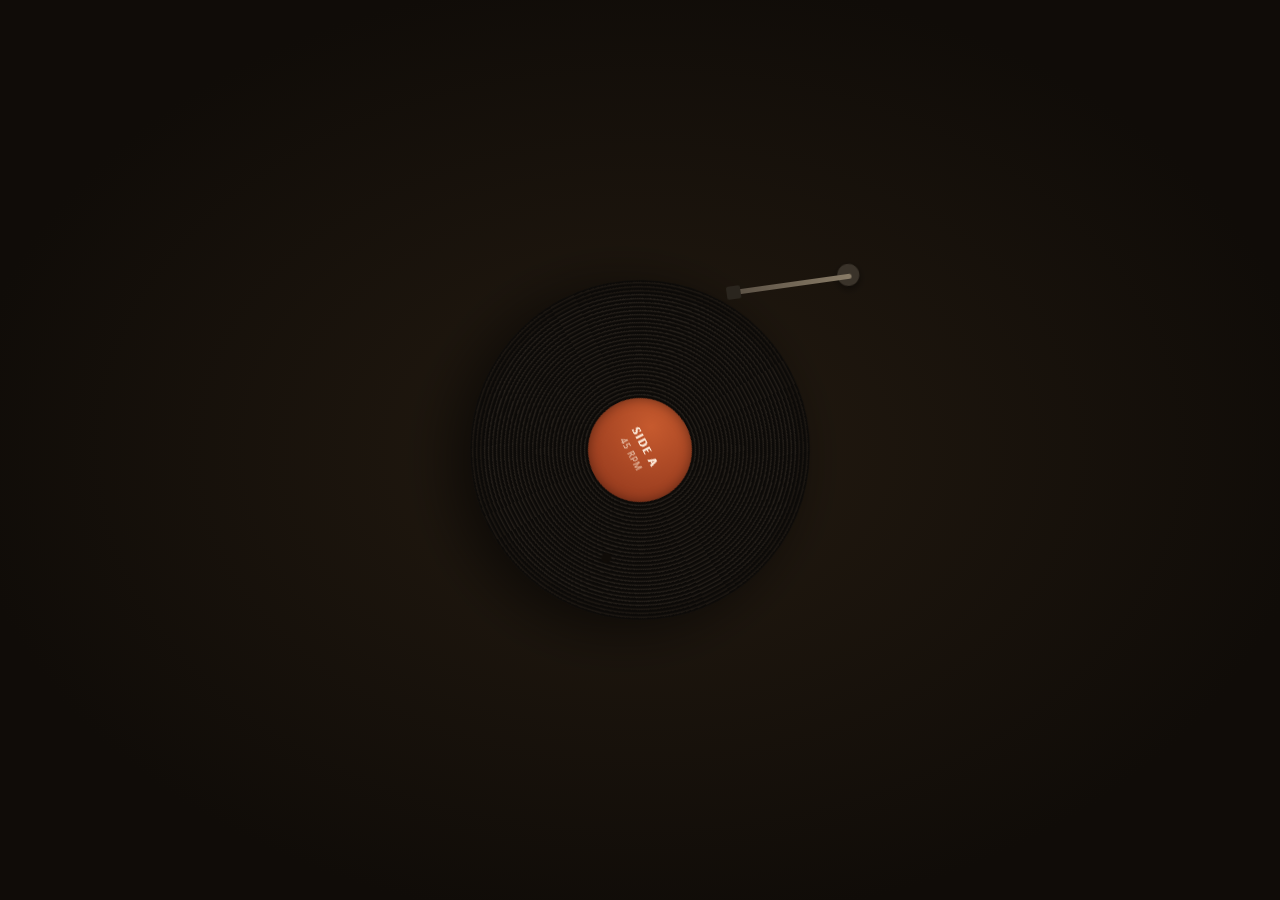
The Scroll Vinyl Record Spin snippet sequences three coordinated pieces of motion — a tonearm lowering, a record accelerating from rest, and a now-playing card fading in — from one scrubbed GSAP timeline, using pure CSS gradients for the vinyl grooves and label instead of any image or canvas drawing.
Repeating radial gradients as vinyl grooves
The record's dark base and its fine groove texture are both repeating-radial-gradient(circle at center, ...) backgrounds layered on top of each other — one with a slightly larger step for the disc's overall banding, one with a much finer 1px step and low white opacity for the actual groove lines. No image asset, no SVG, and the grooves automatically stay centered and circular at any record size.
A timeline with overlapping, offset phases
Rather than three separate ScrollTriggers, one gsap.timeline() holds all three phases as tweens positioned at explicit time offsets (0, 0.3, 0.55) rather than sequentially — the tonearm starts lowering immediately, the record's acceleration begins slightly before the tonearm finishes settling (so the touch of the needle plausibly kicks off the spin), and the now-playing card only appears once the record is already most of the way up to speed. Overlapping phases like this read as one continuous mechanical sequence rather than three disconnected steps.
A non-linear spin-up, not constant angular velocity
Real turntables ramp up to speed rather than snapping instantly to full RPM. The record's rotation tween uses a plain numeric proxy (state.spin) and, in its onUpdate, computes total turns as spin * spin * 26 — a quadratic ease so the record visibly accelerates, covering far more rotation in the second half of the phase than the first, then applies that as a single rotate() transform written directly to the element for minimal per-frame overhead.
Tonearm rotation as one transform-origin trick
The tonearm's pivot is set via transform-origin at its mounting-post coordinates, so rotating the whole .vny-tonearm element by a small negative degree swings the entire arm-and-head assembly down onto the record edge, without needing separate joint elements or inverse kinematics.
Everything keyed to one scrubbed timeline
Because all three phases live inside one timeline scrubbed by a single ScrollTrigger, scrolling back up reverses the whole sequence in the correct order automatically — the card fades out first, the record decelerates back toward rest, and the tonearm lifts back off — with no manual state tracking required.
Build with AI
Build, Understand, Optimize, and Extend It With AI
You do not need a canvas drawing or an image asset to understand how this vinyl record spins up realistically on scroll. Paste this snippet's HTML, CSS, and JS into an AI assistant like Claude and ask it to explain why the rotation uses spin squared instead of a linear ramp, or why the timeline's three phases are given overlapping time offsets rather than running strictly in sequence. The same assistant can help you extend it — ask it to add a subtle wobble to the tonearm as it settles, vary record label colors per "track", or add a second record that swaps in once the first fades out. It can also help optimize further, for instance using CSS custom properties for the rotation angle instead of writing inline transform strings. Treat the code as a conversation starter, not a finished artifact.
Prompt to recreate it
Copy this into your AI assistant of choice to build the effect from scratch, or as a jumping-off point for your own variant:
Build a "scroll-scrubbed vinyl record spin-up" in plain HTML, CSS, and JavaScript using CSS gradients, GSAP, and GSAP's ScrollTrigger plugin, all loaded from a CDN (no bundler, no build step, no canvas, no image assets).

Requirements:
- A pinned section containing a circular "record" element styled with layered repeating-radial-gradient backgrounds to fake vinyl grooves (one coarser step for overall disc banding, one much finer low-opacity step for groove lines), a circular label element near its center, and a separate "tonearm" element positioned near the top-right of the record with its transform-origin set to a plausible mounting-post position.
- Build one gsap.timeline() attached to a ScrollTrigger on the pinned section, with pin: true, start at top top, a numeric scrub, and a multi-hundred-percent end.
- Inside that timeline, add a tween that rotates the tonearm element by a small negative degree (lowering it onto the record) positioned near the start of the timeline.
- Add a second tween, overlapping partway through the tonearm's lowering, that animates a plain numeric proxy value from 0 to 1 and, in its onUpdate callback, computes the record's rotation angle as that value squared times a large turn count, then writes a rotate() transform directly to the record element, so the record visibly accelerates from rest up to a fast spin rather than snapping to constant speed immediately.
- Add a third tween, starting once the record is mostly up to speed, that fades and slides in a small "now playing" info card (album art swatch, track title, artist).
- Confirm scrolling back up reverses the full sequence in the correct order: the card fades out, the record decelerates back toward rest, and the tonearm lifts back off the record — since the entire sequence lives in one timeline scrubbed by a single ScrollTrigger.
Want to tighten it up first? Run this prompt through the AI Prompt Studio to score it across 8 quality dimensions, catch anti-patterns, and tune the wording for Claude, ChatGPT, or Gemini before you paste it in.
Source Code
<section class="vny-stage" id="vnyStage">
  <div class="vny-intro"><p>Scroll ↓ to drop the needle and spin up the record</p></div>
  <div class="vny-deck">
    <div class="vny-record" id="vnyRecord">
      <div class="vny-grooves"></div>
      <div class="vny-label">
        <span class="vny-label-title">SIDE A</span>
        <span class="vny-label-sub">45 RPM</span>
      </div>
      <div class="vny-hole"></div>
    </div>
    <div class="vny-tonearm" id="vnyTonearm">
      <div class="vny-tonearm-base"></div>
      <div class="vny-tonearm-arm">
        <div class="vny-tonearm-head"></div>
      </div>
    </div>
  </div>
  <div class="vny-card" id="vnyCard">
    <div class="vny-card-art"></div>
    <div class="vny-card-text">
      <strong>Now Playing</strong>
      <span>Nocturne in Warm Static</span>
      <span class="vny-card-artist">The Slow Room</span>
    </div>
  </div>
</section>
<section class="vny-bottom"><p>Side A, spinning at full speed.</p></section>*{box-sizing:border-box;margin:0;padding:0}
html,body{background:#100c08;color:#f2e9db;font-family:system-ui,-apple-system,sans-serif}
.vny-bottom{min-height:70vh;display:flex;justify-content:center;align-items:center;color:#8a7a63;font-size:15px;letter-spacing:.08em;text-transform:uppercase;text-align:center;padding:0 24px}
.vny-stage{height:100vh;position:relative;overflow:hidden;display:flex;align-items:center;justify-content:center;background:radial-gradient(ellipse at center,#231a10 0%,#100c08 75%)}
.vny-intro{position:absolute;top:10%;left:0;right:0;display:flex;justify-content:center;text-align:center;padding:0 24px;pointer-events:none;z-index:6;color:#d8c7a3;font-size:15px;letter-spacing:.08em;text-transform:uppercase;transition:opacity .4s ease;}
.vny-deck{position:relative;width:340px;height:340px}
.vny-record{position:absolute;inset:0;border-radius:50%;background:
repeating-radial-gradient(circle at center,#0c0a08 0px,#0c0a08 2px,#1c1712 3px,#1c1712 4px);
box-shadow:0 20px 60px rgba(0,0,0,.6);will-change:transform;}
.vny-grooves{position:absolute;inset:14px;border-radius:50%;background:
repeating-radial-gradient(circle at center,transparent 0 3px,rgba(255,255,255,.035) 3px 4px);}
.vny-label{position:absolute;inset:118px;border-radius:50%;background:radial-gradient(circle at 35% 30%,#c65a2e,#8a331a);display:flex;flex-direction:column;align-items:center;justify-content:center;gap:2px;box-shadow:inset 0 0 12px rgba(0,0,0,.4)}
.vny-label-title{font-size:11px;letter-spacing:.14em;font-weight:700;color:#fff0e0}
.vny-label-sub{font-size:9px;letter-spacing:.1em;color:#f0d3bd;opacity:.8}
.vny-hole{position:absolute;inset:0;margin:auto;width:10px;height:10px;border-radius:50%;background:#100c08;top:50%;left:50%;transform:translate(-50%,-50%)}
.vny-tonearm{position:absolute;top:-18px;right:-56px;width:150px;height:150px;transform-origin:132px 18px;transform:rotate(-32deg);}
.vny-tonearm-base{position:absolute;top:2px;right:6px;width:22px;height:22px;border-radius:50%;background:#3a332a;box-shadow:0 3px 8px rgba(0,0,0,.5)}
.vny-tonearm-arm{position:absolute;top:12px;right:14px;width:120px;height:5px;background:linear-gradient(90deg,#5a5044,#8a7d68);border-radius:3px;transform-origin:right center;}
.vny-tonearm-head{position:absolute;left:-6px;top:-4px;width:14px;height:13px;background:#2a251e;border-radius:2px}
.vny-card{position:absolute;left:24px;bottom:24px;display:flex;align-items:center;gap:12px;background:rgba(20,16,10,.85);border:1px solid rgba(255,255,255,.08);border-radius:12px;padding:12px 16px;opacity:0;transform:translateY(10px);backdrop-filter:blur(6px)}
.vny-card-art{width:38px;height:38px;border-radius:6px;background:linear-gradient(135deg,#c65a2e,#8a331a)}
.vny-card-text{display:flex;flex-direction:column;font-size:12px;line-height:1.5}
.vny-card-text strong{font-size:10px;letter-spacing:.1em;color:#e0a877;text-transform:uppercase}
.vny-card-artist{color:#a89a80;font-size:11px}gsap.registerPlugin(ScrollTrigger);
var record = document.getElementById('vnyRecord');
var tonearm = document.getElementById('vnyTonearm');
var card = document.getElementById('vnyCard');
var introEl = document.querySelector('.vny-intro');
// A single scrubbed progress value drives three things at once: tonearm
// rotation (lowering onto the record), record spin speed/angle, and the
// now-playing card's fade-in — all as pure functions of that one value so
// the whole sequence is exactly reversible.
var state = { spin: 0 };
var tl = gsap.timeline({
scrollTrigger: {
trigger: '#vnyStage',
start: 'top top',
end: '+=350%',
scrub: 0.6,
pin: true,
onUpdate: function (self) {
if (introEl) introEl.style.opacity = (self.progress > 0.02) ? '0' : '1';
},
},
});
// Phase 1 (0 -> 0.35): tonearm lowers onto the record.
tl.to(tonearm, { rotate: -8, duration: 0.35, ease: 'power2.inOut' }, 0);
// Phase 2 (0.3 -> 1): record accelerates from rest up to full speed. We
// tween a plain numeric proxy and apply rotation ourselves so we can wrap
// the angle and keep the transform cheap every frame.
tl.to(state, {
spin: 1,
duration: 0.7,
ease: 'power1.in',
onUpdate: function () {
// Total rotation grows non-linearly with spin progress so the record
// visibly speeds up rather than moving at a constant rate.
var totalTurns = state.spin * state.spin * 26; // eases into full speed
record.style.transform = 'rotate(' + (totalTurns * 360).toFixed(1) + 'deg)';
},
}, 0.3);
// Phase 3 (0.55 -> 0.85): now-playing card fades and slides in once the
// needle has dropped and the record is audibly up to speed.
tl.to(card, { opacity: 1, y: 0, duration: 0.3, ease: 'power2.out' }, 0.55);Step by step
How to Use
- 1Load the two GSAP CDN scriptsAdd gsap.min.js and ScrollTrigger.min.js from the CDN panel, in that order.
- 2Paste HTML, CSS, and JSA stationary record with its tonearm lifted appears inside a pinned stage.
- 3Scroll downThe tonearm lowers onto the record, the disc accelerates up to full speed, and a "Now Playing" card fades in.
- 4Scroll back upThe card fades out, the record decelerates, and the tonearm lifts off — the full sequence reverses in order.
- 5Restyle the label and cardEdit the .vny-label and .vny-card-text content and colors for your own track/album details.
- 6Adjust the pacingChange the ScrollTrigger end value (+=350%) or the timeline's phase offsets for a slower or snappier drop.
Real-world uses
Common Use Cases
Got questions?
Frequently Asked Questions
Two layered repeating-radial-gradient backgrounds handle it: one with a slightly larger repeat step colors the disc's overall dark banding, and a second with a much finer 1px repeat step and very low white opacity produces the fine groove lines. Because it is a gradient, it scales cleanly with the record's size and needs no image asset.
The rotation tween drives a plain numeric proxy (state.spin) from 0 to 1, and in its onUpdate callback the actual rotation angle is computed as spin squared times a turn count. Squaring the progress means the record covers much less rotation early in the phase and much more later, which reads as genuine acceleration rather than an instant jump to full RPM.
The .vny-tonearm element's transform-origin is set to the coordinates of its mounting post (where it would be screwed to a real turntable), so rotating that one element by a small negative degree swings the entire arm-and-head assembly down toward the record edge as a single rigid rotation, no separate joints needed.
Positioning the tonearm-lower, record-spin-up, and card-fade-in tweens at explicit time offsets (0, 0.3, 0.55) rather than back-to-back lets them overlap naturally — the record's acceleration begins slightly before the tonearm has fully settled, so the needle touching down plausibly triggers the spin, and the whole sequence reads as one continuous mechanical action instead of three disconnected steps.
Yes. Click JSX for a React component, Vue for a Vue 3 SFC, Angular for a standalone component, or Tailwind for a React + Tailwind version. Build the timeline inside a mount effect keyed to refs on the record, tonearm, and card, and on unmount kill the ScrollTrigger instance so the pin does not leak between route changes.