Learn Coding Visually
Learn to code with interactive, live-preview playgrounds — HTML, CSS, JavaScript, React & more.
 HTML Playground42 lessons · Click-based · Live preview
 CSS PlaygroundLearn CSS with a live editor
 JavaScript Playground60 lessons · DOM · Async · Canvas
 React PlaygroundLearn React with a live code editor
 GSAP PlaygroundLearn GSAP animation interactively
 SVG Playground44 lessons · shapes · paths · animation
 SCSS Playground45 lessons · Sass modules · tokens
 Tailwind PlaygroundLearn Tailwind CSS with a live editor
 Bootstrap 5 Playground50 lessons · live preview
Scroll Card Deck Shuffle — Free HTML CSS JS Snippet
Scroll Card Deck Shuffle · Scroll · Plain HTML, CSS & JS · Live preview
What's included
Features
About this UI Snippet
Scroll Card Deck Shuffle — Staggered Riffle Tweens & Trigonometric Fan Layout
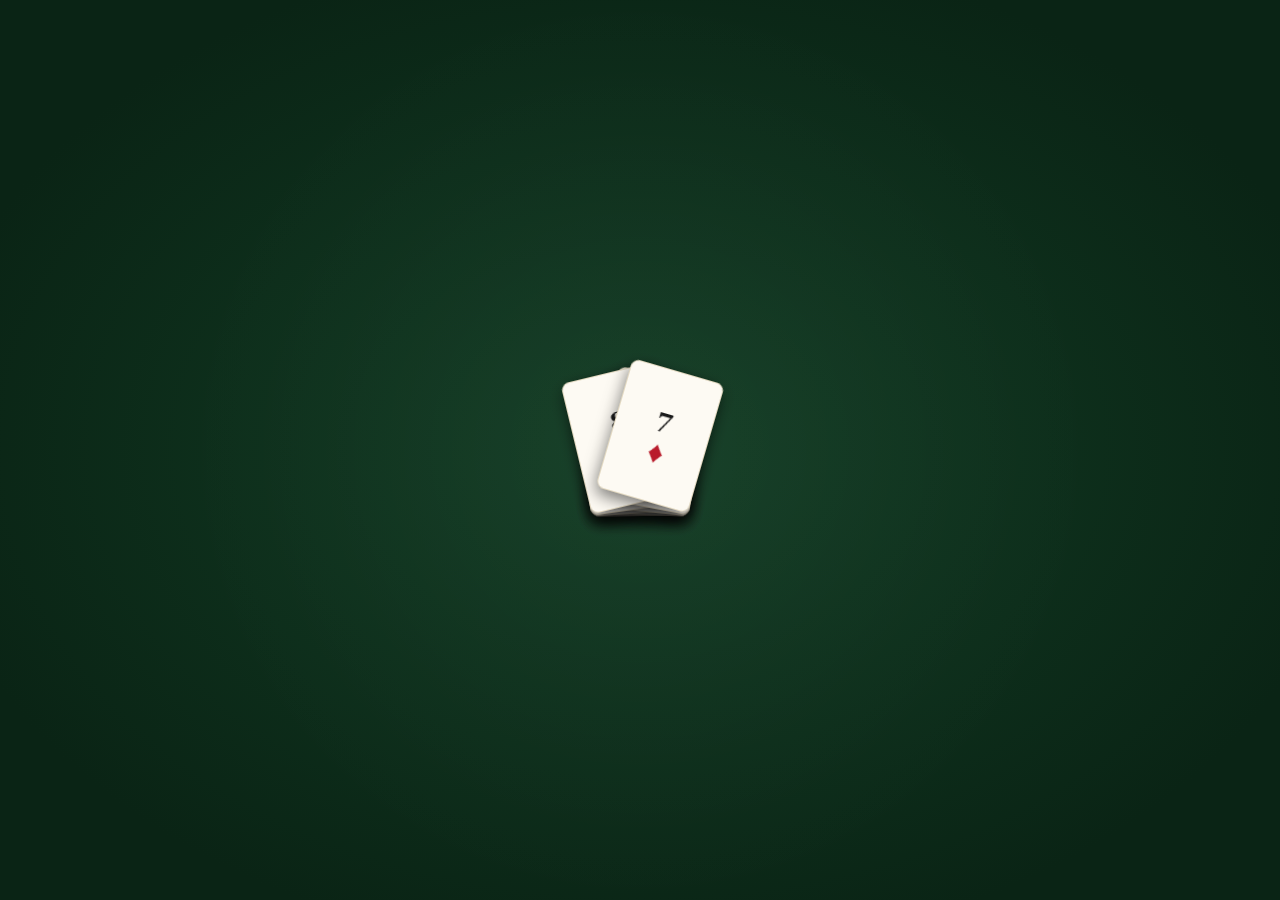
This snippet animates a stack of card divs through two distinct scroll-driven phases on one shared timeline: first a riffle-shuffle where each card kicks outward and rotates with a small stagger before snapping back to the stack, then a fan-out spread where every card moves to a calculated position along an arc, like a hand of cards being displayed.
Phase one — the riffle shuffle
Each .card gets two tweens placed early on the timeline at a small stagger offset (0.02 * i): first kicking it outward and rotating it left or right depending on whether its index is even or odd (side = i % 2 === 0 ? -1 : 1), then immediately tweening it back to x: 0, y: 0, rotate: 0. Because each card's stagger offset is tiny and its kick/return duration is short, the cumulative effect as scroll progresses through this range reads as a riffle — cards flicking out and snapping back in a rapid cascading sequence, just like an interleaved shuffle.
Phase two — the trigonometric fan spread
For the second half of the timeline, each card's final resting position is computed with trigonometry rather than hardcoded per-card values: angle = -fanAngle/2 + t * fanAngle distributes each card evenly across a total fanAngle of 46 degrees based on its normalized index t = i / (n - 1), then Math.sin(rad) and Math.cos(rad) convert that angle into x/y offsets along a circular arc of a given radius — the same math used for clock hands or pie-chart slices. This means adding or removing cards from the deck automatically redistributes the fan evenly with no manual position edits.
z-index via GSAP set with a function
gsap.set(cards, { zIndex: i => i }) uses GSAP's per-element function value syntax to assign each card an ascending stack order once, so later cards in the deck array visually sit on top during both the shuffle and the fan, matching a real deck's draw order.
Fully reversible
Every phase lives on one scrub: true timeline, so scrolling back up un-fans the cards back into a neat stack and reverses the shuffle motion.
Pair this with Scroll Book Shelf Slide for another sequential-reveal technique, or Scroll Polaroid Stack Flip for a related stack-to-grid transformation.
Build with AI
Build, Understand, Optimize, and Extend It With AI
Paste this snippet's HTML, CSS and JS into an AI coding assistant and ask it to explain the trigonometry in the fan-out phase — specifically why Math.sin and Math.cos of an angle derived from each card's normalized index produce an evenly spaced arc, and how changing radius versus fanAngle affects the result differently. It's also worth extending with an assistant's help: ask it to make the shuffle interleave two literal half-decks instead of a symmetric alternation, to add a "deal" phase afterward where cards fly off one at a time to fixed positions, or to make card face content (rank/suit) randomize on each shuffle pass using a brief flip animation.
Prompt to recreate it
Copy this into your AI assistant of choice to build the effect from scratch, or as a jumping-off point for your own variant:
Build a scroll-driven "card deck shuffle and fan" animation in HTML, CSS and JavaScript using GSAP and ScrollTrigger — no canvas, no WebGL.

Requirements:
- Render a small stack of absolutely-positioned "card" divs (all at the same top-left position, each showing a distinct rank/suit), each layered in order with ascending z-index matching their position in the deck.
- Wrap the deck in a tall scroll section and attach one GSAP timeline via ScrollTrigger with scrub: true spanning the section.
- In the first portion of the timeline, give each card a small staggered pair of tweens: kick it outward and rotate it (alternating direction left/right based on even/odd index) then snap it back to the stack's resting position, with a tiny stagger offset between consecutive cards so the cumulative motion reads as a riffle shuffle rather than everything moving at once.
- In the second portion of the timeline, compute each card's final position along a fanned arc using trigonometry: distribute cards evenly across a total fan angle based on their normalized index among all cards, convert that angle plus a radius into x/y offsets with sine and cosine, and rotate each card to match its angle on the arc — so cards end up fanned out like a hand of cards, and the layout automatically adjusts if more or fewer cards are present.
- The whole sequence (shuffle, then fan) must animate forward and reverse cleanly and smoothly as the user scrolls down and back up, since it is driven entirely by scrub rather than one-shot triggers.
- Use a casino felt-green and gold/cream color palette for the table background and cards.
Want to tighten it up first? Run this prompt through the AI Prompt Studio to score it across 8 quality dimensions, catch anti-patterns, and tune the wording for Claude, ChatGPT, or Gemini before you paste it in.
Source Code
<div class="hint">Scroll ↓ to shuffle the deck</div>
<div class="deck-wrap">
  <div class="deck-stage">
    <div class="felt-table"></div>
    <div class="deck" id="deck">
      <div class="card" style="--i:0"><span class="rank">A</span><span class="suit">♠</span></div>
      <div class="card" style="--i:1"><span class="rank">K</span><span class="suit red">♥</span></div>
      <div class="card" style="--i:2"><span class="rank">Q</span><span class="suit">♣</span></div>
      <div class="card" style="--i:3"><span class="rank">J</span><span class="suit red">♦</span></div>
      <div class="card" style="--i:4"><span class="rank">10</span><span class="suit">♠</span></div>
      <div class="card" style="--i:5"><span class="rank">9</span><span class="suit red">♥</span></div>
      <div class="card" style="--i:6"><span class="rank">8</span><span class="suit">♣</span></div>
      <div class="card" style="--i:7"><span class="rank">7</span><span class="suit red">♦</span></div>
    </div>
  </div>
</div>
* { box-sizing: border-box; }
body { margin: 0; font-family: 'Georgia', serif; }
.hint { text-align: center; padding: 28px 16px; font-size: 14px; letter-spacing: 0.04em; color: #f4d9a0; background: #0d2b1a; font-family: system-ui, sans-serif; }
.deck-wrap { height: 400vh; position: relative; }
.deck-stage { position: sticky; top: 0; height: 100vh; display: flex; align-items: center; justify-content: center; overflow: hidden; background: radial-gradient(ellipse at 50% 50%, #123d24, #0a2415 80%); }
.felt-table { position: absolute; inset: 0; background-image: radial-gradient(circle at 50% 50%, rgba(255,255,255,0.03), transparent 60%); }
.deck { position: relative; width: 96px; height: 134px; }
.card { position: absolute; top: 0; left: 0; width: 96px; height: 134px; border-radius: 8px; background: #fdfaf3; box-shadow: 0 6px 16px rgba(0,0,0,0.5); display: flex; flex-direction: column; align-items: center; justify-content: center; gap: 2px; border: 1px solid #e2d8c0; transform: translate(0,0) rotate(0deg); }
.rank { font-size: 26px; font-weight: 700; color: #1a1a1a; }
.suit { font-size: 30px; color: #1a1a1a; }
.suit.red { color: #b91c2c; }
@media (max-width: 640px) { .deck, .card { width: 72px; height: 100px; } .rank { font-size: 20px; } .suit { font-size: 22px; } }gsap.registerPlugin(ScrollTrigger);
const cards = gsap.utils.toArray('.card');
const n = cards.length;
gsap.set(cards, { zIndex: (i) => i });
const tl = gsap.timeline({
scrollTrigger: {
trigger: '.deck-wrap',
start: 'top top',
end: 'bottom bottom',
scrub: true,
},
});
cards.forEach((card, i) => {
const side = i % 2 === 0 ? -1 : 1;
tl.to(card, {
x: side * (10 + i * 1.5),
y: -6 - i * 1.2,
rotate: side * (6 + i * 1.5),
duration: 0.34,
ease: 'none',
}, 0.02 * i)
.to(card, {
x: 0, y: 0, rotate: 0,
duration: 0.16,
ease: 'none',
}, 0.02 * i + 0.34);
});
const spreadStart = 0.55;
const spreadEnd = 0.95;
const fanAngle = 46;
cards.forEach((card, i) => {
const t = n > 1 ? i / (n - 1) : 0;
const angle = -fanAngle / 2 + t * fanAngle;
const rad = (angle * Math.PI) / 180;
const radius = 210;
const x = Math.sin(rad) * radius;
const y = -Math.cos(rad) * radius + radius * 0.55;
tl.to(card, {
x, y, rotate: angle,
duration: spreadEnd - spreadStart,
ease: 'none',
}, spreadStart);
});
ScrollTrigger.refresh();Step by step
How to Use
- 1Scroll through the previewScroll down slowly — the deck riffle-shuffles with cards kicking outward and snapping back, then fans out into a spread showing every card face.
- 2Add or remove cardsDuplicate a .card element inside #deck with its own --i index (used only for potential styling hooks); the JS reads cards.length automatically for fan math.
- 3Tune the shuffle intensityIn the JS panel, adjust the x/y/rotate values in the first .to() call (10 + i * 1.5, etc.) to make the riffle kick more or less dramatic.
- 4Adjust the fan spreadChange fanAngle (total arc in degrees) and radius (arc distance) to make the final fan tighter, wider, or larger.
- 5Retime the phasesChange spreadStart and spreadEnd (currently 0.55 and 0.95) to control how much of the scroll distance is spent shuffling versus fanning.
- 6Export in your formatClick "HTML" for a standalone file, "JSX" for a React component, or "Tailwind" for a React + Tailwind version.
Real-world uses
Common Use Cases
Got questions?
Frequently Asked Questions
Each card's normalized position t = i / (n - 1) is mapped to an angle within a total fanAngle, then Math.sin and Math.cos convert that angle plus a radius into x/y pixel offsets — the same trigonometry used to place points evenly around a circle or arc.
The side variable alternates -1/1 based on whether the card index is even or odd (i % 2 === 0), so neighboring cards kick in opposite directions, visually resembling how a riffle shuffle interleaves two halves of a deck.
Yes — add another pair of kick/return tweens at a later timeline position (e.g. 0.3 + 0.02 * i) before the fan-out phase begins, for a second shuffle pass.
Add or remove .card elements inside #deck — the JS reads cards.length dynamically, so both the z-index stacking and the fan angle math automatically adjust to the new count.
No — cards are styled divs with rank/suit text content, but you can replace the inner markup with an <img> of a real card face without changing any animation logic.