
Learn Coding Visually
Learn to code with interactive, live-preview playgrounds — HTML, CSS, JavaScript, React & more.
 HTML Playground42 lessons · Click-based · Live preview
 CSS PlaygroundLearn CSS with a live editor
 JavaScript Playground60 lessons · DOM · Async · Canvas
 React PlaygroundLearn React with a live code editor
 GSAP PlaygroundLearn GSAP animation interactively
 SVG Playground44 lessons · shapes · paths · animation
 SCSS Playground45 lessons · Sass modules · tokens
 Tailwind PlaygroundLearn Tailwind CSS with a live editor
 Bootstrap 5 Playground50 lessons · live preview
Scroll Fabric Unroll Bolt — Free HTML CSS JS Snippet
Scroll Fabric Unroll Bolt · Scroll · Plain HTML, CSS & JS · Live preview
What's included
Features
About this UI Snippet
Scroll Fabric Unroll Bolt — Scrubbed Width Growth, Roll Rotation & Sticky Staging
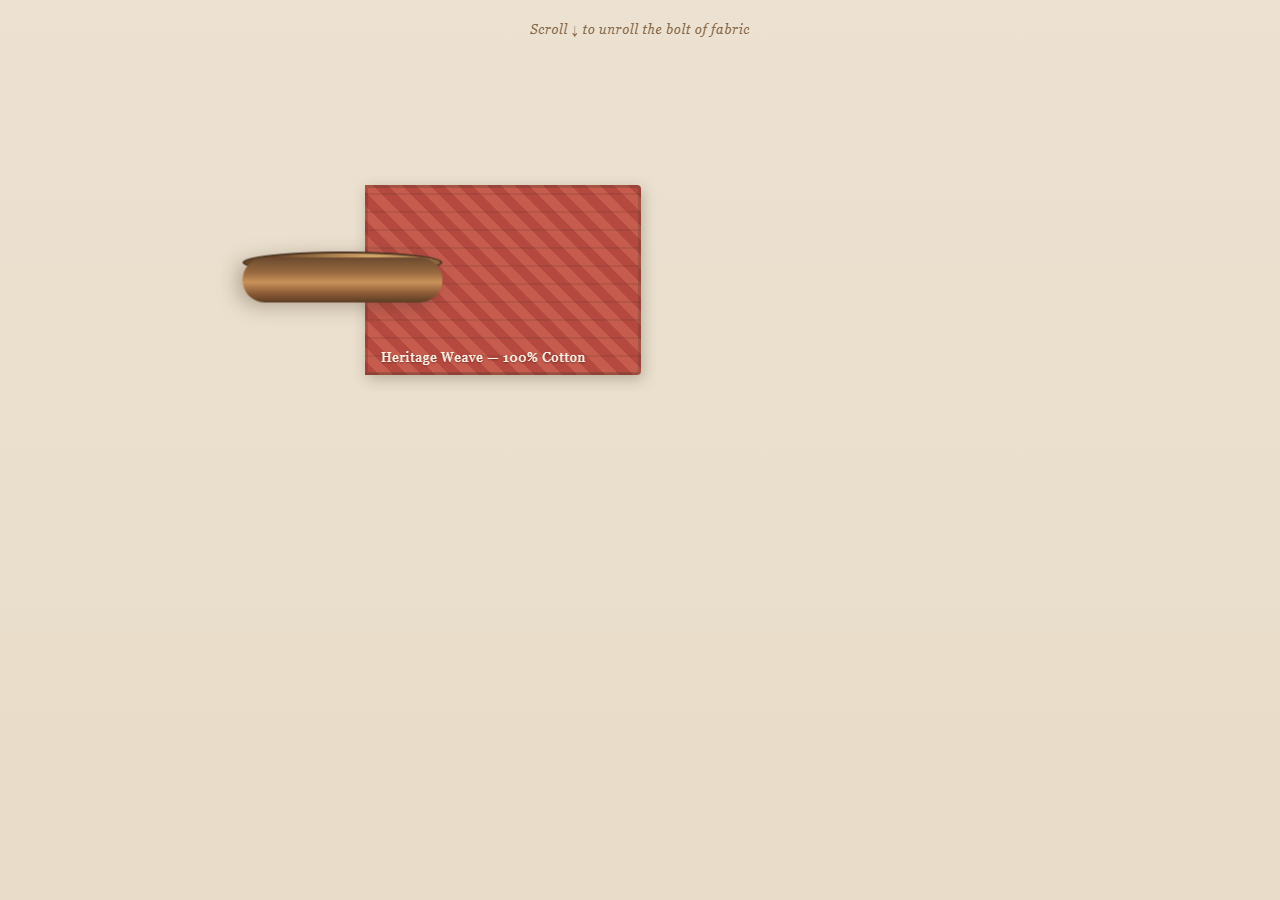
A textile-shop-style scroll effect: a rolled bolt of fabric sits at the left of a sticky stage, and as the page scrolls, a patterned strip grows out from it like cloth being unrolled across a cutting table. Pair with Scroll Parallax Layers for a complementary scrub technique, or Scroll Progress if you want an explicit completion indicator alongside it.
A sticky stage inside a tall section
The outer .table element is 260vh tall — it defines how much scroll distance the unroll takes. Inside it, .bolt-scene is position: sticky; top: 20vh, so it holds its position on screen for the duration of that scroll distance without GSAP's pin. This snippet intentionally uses pin: false on its ScrollTrigger — sticky positioning does the visual staging instead, which is lighter weight and avoids GSAP inserting spacer elements.
Growing width, not translateX
The fabric strip starts at width: 4% and is tweened to width: 82% with ease: none inside a scrubbed timeline. Because scrub is a number, the width tracks scroll position directly — scrolling up shrinks the fabric back into the roll exactly as it grew out.
Selling the unroll with rotation and shrink
Two more tweens run in parallel on the same timeline position (0): the roll rotates up to 900° (transformOrigin: '50% 50%') to look like it is spinning as cloth pays out, and its width tweens down from 56px to 34px, implying the roll is getting thinner as material leaves it. All three tweens share the same scrub-driven timeline, so they stay perfectly in sync in both scroll directions.
Pattern via layered repeating-linear-gradient
The fabric texture is pure CSS — two stacked repeating-linear-gradient backgrounds at opposing angles create a woven plaid-like pattern with no image asset, so it scales crisply as the strip's width changes.
Label fade-in as a milestone
The fabric label crossfades in via a short tween placed at timeline position 0.3, appearing only once enough fabric has unrolled to read comfortably — a simple example of layering a discrete "reveal" on top of a continuous scrub.
Build with AI
Build, Understand, Optimize, and Extend It With AI
Ask an AI assistant to walk through why this snippet pairs CSS position: sticky with ScrollTrigger's pin: false rather than using GSAP's own pin option — understanding that trade-off (fewer inserted DOM nodes vs. losing some of ScrollTrigger's pinning features like pinSpacing control) is useful well beyond this one effect. It's also a good snippet to extend: ask the assistant to add a second fabric roll that unrolls in parallel with a different pattern, to drive the roll's rotation speed from scroll velocity instead of scroll position, or to add a fabric-cutting animation that "snips" the strip at the end of the scroll range. Use it as a working reference, not a finished product page.
Prompt to recreate it
Copy this into your AI assistant of choice to build the effect from scratch, or as a jumping-off point for your own variant:
Build a scroll-driven "unrolling fabric bolt" animation in plain HTML, CSS, and JavaScript using GSAP and ScrollTrigger — no canvas, no image assets for the pattern.

Requirements:
- Create a tall wrapping section (e.g. 250-300vh) that defines the scroll distance for the whole effect.
- Inside it, create a "stage" element positioned with CSS position: sticky and a top offset, so it holds its position in the viewport as the user scrolls through the tall section — do NOT use a pinning library option for this; use sticky positioning instead, and set the ScrollTrigger's own pin option to false.
- Inside the stage, create a cylindrical "roll" element on one side (styled with gradients to look three-dimensional) and a "fabric" strip element next to it that starts very narrow (e.g. 4% width).
- Give the fabric strip a background made of two stacked repeating-linear-gradient layers at different angles and colors, so it reads as a woven or plaid pattern without any image file.
- Create one GSAP timeline whose scrollTrigger is attached to the tall wrapping section with a numeric scrub value (not scrub: true) and pin set to false.
- In that timeline, tween the fabric strip's width from its narrow starting value up to a much larger value (e.g. 80%) using ease: "none" so scroll position maps directly and linearly to fabric length.
- At the same timeline position, also tween the roll element's rotation up several full turns (e.g. 900 degrees) and its width down slightly, both with ease: "none", so the roll visually appears to spin and thin out as fabric leaves it.
- Add a text label that fades in via a short opacity tween placed partway through the timeline (e.g. at position 0.3), so it only appears once a meaningful amount of fabric has unrolled.
- Verify scrolling back up reverses everything smoothly: the fabric retracts into the roll, the roll unspins, and the label fades back out.
- Use a warm textile color palette: cream/parchment background, walnut-brown roll, and a warm patterned fabric color.
Want to tighten it up first? Run this prompt through the AI Prompt Studio to score it across 8 quality dimensions, catch anti-patterns, and tune the wording for Claude, ChatGPT, or Gemini before you paste it in.
Source Code
<div class="wrap">
  <div class="hint">Scroll ↓ to unroll the bolt of fabric</div>
  <div class="table">
    <div class="bolt-scene">
      <div class="roll" id="roll">
        <div class="roll-end"></div>
        <div class="roll-core"></div>
      </div>
      <div class="fabric" id="fabric">
        <div class="fabric-edge"></div>
        <span class="fabric-label">Heritage Weave — 100% Cotton</span>
      </div>
    </div>
  </div>
</div>
* { box-sizing: border-box; }
body { margin: 0; font-family: 'Georgia', serif; background: #efe6d8; color: #4a3728; }
.hint { position: sticky; top: 12px; text-align: center; font-size: 13px; letter-spacing: 0.05em; color: #8a6a4a; z-index: 4; padding: 10px; font-style: italic; }
.wrap { padding-bottom: 30vh; }
.table { height: 260vh; display: flex; align-items: flex-start; justify-content: center; padding-top: 8vh; background: linear-gradient(180deg, #efe6d8 0%, #e6d8c2 100%); }
.bolt-scene { position: sticky; top: 20vh; width: min(90vw, 640px); height: 200px; display: flex; align-items: center; }
.roll { position: relative; width: 56px; height: 200px; flex-shrink: 0; z-index: 2; filter: drop-shadow(4px 6px 10px rgba(74,55,40,0.35)); }
.roll-core { position: absolute; inset: 0; border-radius: 28px; background: linear-gradient(90deg, #6b4a2f 0%, #9a6b3f 35%, #c9925a 55%, #8a5a35 80%, #5c3d24 100%); }
.roll-end { position: absolute; left: -6px; top: 0; width: 22px; height: 200px; border-radius: 50%; background: radial-gradient(circle at 35% 35%, #d8a96b, #6b4527 75%); border: 2px solid #4a3320; }
.fabric { position: relative; height: 190px; width: 4%; overflow: hidden; background:
repeating-linear-gradient(45deg, #b5493f 0 10px, #c65c4e 10px 20px),
repeating-linear-gradient(-45deg, rgba(255,255,255,0.08) 0 6px, transparent 6px 14px);
box-shadow: inset 0 0 0 3px rgba(74,55,40,0.25), 2px 4px 14px rgba(74,55,40,0.3);
border-radius: 0 4px 4px 0;
}
.fabric-edge { position: absolute; inset: 0; background: repeating-linear-gradient(0deg, rgba(74,55,40,0.15) 0 2px, transparent 2px 18px); }
.fabric-label { position: absolute; bottom: 10px; left: 16px; font-size: 13px; letter-spacing: 0.06em; color: #fdf3e7; text-shadow: 0 1px 2px rgba(0,0,0,0.4); white-space: nowrap; opacity: 0; }gsap.registerPlugin(ScrollTrigger);
var fabric = document.getElementById('fabric');
var roll = document.getElementById('roll');
var label = document.querySelector('.fabric-label');
var tl = gsap.timeline({
scrollTrigger: {
trigger: '.table',
start: 'top top',
end: 'bottom bottom',
scrub: 0.5,
},
});
tl.to(fabric, { width: '82%', ease: 'none', duration: 1 }, 0)
.to(roll, { rotation: 900, ease: 'none', duration: 1, transformOrigin: '50% 50%' }, 0)
.to(roll, { width: 34, ease: 'none', duration: 1 }, 0)
.to(label, { opacity: 1, duration: 0.15 }, 0.3);Step by step
How to Use
- 1Scroll through the sectionScroll down slowly — the fabric strip grows out from the roll, the roll spins and thins, and the label fades in partway through.
- 2Scroll back upThe whole sequence reverses smoothly — the fabric retracts, the roll unspins, and the label fades out.
- 3Change the fabric patternEdit the repeating-linear-gradient values on .fabric in the CSS panel to swap in stripes, checks, or a different colorway.
- 4Adjust unroll distanceChange the height of .table (currently 260vh) to make the unroll take more or less scroll distance.
- 5Tune the final fabric lengthChange the width: "82%" target in the JS panel to make the unrolled strip longer or shorter relative to the stage.
- 6Export in your formatClick "HTML" for a standalone file, "JSX" for React, or "Tailwind" for a React + Tailwind version.
Real-world uses
Common Use Cases
Got questions?
Frequently Asked Questions
Sticky positioning achieves the same "stays in view while scrolling through this section" effect without GSAP inserting a pin-spacer element, which keeps the DOM simpler for an effect like this that does not need pin's more advanced pinning controls.
The width tween uses ease: "none" inside a scrub-driven timeline, so GSAP maps scroll progress directly and linearly to the width value — no easing curve means no lag between scroll position and fabric length.
Two repeating-linear-gradient backgrounds are layered at opposing 45-degree angles with different colors and opacities, producing a plaid-like weave purely in CSS that stays crisp at any element size.
All three tweens are placed at the same timeline position (0) in one scrubbed GSAP timeline, so they progress in lockstep with scroll — this is what makes the roll look like it is actively unspooling the fabric rather than the two effects happening independently.
Yes — change the height of the .table element. A taller section spreads the same 0-to-1 animation across more scroll distance, making it feel slower; a shorter one speeds it up.