You Might Also Like
Learn Coding Visually
Learn to code with interactive, live-preview playgrounds — HTML, CSS, JavaScript, React & more.
 HTML Playground42 lessons · Click-based · Live preview
 CSS PlaygroundLearn CSS with a live editor
 JavaScript Playground60 lessons · DOM · Async · Canvas
 React PlaygroundLearn React with a live code editor
 GSAP PlaygroundLearn GSAP animation interactively
 SVG Playground44 lessons · shapes · paths · animation
 SCSS Playground45 lessons · Sass modules · tokens
 Tailwind PlaygroundLearn Tailwind CSS with a live editor
 Bootstrap 5 Playground50 lessons · live preview
Draggable Rotation Dial — Free GSAP Inertia Knob Snippet
Draggable Rotation Dial · Forms · Plain HTML, CSS & JS · Live preview
What's included
Features
About this UI Snippet
Draggable Rotation Dial — A Real Knob From type: "rotation"
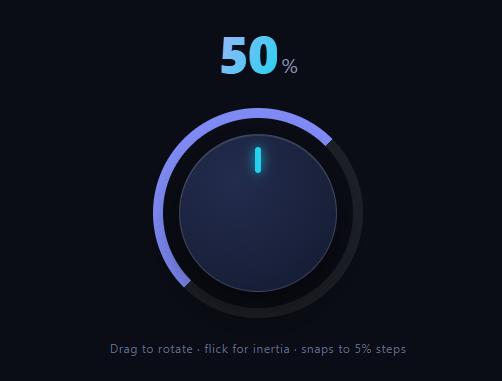
Rotary knobs are the hardest common control to build by hand: you're converting pointer positions into angles around a center, handling the ±180° wraparound, clamping a sweep range, and — if you want it to feel physical — adding flick momentum with snap detents. GSAP's Draggable has a dedicated mode for all of it: type: 'rotation'. This snippet builds a 270° volume-style dial with inertia, 5% detents, a glowing marker, and a conic-gradient fill ring that doubles as the value display.
type: 'rotation' replaces the atan2 layer
In rotation mode, Draggable computes the angle between the pointer and the element's center each frame and applies the *delta* as rotation — including the wraparound bookkeeping where naive atan2 implementations jump 360° when crossing the negative x-axis. Your code never sees coordinates; it reads this.rotation, a clean accumulated angle, in onDrag.
bounds become a mechanical sweep
bounds: { minRotation: -135, maxRotation: 135 } gives the knob a 270° travel — the classic hi-fi volume sweep with a dead zone at the bottom. With edgeResistance: 0.9, over-rotating past an end barely moves the dial (10% follow-through), reproducing the feel of a knob hitting its end stops, and releases settle back inside the range.
inertia + snap = detents
inertia: true carries flick velocity into a glide, and the snap function quantizes the *solved end value*: InertiaPlugin computes where the throw would naturally stop, passes it to snap, and retargets the glide to Math.round(value / 13.5) × 13.5 — 5% steps across the 270° sweep. Because snapping happens at the destination-solving stage (not as a post-hoc correction), the dial decelerates *into* a detent in one continuous motion, exactly like a weighted encoder wheel.
One render() serves drag and throw
Both onDrag and onThrowUpdate call the same render(this.rotation), which maps the angle to 0–100 and writes two things: the tabular-numeral readout and a --fill custom property. Handling both callbacks matters — a flick keeps changing the value *after* release, and forgetting onThrowUpdate is the classic bug where the readout freezes while the knob keeps spinning.
The fill ring is a conic gradient driven by one variable
The shell's background is conic-gradient(from 225deg, indigo var(--fill), faint var(--fill)) — starting at the sweep's origin (225° = bottom-left) and hard-stopping at the current percentage. Updating one CSS custom property per frame repaints the arc; no SVG, no dash math, and an inset pseudo-element hollows the ring.
touch-action: none, again
As with every pointer-driven control, touch-action: none on the dial keeps mobile browsers from interpreting rotation gestures as scrolling — miss it and the knob works on desktop while silently failing on touch.
Customizing it
Change the detent size (one divisor), widen the sweep, or emit the value to a real input for form submission. Related controls: the vanilla-math rotary knob, linear cousins in range slider and brightness slider, x/y momentum in drag throw notes, and audio context in volume control.
Build with AI
Build, Understand, Optimize, and Extend It With AI
Instead of reverse-engineering GSAP's rotation pipeline yourself, paste this snippet's HTML, CSS, and JS into an AI coding assistant like Claude and ask it to explain exactly how the snap function's Math.round(value / 13.5) * 13.5 formula turns InertiaPlugin's solved end rotation into 5% detents, and why edgeResistance of 0.9 produces a firm end-stop feel rather than a soft one. The same assistant can help optimize it, for instance checking whether writing the --fill custom property every single onDrag and onThrowUpdate call could be throttled without hurting the visual smoothness of the conic-gradient fill ring. It's also useful for extending the dial: ask it to add double-click-to-reset-to-default, support two-finger rotation gestures on touch, or expose the current value to a hidden form input for submission. Treat the code less like a finished artifact and more like a starting point for a conversation.
Prompt to recreate it
Copy this into your AI assistant of choice to build the effect from scratch, or as a jumping-off point for your own variant:
Build a draggable rotary dial control in plain HTML, CSS, and JavaScript using GSAP's Draggable plugin with its rotation type and InertiaPlugin (load both from a CDN alongside core GSAP) — no manual pointer-angle math.

Requirements:
- A circular knob element configured with Draggable's rotation type so dragging anywhere on the knob rotates it based on the pointer's angle around its own center, not the pointer's raw x/y position.
- Constrain the rotation to a 270-degree sweep using minRotation and maxRotation bounds (e.g. -135 to 135 degrees), with edgeResistance set high enough (around 0.9) that dragging past either end barely moves the knob further, mimicking a physical end stop.
- Enable inertia so that releasing the knob mid-flick continues rotating it and glides to a natural stop rather than halting instantly, and provide a snap function that rounds the inertia-solved end rotation to the nearest 5 percent step of the total sweep range, so flicks always settle on a clean detent value.
- Register both an onDrag and an onThrowUpdate callback that call the same rendering function, since the value keeps changing during the momentum glide after the pointer is released, not only while actively dragging.
- That rendering function must map the current rotation to a 0-100 percentage, update a live numeric readout, and set a single CSS custom property that drives a conic-gradient background arc representing the fill amount, without using SVG or manual stroke-dasharray math.
- Set touch-action: none on the draggable knob element so mobile browsers hand rotation gestures to the drag library instead of interpreting them as page scrolling.
Want to tighten it up first? Run this prompt through the AI Prompt Studio to score it across 8 quality dimensions, catch anti-patterns, and tune the wording for Claude, ChatGPT, or Gemini before you paste it in.
Step by step
How to Use
- 1Add the GSAP CDNsgsap, Draggable, and InertiaPlugin from the CDN panel.
- 2Paste HTML, CSS, and JSThe dial renders at 50% with its fill ring.
- 3Drag around the knobPointer orbit becomes rotation; the readout tracks.
- 4Flick and releaseInertia glides the dial into a 5% detent.
- 5Push past an endFirm resistance at ±135°, like real end stops.
- 6Wire the valuerender() is where you emit to inputs or state.
Real-world uses
Common Use Cases
Got questions?
Frequently Asked Questions
The full angle pipeline: computing pointer angle around the element's live center, applying deltas (so grabbing any point on the knob rotates from there, without jumping the marker to the pointer), and the ±180° wraparound where raw atan2 implementations suddenly leap 360°. Handlers just read this.rotation as a clean accumulated angle.
InertiaPlugin solves the throw's natural end rotation first, then passes it through the snap function, which rounds to the nearest 13.5° (5% of the 270° sweep). The glide is retargeted to that detent, so the dial decelerates into its resting notch in one continuous motion — snapping at the destination-solve stage, not as a jarring post-correction.
Because with inertia the value keeps changing after the finger lifts: onDrag stops firing at release, but the dial glides on for several hundred milliseconds. onThrowUpdate fires during that glide. Skipping it is the classic knob bug — the number freezes at the release value while the marker visibly keeps rotating.
The shell's background is a conic-gradient starting from 225° (the sweep's bottom-left origin) with a hard color stop at var(--fill); render() writes that custom property as a percentage each frame, and the browser repaints the arc. An inset pseudo-element covers the middle, leaving a 10px ring. One variable, no dash-offset math.
Yes — remove bounds and it rotates continuously, accumulating beyond 360° (this.rotation keeps counting, which suits jog wheels and infinite scrubbing). For value mapping, take rotation modulo 360 or map the raw accumulation to your range. Keep snap if you still want detents on an endless encoder.
Create the Draggable in a mount effect — useEffect, onMounted, or ngAfterViewInit — from a dial ref, and kill it in the cleanup so pointer listeners release on unmount. Emit values from render() via a callback prop or event rather than binding rotation to state (that would re-render per frame); commit to state only on onDragEnd/onThrowComplete. The ring and readout style directly with Tailwind arbitrary values.
Draggable instances expose rotation as a settable property, not just a read value. Compute the starting angle from your saved value — invert the render() mapping, e.g. rotation = (value / 100) * 270 - 135 for this 270° sweep — and set it on the Draggable instance before the first render() call, then call render(startRotation) once to sync the readout and fill ring. GSAP's set() on the target element also accepts a rotation value directly if you'd rather skip the Draggable instance property.