You Might Also Like
Learn Coding Visually
Learn to code with interactive, live-preview playgrounds — HTML, CSS, JavaScript, React & more.
 HTML Playground42 lessons · Click-based · Live preview
 CSS PlaygroundLearn CSS with a live editor
 JavaScript Playground60 lessons · DOM · Async · Canvas
 React PlaygroundLearn React with a live code editor
 GSAP PlaygroundLearn GSAP animation interactively
 SVG Playground44 lessons · shapes · paths · animation
 SCSS Playground45 lessons · Sass modules · tokens
 Tailwind PlaygroundLearn Tailwind CSS with a live editor
 Bootstrap 5 Playground50 lessons · live preview
Canvas Particle Text Formation — Free Particles-Into-Text Snippet
Canvas Particle Text Formation · Animations · Plain HTML, CSS & JS · Live preview
What's included
Features
About this UI Snippet
Canvas Particle Text Formation — Particles That Assemble Into Words
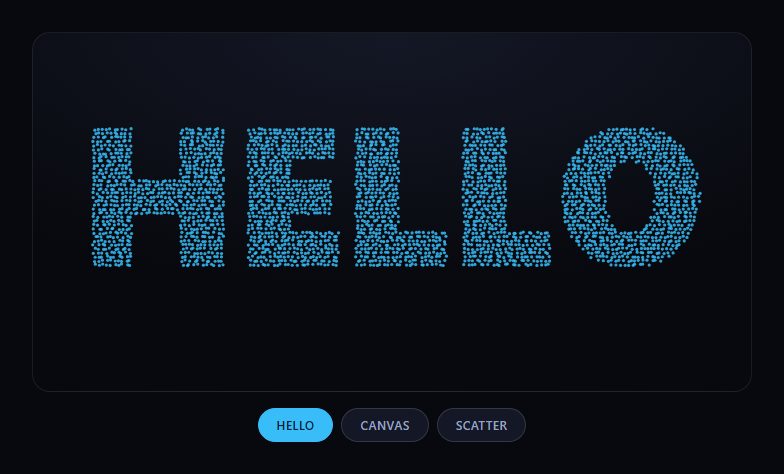
The particle text formation snippet scatters hundreds of small dots randomly across a canvas, then animates them into position so they collectively form a word — a technique built entirely on the Canvas 2D API, with no external particle or physics library. It works by rendering text you can't see and sampling where its pixels are.
Text becomes a set of coordinates
sampleTextPoints(word) draws the target word onto a hidden offscreen canvas at a large, bold font size, then reads its pixel data with getImageData. Any pixel with alpha above a threshold is "inside" a letter, and its (x, y) position (sampled on a grid spaced a few pixels apart, not every single pixel, for performance) becomes one particle's target. This is how arbitrary text — any word, any font the browser has — turns into a list of coordinates without hand-plotting a single point.
Particles ease toward their targets, not jump
Each particle stores a current position and a target (tx, ty). Every frame, tick() computes the delta to the target and nudges the particle's velocity toward it (p.vx = (p.vx + dx * 0.02) * 0.85), then applies that velocity to position — a simple spring-like approach that produces an organic ease-in, ease-out settle rather than particles snapping or moving in a straight line at constant speed.
Reusing particles across words
When you switch words, formWord doesn't destroy and recreate every particle — it grows or shrinks the existing array to match the new point count and reassigns each surviving particle's target. That's what makes switching between words (or into "Scatter") look like the same particle swarm reorganizing itself, rather than one shape disappearing and a new one popping in.
A scatter state, not just formation
The "Scatter" button reassigns every particle's target to a random canvas position instead of a sampled text point, using the identical spring-follow motion — so the same animation loop handles both assembling into text and dissolving back into chaos.
Customizing it
Adjust the sampling gap for particle density, the spring stiffness (0.02) and damping (0.85) for snappier or looser motion, particle color, or swap the font for a script/serif face. Pair it with text particles, or contrast it with matrix rain and starfield for other canvas-driven text and particle effects.
Build with AI
Build, Understand, Optimize, and Extend It With AI
Paste this snippet's HTML, CSS, and JS into an AI coding assistant like Claude and ask it to explain how rendering text to an offscreen canvas and reading its pixel alpha values turns arbitrary words into a set of particle target coordinates, and why the spring-follow velocity update produces smoother motion than directly interpolating position. It's also useful for extending — ask for particles colored by their position in the word, a version that cycles automatically through a list of words on a timer, or a mouse-repulsion effect so hovering scatters nearby particles before they re-settle. Use the conversation to understand the sampling and motion technique well enough to apply it to other shapes, like a logo silhouette instead of text.
Prompt to recreate it
Copy this into your AI assistant of choice to build the effect from scratch, or as a jumping-off point for your own variant:
Build a "particle text formation" effect in plain HTML, CSS, and JavaScript using only the Canvas 2D API — no external libraries or CDNs.

Requirements:
- A visible canvas element and a set of buttons for different target words (plus a "scatter" option), with device-pixel-ratio-aware canvas sizing so it renders sharp on high-density displays.
- Implement text-to-points sampling: render the target word onto a separate offscreen canvas at a large bold font size, read its pixel data with getImageData, and collect the coordinates of pixels above an alpha threshold on a spaced sampling grid (not every single pixel, for performance) as the particle target positions.
- Maintain a persistent array of particle objects with current position, velocity, and target position. When the target word changes, grow or shrink the existing particle array to match the new point count and reassign each particle's target — do not destroy and recreate the whole particle set on every word change.
- Animate particles toward their targets using a spring-like velocity update each frame (nudge velocity toward the delta to target, then damp it, then apply velocity to position) so motion eases in and settles rather than moving in a straight line at constant speed or snapping instantly.
- Implement a "scatter" mode that reassigns every particle's target to a random canvas position, using the same follow motion, so scattering and forming text share one animation loop.
- Handle window resize by recalculating canvas dimensions and re-sampling the currently active word's target points.
Want to tighten it up first? Run this prompt through the AI Prompt Studio to score it across 8 quality dimensions, catch anti-patterns, and tune the wording for Claude, ChatGPT, or Gemini before you paste it in.
Step by step
How to Use
- 1Paste HTML, CSS, and JSA canvas and word buttons render; particles form HELLO.
- 2Click another wordParticles reorganize from the current shape into the new one.
- 3Click ScatterParticles dissolve back into a random scatter.
- 4Resize the windowThe canvas and sample points recalculate at the new size.
- 5Edit the word buttonsAdd a data-word button; the same handler forms it.
- 6Tune the motionAdjust the spring and damping constants in tick().
Real-world uses
Common Use Cases
Got questions?
Frequently Asked Questions
It renders the target word onto a separate, invisible offscreen canvas at a large font size, then reads that canvas's pixel data with getImageData. Any pixel with high enough alpha is considered part of a letter, and its coordinates (sampled on a spaced grid rather than every pixel) become the target position for one particle.
Each particle's velocity is nudged toward its target every frame by a fraction of the remaining distance, then damped, which is a simple spring approximation. That produces a natural accelerate-then-settle motion instead of linear or instant movement, and it's cheap to compute since it's just a couple of multiplications per particle per frame.
Switching words reuses the existing particle array and only reassigns each particle's target coordinates (growing or trimming the array to match the new point count). Since particles keep their current position and velocity, they visibly travel from the old word's shape to the new one instead of the whole set vanishing and respawning.
The sampling grid spacing (gap) directly controls particle count — a smaller gap samples more points and produces a denser, more detailed text shape but costs more per-frame work. For longer words or lower-powered devices, increase the gap value to trade density for frame rate.
Move the canvas setup, sampling, and animation loop into a mount effect that runs once the canvas ref exists, and cancel the requestAnimationFrame loop in the cleanup function. Re-run sampleTextPoints/formWord whenever the target word prop or state changes, guarding against calling it before the canvas has a nonzero size.