You Might Also Like
Learn Coding Visually
Learn to code with interactive, live-preview playgrounds — HTML, CSS, JavaScript, React & more.
 HTML Playground42 lessons · Click-based · Live preview
 CSS PlaygroundLearn CSS with a live editor
 JavaScript Playground60 lessons · DOM · Async · Canvas
 React PlaygroundLearn React with a live code editor
 GSAP PlaygroundLearn GSAP animation interactively
 SVG Playground44 lessons · shapes · paths · animation
 SCSS Playground45 lessons · Sass modules · tokens
 Tailwind PlaygroundLearn Tailwind CSS with a live editor
 Bootstrap 5 Playground50 lessons · live preview
GSAP quickTo Cursor — Free Mouse Follower Snippet
GSAP quickTo Cursor · Animations · Plain HTML, CSS & JS · Live preview
What's included
Features
About this UI Snippet
GSAP quickTo Cursor — The Right Way to Animate Toward the Pointer
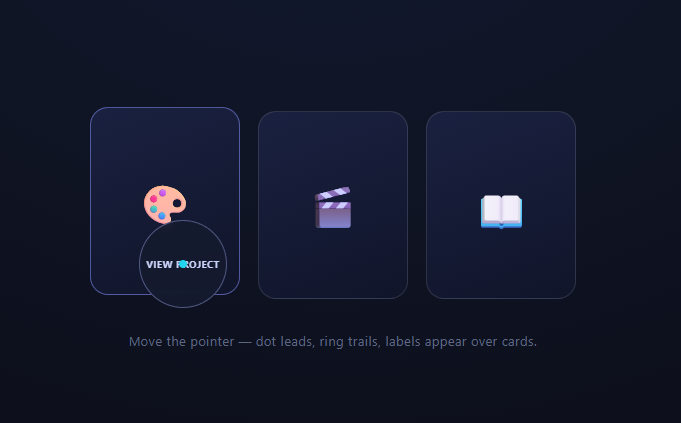
Custom cursors live or die on their follow physics — and on what happens under the hood at 120 mousemove events per second. The naive approach creates a fresh gsap.to() on every move, churning tween objects and fighting overwrites. gsap.quickTo() is the engine's purpose-built answer: create *one* tween per property up front, then feed it new destinations forever. This snippet uses it for the classic two-part cursor — an eager dot and a lazy ring that becomes a labeled lens over interactive cards.
quickTo: one tween, infinitely retargeted
gsap.quickTo('#dot', 'x', { duration: 0.18, ease: 'power3' }) returns a *function*. Calling dotX(482) doesn't create anything — it retargets the single pre-built tween toward the new value, re-easing smoothly from the current position and velocity. Per mousemove, the cost is a function call and a number, not object allocation plus overwrite resolution. This is the API GSAP recommends whenever input events drive animation: cursors, magnetic buttons, tilt cards, drag ghosts.
The lag hierarchy is the whole aesthetic
Both parts chase the same coordinates with the same ease — only their durations differ. The dot's 0.18s makes it feel *attached*; the ring's 0.55s stretches the pair apart during motion and lets the ring glide in after every stop. That eased separation-and-reunion, driven purely by two duration numbers, is the entire "premium cursor" feel — and it's genuinely smoother than lerp-in-rAF implementations because each retarget preserves velocity through GSAP's easing rather than exponentially decaying toward stale targets.
x/y transforms, fixed positioning, margin centering
The followers are position: fixed at the viewport origin with negative margins equal to half their size, so x/y transforms (compositor-only) place their *centers* on the pointer. pointer-events: none keeps them from stealing hovers from the page beneath, and the stage's cursor: none hides the native arrow so the pair fully replaces it.
The label lens is CSS state, motion is GSAP
Hovering a card sets the ring's is-label class: it grows from 44px to an 88px frosted lens (CSS transitions on size/background), and the card's data-label fades in at its center. The division of labor is deliberate — *continuous* motion (following) belongs to quickTo; *discrete* state changes (lens mode) belong to class toggles. The two never conflict because they animate different properties.
Why not lerp in requestAnimationFrame?
The classic pos += (target − pos) × 0.1 loop runs forever (even when idle), has velocity implied by a magic constant rather than a chosen ease, and hitches when frames drop. quickTo runs only while animating, exposes real duration/ease vocabulary, and inherits GSAP's frame-drop compensation. Same effect, strictly better mechanics.
Touch needs a fallback
Custom cursors are pointer-hover constructs; on touch devices, gate the whole feature behind matchMedia('(hover: hover)') and let the native cursor (none) simply not matter.
Customizing it
Retune the two durations (the gap *is* the personality), scale the dot on click for press feedback, or add a third, even lazier glow layer. Related: the vanilla-lerp custom cursor, attraction physics in magnetic button, pointer-reactive cards in 3d card tilt, and image-trailing in hover image trail.
Build with AI
Build, Understand, Optimize, and Extend It With AI
You do not have to reason through GSAP's internals alone to see why this cursor holds up under 120 mousemove events a second. Paste this snippet's HTML, CSS, and JS into an AI coding assistant like Claude and ask it to explain precisely what gsap.quickTo returns and why calling that returned function on every mousemove avoids the tween allocation and overwrite-resolution cost of calling gsap.to fresh each time. The same assistant can help you optimize it — ask whether four quickTo setters (dotX, dotY, ringX, ringY) firing every mousemove could be trimmed further, or whether the label lens's CSS transitions on width and background risk jank on low-end GPUs when toggled rapidly. It is also useful for extending the effect: ask it to add a third, even lazier trailing layer, scale the dot down on click for press feedback, or gate the whole thing behind a hover-capability media query for touch devices. Treat the code less like a finished artifact and more like a starting point for a conversation.
Prompt to recreate it
Copy this into your AI assistant of choice to build the effect from scratch, or as a jumping-off point for your own variant:
Build a two-part custom cursor (a fast inner dot and a slower trailing ring) in plain HTML, CSS, and JavaScript using GSAP's gsap.quickTo API — no requestAnimationFrame lerp loop, no library besides core GSAP.

Requirements:
- Two fixed-position, pointer-events:none elements (a small dot and a larger ring), each centered on the pointer via negative margins equal to half their own size rather than per-frame coordinate math, with the page's native cursor hidden via cursor: none.
- Create exactly one gsap.quickTo call per element per axis (four total: dot x, dot y, ring x, ring y) at page load — do not call gsap.to inside the mousemove handler.
- On every mousemove event, call the four quickTo setter functions with the event's clientX/clientY — nothing else should happen in that handler.
- Give the dot a short tween duration (under 0.2s) and the ring a noticeably longer one (over 0.5s), both with the same easing curve, so the two visibly separate during fast movement and reunite when the pointer stops — this duration gap is the entire visual effect, do not add separate spring or lerp math.
- When the pointer hovers a card element, grow the ring into a larger frosted "lens" showing a text label pulled from a data attribute on that card, purely via a CSS class toggle and CSS transitions — keep this discrete state change entirely separate from the continuous quickTo-driven position tweening.
- Note in a comment why this approach is preferred over a hand-rolled position += (target - position) * factor loop inside requestAnimationFrame.
Want to tighten it up first? Run this prompt through the AI Prompt Studio to score it across 8 quality dimensions, catch anti-patterns, and tune the wording for Claude, ChatGPT, or Gemini before you paste it in.
Step by step
How to Use
- 1Add the GSAP CDNCore gsap only — quickTo is built in.
- 2Paste HTML, CSS, and JSThe native cursor hides; dot and ring take over.
- 3Move the pointerThe dot snaps close; the ring trails behind.
- 4Stop abruptlyWatch the ring glide in and reunite with the dot.
- 5Hover a cardThe ring grows into a frosted, labeled lens.
- 6Tune the two durationsThe dot/ring gap defines the personality.
Real-world uses
Common Use Cases
Got questions?
Frequently Asked Questions
Allocation and overwrite churn: mousemove can fire 120+ times per second, and a fresh gsap.to each time creates a tween object, resolves overwrites against the previous one, and discards it milliseconds later. quickTo builds one tween per property once and returns a setter function that merely retargets it — per event, the cost is a number assignment.
Retargeting preserves momentum: each new destination re-eases from the element's current position and velocity under power3, so direction changes curve naturally and stops glide in. Combined with the duration gap (0.18s dot vs 0.55s ring), the pair stretches apart in motion and reunites at rest — spring-like behavior from pure easing.
Lerp loops run every frame forever (idle included), encode responsiveness in an opaque 0.1 constant instead of duration/ease vocabulary, decay exponentially so they never quite arrive, and hitch under frame drops. quickTo ticks only while animating, uses real eases, arrives exactly, and inherits GSAP's lag smoothing — identical look, better mechanics.
Fixed puts their coordinate origin at the viewport corner so e.clientX/Y map directly to x/y transforms with no scroll math; negative margins of half their size center them on the pointer without per-frame subtraction. pointer-events: none keeps them from blocking hovers, and the stage's cursor: none removes the native arrow they replace.
It shouldn't exist there — no persistent pointer means a follower just haunts the last tap. Gate initialization behind matchMedia('(hover: hover) and (pointer: fine)') so touch devices keep native behavior, and leave cursor: none off for them. The cards' own hover styles degrade gracefully to tap states.
Create the quickTo setters and the mousemove listener in a mount effect — useEffect, onMounted, or ngAfterViewInit — against refs, and remove the listener in the cleanup (the setters need no explicit kill, but a gsap.context revert is tidy). Never route coordinates through state — that's a re-render per mousemove. The lens mode can be state-driven since it changes rarely; its styles are plain Tailwind with a transition.
Yes — quickTo scales linearly with follower count since each is just two more setter calls per mousemove. Add a third element, give it its own duration (say 0.35s, between the dot and ring) and its own pair of x/y setters, then call all six setters in the same mousemove handler. Stagger the durations further apart and the trail reads as a comet rather than a single ring; stack them too close and they blur into one shape.