You Might Also Like
Learn Coding Visually
Learn to code with interactive, live-preview playgrounds — HTML, CSS, JavaScript, React & more.
 HTML Playground42 lessons · Click-based · Live preview
 CSS PlaygroundLearn CSS with a live editor
 JavaScript Playground60 lessons · DOM · Async · Canvas
 React PlaygroundLearn React with a live code editor
 GSAP PlaygroundLearn GSAP animation interactively
 SVG Playground44 lessons · shapes · paths · animation
 SCSS Playground45 lessons · Sass modules · tokens
 Tailwind PlaygroundLearn Tailwind CSS with a live editor
 Bootstrap 5 Playground50 lessons · live preview
GSAP Ease Gallery — Free Easing Comparison Snippet
GSAP Ease Gallery · Animations · Plain HTML, CSS & JS · Live preview
What's included
Features
About this UI Snippet
GSAP Ease Gallery — See Every Easing Personality Side by Side
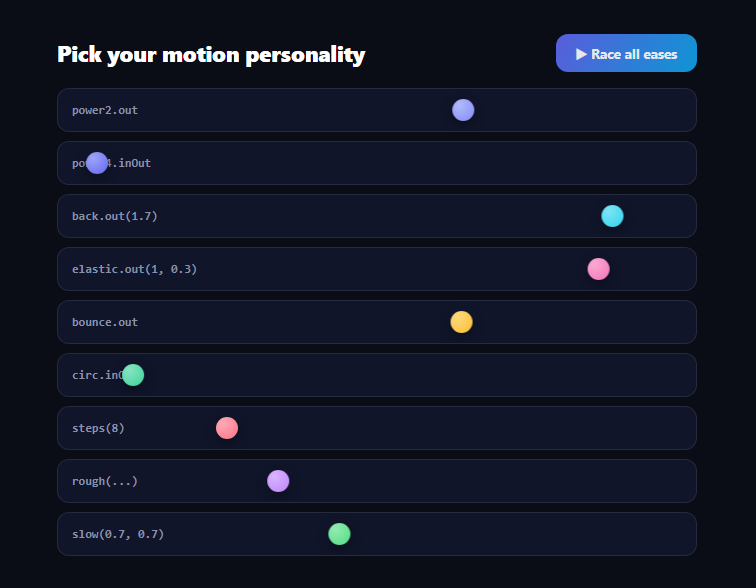
Easing is the most consequential decision in any animation — the same 1.8-second, same-distance movement reads as confident, playful, broken, or robotic purely from its curve. But eases are impossible to choose from documentation graphs. This gallery makes them physical: nine balls race identical lanes over identical durations, differing *only* in ease — the core families plus EasePack's exotic rough() and slow() — with a race-all button and per-lane replays.
Identical everything except the curve
Every lane's tween is fromTo(ball, { x: 0 }, { x: dist, duration: 1.8, ease }). Distance is measured per lane (clientWidth − 38) so the race is fair at any container width. Because duration and distance are constant, all differences you see — the overshoot, the rubbery settle, the stutter — are pure easing. That controlled-experiment framing is what makes the gallery useful for *choosing*: you're comparing personalities, not implementations.
The core cast, briefly
power2.out is the workhorse UI ease (fast start, gentle landing); power4.inOut is its dramatic cousin with a violent middle. back.out(1.7) overshoots the target and returns — the parenthesized config is amplitude, tunable inline. elastic.out(1, 0.3) oscillates around the target like a plucked band (amplitude, period). bounce.out hits the end like a floor. circ.inOut is quarter-circle geometry — silkier than power curves at the extremes. steps(8) quantizes motion into eight discrete jumps, the sprite-sheet and mechanical-counter ease.
EasePack's exotics are the reason this file exists
rough({ strength: 2, points: 24, taper: 'out', randomize: true }) perturbs an underlying ease with jitter — the flickering-candle, damaged-machine, glitch ease; taper: 'out' calms it near the finish. slow(0.7, 0.7, false) rushes in, moves *almost not at all* through a long middle plateau, then rushes out — the slow-motion-highlight ease used for text flybys (its third parameter can even yoyo the value back). Both ship in EasePack, loaded as one extra CDN script and available by string name with zero registration.
Config-in-the-string is the underrated feature
back.out(1.7), elastic.out(1, 0.3), steps(8), rough({...}) — GSAP parses ease configuration from the string itself, so an ease choice (with tuning) is *data*, not code. This gallery exploits that: the entire lineup is an array of strings, and your production code can store ease choices in config, CMS fields, or design tokens the same way.
killTweensOf keeps replays honest
Clicking a lane mid-race kills that ball's tween and restarts from zero — the standard interrupt-safety idiom — so you can spam-compare two lanes rhythmically, which is genuinely the fastest way to feel the difference between, say, back and elastic settles.
What's deliberately absent
No curve graphs: graphs describe eases the way sheet music describes a song. Motion is the medium; judge eases by watching the balls. For designing *custom* curves, GSAP's CustomEase draws them as SVG paths — with CustomBounce and CustomWiggle as its generators.
Customizing it
Add lanes to the EASES array (name, ease string, color), race y-axis drops instead, or wire lane clicks to copy the ease string. Related: bounce physics in custom bounce ball, oscillation in custom wiggle icons, curve editing in bezier curve editor, and CSS-side timing in css animation generator.
Build with AI
Build, Understand, Optimize, and Extend It With AI
You don't have to decode every ease string by memory. Paste this snippet's HTML, CSS, and JS into an AI coding assistant like Claude and ask it to explain exactly what the rough() ease's strength, points, and taper parameters do to the underlying motion, or why killTweensOf is called before every replay. The same assistant is useful for optimizing it — ask whether recalculating clientWidth on every single run() call could be cached and only invalidated on resize, especially if the lane count grows much larger. It is just as handy for extending the gallery: ask it to add a duration slider so viewers can compare eases at different speeds, let users paste a custom ease string into a new lane, or add a mode that races the same ease at different durations instead of different eases at the same duration. Treat the code less like a finished artifact and more like a starting point for a conversation.
Prompt to recreate it
Copy this into your AI assistant of choice to build the effect from scratch, or as a jumping-off point for your own variant:
Build an "ease comparison gallery" in plain HTML, CSS, and JavaScript using GSAP with its EasePack plugin loaded from a CDN — no other libraries.

Requirements:
- Define an array of ease candidates, each with a display name, a GSAP ease string (including at least one core family like power2.out, one overshoot like back.out with a numeric amplitude argument, one oscillating one like elastic.out with amplitude and period arguments, one bounce.out, and at least one EasePack-only ease such as rough({...}) or slow(a, b, false)), and a distinct color.
- Render one horizontal lane per ease, each a fixed-height track containing a label showing the ease name and a circular ball positioned at the left edge.
- Write a run function that measures the lane's own clientWidth at call time (not a hardcoded distance) to compute a fair travel distance, calls gsap.killTweensOf on that lane's ball first, then tweens the ball with gsap.fromTo from x:0 to x:distance over a fixed duration using the lane's ease string — so every lane's duration and distance are identical and only the ease differs.
- Clicking an individual lane must replay only that lane's ball using its own ease, without disturbing other lanes' current tweens.
- Add a single "race all" button that runs every lane simultaneously so all eases can be compared side by side in real time, and trigger that same race automatically once on page load.
Want to tighten it up first? Run this prompt through the AI Prompt Studio to score it across 8 quality dimensions, catch anti-patterns, and tune the wording for Claude, ChatGPT, or Gemini before you paste it in.
Step by step
How to Use
- 1Add the GSAP CDNsInclude gsap and EasePack from the CDN panel.
- 2Paste HTML, CSS, and JSNine lanes build from the EASES array and race once.
- 3Click Race allAll balls launch together — same time, same distance.
- 4Replay one laneClick it; killTweensOf restarts that ball cleanly.
- 5Study rough and slowEasePack's exotics jitter and plateau mid-run.
- 6Add your candidatesOne array entry per ease string you're considering.
Real-world uses
Common Use Cases
Got questions?
Frequently Asked Questions
Graphs describe position-over-time abstractly; motion is judged by the eye. With duration and distance held constant across lanes, every visible difference — overshoot, oscillation, stutter, plateau — is pure easing personality. Watching back.out and elastic.out settle side by side communicates their difference faster than any pair of plots.
Inline configuration parsed from the string: back's parameter is overshoot amplitude (1.7 is the classic default; 3 is cartoonish), elastic.out(1, 0.3) is amplitude and period (smaller period = faster oscillation), steps(8) is the jump count. Because config lives in the string, tuned eases are storable data — in tokens, CMS fields, or props.
Three specialty eases: rough(), which perturbs a base ease with configurable jitter (strength, point count, tapering) for flicker and glitch motion; slow(), which rushes in, holds a long near-still plateau, and rushes out — with an optional yoyo for flyby effects; and expoScale(), which linearizes perceived zoom rates between scale factors. One extra script, string-name access.
Whenever motion should be discrete: sprite-sheet frame playback, mechanical counters and flip displays, typewriter-adjacent movement, or retro/8-bit aesthetics where smoothness would break the fiction. steps(8) quantizes the tween into eight equal jumps — pair it with tabular numerals or frames sized to the step count.
run() begins with gsap.killTweensOf(ball) and a fromTo that re-asserts x: 0, so a fresh race replaces the old tween rather than stacking on it. Interrupt-safety matters double in a comparison tool — rhythmically replaying two lanes back-to-back is the fastest way to feel a difference, and that habit must not corrupt state.
Render lanes from the EASES array (map / v-for / *ngFor) with per-lane refs, fire run() from click handlers, and trigger the initial race in a mount effect — useEffect, onMounted, or ngAfterViewInit — with killTweensOf cleanup on unmount. Measure lane width at run time (as here) so responsive Tailwind layouts keep races fair; the ease strings themselves are framework-agnostic data.