You Might Also Like
Learn Coding Visually
Learn to code with interactive, live-preview playgrounds — HTML, CSS, JavaScript, React & more.
 HTML Playground42 lessons · Click-based · Live preview
 CSS PlaygroundLearn CSS with a live editor
 JavaScript Playground60 lessons · DOM · Async · Canvas
 React PlaygroundLearn React with a live code editor
 GSAP PlaygroundLearn GSAP animation interactively
 SVG Playground44 lessons · shapes · paths · animation
 SCSS Playground45 lessons · Sass modules · tokens
 Tailwind PlaygroundLearn Tailwind CSS with a live editor
 Bootstrap 5 Playground50 lessons · live preview
CustomWiggle Icons — Free GSAP Wiggle Ease Snippet
CustomWiggle Icons · Animations · Plain HTML, CSS & JS · Live preview
What's included
Features
About this UI Snippet
CustomWiggle Icons — Oscillation as an Ease, Not a Keyframe List
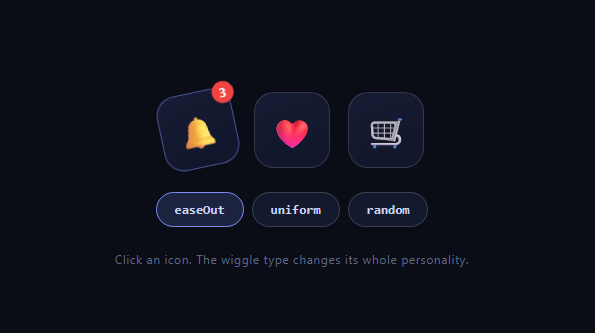
The attention wiggle — a bell shaking for unread notifications, a cart nudging after add-to-item — is usually hacked together with a dozen CSS keyframe stops. GSAP's CustomWiggle (free on the CDN since 3.13) reframes oscillation as an *easing curve*: an ease whose output swings between −1 and 1 a configured number of times before settling. This snippet wiggles three icons on three different properties from one registered ease, with buttons switching the amplitude envelope live.
An ease that oscillates changes everything
Normal eases travel from 0 to 1. CustomWiggle.create('wig', { wiggles: 8 }) registers an ease that crosses zero sixteen times, overshooting alternately positive and negative. Applied to a tween targeting rotation: 14, the element swings between roughly +14° and −14°, decaying per the envelope, and lands exactly at the target. One tween line replaces the keyframe list — and because it's an ease, it composes with any property, duration, or timeline position like every other GSAP curve.
type is the amplitude envelope
The three buttons rebuild the ease with different type values, and the personality change is dramatic. easeOut starts at full amplitude and decays — a struck bell, the natural physical read. uniform holds constant amplitude to the end then stops — mechanical, alarm-like, deliberately artificial. random perturbs the oscillation pattern — organic jitter, closer to shivering than ringing. (easeInOut and anticipate, which winds up backward first, round out the set.) Same wiggle count, three different creatures.
One ease, three properties
The bell wiggles rotation (±14°, the canonical ring), the heart wiggles scale (a flutter around its size), and the cart wiggles x (a side-to-side nudge). Because the ease is registered by name, each icon's handler is a three-line fromTo — the oscillation logic lives in the curve, not in per-icon code. This is the pattern worth internalizing: encode motion *character* in a named ease once, then apply it anywhere.
killTweensOf makes mashing safe
Each wiggle starts by killing the element's running tweens and re-asserting the zero state via fromTo. Rapid clicks restart the shake cleanly instead of stacking oscillations into chaos — the same interrupt-safety idiom as every replayable effect, doubly important for an interaction users *will* spam.
Why rotation origin isn't touched here
Icons rotate around their centers, which reads fine at ±14°. For a hanging-bell feel, set transformOrigin: '50% 0%' so it swings from its mount point — one line, and the same ease produces pendulum physics instead of center spin.
Wiggles are the sibling of bounces
CustomWiggle is built on CustomEase (as is CustomBounce) — both are generators for curve families too tedious to draw by hand. Bounce is asymmetric gravity; wiggle is symmetric oscillation. Between them and raw CustomEase paths, virtually any motion personality is expressible as a named, reusable ease.
Customizing it
Tune wiggles (3 is a nudge, 15 is a rattle), pair a wiggle with a color pulse on the badge, or trigger on real events — incoming websocket messages wiggling the bell is the production use. Related: attention motion in notification bell, impact physics in custom bounce ball, curve shopping in gsap ease gallery, and click celebration in like burst button.
Build with AI
Build, Understand, Optimize, and Extend It With AI
You don't have to guess why one registered ease can drive three completely different-feeling shakes. Paste this snippet's HTML, CSS, and JS into an AI coding assistant like Claude and ask it to walk through exactly how CustomWiggle.create turns a wiggles count and a type into an ease whose output swings between negative one and one, and why that same curve can be applied to rotation, scale, and x with totally different results. The same assistant can help optimize it — ask whether re-creating the named ease on every type-button click is wasteful compared to pre-registering all three variants up front, and whether the killTweensOf-then-fromTo pattern could miss an edge case during extremely rapid repeated clicks. It's also useful for extending the icons: ask it to wire the bell wiggle to a real websocket notification event instead of a click, add a color pulse on the badge synchronized to the wiggle's decay, or build a fourth custom envelope type by hand-drawing a CustomEase path. Treat the code less like a finished artifact and more like a starting point for a conversation.
Prompt to recreate it
Copy this into your AI assistant of choice to build the effect from scratch, or as a jumping-off point for your own variant:
Build a set of wiggling icon buttons in plain HTML, CSS, and JavaScript using GSAP with the CustomEase and CustomWiggle plugins (load all three from a CDN, in that order) — no manual keyframe animation.

Requirements:
- At least three icon buttons (for example a bell, a heart, and a cart), each wiggling a different CSS property when clicked: one rotation, one scale, one horizontal translation.
- Register a single named ease with CustomWiggle.create using a wiggles count (how many oscillations before settling) and a type option controlling the amplitude envelope, and expose at least three selectable type values as buttons that re-register the same named ease with a different envelope.
- Every icon's click handler must reuse the one named ease by reference (not duplicate oscillation logic per icon), animating its specific property with gsap.fromTo from a rest value to a displaced value using that ease.
- Before starting a new wiggle on an element, kill any of that element's in-flight tweens and reset it to its rest value via fromTo's "from" state, so rapid repeated clicks restart the shake cleanly instead of stacking multiple oscillations into visual chaos.
- Make switching the active envelope type live: clicking a type button should immediately re-register the named ease so the next wiggle triggered on any icon uses the newly selected envelope, without requiring a page reload.
- Explain in a comment or to the user why the same ease, applied to rotation versus scale versus x, produces a ring, a flutter, and a nudge respectively, even though the underlying oscillating curve is identical.
Want to tighten it up first? Run this prompt through the AI Prompt Studio to score it across 8 quality dimensions, catch anti-patterns, and tune the wording for Claude, ChatGPT, or Gemini before you paste it in.
Step by step
How to Use
- 1Add the GSAP CDNsgsap, CustomEase, and CustomWiggle (order matters).
- 2Paste HTML, CSS, and JSThree icon buttons render with a type switcher.
- 3Click the bellIt rings with a decaying ±14° rotation wiggle.
- 4Switch to uniformThe same click now shakes mechanically.
- 5Try heart and cartScale flutter and x-nudge share the one ease.
- 6Tune wiggles3 for a polite nudge, 15 for an urgent rattle.
Real-world uses
Common Use Cases
Got questions?
Frequently Asked Questions
CustomWiggle registers a curve whose output oscillates between −1 and 1 the configured number of times before settling at the end value. A tween to rotation: 14 with that ease therefore swings between roughly +14° and −14°, decaying per the envelope, landing exactly on target. The oscillation lives in the curve — the tween itself is one ordinary line.
The amplitude envelope over the oscillations. easeOut starts full-strength and decays like a struck bell; uniform holds constant amplitude until it abruptly stops — mechanical and alarm-like; random perturbs the pattern into organic jitter. easeInOut ramps both ends, and anticipate winds backward before wiggling. Same count, radically different personalities.
Because eases are property-agnostic progress curves: GSAP maps the −1..1 output onto whatever delta each tween defines. rotation: 14 swings degrees, scale wiggles size around the start value, x: 10 nudges pixels. Registering the wiggle by name means its character is defined once and applied to any property with zero duplicated logic.
Every trigger starts with killTweensOf(el) and a fromTo that re-asserts the rest state, so a new shake replaces the old rather than stacking on top of a half-finished oscillation. Without the kill, spam clicks compound transforms into visual chaos — this is the standard interrupt-safety idiom for any replayable effect.
Set transformOrigin: '50% 0%' in the wiggle tween so rotation pivots at the mount point instead of the center — the same ease instantly reads as a pendulum. Combine a rotation wiggle with a small synchronized y wiggle for a bell on a springy bracket; both can share the one 'wig' ease at different amplitudes.
Register CustomEase and CustomWiggle at module scope and create named wiggles there when the config is static (re-create in handlers only for live switching like this demo). Fire wiggles from event handlers against refs — no mount effect required — and killTweensOf targets in the unmount cleanup. Icon buttons and the type switcher are straightforward Tailwind compositions.