You Might Also Like
Learn Coding Visually
Learn to code with interactive, live-preview playgrounds — HTML, CSS, JavaScript, React & more.
 HTML Playground42 lessons · Click-based · Live preview
 CSS PlaygroundLearn CSS with a live editor
 JavaScript Playground60 lessons · DOM · Async · Canvas
 React PlaygroundLearn React with a live code editor
 GSAP PlaygroundLearn GSAP animation interactively
 SVG Playground44 lessons · shapes · paths · animation
 SCSS Playground45 lessons · Sass modules · tokens
 Tailwind PlaygroundLearn Tailwind CSS with a live editor
 Bootstrap 5 Playground50 lessons · live preview
Bezier Curve Editor — Visual cubic-bezier() Easing Tool
Bezier Curve Editor · Animations · Plain HTML, CSS & JS · Live preview
What's included
Features
About this UI Snippet
Bezier Curve Editor — Drag-Handle cubic-bezier() Easing with Live Preview
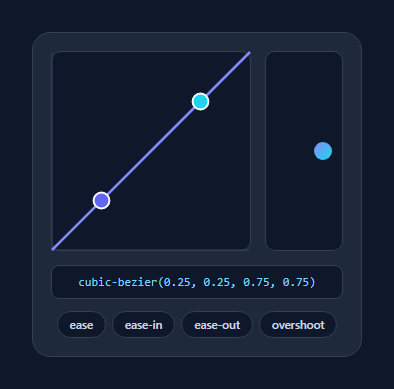
A bezier curve editor lets you shape a CSS cubic-bezier() easing by dragging two control points and watching the motion play in real time — the tool behind every "tweak the animation feel" workflow. This snippet builds a fully interactive one in SVG with draggable handles, a live ball preview, presets, and copyable output, in plain HTML, CSS, and vanilla JavaScript.
SVG curve, mapped to easing space
The editor draws a cubic Bézier path from the bottom-left (0,0) to the top-right (1,1) corner — the fixed endpoints of every CSS easing curve — with two draggable control points in between. The 200×200 SVG is mapped so x runs 0→1 left to right and y runs 0→1 bottom to top, with the conversion x/200 and (200 - y)/200. Crucially, the y axis is left unclamped so you can drag a handle above the top or below the bottom to create overshoot and anticipation curves (values outside 0–1), exactly like the bouncy cubic-bezier(0.34, 1.56, 0.64, 1).
Pointer dragging that works on touch
Handles use Pointer Events, so the same code drives mouse, trackpad, and touch. Pressing a handle attaches document-level pointermove/pointerup listeners, so the drag keeps tracking even when the cursor leaves the SVG — the detail that makes dragging feel solid. touch-action: none on the SVG stops the page scrolling while you drag on mobile.
Live preview that re-triggers
Below the curve, a ball animates left-to-right using the current easing. Every edit re-runs the animation: the script sets transition: none, resets the position, then on the next two animation frames applies the new cubic-bezier() and moves the ball — the double-rAF trick that forces the browser to restart a CSS transition. You feel the easing, not just see the curve, which is how you actually judge whether motion looks right.
Presets and copyable output
Chips load the named CSS easings (ease, ease-in, ease-out) plus an overshoot, instantly positioning the handles — a fast starting point you then fine-tune. The live cubic-bezier(…) string updates as you drag, rounded to three decimals, and clicking it copies it to the clipboard ready to paste into your CSS or a transition.
Keyboard accessible
Each handle is focusable with role="slider" and responds to arrow keys (Shift for larger steps), so the curve can be adjusted without a mouse. The whole editor is self-contained and dependency-free — a clean reference for building an easing picker into a design tool, theme editor, or animation playground.
Build with AI
Build, Understand, Optimize, and Extend It With AI
You don't have to reconstruct the coordinate mapping by hand to see how this works. Paste this snippet's HTML, CSS, and JS into an AI coding assistant like Claude and ask it to explain exactly how pointFromEvent converts pixel coordinates into the 0-200 SVG space and why only the x value gets clamped while y is left free for overshoot curves. The same assistant can help optimize it — asking whether attaching pointermove listeners to the whole document on every drag start is the cheapest way to track dragging, or whether the double-rAF restart in play() could be replaced with the Web Animations API for more control. It's also useful for extending the tool: ask it to add a way to save custom presets to localStorage, support four-point cubic curves for step-based easings, or sync the picked easing directly into a live CSS variable on a preview element. Treat the code less like a finished artifact and more like a starting point for a conversation.
Prompt to recreate it
Copy this into your AI assistant of choice to build the effect from scratch, or as a jumping-off point for your own variant:
Build a draggable "cubic-bezier easing editor" in plain HTML, CSS, and JavaScript using an SVG path with two draggable control points and Pointer Events — no libraries, no canvas.

Requirements:
- A 200x200 SVG containing a fixed cubic curve path drawn from the bottom-left corner to the top-right corner, two dashed guide lines connecting each control point back to its corresponding fixed endpoint, and two circle elements acting as draggable handles.
- Convert screen pixel positions to the SVG's internal 0-200 coordinate space using the SVG element's bounding rect, and convert those coordinates into easing-space values by dividing x by 200 and computing y as (200 - y) / 200, so up is 1 and down is 0.
- Clamp only the x coordinate of each handle to the 0-200 range; deliberately leave y unclamped so handles can be dragged above or below the box to produce overshoot/anticipation easing values outside the normal 0-1 range.
- Implement dragging with pointerdown on each handle that attaches pointermove and pointerup listeners on the document (not the handle itself), so a drag continues tracking correctly even if the pointer leaves the small handle or the SVG bounds, and remove those listeners on pointerup.
- Also support keyboard control: each handle must be focusable and respond to arrow keys to nudge its position by a small step (and a larger step when Shift is held).
- Render the live cubic-bezier(x1, y1, x2, y2) string as text, rounded to three decimals, and make clicking it copy the string to the clipboard.
- Add a small preview element that replays a CSS transition using the current cubic-bezier value every time a handle moves, by resetting the transition to none, snapping back to the start position, then in two nested requestAnimationFrame calls re-applying the transition and the end position so the animation reliably restarts instead of being skipped by the browser.
Want to tighten it up first? Run this prompt through the AI Prompt Studio to score it across 8 quality dimensions, catch anti-patterns, and tune the wording for Claude, ChatGPT, or Gemini before you paste it in.
Step by step
How to Use
- 1Paste HTML, CSS, and JSA curve editor renders with two handles and a ball preview.
- 2Drag the handlesMove the two control points to shape the easing; drag past the top for overshoot.
- 3Watch the previewThe ball replays with the new easing on every change.
- 4Try a presetChips load ease, ease-in, ease-out, and overshoot as starting points.
- 5Copy the valueClick the cubic-bezier() string to copy it for your CSS.
- 6Use the keyboardFocus a handle and nudge it with arrow keys (Shift for bigger steps).
Real-world uses
Common Use Cases
Got questions?
Frequently Asked Questions
The SVG is 200×200 with the curve fixed from corner (0,0) to (1,1). Each handle's position converts to easing coordinates with x/200 across and (200 − y)/200 up, then rounds to three decimals. The two resulting (x, y) pairs are the four numbers in cubic-bezier(x1, y1, x2, y2), exactly what CSS expects.
Yes — drag a handle above the top edge or below the bottom edge of the box. The y coordinate is intentionally not clamped, so control points can exceed the 0–1 range, producing easings like cubic-bezier(0.34, 1.56, 0.64, 1) that overshoot and settle. The x coordinate is clamped to 0–1 because CSS requires it.
To feel an easing you have to see the motion, so the ball re-animates whenever the curve changes. Restarting a CSS transition mid-flight requires removing the transition, forcing a reflow, then reapplying it — done here with a double requestAnimationFrame so the browser registers the reset before the new transition. That is the reliable cross-browser way to retrigger a transition.
Yes. The handles use Pointer Events, which unify mouse and touch, and the move/up listeners are attached to the document so a drag keeps tracking even if your finger leaves the SVG. touch-action: none on the SVG prevents the page from scrolling while you drag a handle on a phone.
Hold the two control points in state and render the SVG path, handles, and cubic-bezier string from them. Move the pointer drag into handlers that update state (attach window listeners in an effect and clean them up), and drive the preview by toggling an inline transition. Tailwind users replace the classes with utilities; the coordinate math and transition-restart trick are unchanged.